> For the complete documentation index, see [llms.txt](https://help.aikido.dev/llms.txt). Markdown versions of documentation pages are available by appending `.md` to page URLs; this page is available as [Markdown](https://help.aikido.dev/aikido-agent/cve-exploitability-analysis.md).
# CVE Exploitability Analysis
CVE Exploitability Analysis uses [Aikido Agent](/aikido-agent/aikido-agent.md) to assess open-source dependency CVEs in your repositories and containers. Instead of treating every CVE with the same urgency, the Agent reads how the vulnerable package is used in your code or container image and decides whether the finding is truly exploitable in your environment, then takes the triage actions you allow.
This is a **credit-based** automation (configurable per repo / container). You configure it once in [Triage Settings](https://app.aikido.dev/settings/advanced), and Aikido runs analysis on matching open CVE findings each night. You can also [trigger a run on demand](#run-analysis-on-demand) and [review every run in the history](#review-analysis-history).
## Use cases
* ✨ **Reduce dependency noise**: Automatically ignore or downgrade CVEs that aren't exploitable in your code or containers
* 🎯 **Prioritize real risk**: Upgrade severity when the agent finds a CVE is easier to exploit than the base score suggests
* ⚙️ **Control automation**: Choose which actions run automatically and which require your approval
* 🔍 **Get environment-specific reasoning**: Go beyond generic CVE descriptions with analysis grounded in how you use the package
## How it works
CVE Exploitability Analysis triages your existing open dependency findings in repositories and [linked containers](/container-image-scanning/configuration/link-repository-to-container.md). Aikido Agent assesses each CVE, then applies the actions you've allowed, such as changing severity, snoozing, or ignoring the finding.
* **Repositories**: The Agent reads how the vulnerable package is used in your code.
* **Containers**: The Agent uses image context such as the Dockerfile, base image, and distro, plus how the container is running.
When a finding is ignored, you'll see the reason **CVE determined not exploitable** in the issue's severity breakdown.
{% hint style="info" %}
This complements [reachability analysis](/getting-started/reachability-analysis/introduction-to-reachability-analysis.md), which filters findings with no execution path to vulnerable code. CVE Exploitability Analysis adds Agent reasoning grounded in your code and container context on top.
{% endhint %}
## Credits and availability
* **1 Aikido Credit per CVE triage**: Each CVE the Agent analyzes consumes one credit from your [Aikido Wallet](/miscellaneous-info/wallet-and-credits.md), whether the finding is in a repository or a container.
* **Admin access required**: Only workspace admins can view and change CVE Exploitability Analysis settings.
## Configure CVE Exploitability Analysis
{% stepper %}
{% step %}
### Open the settings
Go to **Settings** → **Triage**, find the **CVE Exploitability Analysis** section, and click **Manage**.
{% endstep %}
{% step %}
### Enable CVE Exploitability Analysis
Turn on **Enable CVE Exploitability Analysis** to edit the fields below. When enabled, Aikido runs analysis on all open findings that match your configured severity, repository, and container scope.
{% endstep %}
{% step %}
### Set the scope
* **Minimum Severity**: Choose which findings get triaged: **Critical only**, **High and above**, **Medium and above**, or **All severities**.
* **Repositories**: Select which repositories to run analysis on. Start with a smaller scope to test the feature without spending too many credits at once.
* **Containers**: Select which containers to run analysis on. Only containers [linked to a repository](/container-image-scanning/configuration/link-repository-to-container.md) are eligible.
You need at least one repository or container in scope.
{% endstep %}
{% step %}
### Choose allowed actions
Under **Allowed Actions**, set each outcome to **Fully Automated** or **Human Approval**:
* **Downgrade**: Lower the severity when the CVE is less risky in your environment
* **Upgrade**: Raise the severity when exploitability is higher than the base score suggests
* **Snooze**: Temporarily hide the finding until a specified date
* **Ignore**: Remove the finding from your feed when the CVE is not exploitable in your environment
With **Fully Automated**, the agent applies the action immediately after analysis. With **Human Approval**, the agent proposes the action and waits for you to approve it from the [analysis history](#approve-proposed-actions).
{% endstep %}
{% step %}
### Set a spend limit
Set a **Spend Limit per Day** to cap how many credits analysis can use in a 24-hour period (default is 100). The limit is shared across repository and container CVEs. The **Cost to Inbox Zero** estimate shows how many CVEs match your selected repositories and containers, and how many credits a full run would use, alongside your available credits.
{% endstep %}
{% endstepper %}
## What the agent can change
| Action | When it's used | What you'll see |
| ------------- | ---------------------------------------------------------------------------------------- | --------------------------------------------------------------------- |
| **Downgrade** | The CVE is real but less exploitable in your environment than the base severity suggests | Severity score decreases with an agent-provided reason |
| **Upgrade** | The CVE is more exploitable in your environment than the base severity suggests | Severity score increases with an agent-provided reason |
| **Snooze** | The finding needs attention later, not now | Finding is snoozed until the date the agent sets, with a reason |
| **Ignore** | The CVE is not exploitable in your environment | Finding is ignored with the reason **CVE determined not exploitable** |
Severity changes only apply when the finding's current severity still matches what the agent analyzed. If the severity changed between analysis and action (for example, due to another rule), the change is skipped to avoid conflicting updates.
## Run analysis on demand
Analysis runs automatically each night, but you don't have to wait for the nightly job. In the **CVE Exploitability Analysis** section (via Settings/Triage), click **Start Analysis** to queue a run immediately for the CVEs matching your scope.
Each run respects your daily spend limit and available credits. Only one run happens at a time. While a run is in progress, **Start Analysis** is disabled and shows *An analysis is already in progress*. If there's nothing to do, Aikido tells you why (for example, you're out of credits, the daily spend limit is reached, or no matching issues were found).
## Review analysis history
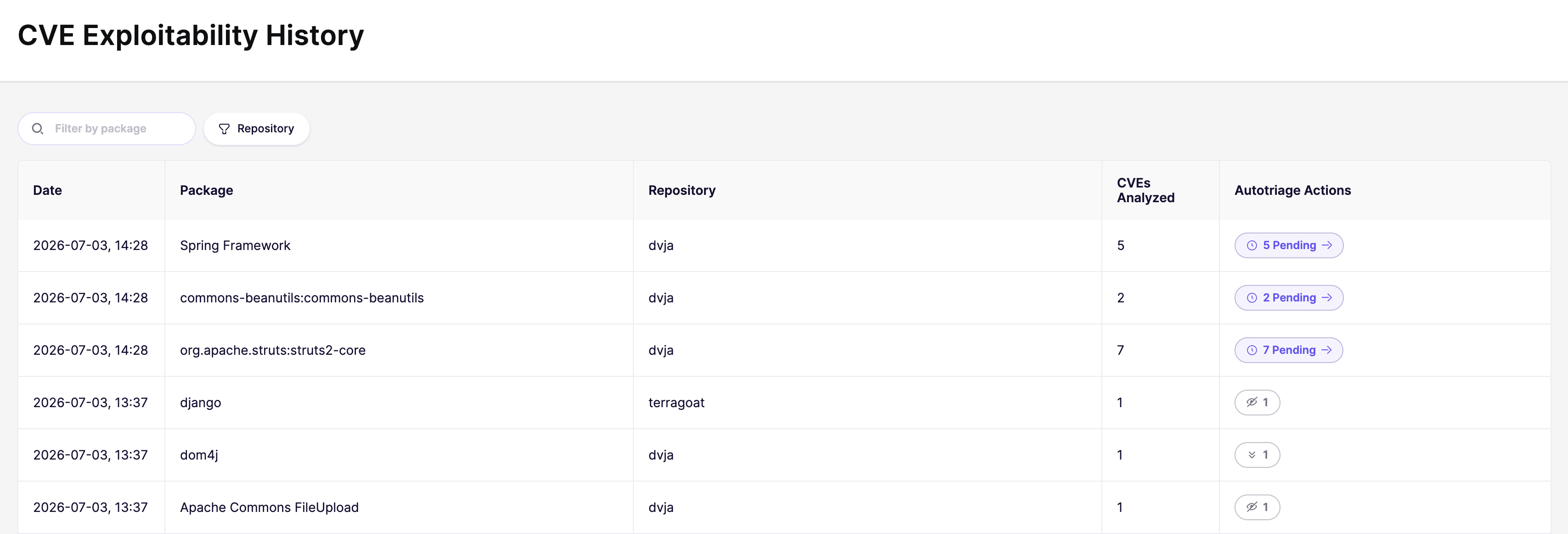
Every run is recorded so you can see what the agent analyzed and what it did. Click **View History** in the CVE Exploitability Analysis section to open the **CVE Exploitability History** page.
The history table lists each run with its date, package or container, repository, and number of CVEs analyzed, along with the triage actions taken (ignore, snooze, upgrade, downgrade). A purple **pending** badge marks actions the agent proposed but didn't apply. Use the search and repository filters to narrow the list.
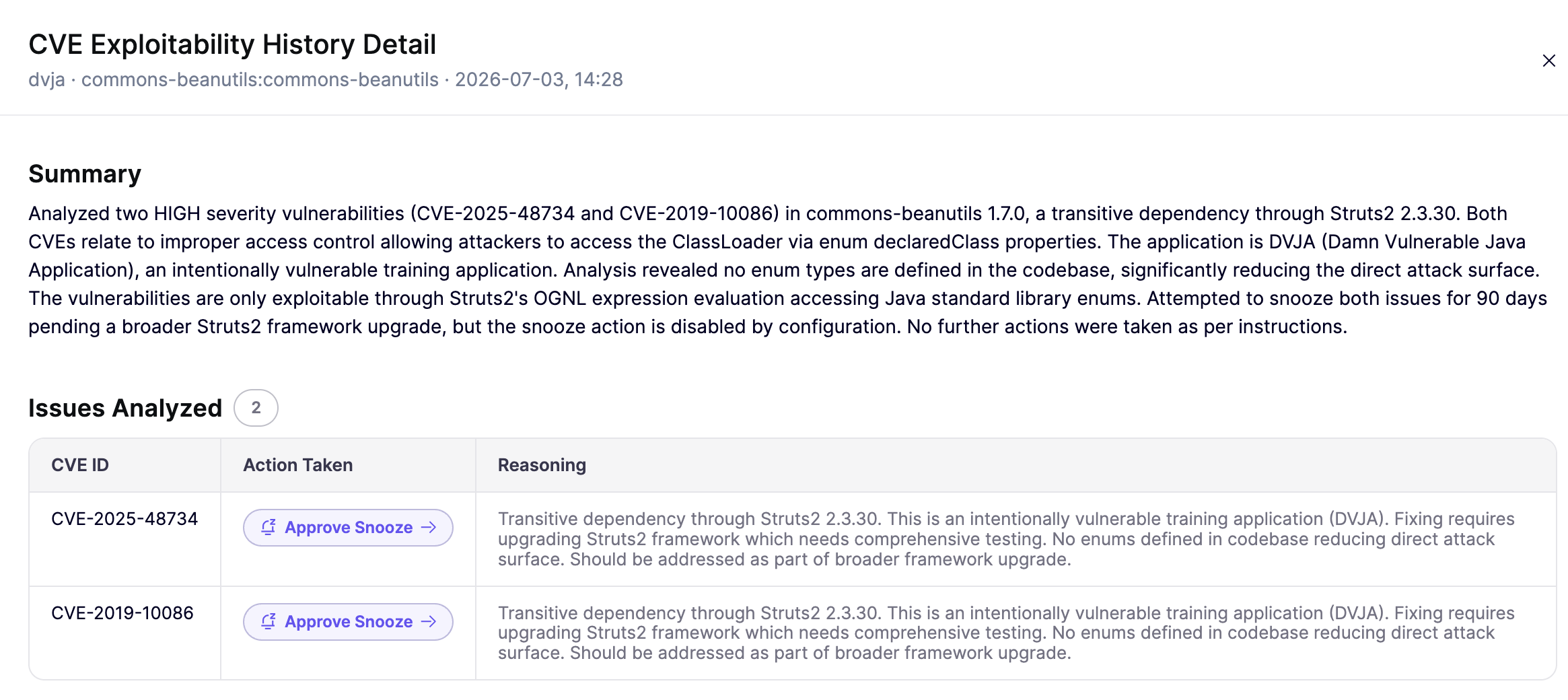
Click any run to open its detail, which shows:
* An agent-written **summary** of the run
* The **issues analyzed**, with each CVE's action taken and the agent's reasoning
* A **timeline** of the run
### Approve proposed actions
When an action is set to **Human Approval**, the agent records its recommendation but doesn't apply it. In the run detail, pending actions appear as **Approve Ignore**, **Approve Snooze**, **Approve Downgrade**, or **Approve Upgrade**. Click the badge to open the relevant triage flow, prefilled with the agent's reasoning. After you confirm, the action is marked as executed in the history.
## Important notes
* Analysis runs **each night** for workspaces where the feature is enabled, and can also be [started on demand](#run-analysis-on-demand). New findings that match your configuration are picked up on subsequent runs.
* A **daily spend limit** caps how many credits analysis can use per day (default is 100). The limit is shared across repository and container CVEs. Runs stop once the limit is reached and resume the next day.
* Container analysis only runs on containers that are [linked to a code repository](/container-image-scanning/configuration/link-repository-to-container.md).
* The agent needs **read access** to your connected repositories to analyze how packages are used.
* Only **one analysis task per repository and package**, or per container, runs at a time. Duplicate runs are prevented while a task is pending.
* Changing an action from **Fully Automated** to **Human Approval** does not undo actions the agent already took.
---
# Agent Instructions
This documentation is published with GitBook. GitBook is the documentation platform designed so that both humans and AI agents can read, navigate, and reason over technical content effectively. Learn more at gitbook.com.
## Querying This Documentation
If you need additional information that is not directly available in this page, you can query the documentation by asking a question.
Perform an HTTP GET request on the following URL with the `ask` and `goal` query parameters:
```
GET https://help.aikido.dev/aikido-agent/cve-exploitability-analysis.md?ask=&goal=
```
`ask` is the immediate question: it should be specific, self-contained, and written in natural language.
`goal` is what the user is ultimately trying to achieve, the reason they need the answer. Sharing it helps GitBook give you a better, more relevant answer. A goal is most helpful when it describes the outcome the user wants rather than restating the question. For example, with `ask=how do I create an API token`, a goal like `automate deployments from our CI pipeline` lets GitBook tailor the answer to that use case.
The response will contain a direct answer to the question and relevant excerpts and sources from the documentation.
Use this mechanism when the answer is not explicitly present in the current page, you need clarification or additional context, or you want to retrieve related documentation sections.
.png?alt=media)