> For the complete documentation index, see [llms.txt](https://help.aikido.dev/llms.txt). Markdown versions of documentation pages are available by appending `.md` to page URLs; this page is available as [Markdown](https://help.aikido.dev/ai-and-dev-tools/ide-plugins-overview/cursor-ide.md).
# Cursor IDE
Aikido automatically scans your projects for hardcoded secrets (API keys, tokens) and insecure code patterns (SQL injections, path traversal, ..) so you can catch issues early and keep your codebase safe.
Scans run automatically whenever you open a file or save changes, making it easy to catch issues early in development.
When security issues are found, they're highlighted directly in your code and listed in the Aikido window.
{% stepper %}
{% step %}
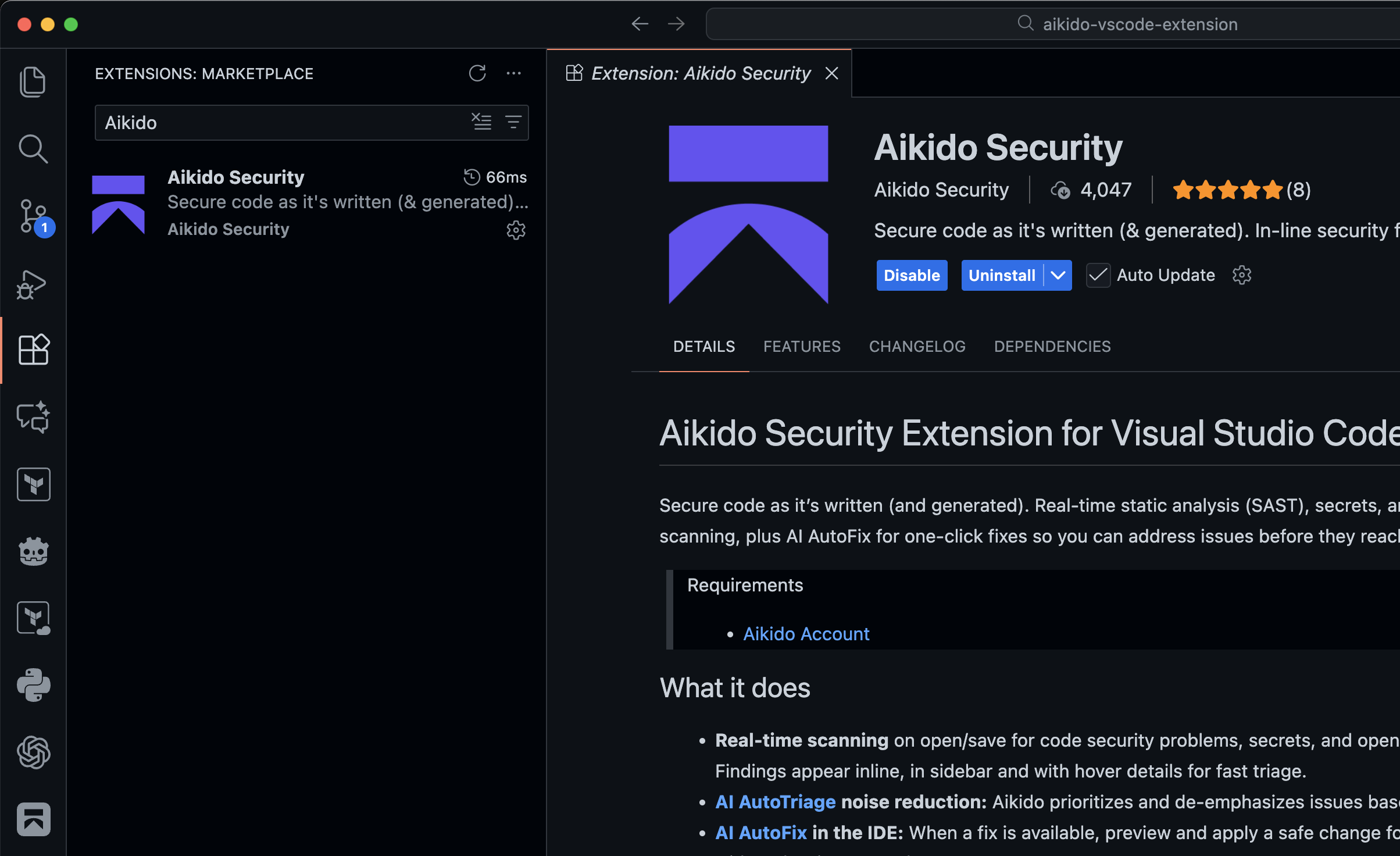
### Open Extensions and Install "Aikido Security"
Alternatively use these links to go to the Marketplaces
* [VS Code](https://marketplace.visualstudio.com/items?itemName=AikidoSecurity.aikido)
* [Windsurf](https://open-vsx.org/extension/AikidoSecurity/aikido) / [Cursor](https://open-vsx.org/extension/AikidoSecurity/aikido) / [Kiro](https://open-vsx.org/extension/AikidoSecurity/aikido) / [Google Antigravity](https://open-vsx.org/extension/AikidoSecurity/aikido)
{% endstep %}
{% step %}
### Authenticate with Aikido
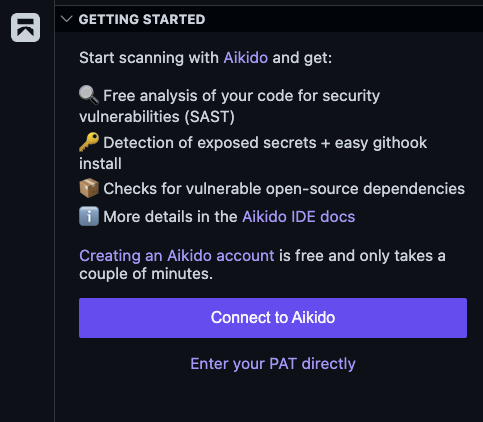
Open the Aikido plugin by clicking on the sidebar icon and click on "Connect to Aikido" to authenticate with Aikido platform.
Alternatively you can open up the Command Palette and run `Aikido: Log In`
If the automated authentication does not work you can manually create a personal access within Aikido by going to the [Integrations page and following the instructions](https://app.aikido.dev/settings/integrations?section=ide).
{% endstep %}
{% step %}
### Try out our examples
Below you can find an example `index.js` file that can be used to verify if the extension is working correctly, it should detect one SAST issue (SQL injection) and one exposed secret (SQL Server connection string).
```javascript
const app = {}
app.get("/user", (req, res) => {
const connStr = "Server=tcp:myserver.database.windows.net,1433;Initial Catalog=mydb;Persist Security Info=False;User ID=myuser;Password=$uperSecret123!@#";
const username = req.query.username
const unsafeQuery = `SELECT * FROM users WHERE username = '${username}'`
sql.connect(connStr).query(unsafeQuery, (err, result) => {
res.status(200).send(result)
})
})
```
{% endstep %}
{% step %}
### Turn on Additional Security Tooling
Extend Aikido in your IDE with Expansion Packs like [MCP for AI agents](/ai-and-dev-tools/aikido-mcp.md), [pre-commit hooks](/ai-and-dev-tools/aikido-secrets-pre-commit-hook.md), and [Safe Chain](/code-scanning/aikido-malware-scanning.md). For more details, see the documentation below.
{% content-ref url="/pages/BlcMVHrRgvP9HMKc2BJs" %}
[Aikido Expansion Packs](/ai-and-dev-tools/ide-plugins-overview/features/aikido-expansion-packs.md)
{% endcontent-ref %}
{% endstep %}
{% endstepper %}
Now that the plugin is installed, you can dive into the features that help you spot security issues while you work:
{% content-ref url="/pages/JahfnwEjZfhYiedCJiRf" %}
[Real-time SAST, Secrets and IaC scanning in IDE](/ai-and-dev-tools/ide-plugins-overview/features/real-time-code-scanning-in-ide.md)
{% endcontent-ref %}
{% content-ref url="/pages/7i2dwzkrBY6h9JJxKMiv" %}
[Broken mention](broken://pages/7i2dwzkrBY6h9JJxKMiv)
{% endcontent-ref %}
{% content-ref url="/pages/VHkf3JZol0Ev7NoGW7Mo" %}
[Open-Source Dependency Scanning (SCA) in IDE](/ai-and-dev-tools/ide-plugins-overview/features/open-source-dependency-scanning-sca-in-ide.md)
{% endcontent-ref %}
{% content-ref url="/pages/PnC2O8bNLN58q3huxlu2" %}
[Full Workspace Scan in IDE](/ai-and-dev-tools/ide-plugins-overview/features/full-workspace-scan-in-ide.md)
{% endcontent-ref %}
{% content-ref url="/pages/DQN8YWwg6NjpNanCvqwo" %}
[Aikido AI in IDE](/ai-and-dev-tools/ide-plugins-overview/features/aikido-ai-in-ide.md)
{% endcontent-ref %}
{% content-ref url="/pages/EdBhlGHmXPTI17yEJA8f" %}
[VS Code - Extension Keeps Disconnecting](/ai-and-dev-tools/ide-plugins-overview/troubleshooting/vs-code-extension-keeps-disconnecting.md)
{% endcontent-ref %}
{% content-ref url="/pages/U2xtX88ANZV0NrYmqi0D" %}
[VS Code - Information for Support](/ai-and-dev-tools/ide-plugins-overview/troubleshooting/vs-code-information-for-support.md)
{% endcontent-ref %}
## Aikido MCP for Cursor
You can add Aikido Cursor Plugin to your Cursor AI workflow via Expansion Packs or the Cursor Marketplace. The plugin lets Cursor scan your code for security issues as you build.
[Set up Aikido MCP for Cursor](https://help.aikido.dev/ai-and-dev-tools/aikido-mcp/cursor-mcp)
---
# Agent Instructions
This documentation is published with GitBook. GitBook is the documentation platform designed so that both humans and AI agents can read, navigate, and reason over technical content effectively. Learn more at gitbook.com.
## Querying This Documentation
If you need additional information that is not directly available in this page, you can query the documentation dynamically by asking a question.
Perform an HTTP GET request on the current page URL with the `ask` query parameter, and the optional `goal` query parameter:
```
GET https://help.aikido.dev/ai-and-dev-tools/ide-plugins-overview/cursor-ide.md?ask=&goal=
```
`ask` is the immediate question: it should be specific, self-contained, and written in natural language.
`goal` is optional and describes the broader end goal you are ultimately trying to accomplish on behalf of the user. GitBook uses it to tailor the answer towards what is most useful for that goal.
The response will contain a direct answer to the question and relevant excerpts and sources from the documentation.
Use this mechanism when the answer is not explicitly present in the current page, you need clarification or additional context, or you want to retrieve related documentation sections.
 Open the Aikido plugin by clicking on the sidebar icon and click on "Connect to Aikido" to authenticate with Aikido platform.