> For the complete documentation index, see [llms.txt](https://help.aikido.dev/llms.txt). Markdown versions of documentation pages are available by appending `.md` to page URLs; this page is available as [Markdown](https://help.aikido.dev/aikido-agent/ask-aikido.md).
# Ask Aikido
Ask Aikido is the conversational interface to Aikido Agent on a specific finding.
**Ask Aikido** is how you talk to [Aikido Agent](/aikido-agent/aikido-agent.md) on a specific finding. Use it when you want to validate a triage decision, inspect the real attack path, or adapt a generated fix, without leaving Aikido or pasting findings into a separate chatbot.
Aikido Agent already filters noise automatically through [SAST AutoTriage](/aikido-agent/sast-autotriage.md), [Secrets AutoTriage](/aikido-agent/secrets-autotriage.md), and [CVE Exploitability Analysis](/aikido-agent/cve-exploitability-analysis.md). Most of the time, that is enough. Use Ask Aikido when you want to dig deeper.
### Use cases
#### 1. SAST: Code analysis
Ask questions like `Is this actually risky for us?`, `Why did AutoTriage raise the severity for this issue?`, or `Walk me through how this could be exploited in practice.`
Use this chat to:
* validate severity
* understand the realistic attack path
* decide whether to fix now, schedule it, or ignore it with a reason
Open **View Code Analysis** in the sidebar for a SAST issue, then click **Ask Aikido** in the top left.
#### 2. Dependencies: Full impact analysis
Ask questions like `Is this actually reachable in our app?` or `Explain the full impact analysis`.
Use this chat to turn dependency paths and call graph output into plain-language exploitability guidance.
Open **View Reachability Analysis** in the sidebar for a dependency issue, then click **Ask Aikido** in the bottom left.
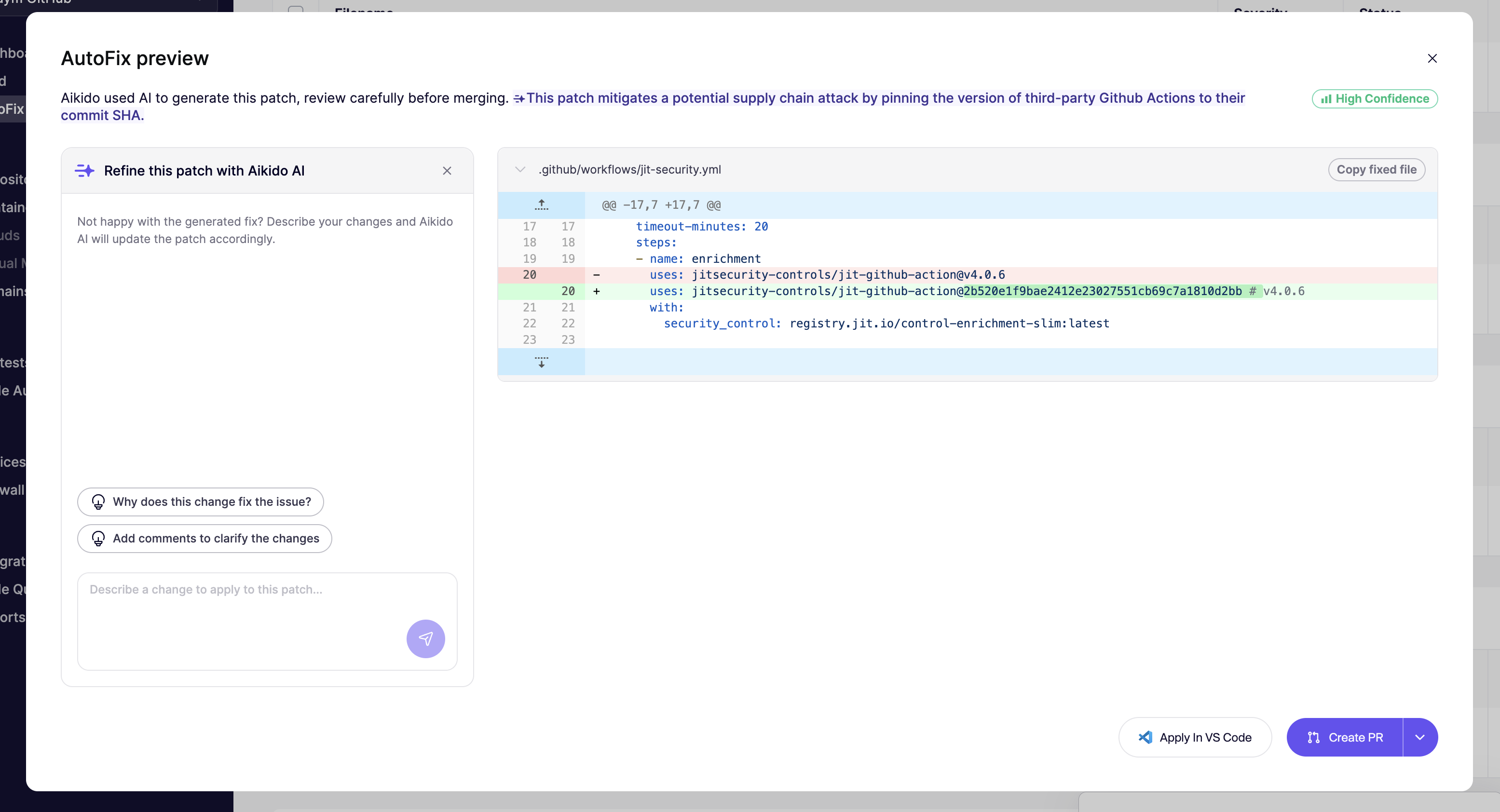
#### 3. Refine AutoFix
Use this chat when an AutoFix is close, but not ready to merge. Ask questions like `Can you adjust this patch to X`, `Explain the reasoning for this fix`, or `Please add a comment explaining the fix`.
You can ask Aikido Agent to:
* match your naming and style conventions
* add tests or small logic changes
* adapt the patch to your architecture
For more on fix refinement, see [Refine AutoFixes with Aikido AI](/autofix-and-remediation/automation-and-merging/refine-autofixes-with-aikido-ai.md).
### What it knows
Each chat runs with full context: the finding, affected code, CVE metadata, reachability signals, and the diff (where relevant). Answers are grounded in your specific stack, not generic security advice.
### Actions you can take from chat
From the chat, you can:
* ignore the issue with AI-generated reasoning
* create or refine an AutoFix
* save custom context to improve future suggestions
### Related pages
* [Aikido Agent](/aikido-agent/aikido-agent.md)
* [Custom Reports](/aikido-agent/custom-reports.md)
* [SAST AutoTriage](/aikido-agent/sast-autotriage.md)
* [Secrets AutoTriage](/aikido-agent/secrets-autotriage.md)
* [CVE Exploitability Analysis](/aikido-agent/cve-exploitability-analysis.md)
* [How Aikido Uses AI](/ai-and-dev-tools/how-aikido-uses-ai.md)
* [Refine AutoFixes with Aikido AI](/autofix-and-remediation/automation-and-merging/refine-autofixes-with-aikido-ai.md)
* [Introduction to Reachability Analysis](/getting-started/reachability-analysis/introduction-to-reachability-analysis.md)
---
# Agent Instructions
This documentation is published with GitBook. GitBook is the documentation platform designed so that both humans and AI agents can read, navigate, and reason over technical content effectively. Learn more at gitbook.com.
## Querying This Documentation
If you need additional information that is not directly available in this page, you can query the documentation by asking a question.
Perform an HTTP GET request on the following URL with the `ask` and `goal` query parameters:
```
GET https://help.aikido.dev/aikido-agent/ask-aikido.md?ask=&goal=
```
`ask` is the immediate question: it should be specific, self-contained, and written in natural language.
`goal` is what the user is ultimately trying to achieve, the reason they need the answer. Sharing it helps GitBook give you a better, more relevant answer. A goal is most helpful when it describes the outcome the user wants rather than restating the question. For example, with `ask=how do I create an API token`, a goal like `automate deployments from our CI pipeline` lets GitBook tailor the answer to that use case.
The response will contain a direct answer to the question and relevant excerpts and sources from the documentation.
Use this mechanism when the answer is not explicitly present in the current page, you need clarification or additional context, or you want to retrieve related documentation sections.