> For the complete documentation index, see [llms.txt](https://help.aikido.dev/llms.txt). Markdown versions of documentation pages are available by appending `.md` to page URLs; this page is available as [Markdown](https://help.aikido.dev/aikido-device-protection/using-aikido-endpoint/firewall.md).
# Device Firewall
The Device Firewall controls which domains your connected devices can reach. Use it to keep developers away from risky package marketplaces, unapproved registries, malware and phishing domains, and other sites you don't want on work machines.
## How it works
Device Protection monitors network traffic on each device. When a device tries to reach a blocked domain, the request is stopped at the network level before it connects.
## Lists and domains
The Firewall tab has two views. Switch between them with the **Lists / Domains** toggle at the top.
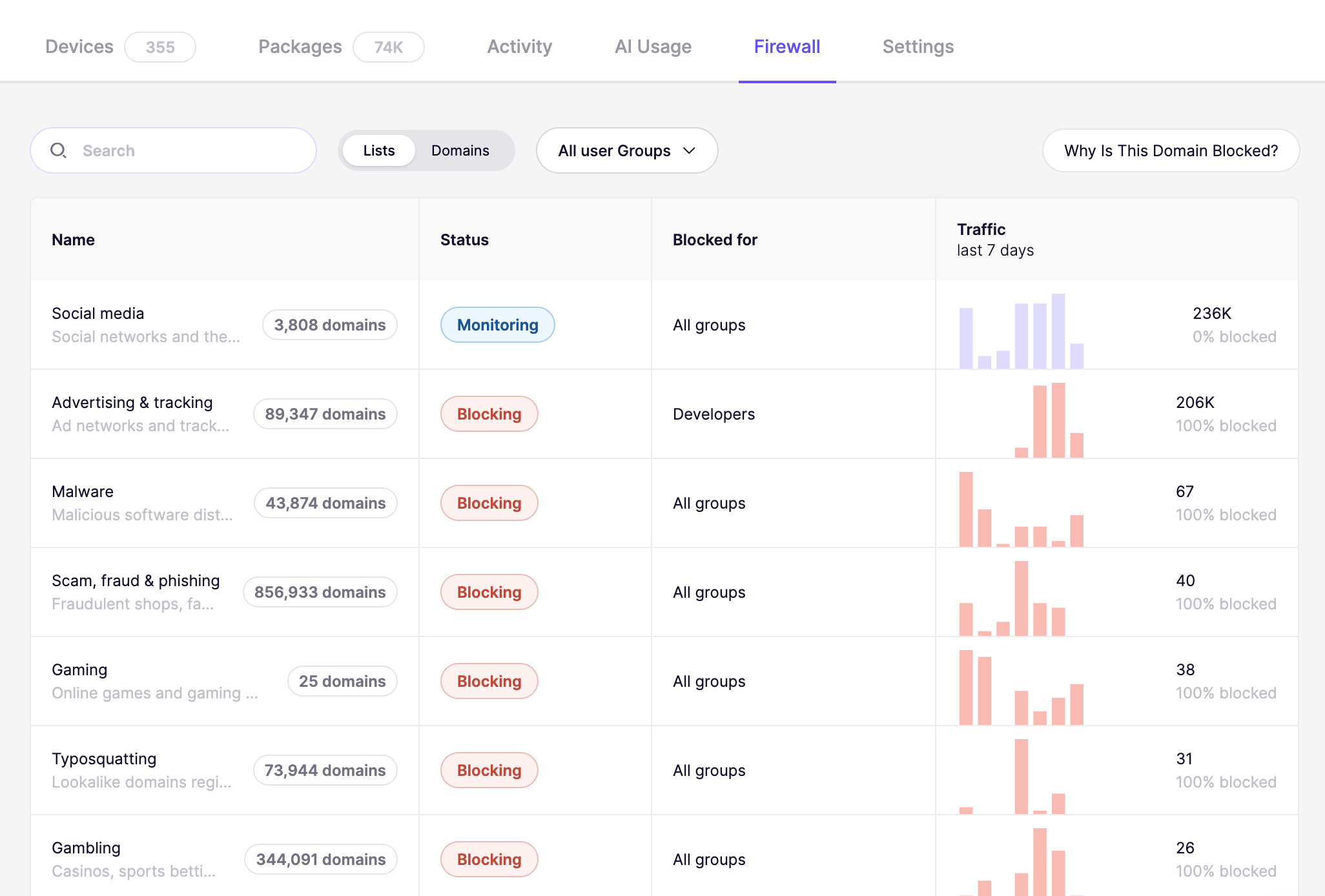
* **Lists** shows curated domain lists that Aikido maintains and keeps up to date for you: Malware, Scam, fraud & phishing, Typosquatting, Gambling, Advertising & tracking, Social media, Gaming, and more. Each list bundles many domains, from a couple of dozen to several hundred thousand, so you set one policy instead of maintaining your own blocklist. Every row shows the list's description and its current domain count.
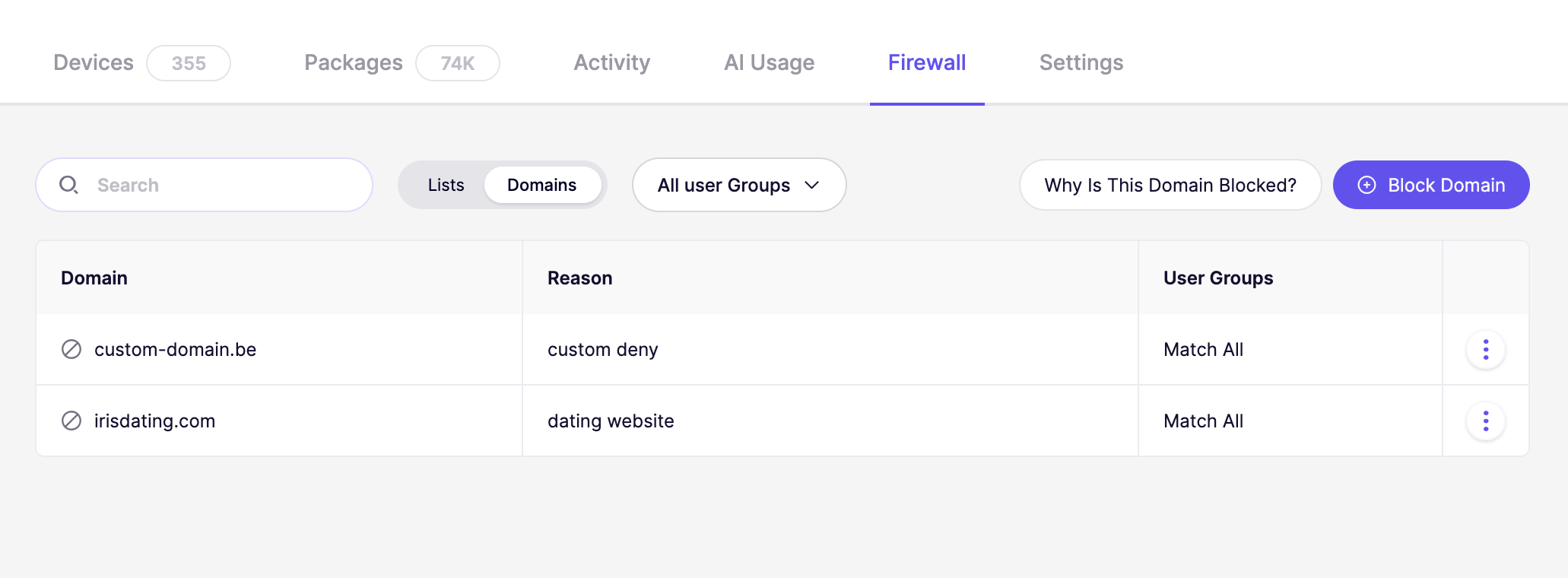
* **Domains** shows the individual domains you added yourself.
## Set a policy on a domain list
1. Go to [Device Protection and open the Firewall tab](https://app.aikido.dev/endpoint-protection/firewall).
2. Make sure the **Lists** view is selected.
3. Select the list you want to configure.
4. Set its status:
* **Monitoring** lets requests through and records the traffic. Use this to see what your devices actually reach before you block anything.
* **Blocking** stops every request to a domain on the list.
5. Choose which **user groups** the policy applies to. Pick all groups, or a specific group such as Developers.
The **Blocked for** column shows the groups a list applies to, and **Traffic (last 7 days)** shows how many requests went to the list's domains and what share of them was blocked. A list set to Monitoring shows 0% blocked.
For the security lists below, the traffic also shows which device made each request, so you can follow up with the person whose machine reached a risky domain:
* Malware
* Ransomware
* VPN & proxy
* Dynamic DNS
* Scam, fraud & phishing
* Remote access
{% hint style="info" %}
Start new lists on Monitoring for a week, check the traffic numbers, then switch to Blocking. That way you see what you are about to break before you break it.
{% endhint %}
## Block a single domain
1. Go to [Device Protection and open the Firewall tab](https://app.aikido.dev/endpoint-protection/firewall).
2. Switch to the **Domains** view.
3. Select **Block Domain**.
4. Enter the domain you want to block (for example `clawhub.ai`).
5. Choose which **User Groups** the block applies to. Select **Match All** to apply it to every device, or pick a specific group such as Developers.
6. Optionally add a **Reason** so your team knows why the domain is blocked.
7. Save the block.
The domain now appears in the list and applies to the selected devices.
## Check whether a domain is blocked
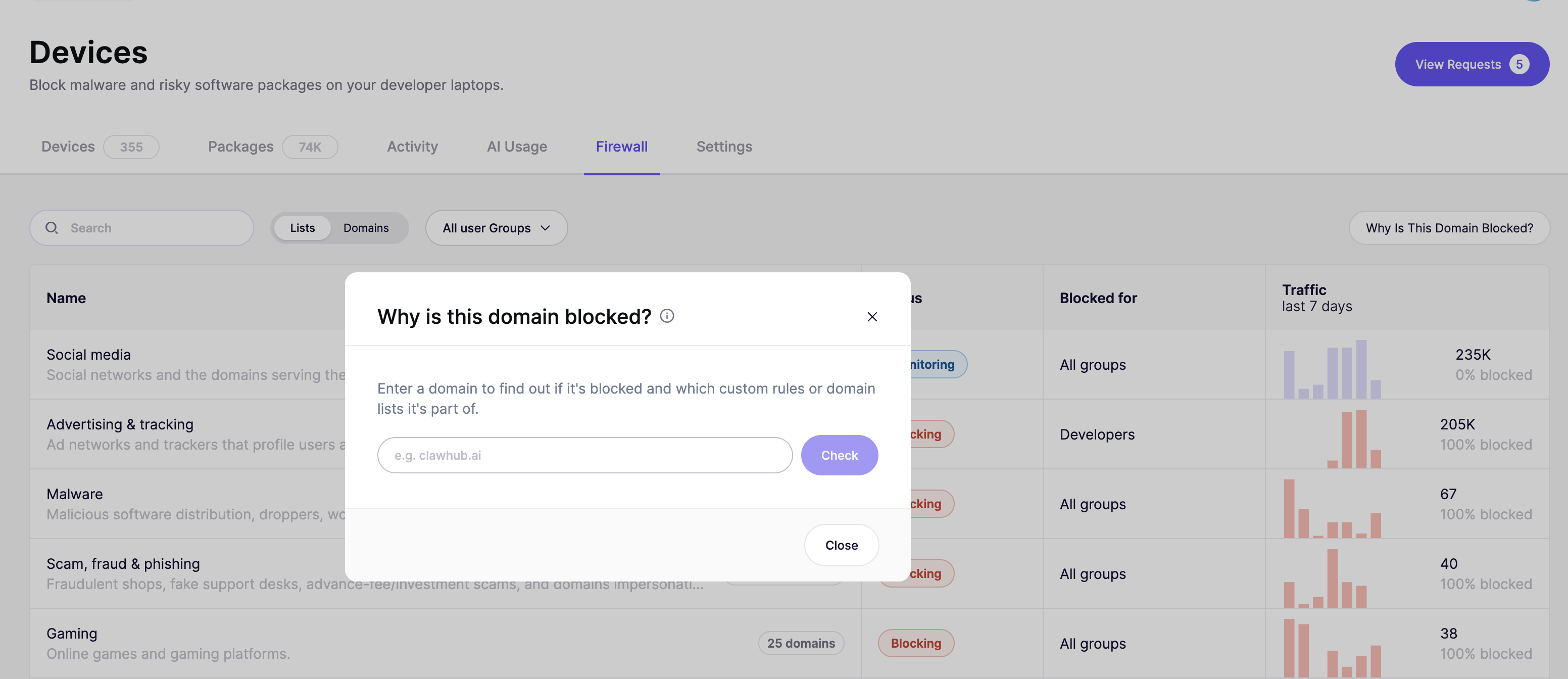
Select **Why Is This Domain Blocked?** in the top right of the Firewall tab, available in both views. Enter a domain and select **Check**. Aikido tells you whether the domain is blocked, and which custom rules or domain lists it belongs to.
Use this when a developer reports that a site won't load and you need to know which rule is responsible before you change anything.
## Manage lists and blocked domains
* Use the **Search** bar to find a list or a blocked domain by name.
* Use the **All user Groups** filter to see only the lists and domains that apply to a specific group.
* In the **Domains** view, select the menu (the three dots) on any row to edit or remove a block.
---
# Agent Instructions
This documentation is published with GitBook. GitBook is the documentation platform designed so that both humans and AI agents can read, navigate, and reason over technical content effectively. Learn more at gitbook.com.
## Querying This Documentation
If you need additional information that is not directly available in this page, you can query the documentation by asking a question.
Perform an HTTP GET request on the following URL with the `ask` and `goal` query parameters:
```
GET https://help.aikido.dev/aikido-device-protection/using-aikido-endpoint/firewall.md?ask=&goal=
```
`ask` is the immediate question: it should be specific, self-contained, and written in natural language.
`goal` is what the user is ultimately trying to achieve, the reason they need the answer. Sharing it helps GitBook give you a better, more relevant answer. A goal is most helpful when it describes the outcome the user wants rather than restating the question. For example, with `ask=how do I create an API token`, a goal like `automate deployments from our CI pipeline` lets GitBook tailor the answer to that use case.
The response will contain a direct answer to the question and relevant excerpts and sources from the documentation.
Use this mechanism when the answer is not explicitly present in the current page, you need clarification or additional context, or you want to retrieve related documentation sections.