> For the complete documentation index, see [llms.txt](https://help.aikido.dev/llms.txt). Markdown versions of documentation pages are available by appending `.md` to page URLs; this page is available as [Markdown](https://help.aikido.dev/autofix-and-remediation/aikido-images/autofix-for-containers-using-aikido-images.md).
# AutoFix for Containers: Aikido Images
Updating to the latest version of a base image can be difficult because it may require changes to your application. When updating to a newer base image is not a viable option, you can stay secure by using **Aikido Images**.
Aikido Images is a registry of zero-CVE base images: drop-in replacements that carry patched versions of libraries with reported **CRITICAL** or **HIGH** severity security issues. When you accept an AutoFix suggestion to use an Aikido Image, the image from the Aikido registry replaces the existing base image in your Dockerfile.
{% hint style="info" %}
Aikido Images cover OS-level CVEs under a defined [patch creation SLA](/autofix-and-remediation/aikido-libraries-overview/patch-creation-sla.md). Application-level package vulnerabilities (Python, npm, Java, Go, etc.) are also fixed, but on a best-effort basis with no guaranteed SLA. For guaranteed application-level coverage, see [Aikido Libraries](/autofix-and-remediation/aikido-libraries-overview.md).
{% endhint %}
For example, [CVE-2025-4373](https://security-tracker.debian.org/tracker/CVE-2025-4373) is fixed by Debian in Trixie and Sid but not in Bookworm. The Aikido Images variant of `debian:bookworm` contains a patched version of `glib2.0` that fixes this vulnerability. Using this image avoids breaking changes while maintaining a good security posture.
Aikido Images are continuously rebuilt as new CVEs are reported, so the base images you depend on stay up to date, with AutoFix surfacing updates as appropriate.
## Using Aikido Images with AutoFix
1. In Aikido, navigate to **Containers**. For a container with security issues, select the kebab menu for that entry and click **Preview AutoFix** (if AutoFix is available for that issue).
1. **Note:** You can alternatively navigate to **AutoFix > Containers** and click **View Fix** under the **Status** column for that issue.
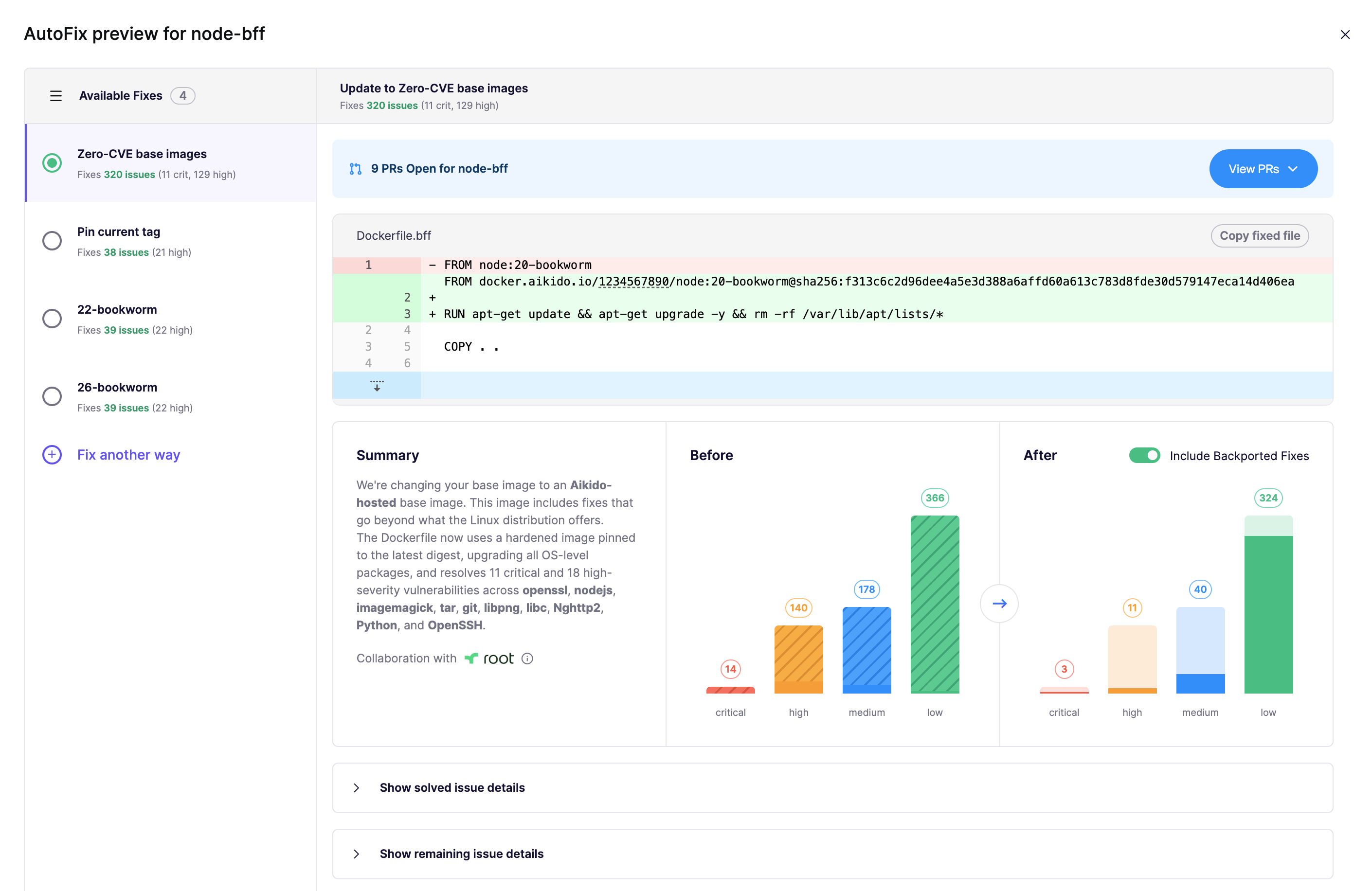
2. AutoFix for containers will automatically propose an Aikido Image when available. The image is hosted on `docker.aikido.io`.
In this example we see a Dockerfile using a `node:20-bookworm` base image. Switching to the Aikido Images variant resolves 322 issues present in that base image.
3. Select **Create PR** to open a pull request in your SCM to apply the fix.
### Using Aikido Images with the Local Scanner
Aikido Images are also available when you scan images with the [Aikido Local Scanner](/container-image-scanning/local-image-scanning/setting-up-image-scanning-with-local-scanner.md). Because the Local Scanner is used when Aikido does not have access to your source code, AutoFix cannot open a pull request against your Dockerfile. Instead, Aikido shows the suggested Aikido Image in the UI and you apply the change yourself by following the [Manually changing the base image](#manually-changing-the-base-image) steps below.
## Aikido Images availability
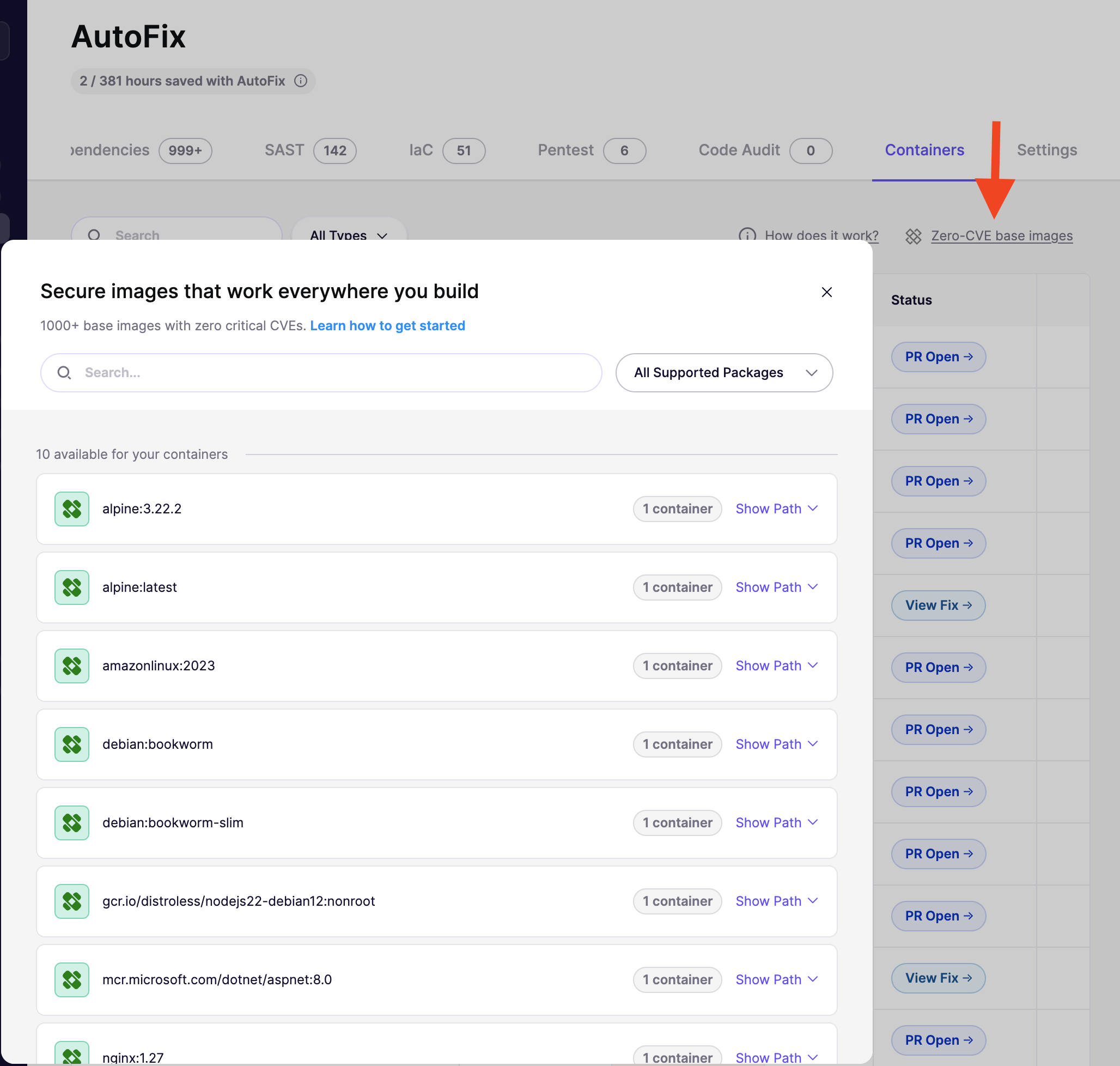
In Aikido, you can view the available base images on **AutoFix** > **Containers** > **Aikido Images**.
All images are available for both `amd64` and `arm64` architectures.
### Manually changing the base image
Click `Show Path` to see the full path for the base image. It will look like:
```
docker.aikido.io//:
```
The token is a read-only token specific to your Aikido account. As an example, this is how you switch from Debian Bookworm to the matching Aikido Image. In your Dockerfile, change
```
FROM debian:bookworm
```
to
```
FROM docker.aikido.io//debian:bookworm
```
Don't forget to replace `` with the token visible in the Aikido UI.
---
# Agent Instructions
This documentation is published with GitBook. GitBook is the documentation platform designed so that both humans and AI agents can read, navigate, and reason over technical content effectively. Learn more at gitbook.com.
## Querying This Documentation
If you need additional information that is not directly available in this page, you can query the documentation by asking a question.
Perform an HTTP GET request on the following URL with the `ask` and `goal` query parameters:
```
GET https://help.aikido.dev/autofix-and-remediation/aikido-images/autofix-for-containers-using-aikido-images.md?ask=&goal=
```
`ask` is the immediate question: it should be specific, self-contained, and written in natural language.
`goal` is what the user is ultimately trying to achieve, the reason they need the answer. Sharing it helps GitBook give you a better, more relevant answer. A goal is most helpful when it describes the outcome the user wants rather than restating the question. For example, with `ask=how do I create an API token`, a goal like `automate deployments from our CI pipeline` lets GitBook tailor the answer to that use case.
The response will contain a direct answer to the question and relevant excerpts and sources from the documentation.
Use this mechanism when the answer is not explicitly present in the current page, you need clarification or additional context, or you want to retrieve related documentation sections.