> For the complete documentation index, see [llms.txt](https://help.aikido.dev/llms.txt). Markdown versions of documentation pages are available by appending `.md` to page URLs; this page is available as [Markdown](https://help.aikido.dev/code-quality/code-coverage/pr-gating-on-code-coverage.md).
# PR Gating on Code Coverage
Fail a GitHub pull request check when uploaded test coverage is below your minimum threshold.
{% hint style="info" %}
Coverage gating is available for GitHub today. Support for GitLab, Bitbucket, and Azure DevOps is coming soon.
{% endhint %}
Fail a GitHub pull request when the coverage report your CI uploads is below a percentage you choose. Aikido posts a separate check, **Aikido Security: code coverage**, and marks it failed when coverage is under the threshold.
This uses the same coverage upload as the [Code Coverage](/code-quality/code-coverage.md) dashboard. The percentage Aikido compares is covered lines divided by the lines in that report, for the pull request commit.
## Prerequisites
Before you turn this on:
* You're on a **Basic**, **Pro**, **Advanced**, or **Enterprise** plan.
* The repository is a GitHub repository [connected to Aikido](/code-scanning/connect-your-source-code.md), with [GitHub PR checks](/pr-and-release-gating/github-ci-pr-gating-via-aikido-dashboard.md) installed.
* At least one scan under **Vulnerability Scanning** is enabled for that repository (dependency, SAST, IaC, secrets, malware, or license). Aikido requires one of those scans before it can fail the pull request on coverage.
* The pull request workflow uploads coverage for that commit with the [Aikido Code Coverage GitHub Action](https://github.com/AikidoSec/code-coverage-github-action). That upload is what closes the check.
## Set the threshold
1. Open [GitHub PR Checks](https://app.aikido.dev/settings/integrations/github/checks).
2. Select the repository and open **Manage configuration**.
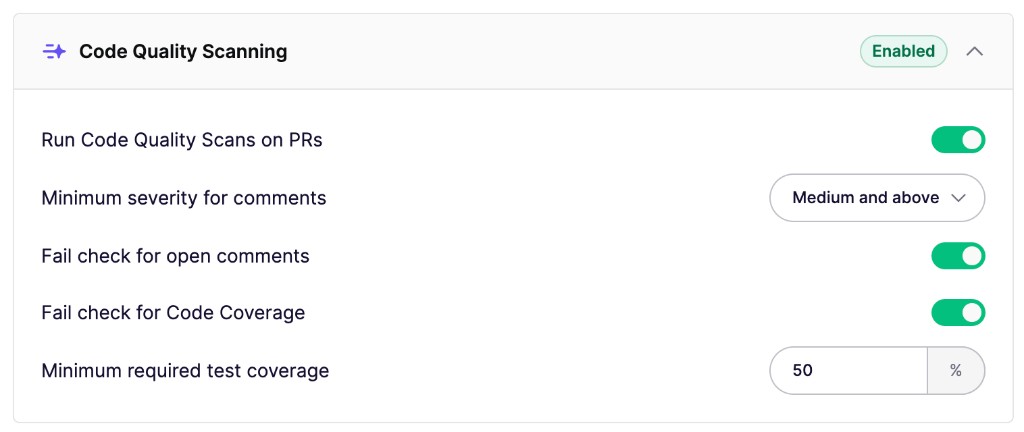
3. In **Code Quality Scanning**, enable **Fail check for Code Coverage**.
4. Set **Minimum required test coverage** to a whole number from 1 to 100. The field starts at 50.
5. Save.
The coverage gate is independent of **Run Code Quality Scans on PRs** and **Fail check for open comments**. You can fail the pull request on coverage without posting code quality comments.
Enable the coverage check and set the minimum percentage for the repository.
{% hint style="info" %}
If **Actions** → **Advanced Settings** → **Always make the PR check green** is on, this check passes even when coverage is below the threshold.
{% endhint %}
## How the check works
On each pull request, Aikido opens **Aikido Security: code coverage** and waits for a coverage upload for that commit.
| Result | When |
| ----------- | ------------------------------------------------------------------------------------------------------------------------------------------------------- |
| **Success** | Uploaded coverage is greater than or equal to the threshold. The check summary shows the percentage and the threshold. |
| **Failure** | Uploaded coverage is below the threshold. |
| **Neutral** | No coverage report arrives within 30 minutes. Aikido does not fail the pull request. The summary says Aikido did not receive a coverage report in time. |
Aikido reads the coverage percentage of the report CI uploaded for that commit. The percentage follows the files in the report. See [You see the files your tests collected](/code-quality/code-coverage.md#you-see-the-files-your-tests-collected).
The check uses the percentage of that commit's upload. Run every app and upload every report. A report that contains only the app that ran makes the threshold apply to that app. To skip unchanged apps, carry their latest reports forward and upload every report together. See [Monorepos That Test Only Changed Paths](/code-quality/code-coverage/monorepos-that-test-only-changed-paths.md).
## Block the merge
Aikido can fail the check. GitHub decides whether that failure blocks the merge. Add **Aikido Security: code coverage** as a required status check on the branch you want to protect.
See [Make failed PR checks block merges](/pr-and-release-gating/github-ci-pr-gating-via-aikido-dashboard.md#make-failed-pr-checks-block-merges).
## Troubleshooting
* **The check stays pending, then finishes neutral:** the pull request workflow did not upload a report for that commit within 30 minutes. Confirm the upload step runs on the pull request, for the head commit, in the repository connected to Aikido.
* **The check failed and the percentage looks lower than you expect:** the threshold applies to the uploaded report. If the report only includes part of the repository, that is the percentage Aikido uses. Widen the test runner's collect or include paths, or upload every app's report together, and upload again. See [Monorepos That Test Only Changed Paths](/code-quality/code-coverage/monorepos-that-test-only-changed-paths.md).
* **Saving the configuration fails:** enable at least one scan under **Vulnerability Scanning**, then save again.
* **The setting shows Upgrade:** Code Coverage, including this check, is available on Basic, Pro, Advanced, and Enterprise plans.
## Need help?
Open the **Intercom chat** in the bottom right corner. Our team is here to help.
---
# Agent Instructions
This documentation is published with GitBook. GitBook is the documentation platform designed so that both humans and AI agents can read, navigate, and reason over technical content effectively. Learn more at gitbook.com.
## Querying This Documentation
If you need additional information that is not directly available in this page, you can query the documentation by asking a question.
Perform an HTTP GET request on the following URL with the `ask` and `goal` query parameters:
```
GET https://help.aikido.dev/code-quality/code-coverage/pr-gating-on-code-coverage.md?ask=&goal=
```
`ask` is the immediate question: it should be specific, self-contained, and written in natural language.
`goal` is what the user is ultimately trying to achieve, the reason they need the answer. Sharing it helps GitBook give you a better, more relevant answer. A goal is most helpful when it describes the outcome the user wants rather than restating the question. For example, with `ask=how do I create an API token`, a goal like `automate deployments from our CI pipeline` lets GitBook tailor the answer to that use case.
The response will contain a direct answer to the question and relevant excerpts and sources from the documentation.
Use this mechanism when the answer is not explicitly present in the current page, you need clarification or additional context, or you want to retrieve related documentation sections.