> For the complete documentation index, see [llms.txt](https://help.aikido.dev/llms.txt). Markdown versions of documentation pages are available by appending `.md` to page URLs; this page is available as [Markdown](https://help.aikido.dev/code-scanning/scanning-practices/custom-vulnerabilities.md).
# Custom CVE Vulnerabilities
Define vulnerabilities for internal or private packages that are not in public CVE databases.
Aikido lets workspace admins define Custom CVEs for internal or private packages. When a scan finds a matching package and version, Aikido creates an open-source issue with a `CUSTOM-CVE-{id}` identifier.
{% hint style="info" %}
This feature needs to be enabled on workspace level. Contact us to enable.
{% endhint %}
#### Use Cases
* Internal or private packages: you maintain a library that isn’t in the public CVE database but has a known security flaw.
* No public CVE exists: a vulnerability was found internally but was never assigned a CVE.
* Policy-driven blocking: you want to enforce “no versions below X” for an internal package across all repos and containers.
#### Add a Custom CVE
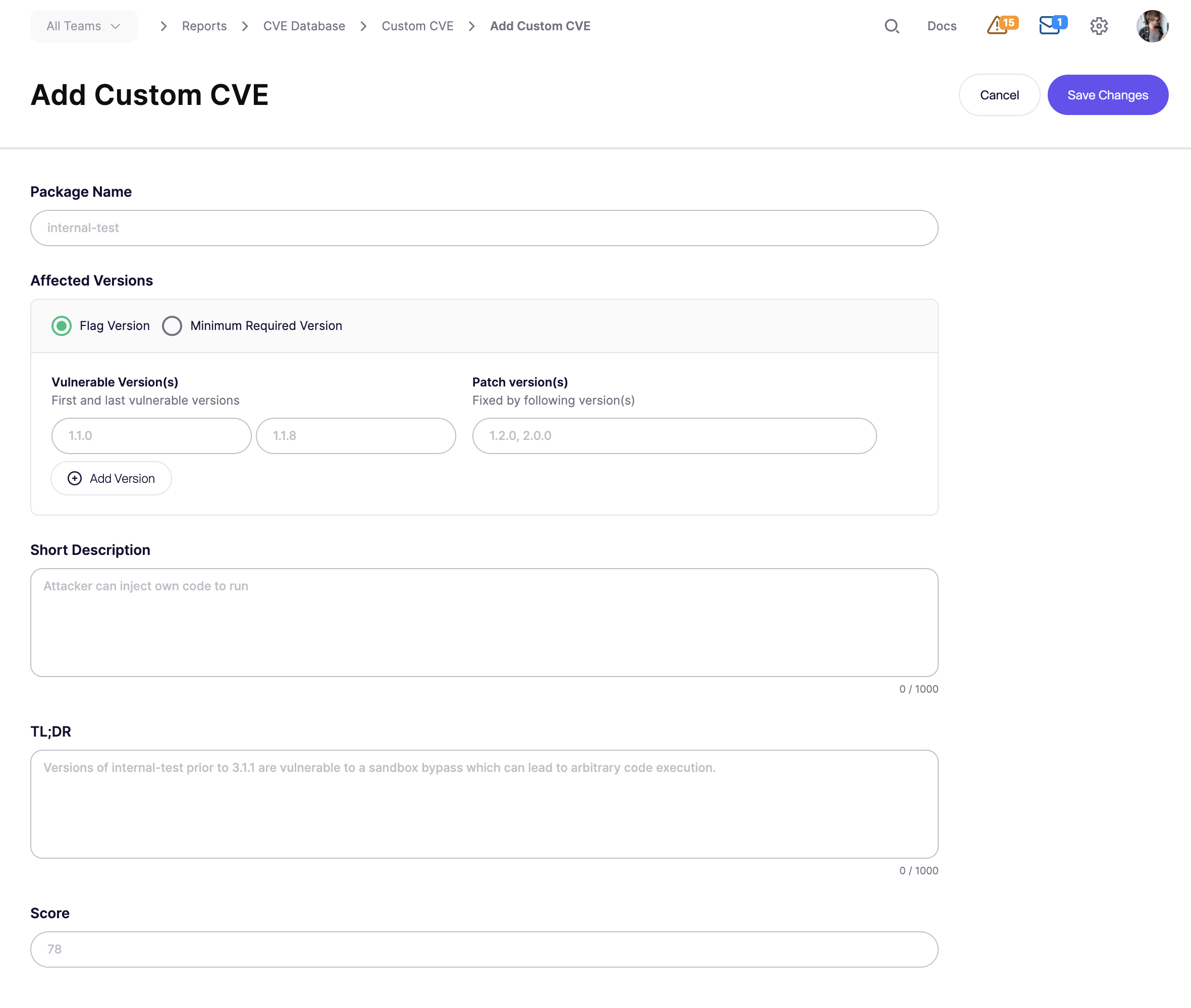
**Step 1.** Go to [**CVE Database**](https://app.aikido.dev/reports/cve) **Report** → **Manage Custom CVEs**
**Step 2.** Click **Add Custom CVE**.
**Step 3.** Fill in these fields:
* **Package name**
* Use the exact package name as detected in scans.
* **Affected versions**
* Use one of these matching methods:
* **Flag Version:** define the first vulnerable version, the last vulnerable version, and the patch or fix version.
* **Minimum Required Version:** flag any version below a required minimum.
* **Short description, TL;DR and Score**
* Set a priority from `1` to `100`. This sets the issue severity.
**Step 4.** Click **Save Changes**.
Aikido assigns a `CUSTOM-CVE-{id}` and starts matching it on the next scan.
Example
Package `acme-auth-lib` is vulnerable from `1.0.0` through `1.5.2`.
Version `1.6.0` contains the fix.
Create the Custom CVE like this:
* **Package name:** `acme-auth-lib`
* **Flag Version:** `1.0.0` → `1.5.2`
* **Patch version:** `1.6.0`
* **Score:** `78` which maps to High severity
Any repository using a vulnerable version gets an issue.
Upgrading to `1.6.0` closes the issue automatically on the next scan.
#### Troubleshooting
A Custom CVE issue may not appear if:
* the package name does not match exactly and is case-sensitive
* the installed version falls outside the defined range
* the package is a dev dependency and dev dependency scanning is off
* the feature is not enabled for your workspace
If the affected package is a dev dependency, enable dev dependency CVE scanning first. See [Scanning Dev Dependencies for CVEs](/code-scanning/scanning-practices/scanning-dev-dependencies-for-cves.md).
---
# Agent Instructions
This documentation is published with GitBook. GitBook is the documentation platform designed so that both humans and AI agents can read, navigate, and reason over technical content effectively. Learn more at gitbook.com.
## Querying This Documentation
If you need additional information that is not directly available in this page, you can query the documentation dynamically by asking a question.
Perform an HTTP GET request on the current page URL with the `ask` query parameter, and the optional `goal` query parameter:
```
GET https://help.aikido.dev/code-scanning/scanning-practices/custom-vulnerabilities.md?ask=&goal=
```
`ask` is the immediate question: it should be specific, self-contained, and written in natural language.
`goal` is optional and describes the broader end goal you are ultimately trying to accomplish on behalf of the user. GitBook uses it to tailor the answer towards what is most useful for that goal.
The response will contain a direct answer to the question and relevant excerpts and sources from the documentation.
Use this mechanism when the answer is not explicitly present in the current page, you need clarification or additional context, or you want to retrieve related documentation sections.