> For the complete documentation index, see [llms.txt](https://help.aikido.dev/llms.txt). Markdown versions of documentation pages are available by appending `.md` to page URLs; this page is available as [Markdown](https://help.aikido.dev/code-scanning/scanning-practices/java-scala-kotlin-projects-using-gradle-security-scanning-best-practices.md).
# Java/Scala/Kotlin Projects Using Gradle: Security Scanning Best Practices
Aikido can find known vulnerabilities (CVE) in your Java dependencies as well as dangerous licenses being used by those dependencies.
How does Aikido find those dependencies and their transitive subdependencies?
Out of the box, Aikido supports the following files for scanning:
* gradle.lockfile
* pom.xml
* .jar/.war/.ear
It should be noted that build.gradle.\* (Gradle manifest) files might not contain exact versions for some of your dependencies. This can cause Aikido to not find the full range of risks in your application.
It's recommended to use Gradle lockfiles that contain an exact version for each dependency as well as the subdependencies.
There are other reasons to use lockfiles besides making security scanning easier for Aikido:
* Using a lockfile protects you against supply chain attacks via malicious packages. This kind of attack is becoming more popular
* Using a lockfiles makes your build more predictable as everyone is using the exact same minor version of packages. Less chance of 'works on my machine'
* Faster build times: no need for dependency resolution anymore
## How to start using lockfiles in your Gradle project?
There are two ways to get a lockfile into your repo:
**Option 1: Let Aikido create it for you (recommended)**
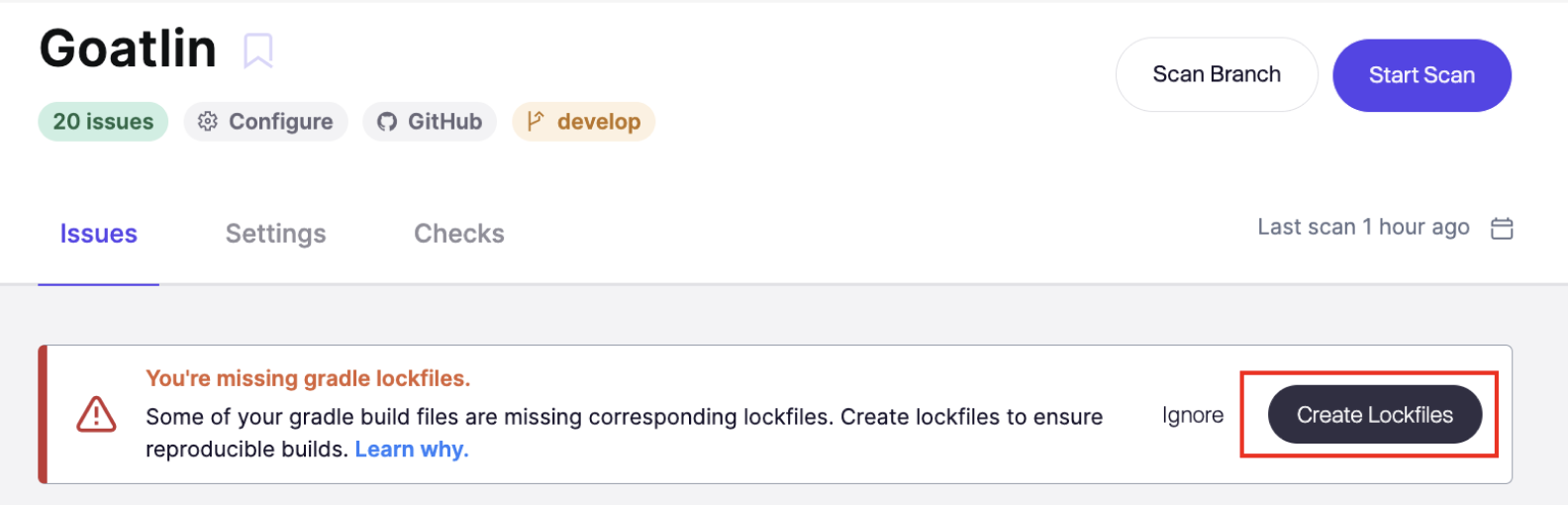
If your repository contains a `build.gradle` or `build.gradle.kts` without a corresponding `gradle.lockfile`, Aikido detects this automatically and **can open a pull request** to generate it for you. *Note:* [*AutoFix*](https://help.aikido.dev/aikido-autofix/overview-aikido-autofix) *needs to be enabled for this option.*
**Step 1.** Go to the respective repository that is missing the lockfile
**Step 2.** Look for the lockfile suggestion on top and click **Create PR**
**Step 3.** Review and merge the PR. Aikido will handle the rest
Once merged, Aikido will immediately be able to scan your full dependency tree, including all transitive dependencies.
**Option 2: Add it manually**
Add the required configuration to your Gradle manifest files. See the [Gradle lockfile documentation](https://docs.gradle.org/current/userguide/dependency_locking.html#ex-locking-all-configurations) for the exact lines to add.
Then run:
```
gradle dependencies --write-locks
```
Commit the generated lockfile to your repository. Treat it like a `package-lock.json` in Node.js; never edit it manually.
---
# Agent Instructions
This documentation is published with GitBook. GitBook is the documentation platform designed so that both humans and AI agents can read, navigate, and reason over technical content effectively. Learn more at gitbook.com.
## Querying This Documentation
If you need additional information that is not directly available in this page, you can query the documentation dynamically by asking a question.
Perform an HTTP GET request on the current page URL with the `ask` query parameter, and the optional `goal` query parameter:
```
GET https://help.aikido.dev/code-scanning/scanning-practices/java-scala-kotlin-projects-using-gradle-security-scanning-best-practices.md?ask=&goal=
```
`ask` is the immediate question: it should be specific, self-contained, and written in natural language.
`goal` is optional and describes the broader end goal you are ultimately trying to accomplish on behalf of the user. GitBook uses it to tailor the answer towards what is most useful for that goal.
The response will contain a direct answer to the question and relevant excerpts and sources from the documentation.
Use this mechanism when the answer is not explicitly present in the current page, you need clarification or additional context, or you want to retrieve related documentation sections.