> For the complete documentation index, see [llms.txt](https://help.aikido.dev/llms.txt). Markdown versions of documentation pages are available by appending `.md` to page URLs; this page is available as [Markdown](https://help.aikido.dev/docs/docs-ja/ai-totsru/ide-plugins-overview/features/aikido-ai-in-ide.md).
# IDE 内の Aikido AI
AikidoのAI機能は、スマートな優先順位付けと安全な自動修正を、直接あなたのIDEに届けます。すべての問題を手作業で確認する代わりに、本当に重要なことに集中でき、ワンクリックで問題を修正することもできます。
## AI AutoTriage
スキャンで複数の問題が検出された場合、AI AutoTriageはどれを優先して確認すべきかを判断するのに役立ちます。
Aikidoは、コードの文脈に基づいて検出結果の到達可能性と影響度を自動的に分析し、最も重要なものをレビュー対象としてマークして、ノイズは優先度を下げます。
### 使い方
1. Aikidoパネルを開くか、インラインの検出項目にカーソルを合わせます。
2. AutoTriageをサポートする検出項目を選択します。
3. [AIで評価]をクリックします。
## AI AutoFix
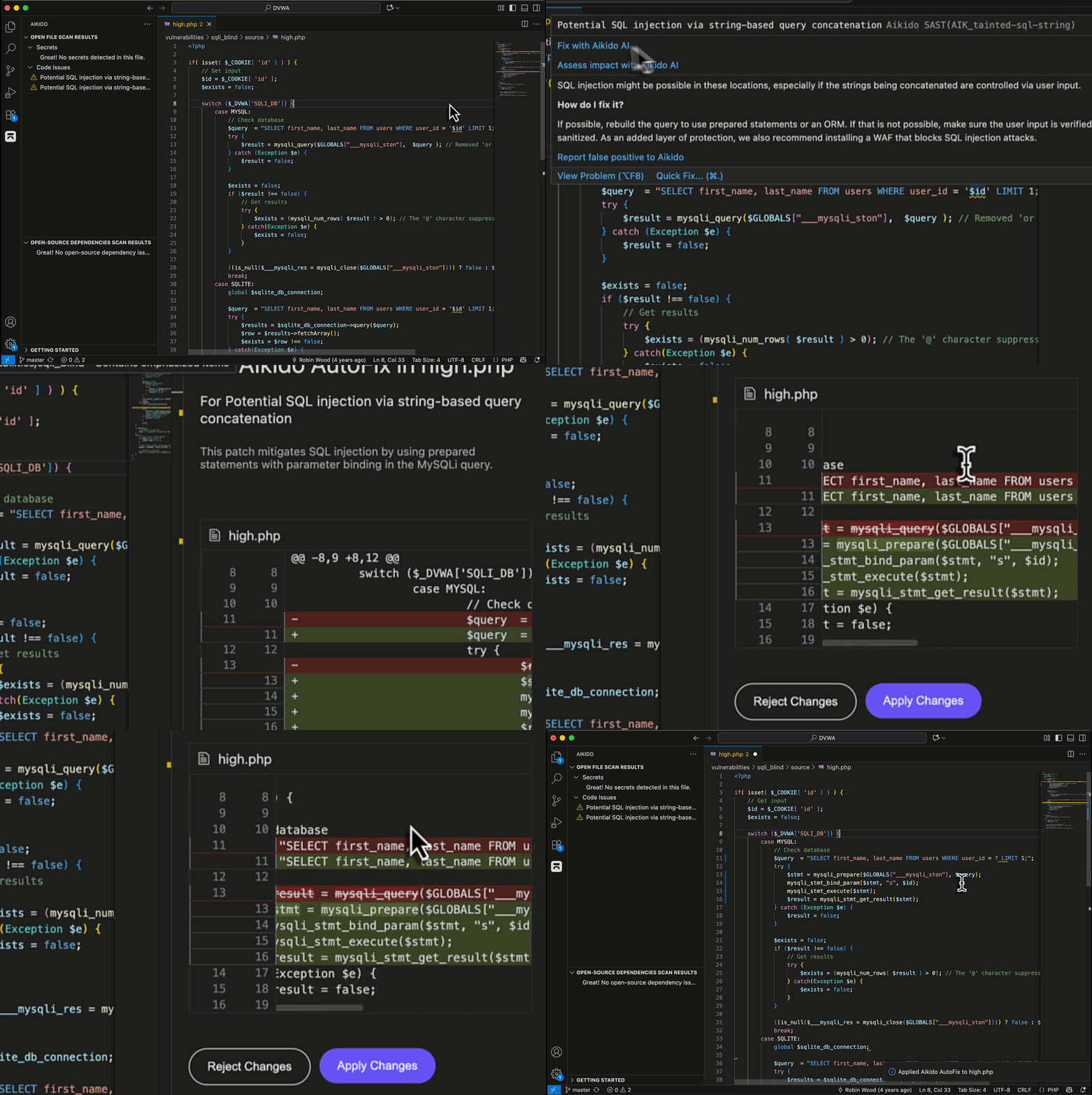
対応するSASTおよびSCAの検出項目について、AikidoはAI AutoFixを提供します。これは、IDE内でプレビューしてそのまま適用できるAI生成の修正です。
各修正には以下が含まれます:
* AikidoのセキュリティAIが生成した、安全なコード変更の提案。
* 適用前に確認できる、並列表示のプレビュー。
* この修正が推奨される理由の説明。
適用すると、コードは自動的に更新され、問題が解決されたことを確認するために再スキャンされます。
### メリット
* ノイズを減らす:AIに問題のフィルタリングと優先順位付けを自動で任せましょう。
* 時間を節約:エディタを離れずに、一般的な脆弱性をすぐに修正できます。
* 一貫性を保つ:IDEの結果は、Aikidoワークスペースで定義されたルールと重大度に一致します。
### 使い方
1. 対応するSASTまたは依存関係の検出項目を開きます。
2. AutoFixをクリックします。
3. 差分プレビューで提案されたパッチを確認します。
4. 変更を適用します。Aikidoがファイルを再スキャンして、問題が解決されたことを確認します。
---
# Agent Instructions
This documentation is published with GitBook. GitBook is the documentation platform designed so that both humans and AI agents can read, navigate, and reason over technical content effectively. Learn more at gitbook.com.
## Querying This Documentation
If you need additional information that is not directly available in this page, you can query the documentation dynamically by asking a question.
Perform an HTTP GET request on the current page URL with the `ask` query parameter, and the optional `goal` query parameter:
```
GET https://help.aikido.dev/docs/docs-ja/ai-totsru/ide-plugins-overview/features/aikido-ai-in-ide.md?ask=&goal=
```
`ask` is the immediate question: it should be specific, self-contained, and written in natural language.
`goal` is optional and describes the broader end goal you are ultimately trying to accomplish on behalf of the user. GitBook uses it to tailor the answer towards what is most useful for that goal.
The response will contain a direct answer to the question and relevant excerpts and sources from the documentation.
Use this mechanism when the answer is not explicitly present in the current page, you need clarification or additional context, or you want to retrieve related documentation sections.