> For the complete documentation index, see [llms.txt](https://help.aikido.dev/llms.txt). Markdown versions of documentation pages are available by appending `.md` to page URLs; this page is available as [Markdown](https://help.aikido.dev/docs/docs-ja/ai-totsru/ide-plugins-overview/features/real-time-code-scanning-in-ide.md).
# IDEでのリアルタイムSAST、シークレット、IaCスキャン
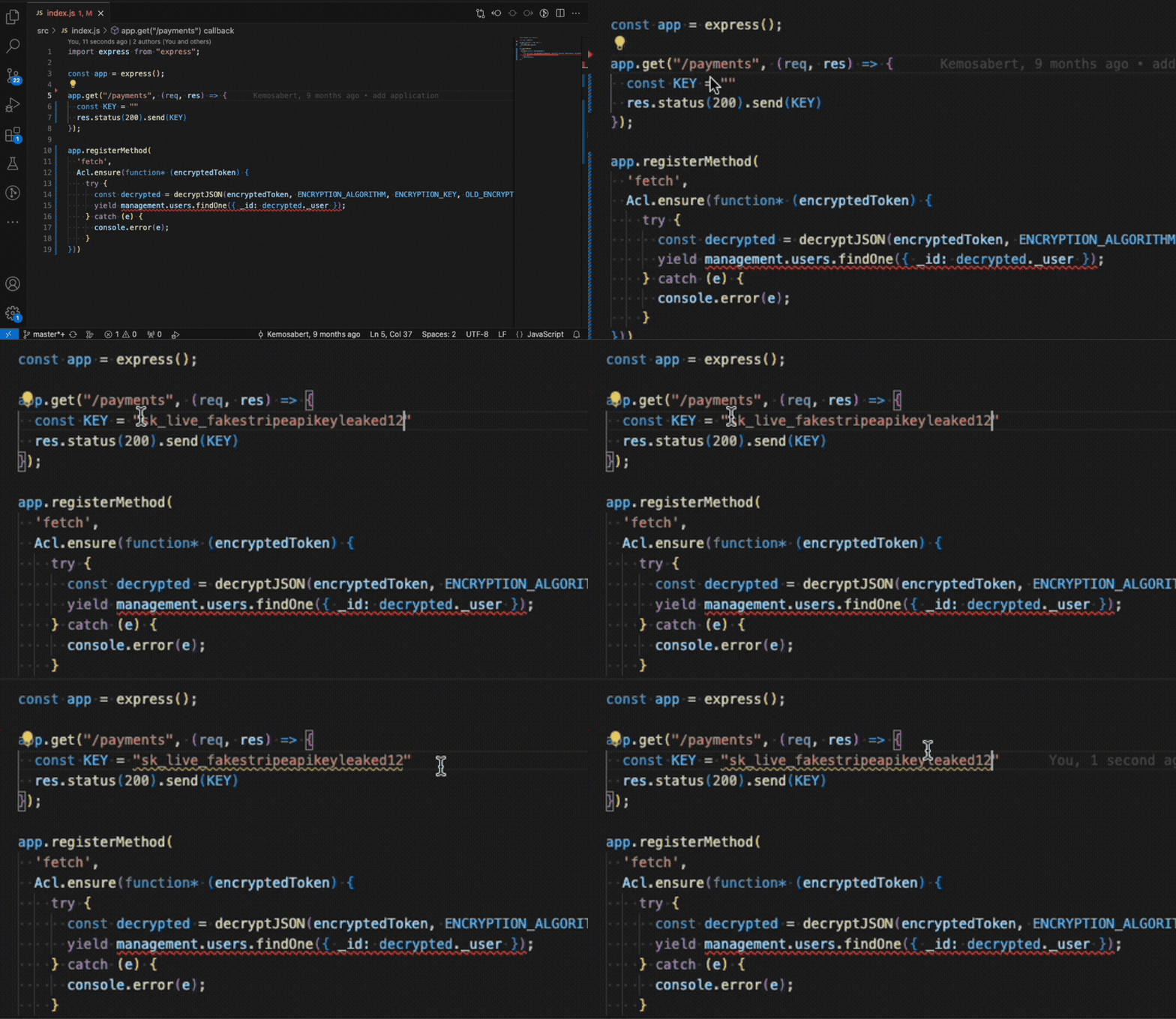
Aikido IDEプラグインは、セキュリティ上の問題が導入された瞬間に検知できるよう支援します。ファイルを開くたび、または保存するたびに、Aikidoがバックグラウンドで迅速なスキャンを実行し、問題をエディタ内で直接ハイライトします。
#### スキャン対象
Aikidoは、リアルタイムで2種類のスキャンを実行します。
* SAST(静的アプリケーションセキュリティテスト):安全でないコーディングパターン、潜在的なインジェクション、安全でないデシリアライズ、その他のコードレベルの脆弱性を検出します。
* Secrets: APIキー、パスワード、トークンなどの露出した認証情報を見つけます。
* IaC(Infrastructure as Code):Terraform、CloudFormation、Dockerfileなどのファイルにおけるクラウドおよびインフラの設定ミスを検出します。
#### 仕組み
ファイルを開くか保存すると、AikidoはAikidoプラットフォームと同じ分析エンジンを使用してコードをスキャンします。
検出された問題は次のように表示されます:
* エディタ内でインライン表示され、下線またはハイライトされます。
* Aikidoサイドバーで、重大度とカテゴリごとにグループ化されます。
* Problemsパネルで、すばやく移動できます。
各検出項目にマウスオーバーすると、コンテキストと修復の詳細を確認できます。サポートされている検出項目については、 [AI Autotriageで分析するか、AI AutoFixを適用して](/docs/docs-ja/ai-totsru/ide-plugins-overview/features/aikido-ai-in-ide.md) IDEを離れることなく、問題を安全に修正できます。
---
# Agent Instructions
This documentation is published with GitBook. GitBook is the documentation platform designed so that both humans and AI agents can read, navigate, and reason over technical content effectively. Learn more at gitbook.com.
## Querying This Documentation
If you need additional information that is not directly available in this page, you can query the documentation by asking a question.
Perform an HTTP GET request on the following URL with the `ask` and `goal` query parameters:
```
GET https://help.aikido.dev/docs/docs-ja/ai-totsru/ide-plugins-overview/features/real-time-code-scanning-in-ide.md?ask=&goal=
```
`ask` is the immediate question: it should be specific, self-contained, and written in natural language.
`goal` is what the user is ultimately trying to achieve, the reason they need the answer. Sharing it helps GitBook give you a better, more relevant answer. A goal is most helpful when it describes the outcome the user wants rather than restating the question. For example, with `ask=how do I create an API token`, a goal like `automate deployments from our CI pipeline` lets GitBook tailor the answer to that use case.
The response will contain a direct answer to the question and relevant excerpts and sources from the documentation.
Use this mechanism when the answer is not explicitly present in the current page, you need clarification or additional context, or you want to retrieve related documentation sections.