> For the complete documentation index, see [llms.txt](https://help.aikido.dev/llms.txt). Markdown versions of documentation pages are available by appending `.md` to page URLs; this page is available as [Markdown](https://help.aikido.dev/docs/docs-ja/aikido-agent/ask-aikido.md).
# Ask Aikido
Ask Aikidoは、特定の検出事項に対するAikido Agentとの対話型インターフェースです。
**Ask Aikido** は、あなたが話しかける相手です [Aikido Agent](/docs/docs-ja/aikido-agent/aikido-agent.md) 特定の検出結果についてのものです。Aikidoを離れたり、検出結果を別のチャットボットに貼り付けたりせずに、トリアージ判断の妥当性を確認したい、実際の攻撃経路を確認したい、あるいは生成された修正を調整したいときに使ってください。
Aikido Agent はすでに次の機能を通じてノイズを自動的に除外しています [SAST自動トリアージ](/docs/docs-ja/aikido-agent/sast-autotriage.md), [シークレット自動トリアージ](/docs/docs-ja/aikido-agent/secrets-autotriage.md)、および [CVEの悪用可能性分析](/docs/docs-ja/aikido-agent/cve-exploitability-analysis.md)。ほとんどの場合、それで十分です。さらに深く掘り下げたいときは Ask Aikido を使ってください。
### ユースケース
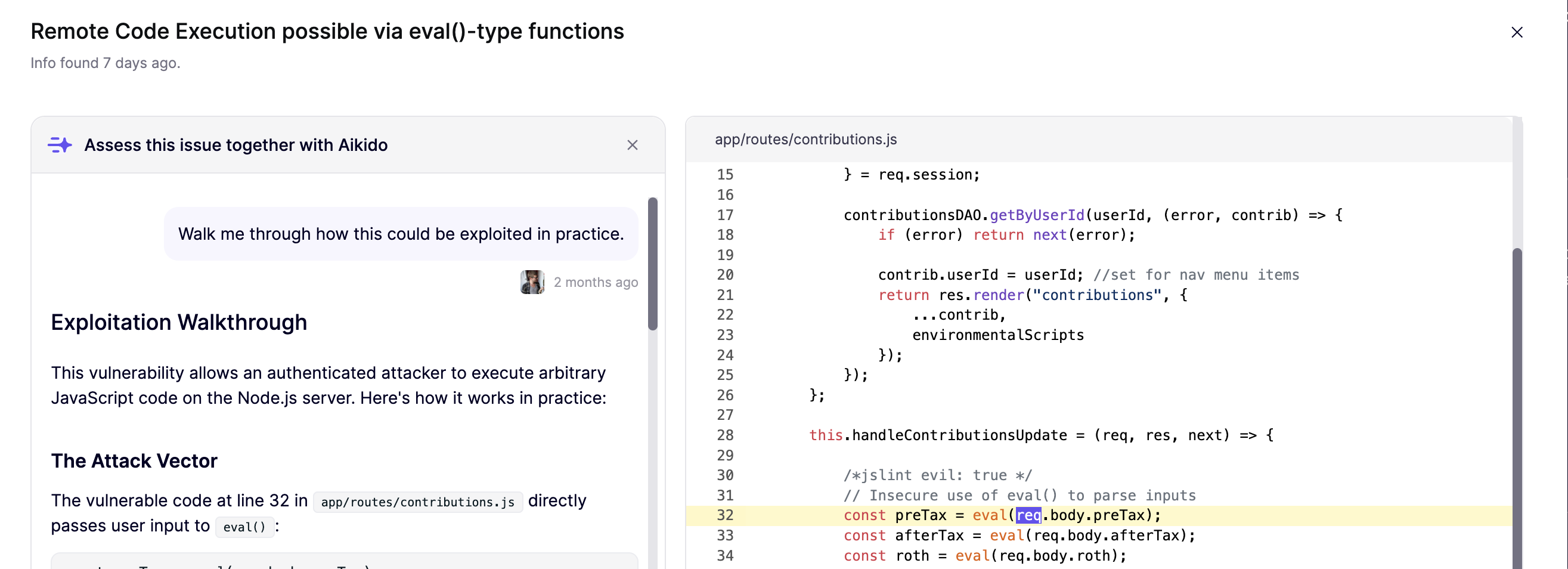
#### 1. SAST: コード解析
次のような質問をしてください `これは本当に私たちにとってリスクがありますか?`, `AutoTriage はなぜこの問題の深刻度を引き上げたのですか?`、または `実際にどのように悪用されるのか、手順を追って説明してください。`
このチャットでは次のことができます:
* 深刻度を検証する
* 現実的な攻撃経路を理解する
* 今修正するか、後で予定するか、理由を付けて無視するかを判断する
次を開きます: **コード解析を表示** SAST の問題についてサイドバーで、次に **Ask Aikido** を左上でクリックします。
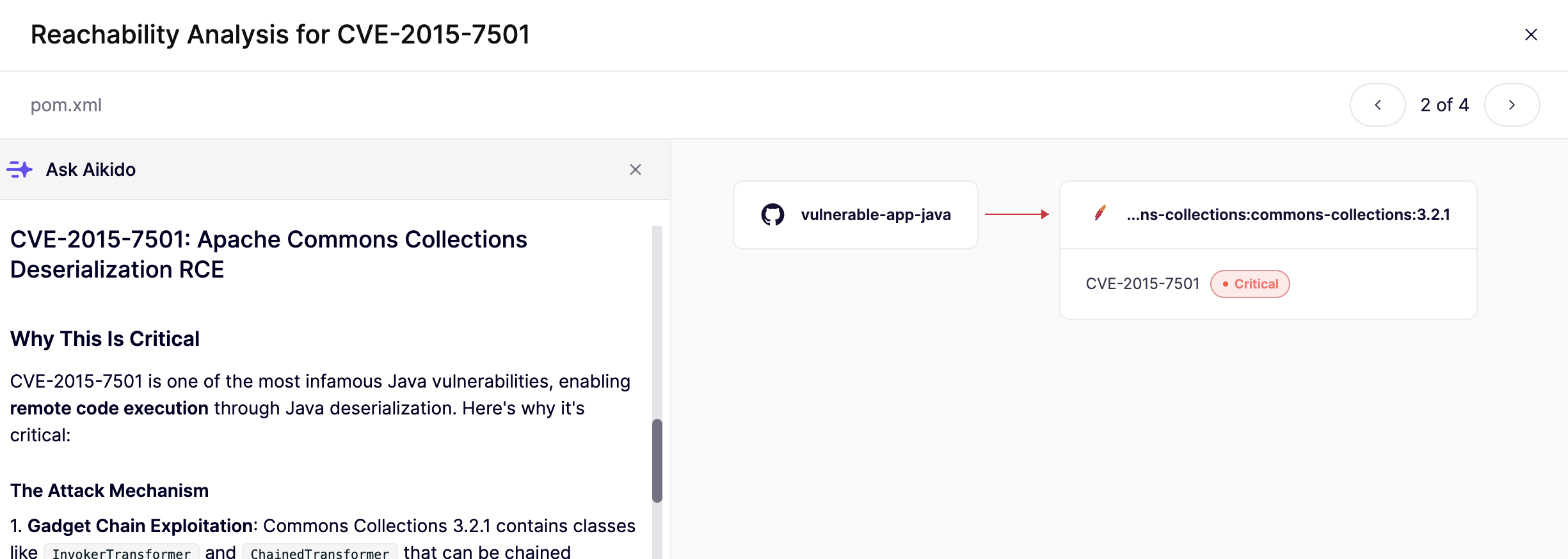
#### 2. 依存関係: 包括的な影響分析
次のような質問をしてください `これは本当に私たちのアプリで到達可能ですか?` または `包括的な影響分析を説明してください`.
このチャットを使って、依存関係パスと呼び出しグラフの出力を、平易な言葉の悪用可能性ガイダンスに変換します。
次を開きます: **到達可能性分析を表示** 依存関係の問題についてサイドバーで、次に **Ask Aikido** を左下でクリックします。
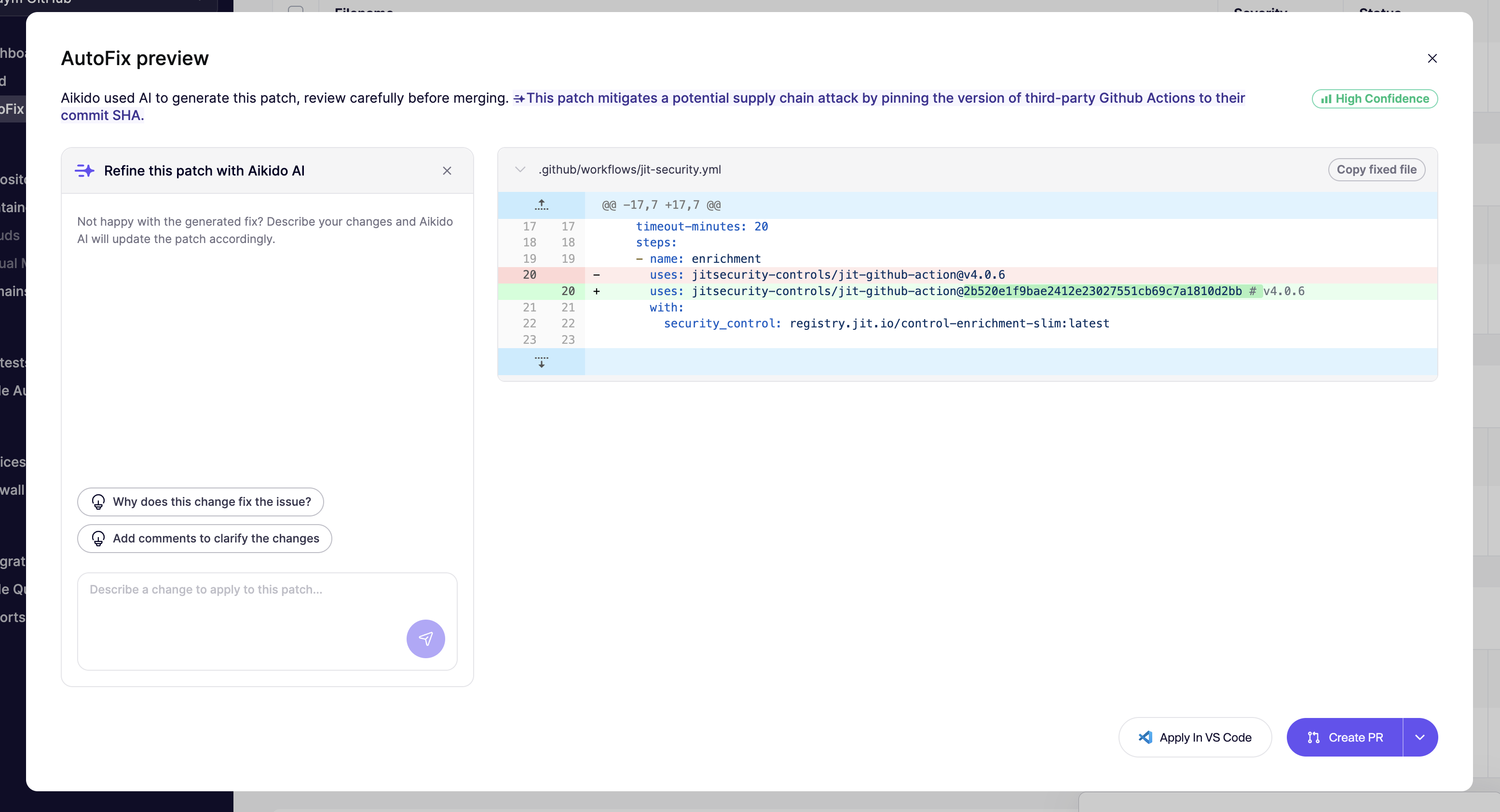
#### 3. AutoFix を調整する
このチャットは、AutoFix がほぼ完成しているが、そのままではマージできないときに使ってください。次のような質問をしてください `このパッチを X に合わせて調整できますか`, `この修正の理由を説明してください`、または `修正内容を説明するコメントを追加してください`.
Aikido Agent に次のことを依頼できます:
* 命名規則やスタイル規約に合わせる
* テストや小さなロジック変更を追加する
* パッチをあなたのアーキテクチャに合わせる
修正の調整について詳しくは、こちらを参照してください [Aikido AIでAutoFixを洗練する](/docs/docs-ja/autofix-to/automation-and-merging/refine-autofixes-with-aikido-ai.md).
### 知っていること
各チャットは、検出結果、影響を受けるコード、CVE メタデータ、到達可能性シグナル、そして(該当する場合は)差分を含む、完全なコンテキストで実行されます。回答は一般的なセキュリティ助言ではなく、あなたの特定のスタックに基づいています。
### チャットから実行できる操作
チャットから次のことができます:
* AI が生成した理由を添えて、その問題を無視する
* AutoFix を作成または調整する
* 今後の提案を改善するためにカスタムコンテキストを保存する
### 関連ページ
* [Aikido Agent](/docs/docs-ja/aikido-agent/aikido-agent.md)
* [カスタムレポート](/docs/docs-ja/aikido-agent/custom-reports.md)
* [SAST自動トリアージ](/docs/docs-ja/aikido-agent/sast-autotriage.md)
* [シークレット自動トリアージ](/docs/docs-ja/aikido-agent/secrets-autotriage.md)
* [CVEの悪用可能性分析](/docs/docs-ja/aikido-agent/cve-exploitability-analysis.md)
* [AikidoがAIをどのように使用するか](/docs/docs-ja/ai-totsru/how-aikido-uses-ai.md)
* [Aikido AIでAutoFixを洗練する](/docs/docs-ja/autofix-to/automation-and-merging/refine-autofixes-with-aikido-ai.md)
* [到達可能性分析の紹介](/docs/docs-ja/hajimeni/reachability-analysis/introduction-to-reachability-analysis.md)
---
# Agent Instructions
This documentation is published with GitBook. GitBook is the documentation platform designed so that both humans and AI agents can read, navigate, and reason over technical content effectively. Learn more at gitbook.com.
## Querying This Documentation
If you need additional information that is not directly available in this page, you can query the documentation by asking a question.
Perform an HTTP GET request on the following URL with the `ask` and `goal` query parameters:
```
GET https://help.aikido.dev/docs/docs-ja/aikido-agent/ask-aikido.md?ask=&goal=
```
`ask` is the immediate question: it should be specific, self-contained, and written in natural language.
`goal` is what the user is ultimately trying to achieve, the reason they need the answer. Sharing it helps GitBook give you a better, more relevant answer. A goal is most helpful when it describes the outcome the user wants rather than restating the question. For example, with `ask=how do I create an API token`, a goal like `automate deployments from our CI pipeline` lets GitBook tailor the answer to that use case.
The response will contain a direct answer to the question and relevant excerpts and sources from the documentation.
Use this mechanism when the answer is not explicitly present in the current page, you need clarification or additional context, or you want to retrieve related documentation sections.