> For the complete documentation index, see [llms.txt](https://help.aikido.dev/llms.txt). Markdown versions of documentation pages are available by appending `.md` to page URLs; this page is available as [Markdown](https://help.aikido.dev/docs/docs-ja/aikido-agent/custom-reports.md).
# カスタムレポート作成
自然言語を使ってAikido Agentでカスタムセキュリティレポートを作成し、ワークスペース全体で保存・共有できます。
**カスタムレポート** では質問できます [Aikido Agent](/docs/docs-ja/aikido-agent/aikido-agent.md) セキュリティデータについて平易な言葉で質問できます。Agent は見つかった内容からグラフや表を作成し、ワークスペースに保存する前にチャットでレポートを調整できます。
{% hint style="info" %}
カスタムレポートは有料プランと Pro トライアル中に利用できます。チームのみのユーザーは利用できません。
{% endhint %}
## 仕組み
1. 自然言語で欲しいインサイトを説明します。
2. Aikido Agent は、ワークスペースのデータから 1 つ以上のウィジェット(表、棒グラフ、折れ線グラフ)を生成します。
3. チャットでレポートを調整します(たとえば、集計の切り口を変更する、フィルターを追加する、日付範囲を調整するなど)。
4. 結果に満足したら、次の場所に保存します: **ワークスペースレポート** すると、ワークスペースの他のメンバーが閲覧できます。
保存したレポートにはデータのキャッシュされたスナップショットが保持されます。後からそのデータを更新したり、日付範囲を変更したりしても、レポートを最初から作り直す必要はありません。
{% hint style="warning" %}
カスタムレポートはワークスペースの実データのみを使用します。Aikido Agent がリクエストに必要なデータにアクセスできない場合は、でっち上げの数値やグラフで穴埋めせず、その旨をお知らせします。
{% endhint %}
## カスタムレポートを作成
{% stepper %}
{% step %}
### カスタムレポートを開く
次へ移動します: [**レポート**](https://app.aikido.dev/reports) を開いて **カスタムレポート**、または直接次へ移動します: [カスタムレポート](https://app.aikido.dev/reports/custom).
{% endstep %}
{% step %}
### 必要な内容を説明する
クリックします **カスタムレポートを作成**。欲しいインサイトの説明を入力するか、提案されたプロンプトのいずれかを選択してください。
{% endstep %}
{% step %}
### 確認して調整
エージェントはリクエストに基づいてウィジェットを作成します。チャットパネルを使って繰り返し調整できます。たとえば、チームごとにグループ化する、重要度で絞り込む、表からグラフに切り替えるといった依頼ができます。
以前のレポートは **過去のチャット** のサイドバーに表示されるので、まだ非公開のものを再度開けます。\

{% endstep %}
{% step %}
### ワークスペースに保存
レポートが問題なければ、次をクリックします: **ワークスペースレポートに追加**。保存したレポートはワークスペースで共有されます。保存するまでは、レポートはあなたにのみ非公開のままです。
{% endstep %}
{% endstepper %}
## ワークスペースレポートに保存
新しいカスタムレポートは最初はあなたにのみ非公開です。これらは **過去のチャット**に表示され、保存するまでワークスペース内の他の人には見えません。
レポートを共有する準備ができたら:
1. レポートを開き、見た目が問題ないことを確認します。
2. クリックします **ワークスペースレポートに追加**.
3. Aikido はレポートを共有 **カスタムレポート** リストに公開します。
その後、ワークスペースの管理者とデフォルトユーザーは次からレポートを開けます: [カスタムレポート](https://app.aikido.dev/reports/custom)。レポートの作成やワークスペースへの保存ができるのは管理者のみです。
## レポートの命名
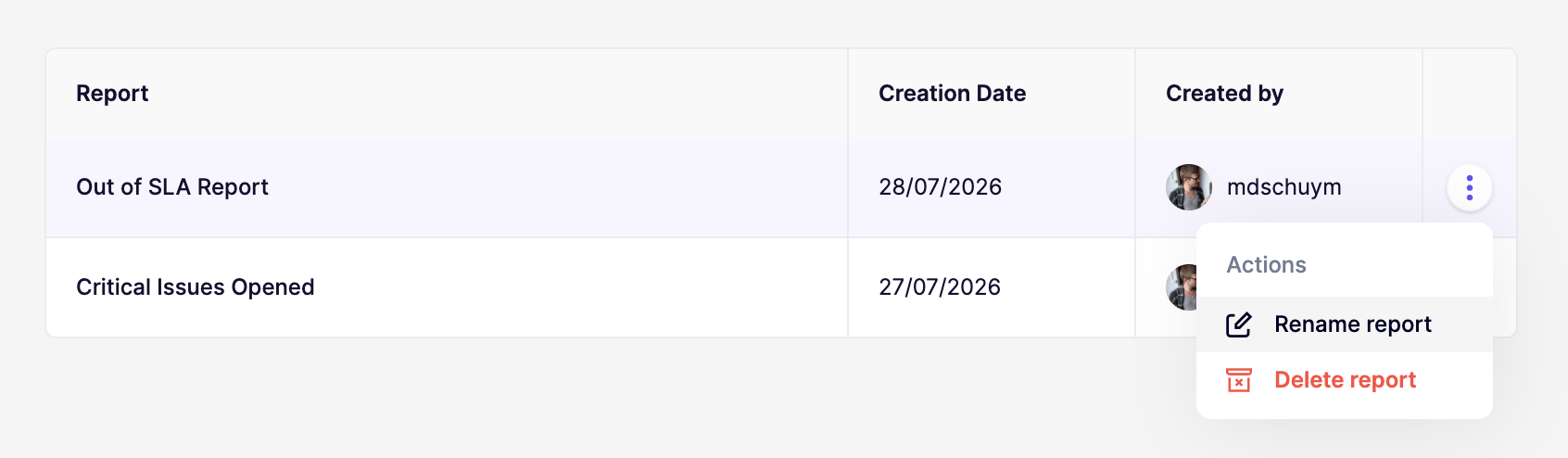
Aikido Agent がレポートを作成すると、 **レポート名** 依頼内容に基づいてレポート名も付けられます。その名前は **過去のチャット** (レポートがあなたにのみ非公開の間)と、共有カスタムレポート一覧(保存後)に表示されます。
ワークスペースに保存したレポートの名前を変更するには:
1. 次へ移動します: [カスタムレポート](https://app.aikido.dev/reports/custom).
2. を開き、 **アクション** メニューを開きます。
3. クリックします **レポート名を変更**.
4. 新しい **レポート名** に移動し、 **Save**.
---
# Agent Instructions
This documentation is published with GitBook. GitBook is the documentation platform designed so that both humans and AI agents can read, navigate, and reason over technical content effectively. Learn more at gitbook.com.
## Querying This Documentation
If you need additional information that is not directly available in this page, you can query the documentation by asking a question.
Perform an HTTP GET request on the following URL with the `ask` and `goal` query parameters:
```
GET https://help.aikido.dev/docs/docs-ja/aikido-agent/custom-reports.md?ask=&goal=
```
`ask` is the immediate question: it should be specific, self-contained, and written in natural language.
`goal` is what the user is ultimately trying to achieve, the reason they need the answer. Sharing it helps GitBook give you a better, more relevant answer. A goal is most helpful when it describes the outcome the user wants rather than restating the question. For example, with `ask=how do I create an API token`, a goal like `automate deployments from our CI pipeline` lets GitBook tailor the answer to that use case.
The response will contain a direct answer to the question and relevant excerpts and sources from the documentation.
Use this mechanism when the answer is not explicitly present in the current page, you need clarification or additional context, or you want to retrieve related documentation sections.