> For the complete documentation index, see [llms.txt](https://help.aikido.dev/llms.txt). Markdown versions of documentation pages are available by appending `.md` to page URLs; this page is available as [Markdown](https://help.aikido.dev/docs/docs-ja/aikido-agent/sast-autotriage.md).
# SAST自動トリアージ
SAST AutoTriage は、 [Aikido Agent](/docs/docs-ja/aikido-agent/aikido-agent.md) 静的解析によるノイズを減らし、実際にセキュリティ上の脅威となる問題に集中できるようにします。まず悪用可能性を排除しようとし、その後(必要な場合のみ)、残った検出結果を (1) 悪用可能性、(2) 悪用された場合の深刻度 の順でランク付けします。主に SAST の検出結果に対して動作し、ローカル IDE、PR チェック、定期的な再スキャンなど、慣れ親しんだワークフローに組み込めます。
{% hint style="info" %}
AutoTriage の主な対象は SAST です。少数のクラウドおよびコンテナのチェックも、文脈上同様の格上げ/格下げ判断が可能な場合に限りサポートされています。
{% endhint %}
## AutoTriage とは何か(そして何ではないか)
AutoTriage 自体はスキャナーではありません。スキャンの後段に位置し、次について判断します ***悪用可能性*** と ***severity*** コードとその文脈に基づいて。
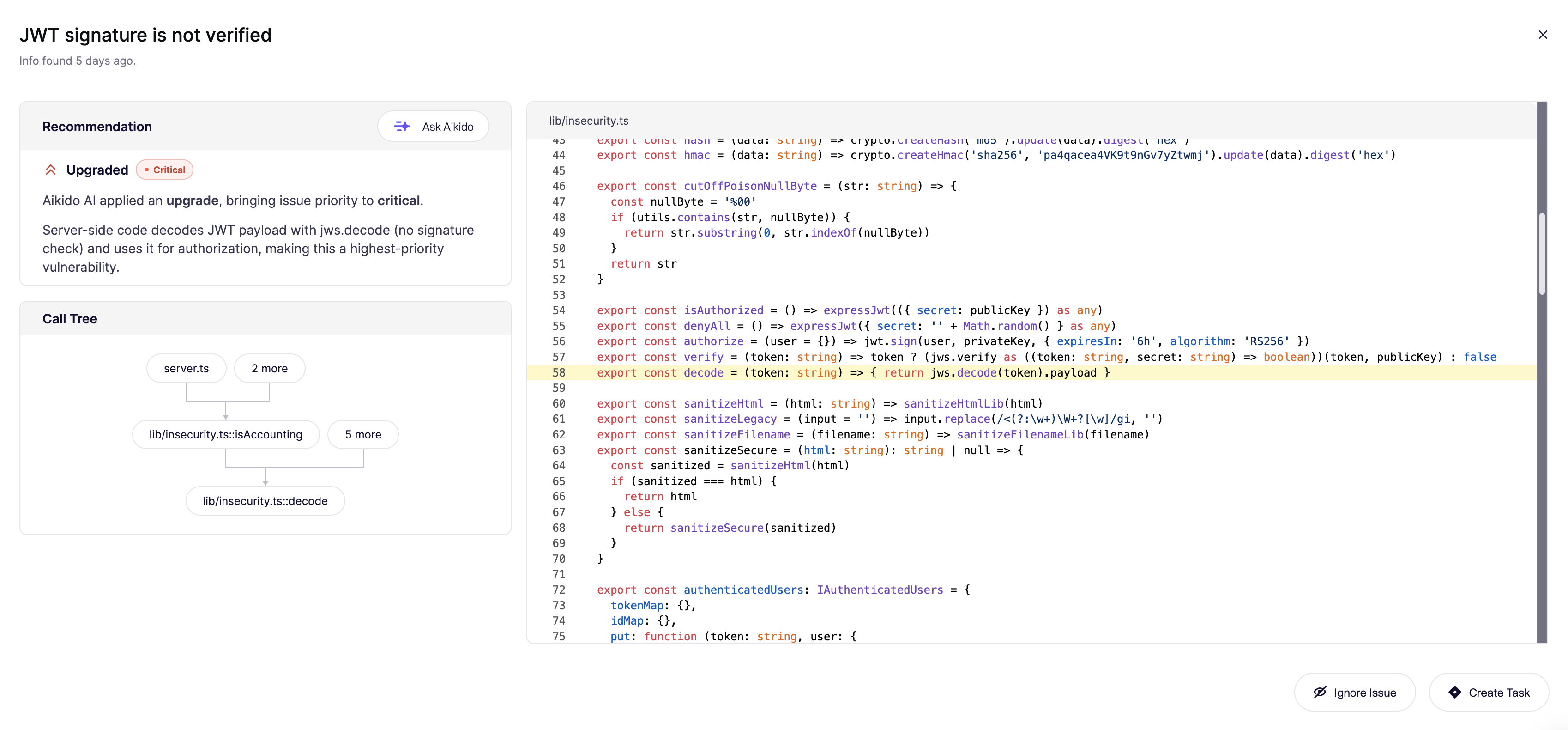
Aikido では、SAST の問題の大半について Aikido 定義のルールに基づいてトリアージを行います。より複雑なケースでは、よりニュアンスのある制御フローとデータフローを解釈するために推論モデルを使用します。これには、呼び出しツリーを計算し、脆弱性のシンクに渡される変数を参照する呼び出し先関数を取り込んで、関連するコードスニペットを構築することが含まれます。
Aikido の社内評価では、このアプローチは、推論を使わない手法と比べて、そうした複雑なケースでおよそ 2 倍多くの誤検知を検出します。
## AutoTriage の仕組み
#### トリアージ前の誤検知フィルタリング
**AutoTriage が LLM を使ってコードを確認する前に**、Aikido の [到達可能性](/docs/docs-ja/hajimeni/reachability-analysis/reachability-engine-to-remove-false-positives.md) エンジンは、脆弱なコードパスがそもそもアプリケーション内で到達可能かを確認することで、誤検知を除外します。これには次のようなものが含まれます。
* 実際に影響を受ける関数を呼び出しているかを確認する
* 脆弱な依存関係が、実運用ではなくツール内でのみ使われているかを追跡する
* ソースとシンクの間にサニタイズがあるかを確認する
* 古くなった、または未使用のコードパスを除外する
これらの手順だけでも、従来型のスキャナーの大半と比べて、アラートのかなりの部分を抑制できます。
> 多くの潜在的な問題が自動的に無視済みとマークされていることに気づくでしょう。これは、到達可能性分析により、信頼できない入力から危険なシンクへの経路が存在しない、またはその使用箇所が本番フローの外にあると判断されたためです。
悪用可能性を排除できない場合、AutoTriage は優先度付けに進みます。
### 優先度スコアリング
問題が依然として悪用可能である可能性がある場合、AutoTriage は発生確率と影響を評価して優先度を決定します。まず Aikido の深刻度スコア(0〜100)を基準にし、前段の手順で収集したコードの文脈を使って上下に調整します。
> **例:**
>
> * SQL インジェクションのレポートは、安全に ***格下げ*** 入力変数が、上流で既に検証済みのデータベースなど、信頼できるソースに由来する場合
> * NoSQL インジェクションのリスクがあるログインエンドポイントは ***格上げ*** され、「修正優先度が非常に高い」に引き上げられます。攻撃が容易で、認証に直接影響するためです。以下に示すとおりです。
#### 真の陽性であれば、AutoFix は
トリアージ済みの真の陽性について、Aikido は次を通じて推奨パッチを生成できます [AutoFix](/docs/docs-ja/autofix-to/overview-aikido-autofix.md) 。そしてレビュー用のプルリクエストを開きます。AutoFix は報告された脆弱性のみに焦点を当てており、GitHub、GitLab、Bitbucket、Azure DevOps の PR チェックや、ローカル IDE でも利用できます。
### AutoTriage が考慮するシグナル
AutoTriage は **文脈を強く必要とします** ように設計されています。実際には、次のような点を考慮します。
* ユーザー入力が機密性の高いシンクに到達可能かどうか、およびサニタイズ/検証の有無と有効性
* 入力が信頼できる保管先に由来するかどうか、また脆弱なコードがビルド時・テスト時に使われているのか、本番環境で使われているのか
* データの機密性など、業務上の影響を示すシグナル
* 複雑なルールでは、推論モデルがたとえば OS 固有の区切り文字やパス解決の意味論といったエッジケースを評価します
## Ask Aikido
クリックします **Ask Aikido** を **推奨** チャットできるパネル [Aikido Agent](/docs/docs-ja/aikido-agent/ask-aikido.md) 脆弱性について。たとえば、なぜフラグされたのか、どのように脆弱なコードに到達するのか、あるいは知りたいことなら何でも。
---
# Agent Instructions
This documentation is published with GitBook. GitBook is the documentation platform designed so that both humans and AI agents can read, navigate, and reason over technical content effectively. Learn more at gitbook.com.
## Querying This Documentation
If you need additional information that is not directly available in this page, you can query the documentation by asking a question.
Perform an HTTP GET request on the following URL with the `ask` and `goal` query parameters:
```
GET https://help.aikido.dev/docs/docs-ja/aikido-agent/sast-autotriage.md?ask=&goal=
```
`ask` is the immediate question: it should be specific, self-contained, and written in natural language.
`goal` is what the user is ultimately trying to achieve, the reason they need the answer. Sharing it helps GitBook give you a better, more relevant answer. A goal is most helpful when it describes the outcome the user wants rather than restating the question. For example, with `ask=how do I create an API token`, a goal like `automate deployments from our CI pipeline` lets GitBook tailor the answer to that use case.
The response will contain a direct answer to the question and relevant excerpts and sources from the documentation.
Use this mechanism when the answer is not explicitly present in the current page, you need clarification or additional context, or you want to retrieve related documentation sections.