> For the complete documentation index, see [llms.txt](https://help.aikido.dev/llms.txt). Markdown versions of documentation pages are available by appending `.md` to page URLs; this page is available as [Markdown](https://help.aikido.dev/docs/docs-ja/aikido-debaisu/deploying-aikido-endpoint/connecting-and-managing-devices.md).
# デバイスの接続と管理
デバイスとは、インストール済みのエージェントを通じて Device Protection に接続された任意のコンピューターです。接続されると、Aikido はそのデバイスにインストールされているパッケージを自動的に検出し、監視します。
## デバイスを接続する
1. 移動して [Device Protection を開き、Devices](https://app.aikido.dev/endpoint-protection/devices) タブ。
2. クリック **デバイスを接続** を右上で開きます。
3. セットアップ手順に従って、デバイスにエージェントをインストールしてください。
エージェントがインストールされると、 [デバイスはデバイス一覧に表示されます](https://app.aikido.dev/endpoint-protection/devices) 「アクティブ」ステータスで表示されます。
## デバイス一覧
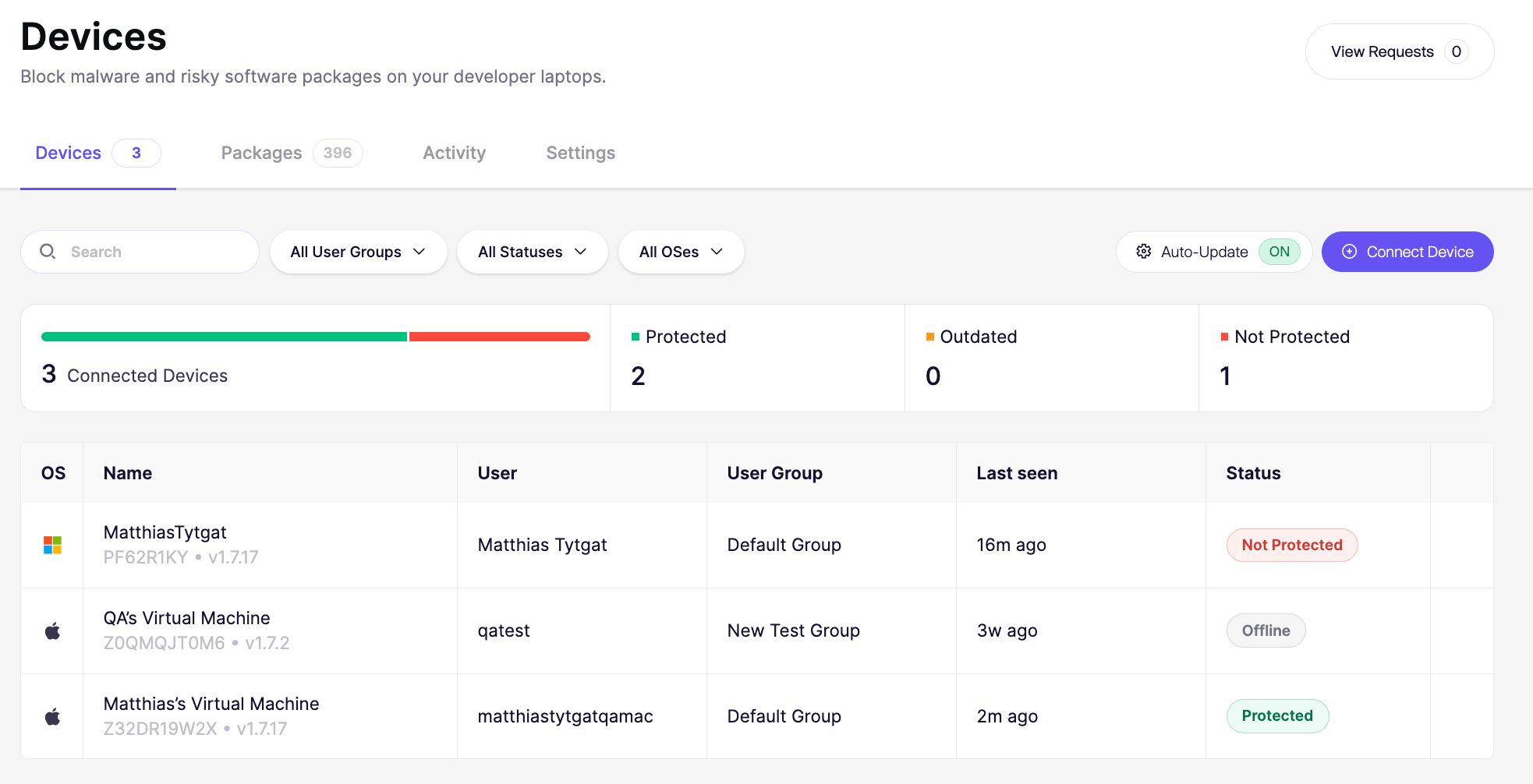
デバイス一覧には、接続済みのすべてのデバイスが表示されます。各行には次の情報が表示されます。
* OS: オペレーティングシステムの種類
* 名前: デバイス名と所有者(例: "Kate Davis の Windows PC")
* ユーザー: デバイス上のアカウント名
* ユーザーグループ: デバイスが所属するグループ(例: Marketing、Product、Sales)
* 最終確認: デバイスが最後にチェックインした日時
* エージェントのステータス: エージェントが現在アクティブかオフラインか、および Device Protection が最新かどうか
{% hint style="info" %}
直近72時間以内にオンラインだった場合、エージェントはアクティブとして表示されます
{% endhint %}
## ユーザーグループ
{% content-ref url="/pages/4f54730fa8f14ab5955efdffd064828415688ecb" %}
[デバイス保護のユーザーグループ](/docs/docs-ja/aikido-debaisu/deploying-aikido-endpoint/user-groups-for-aikido-endpoint.md)
{% endcontent-ref %}
## デバイス操作
をクリック `⋮` デバイス横のメニューからデバイス操作を表示します。
### デバイスの保護を一時停止する
「保護を一時停止」は、エージェントをアンインストールせずに、特定のデバイス上の Device Protection を一時的に無効にします。デバイスは接続されたままで、作業が終わったら同じメニューから保護を再度オンにできます。
例外として使用し、通常の手順にしないでください。定期的に行う必要があることについては、 [インストールポリシー](/docs/docs-ja/aikido-debaisu/using-aikido-endpoint/configuring-installation-policies.md) または [ユーザーグループ](/docs/docs-ja/aikido-debaisu/deploying-aikido-endpoint/user-groups-for-aikido-endpoint.md) を代わりに。
保護を一時停止する理由:
* Device Protection 自体が原因の可能性がある問題のトラブルシューティング
* より恒久的なルールを設定する間に、ポリシーでブロックされたソフトウェアを緊急でインストールする
* IT またはサポートが、保護を一時的にオフにする必要がある修正手順をユーザーに案内する
* Device Protection が、デバイス上の別のセキュリティまたは監視ツールと競合していないか確認する
{% hint style="warning" %}
一時停止中は、デバイスは不正または悪意のあるパッケージのインストールから保護されません。作業が終わり次第、保護を再度オンにしてください。
{% endhint %}
### デバイスを削除する
「デバイスを削除」は、デバイスを Device Protection から切断し、デバイス一覧から削除します。これはデバイス本体からエージェントをアンインストールするものではありません。
次のような場合にデバイスを削除します:
* 廃止、初期化、または交換された
* 従業員が退職し、そのデバイスを監視する必要がなくなった
* 誤って、またはテスト目的で接続され、追跡する必要がない
{% hint style="warning" %}
デバイスを削除しても、Aikido から削除されるだけです。Device Protection の動作を完全に停止するには、 [エージェントをアンインストールしてください](/docs/docs-ja/aikido-debaisu/deploying-aikido-endpoint/uninstall-aikido-endpoint.md) デバイスから
{% endhint %}
---
# Agent Instructions
This documentation is published with GitBook. GitBook is the documentation platform designed so that both humans and AI agents can read, navigate, and reason over technical content effectively. Learn more at gitbook.com.
## Querying This Documentation
If you need additional information that is not directly available in this page, you can query the documentation dynamically by asking a question.
Perform an HTTP GET request on the current page URL with the `ask` query parameter, and the optional `goal` query parameter:
```
GET https://help.aikido.dev/docs/docs-ja/aikido-debaisu/deploying-aikido-endpoint/connecting-and-managing-devices.md?ask=&goal=
```
`ask` is the immediate question: it should be specific, self-contained, and written in natural language.
`goal` is optional and describes the broader end goal you are ultimately trying to accomplish on behalf of the user. GitBook uses it to tailor the answer towards what is most useful for that goal.
The response will contain a direct answer to the question and relevant excerpts and sources from the documentation.
Use this mechanism when the answer is not explicitly present in the current page, you need clarification or additional context, or you want to retrieve related documentation sections.