> For the complete documentation index, see [llms.txt](https://help.aikido.dev/llms.txt). Markdown versions of documentation pages are available by appending `.md` to page URLs; this page is available as [Markdown](https://help.aikido.dev/docs/docs-ja/aikido-device-protection/using-aikido-endpoint/ai-monitoring.md).
# AI の利用
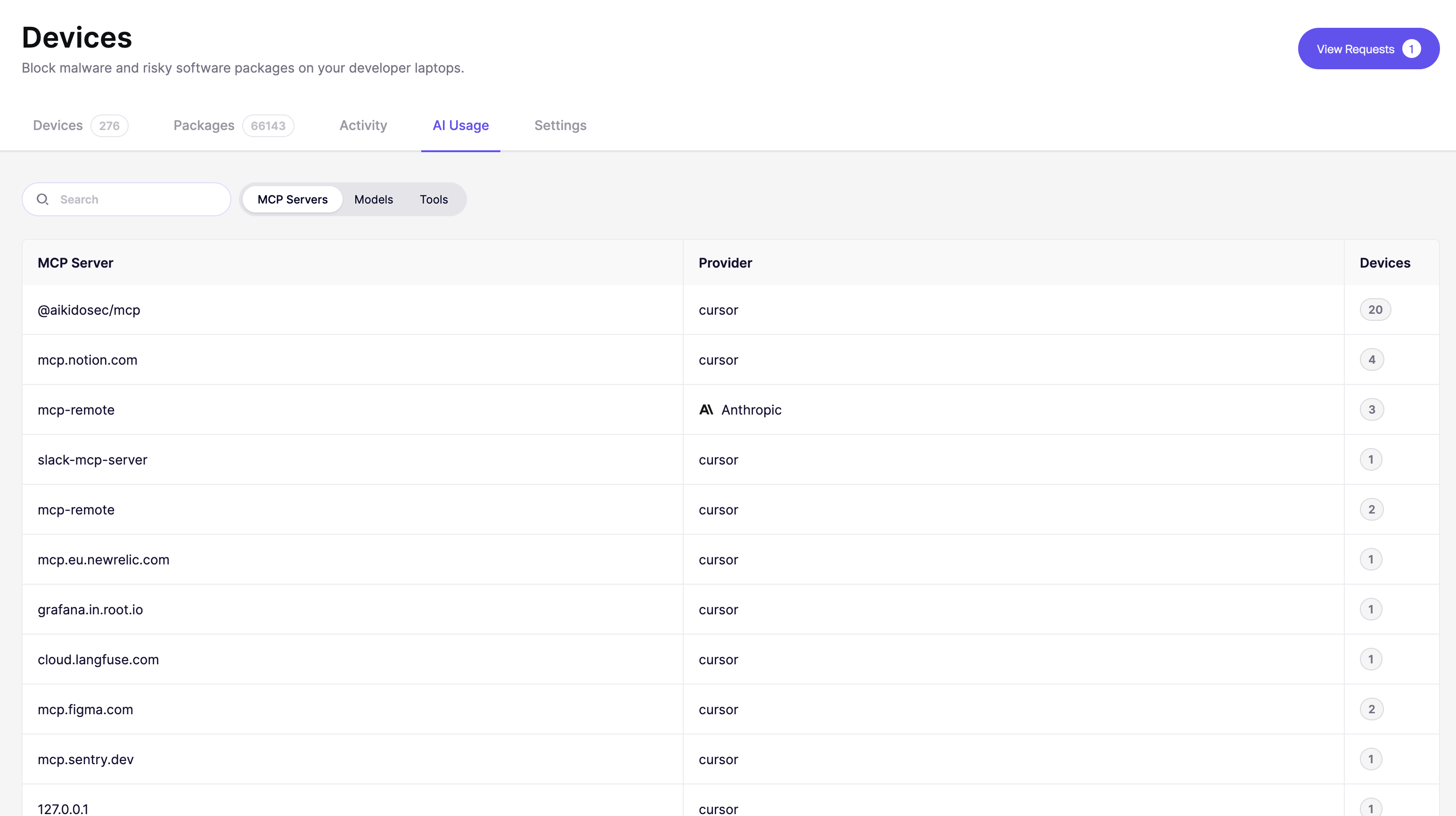
AI Usageタブでは、チームのデバイスで発生しているAIのアクティビティを確認できます。Device Protectionエージェントは3つの項目を検出し、ここに表示します。使用中のModel Context Protocol(MCP)サーバー、呼び出されているAIモデル、そしてそれらのサーバーが実行しているツール呼び出しです。
これにより、セキュリティチームとITチームは、開発者に自己申告を求めることなく、組織全体でのAI利用状況をリアルタイムで把握できます。また、個別のツールを許可またはブロックできるため、AIアシスタントは承認していないものを実行できません。
{% hint style="info" %}
現在、ブロックはツールに適用されます。モデルとMCPサーバーをブロックする機能は近日提供予定です。
{% endhint %}
次へ移動します: [Device Protectionを開き、AI Usageタブを開く](https://app.aikido.dev/endpoint-protection/ai-usage)。次を使用します **MCPサーバー**, **モデル**、および **ツール** 3つの表示を切り替えるためのフィルター。
## 確認すべきポイント
* **見覚えのないモデル、サーバー、またはツール** - 見覚えのないものは、承認されていないツールか、仕事用デバイスで使用されている個人アカウントの可能性があります
* **予期しない項目でのデバイス数が多い** - 未確認のものが広く導入されている場合は、確認する価値があります
* **リモートMCPサーバー** - リモートサーバーはデバイスデータが第三者に送信されていることを意味するため、承認済みであることを確認してください
## MCPサーバー
各行は、デバイスが接続したMCPサーバーです。
* **MCPサーバー** - サーバーの識別子(例: `@aikidosec/mcp`, `mcp.notion.com`)。Aikidoは、デバイス自体で実行されているローカルサーバーと、ネットワーク経由でデバイスが接続するリモートサーバーの両方を検出します
* **プロバイダー** - サーバーに接続したAIクライアントまたはベンダー(例: `cursor`, `Anthropic`)
* **Devices** - このサーバーに接続したデバイス数
## モデル
各行は、少なくとも1台のデバイスから呼び出された固有のモデルです。
* **モデル** - 具体的なモデル識別子(例: `claude-opus-4-8`, `gpt-5-mini`)
* **プロバイダー** - モデルを提供している企業(例: `Anthropic`, `OpenAI`)
* **Devices** - このモデルを呼び出したデバイス数
* **最終使用** - 最後に検出された呼び出し時刻
## ツール
各行は、デバイスから呼び出されたツールです。たとえば、ファイル読み取りツールやデータベースクエリツールです。これにより、AIアシスタントが実際に何をしているのか、どのサーバーに接続しているかだけでなく把握できます。
* **Name** - ツールの識別子(例: `編集`, `Bash`, `書き込み`)。同じMCPサーバーまたはAIクライアントからのツールはグループ化され、グループ名の横にツール数が表示されます。矢印を選択してグループを展開します
* **プロバイダー** - ツールに関連付けられたAIクライアントまたはベンダー(例: `Anthropic`)
* **権限** - ツールがデバイスで許可されているかブロックされているか
* **Devices** - このツールを呼び出したデバイス数
* **最終使用** - ツールが最後に呼び出された時刻
### ツールを許可またはブロックする
1. 次へ移動します: [Device Protectionを開き、AI Usageタブを開く](https://app.aikido.dev/endpoint-protection/ai-usage)、次に **ツール** フィルター。
2. 変更したいツールを見つけます。グループを展開すると、その中の個別のツールを確認できます。
3. のドロップダウンを選択し、 **権限** 列で **許可** または **ブロック**.
ブロックされたツールは、MCPサーバーやAIクライアントが利用可能なままでも、デバイス上で実行できません。
## どのデバイスで使われているかを確認する
任意の行のデバイス数を選択すると、その背後にある正確なデバイスを確認できます。これを使って、見覚えのないモデル、サーバー、またはツールを使用している人をたどれます。
次を使用してください: **検索** バーで、名前を使って特定のモデル、プロバイダー、サーバー、またはツールを検索します。
{% hint style="info" %}
Aikidoは、ChatGPTデスクトップアプリからのAIアクティビティはまだ検出しません。
{% endhint %}
---
# Agent Instructions
This documentation is published with GitBook. GitBook is the documentation platform designed so that both humans and AI agents can read, navigate, and reason over technical content effectively. Learn more at gitbook.com.
## Querying This Documentation
If you need additional information that is not directly available in this page, you can query the documentation by asking a question.
Perform an HTTP GET request on the following URL with the `ask` and `goal` query parameters:
```
GET https://help.aikido.dev/docs/docs-ja/aikido-device-protection/using-aikido-endpoint/ai-monitoring.md?ask=&goal=
```
`ask` is the immediate question: it should be specific, self-contained, and written in natural language.
`goal` is what the user is ultimately trying to achieve, the reason they need the answer. Sharing it helps GitBook give you a better, more relevant answer. A goal is most helpful when it describes the outcome the user wants rather than restating the question. For example, with `ask=how do I create an API token`, a goal like `automate deployments from our CI pipeline` lets GitBook tailor the answer to that use case.
The response will contain a direct answer to the question and relevant excerpts and sources from the documentation.
Use this mechanism when the answer is not explicitly present in the current page, you need clarification or additional context, or you want to retrieve related documentation sections.