> For the complete documentation index, see [llms.txt](https://help.aikido.dev/llms.txt). Markdown versions of documentation pages are available by appending `.md` to page URLs; this page is available as [Markdown](https://help.aikido.dev/docs/docs-ja/aikido-device-protection/using-aikido-endpoint/browsing-packages.md).
# パッケージの閲覧
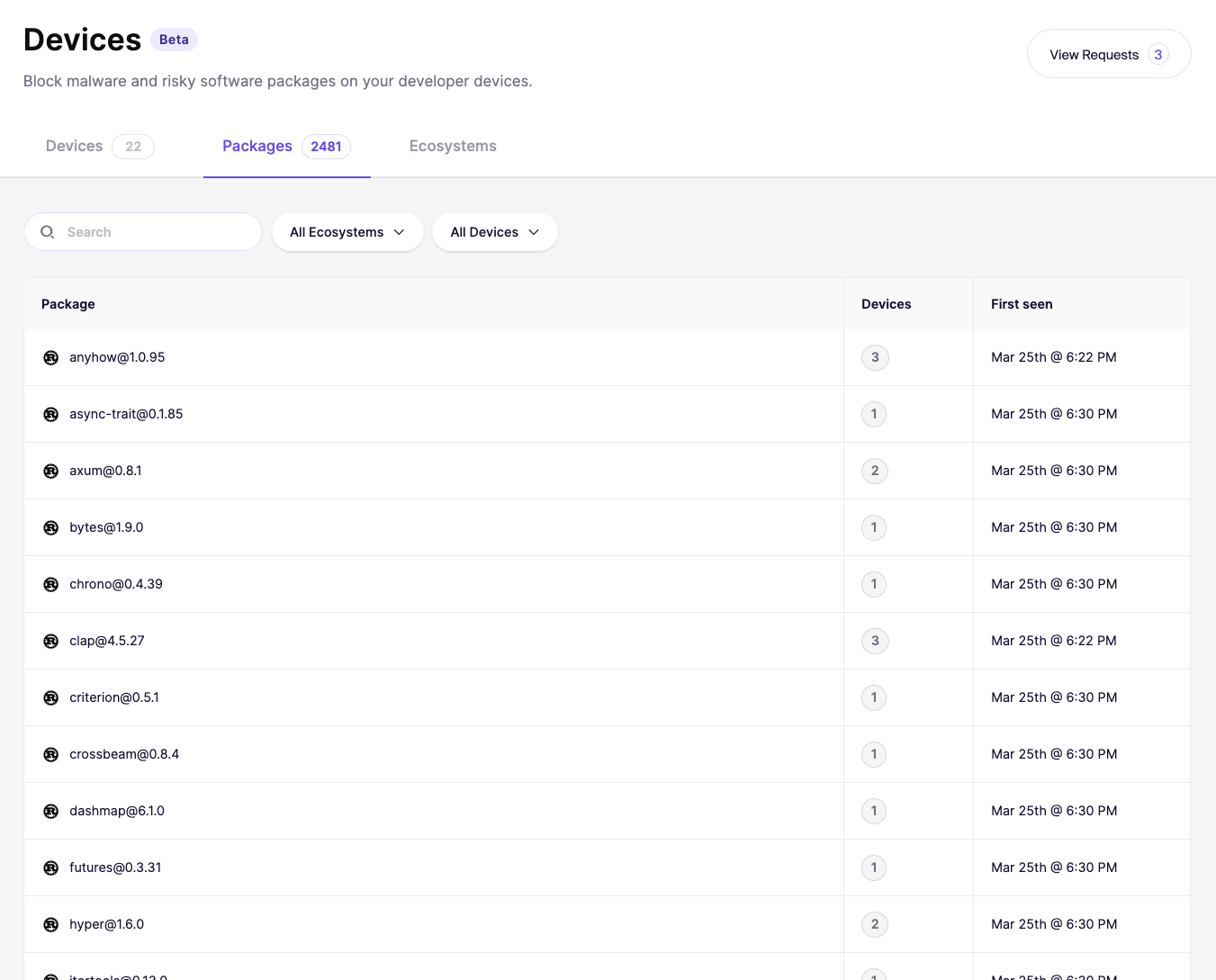
[Packages]タブでは、接続されたすべてのデバイスで検出された各ソフトウェアパッケージの完全な一覧を確認できます。これには、ブラウザー拡張機能、コードライブラリ、IDEプラグイン、ビルド依存関係が含まれます。
## パッケージの表示
次へ移動します: [[Device Protection]を開き、[Packages]を](https://app.aikido.dev/endpoint-protection/packages) タブを開きます。検出されたすべてのパッケージが、名前順に並んだ一覧で表示されます。
各項目には以下が表示されます:
* **パッケージ** ・パッケージ名とバージョン(例: "axios\@1.6.7")
* **Devices** ・このパッケージがインストールされている接続済みデバイスの数
* **初回検出** ・パッケージが最初に検出された日時
## エコシステムで絞り込む
次を使用してください: **すべてのエコシステム** パッケージ一覧の上にあるドロップダウンを使って、特定のソースで絞り込むことができます。たとえば、Chrome拡張機能だけ、またはNPMパッケージだけを確認したい場合に便利です。
また、 **検索** バーを使って、特定のパッケージ名を検索することもできます。
## 確認すべきポイント
[Packages]タブは、組織全体でどのようなソフトウェアが稼働しているかを把握するための良い出発点です。確認するとよい項目は次のとおりです:
* 認識できないが、多くのデバイスにインストールされているパッケージ
* セキュリティまたはプライバシー上のリスクをもたらす可能性があるブラウザー拡張機能
* 既知の脆弱性がある古いパッケージバージョン
* 最近追加され、まだ確認されていないパッケージ
---
# Agent Instructions
This documentation is published with GitBook. GitBook is the documentation platform designed so that both humans and AI agents can read, navigate, and reason over technical content effectively. Learn more at gitbook.com.
## Querying This Documentation
If you need additional information that is not directly available in this page, you can query the documentation by asking a question.
Perform an HTTP GET request on the following URL with the `ask` and `goal` query parameters:
```
GET https://help.aikido.dev/docs/docs-ja/aikido-device-protection/using-aikido-endpoint/browsing-packages.md?ask=&goal=
```
`ask` is the immediate question: it should be specific, self-contained, and written in natural language.
`goal` is what the user is ultimately trying to achieve, the reason they need the answer. Sharing it helps GitBook give you a better, more relevant answer. A goal is most helpful when it describes the outcome the user wants rather than restating the question. For example, with `ask=how do I create an API token`, a goal like `automate deployments from our CI pipeline` lets GitBook tailor the answer to that use case.
The response will contain a direct answer to the question and relevant excerpts and sources from the documentation.
Use this mechanism when the answer is not explicitly present in the current page, you need clarification or additional context, or you want to retrieve related documentation sections.