> For the complete documentation index, see [llms.txt](https://help.aikido.dev/llms.txt). Markdown versions of documentation pages are available by appending `.md` to page URLs; this page is available as [Markdown](https://help.aikido.dev/docs/docs-ja/aikido-device-protection/using-aikido-endpoint/configuring-installation-policies.md).

# インストールポリシーの設定

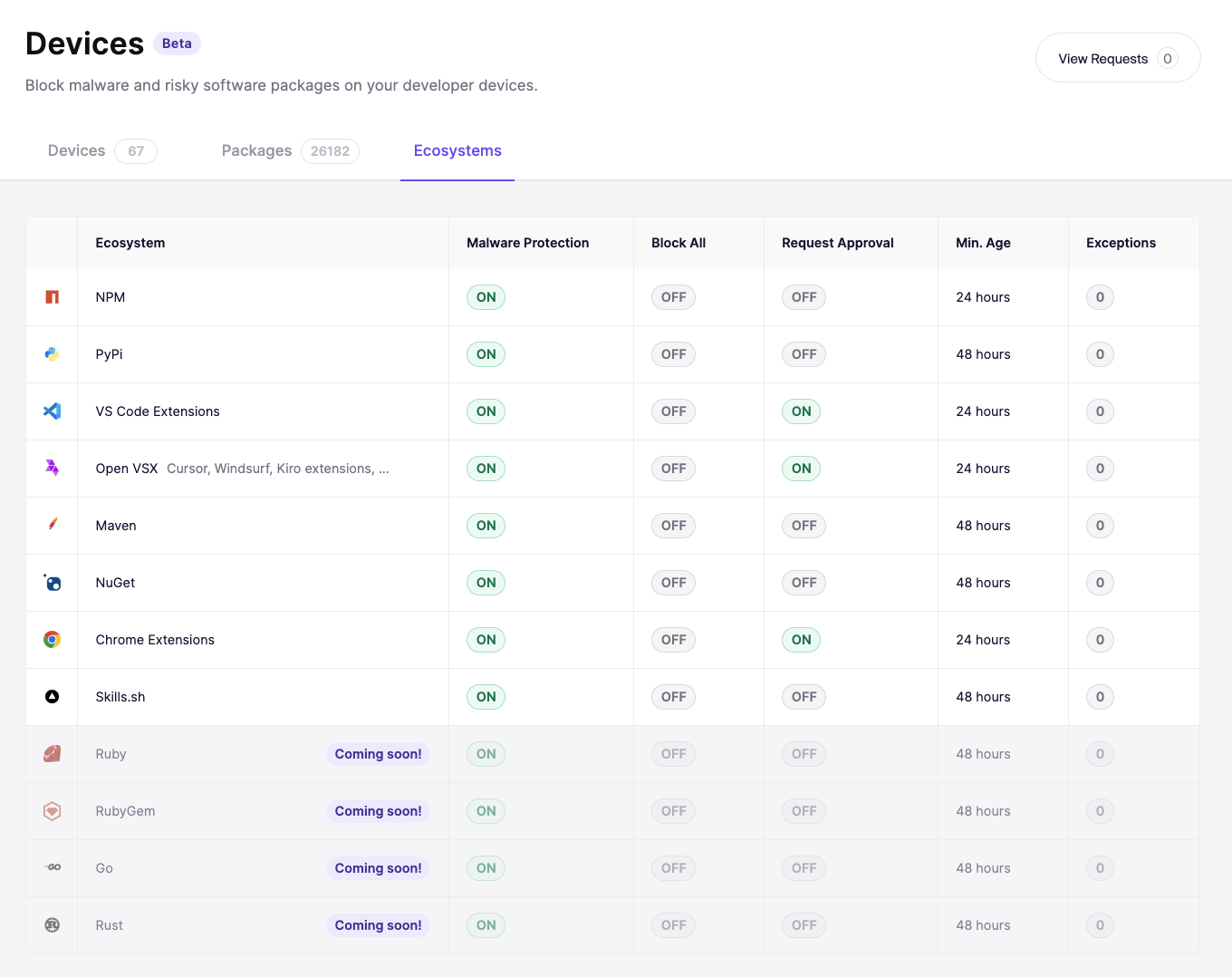
各エコシステムごとにインストールポリシーを個別に設定できます。これにより、チームの誰かが新しいパッケージをインストールしようとしたときの動作を制御できます。

## ポリシー設定へのアクセス

移動先 [Device Protection を開き、設定タブを開きます](https://app.aikido.dev/endpoint-protection/settings)。サポートされているすべてのエコシステムの一覧と、それぞれの現在のポリシー状態が表示されます。設定を構成するエコシステムをクリックします。

<figure><img src="/files/4da8ab41f1a89fefdc9ceb9bdaa23f61715ead96" alt=""><figcaption></figcaption></figure>

## Aikido がパッケージをブロックするか許可するかを判断する仕組み

パッケージがインストールされると、Aikido はルールのセットに順番に照合します。最初に一致したルールが結果を決定します。

<table data-full-width="true"><thead><tr><th width="102">優先度</th><th>ルール</th><th>結果</th></tr></thead><tbody><tr><td>1</td><td>パッケージは次のように識別されます <strong>malware</strong></td><td>常に <mark style="color:$danger;">ブロックされます</mark>。例外はありません。</td></tr><tr><td>2</td><td>あなたのグループには、次の例外があります <strong>ブロックする</strong> このパッケージ</td><td><mark style="color:$danger;">ブロック</mark></td></tr><tr><td>3</td><td>あなたのグループには、次の例外があります <strong>許可する</strong> このパッケージ、または管理者が以前に承認したもの</td><td><mark style="color:$success;">許可済み</mark></td></tr><tr><td>4</td><td><strong>すべてのインストールをブロック</strong> このエコシステムで有効になっています</td><td><mark style="color:$danger;">ブロック</mark></td></tr><tr><td>5</td><td><strong>リクエストを強制</strong> が有効で、パッケージはまだ要求されていません（または以前に拒否されています）</td><td>保留中 <mark style="color:オレンジ;">承認</mark>。リクエストはInboxに送信されます。</td></tr><tr><td>6</td><td>一致するルールはありません</td><td><mark style="color:$success;">許可済み</mark></td></tr></tbody></table>

{% hint style="info" %}
グループの例外は常にデフォルト設定より優先されます。インストールがブロックされた、または許可された理由が不明な場合は、まずグループの例外を確認してください。
{% endhint %}

## 利用可能なコントロール

{% hint style="warning" %}
変更がすべてのデバイスに同期されるまで最大10分かかる場合があります
{% endhint %}

<figure><img src="/files/d862dad9a2c560c67049622c24df47a37409f43f" alt=""><figcaption></figcaption></figure>

### すべてのインストールをブロック

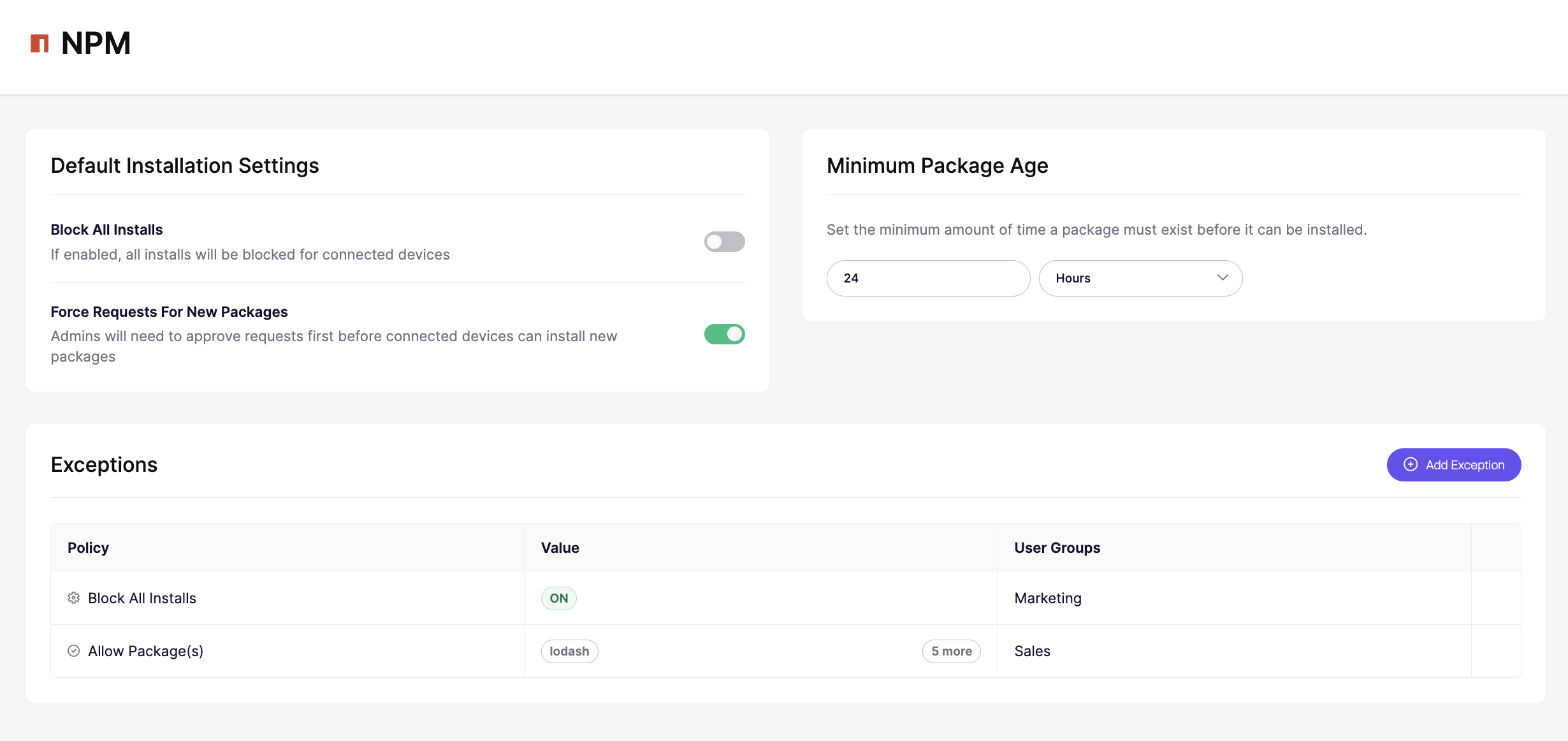
有効にすると、そのエコシステムからのすべてのインストールが接続済みデバイスでブロックされます。これをオフにするか例外を作成するまで、新しいパッケージをインストールできません。

組織向けにエコシステムを完全にロックダウンしたい場合に使用します。

### 新規パッケージのリクエストを強制

有効にすると、チームメンバーは自分で新しいパッケージをインストールできなくなります。代わりに、インストールの試行は **Inbox** 管理者の承認のために送信されます。その後、管理者が承認または拒否できます。

インストールを完全にブロックせずに監視したい場合に適した中間策です。

{% hint style="info" %}
**Skills は例外です。** すべてのインストールをブロックする設定とリクエスト強制は Skills には適用されません。Skills は Aikido が分離できる専用レジストリではなく GitHub 上でホストされているため、GitHub のすべてのトラフィックをブロックまたは強制リクエストしない限り、Skills のインストールをブロックしたり保留にしたりする方法はありません。
{% endhint %}

### 最低パッケージ年齢

インストール可能になる前に、パッケージが公開されてからどれくらい経過している必要があるかを設定します。たとえば 24 時間に設定すると、公開されてから 24 時間未満のパッケージはすべてブロックされます。

これはサプライチェーン攻撃からの保護に役立ちます。攻撃者が悪意のあるコードを公開レジストリに公開し、コミュニティがそれを問題として報告する前に人々にインストールさせようとする攻撃です。

## 例外

例外を使うと、特定のパッケージやユーザーグループに対してデフォルトのポリシーを上書きできます。デフォルトのポリシーが厳格でも、特定のチームに特定のツールへのアクセスが必要な場合に便利です。

#### 例外を追加する

1. 移動先 **デバイス保護** そして、次を開きます **設定** タブ。
2. 構成したいエコシステムをクリックします。
3. 次の項目までスクロールします **例外** セクションで指定できます。
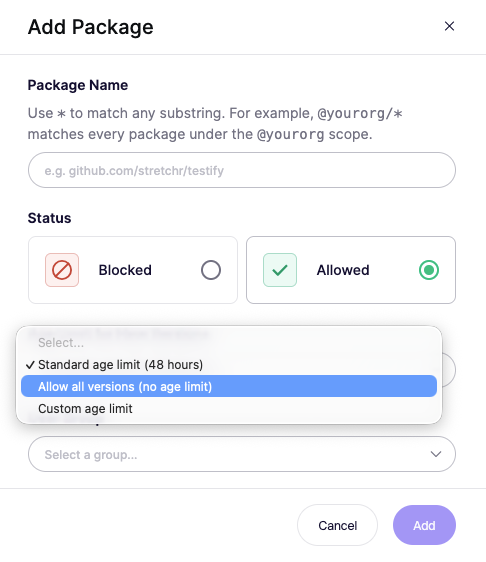
4. クリック **例外を追加**.

<figure><img src="/files/8ec788a234fdd73ad7ca026f1a03acf53ae75960" alt="" width="375"><figcaption></figcaption></figure>

{% hint style="warning" %}
パッケージ識別子はエコシステムによって異なります。 [例外を追加する前に、正しい識別子を必ず再確認してください](/docs/docs-ja/aikido-device-protection/miscellaneous-aikido-endpoint/package-identifiers.md).
{% endhint %}

### ユースケース

* **最小パッケージ経過時間の削除**: 新しい例外を追加し、最小パッケージ経過時間を「最小値なし」に設定します


---

# Agent Instructions
This documentation is published with GitBook. GitBook is the documentation platform designed so that both humans and AI agents can read, navigate, and reason over technical content effectively. Learn more at gitbook.com.

## Querying This Documentation
If you need additional information that is not directly available in this page, you can query the documentation dynamically by asking a question.

Perform an HTTP GET request on the current page URL with the `ask` query parameter, and the optional `goal` query parameter:

```
GET https://help.aikido.dev/docs/docs-ja/aikido-device-protection/using-aikido-endpoint/configuring-installation-policies.md?ask=<question>&goal=<endgoal>
```

`ask` is the immediate question: it should be specific, self-contained, and written in natural language.
`goal` is optional and describes the broader end goal you are ultimately trying to accomplish on behalf of the user. GitBook uses it to tailor the answer towards what is most useful for that goal.

The response will contain a direct answer to the question and relevant excerpts and sources from the documentation.

Use this mechanism when the answer is not explicitly present in the current page, you need clarification or additional context, or you want to retrieve related documentation sections.