> For the complete documentation index, see [llms.txt](https://help.aikido.dev/llms.txt). Markdown versions of documentation pages are available by appending `.md` to page URLs; this page is available as [Markdown](https://help.aikido.dev/docs/docs-ja/autofix-to/scope/autofix-for-open-source-dependencies.md).
# オープンソース依存関係向け AutoFix
{% hint style="info" %}
Aikido Local Scan のアカウントは、UI 内で AutoFix にアクセスできません。ローカルで AutoFix を使用したい場合は、IDE プラグインの使用をおすすめします。
{% endhint %}
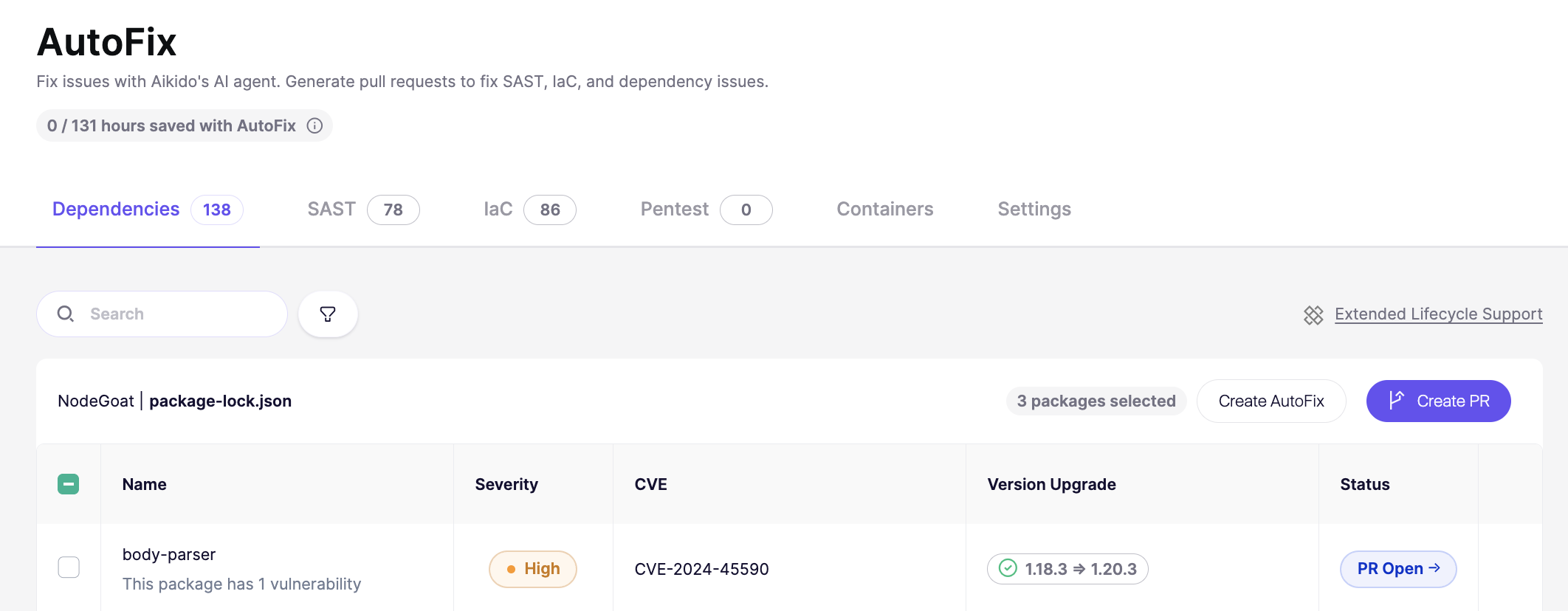
Aikido AutoFix は、影響を受けるパッケージをアップグレードすることで、オープンソースの依存関係にある脆弱性を修正するプルリクエストを作成します。アップグレードは常に、問題を解決するために必要な最小バージョンを対象にします。マイナー版とパッチ版の更新はメジャー版より優先され、破壊的変更を最小限に抑えます。AutoFix は repo と lockfile ごとに修正をまとめるため、各 PR は焦点が定まり、マージしやすい状態に保たれます。場合によっては、1回のアップグレードで単一の脆弱性だけでなく、脆弱性のクラス全体が解消されることがあります。
メジャーバージョンへのアップグレードが提案される場合、脆弱性を解消できるマイナー版またはパッチ版は存在しません。
### AutoFix のオプション
AutoFix では脆弱性を次の2つの方法で修正できます:
* **直接依存関係を更新** 脆弱性を導入した最上位の依存関係を特定してアップグレードします。パッケージマネージャーが、脆弱なサブ依存関係の正しいバージョンを自動的に解決します。これは既定かつ推奨の戦略で、JavaScript、.NET、Java、Kotlin、Python に対応しています。
* **依存関係を更新** 脆弱なサブ依存関係を特定の修正版バージョンに固定します。これは、最上位の依存関係をまだアップグレードできない場合、たとえばメジャーバージョンの更新が破壊的変更になる場合に有用です。
{% hint style="info" %}
3つ目の選択肢は、 **Aikido Libraries** そのまま置き換えられる代替実装です。 [詳細はこちら](/docs/docs-ja/autofix-to/aikido-libraries-overview.md).
{% endhint %}
〜を使用する場合、 **依存関係を更新** 複数の脆弱性を一度に修正するには、 **利用可能な修正すべて** ドロップダウンで、含めるパッケージを選択できます:
1. **利用可能な修正すべて:** メジャーバージョンへの更新も含め、すべて修正します
2. **マイナー版とパッチ版のみ:** メジャーバージョンの更新が必要な修正はすべてスキップします
3. **重大な問題のみ:** Aikido の優先度が Critical の問題のみ修正します
その後、PR 作成の進行状況を示すプログレスウィンドウ(右下)が表示されます。PR の準備ができると更新が届きます。

### AutoFix の設定と最初の PR 作成の例動画
[動画](https://ucarecdn.com/4d1a26c8-3ccf-4762-818c-e3430058f9a9/)
---
# Agent Instructions
This documentation is published with GitBook. GitBook is the documentation platform designed so that both humans and AI agents can read, navigate, and reason over technical content effectively. Learn more at gitbook.com.
## Querying This Documentation
If you need additional information that is not directly available in this page, you can query the documentation dynamically by asking a question.
Perform an HTTP GET request on the current page URL with the `ask` query parameter, and the optional `goal` query parameter:
```
GET https://help.aikido.dev/docs/docs-ja/autofix-to/scope/autofix-for-open-source-dependencies.md?ask=&goal=
```
`ask` is the immediate question: it should be specific, self-contained, and written in natural language.
`goal` is optional and describes the broader end goal you are ultimately trying to accomplish on behalf of the user. GitBook uses it to tailor the answer towards what is most useful for that goal.
The response will contain a direct answer to the question and relevant excerpts and sources from the documentation.
Use this mechanism when the answer is not explicitly present in the current page, you need clarification or additional context, or you want to retrieve related documentation sections.