> For the complete documentation index, see [llms.txt](https://help.aikido.dev/llms.txt). Markdown versions of documentation pages are available by appending `.md` to page URLs; this page is available as [Markdown](https://help.aikido.dev/docs/docs-ja/dast-biao-mian-jian-shi/api-scanning/authenticated-api-scanning-for-rest-graphql.md).
# REST/GraphQL向け認証済みAPIスキャン
このガイドでは、Aikidoで認証済みドメインのスキャンを設定する手順を順を追って説明し、徹底的かつ安全な評価を確実に行えるようにします。
> APIスキャンはProプランとAdvancedプランでのみ利用できます
## ユースケース
* Webサイトの保護された領域に対して、包括的なセキュリティ評価を確実に行えます。
* 認証されたAPIセクション内の脆弱性を特定します。
## ドメインで認証を設定する
**ステップ 1:** へ移動 [**ドメイン概要**](https://app.aikido.dev/settings/domains) そして、三点リーダーをクリックして任意のREST/GraphQL APIドメインのアクションメニューを開きます。次を選択してください **ドメインを認証。**

**ステップ 2:** 認証に使用するお好みのオプションを選択してください。

> すべての種類のスキャン用認証情報は、PKCS1暗号化を使用して安全に保存されます
## 認証オプション
**フォーム経由でログイン**
ドメイン認証用のURLとメールアドレス/パスワードを入力してください。クリック **テスト** Aikido に、それらの認証情報でドメインにアクセスできるか確認させます。
2要素認証が有効な場合は、ワンタイムパスワードの情報も入力できます。詳細は [OTP URL とその仕組みについて詳しくは、ドキュメントを参照してください](/docs/docs-ja/dast-biao-mian-jian-shi/miscellaneous/using-2fa-in-front-end-and-api-scans.md).
{% hint style="success" %}
* Microsoft / Google SSO は現在 **ありません** サポートされています。回避策として、手動で認証し、カスタムヘッダー経由で Cookie ヘッダーを使用して有効なセッションを渡すことができます。
* 該当ケースがサポートされていませんか?チャットでお知らせください。調査します!
{% endhint %}

Aikido は以下のルールに従ってフォーム送信を試みます:
1. 次を持つ表示中のボタンまたは入力フィールドを探します: `type=submit` Google や Facebook などの一般的な OAuth オプションは無視します
2. ラベルまたはテキストに基づいてボタンを探します。login、log in、submit、sign in などに等しい、またはそれに近いテキストを検索します。複数の言語で行います。
3. HTML ID のセットに基づいてボタンを探します。たとえば `id=form-submit`
4. ページ上で最初に表示されているボタンを探します
**カスタムヘッダー**
エンドポイントが、作成後に変更されるべきでない固定キー、Cookie、またはトークンを受け付ける場合、このオプションを使ってカスタムヘッダーとして追加できます。
使用例:
* Cookieの場合は次の `Cookie` ヘッダーを設定します。
```
Cookie: sessionId=38afes7a8
```
* JWT Bearerトークンの場合は次の `認可` ヘッダー
```
Authorization: Bearer
```
**OAuth クライアント認証情報**
このオプションは、MFA を回避したい場合に使用できます。Aikido は、Client Credentials フローの OAuth 仕様に従う、指定されたログイン URL にリクエストを送信します。つまり、設定されたログイン URL に対して POST リクエストを送信し、 `grant_type` が `client_credentials` さらに、client\_id と client\_secret をそれぞれユーザー名とパスワードとして含む Basic 認証ヘッダーを付与します。
**OAuthパスワード・グラント**
APIがOAuthパスワード・グラントフローを使用した直接のユーザー資格情報(ユーザー名とパスワード)を必要とする場合は、このオプションを選択してください。Aikidoは、あなたのログインURLに次の内容を含めてPOSTリクエストを送信します `grant_type` が `パスワード`、これには、あなたが提供するユーザー名とパスワードが含まれます。APIによっては、クライアントIDとシークレットも必要になる場合があります。
**ベーシック認証**
このオプションを、API が標準のベーシック認証を使用している場合に選択してください。ユーザー名とパスワードを入力すると、Aikido が必要な `Authorization: Basic ...` ヘッダーを API への各リクエストに含めます。
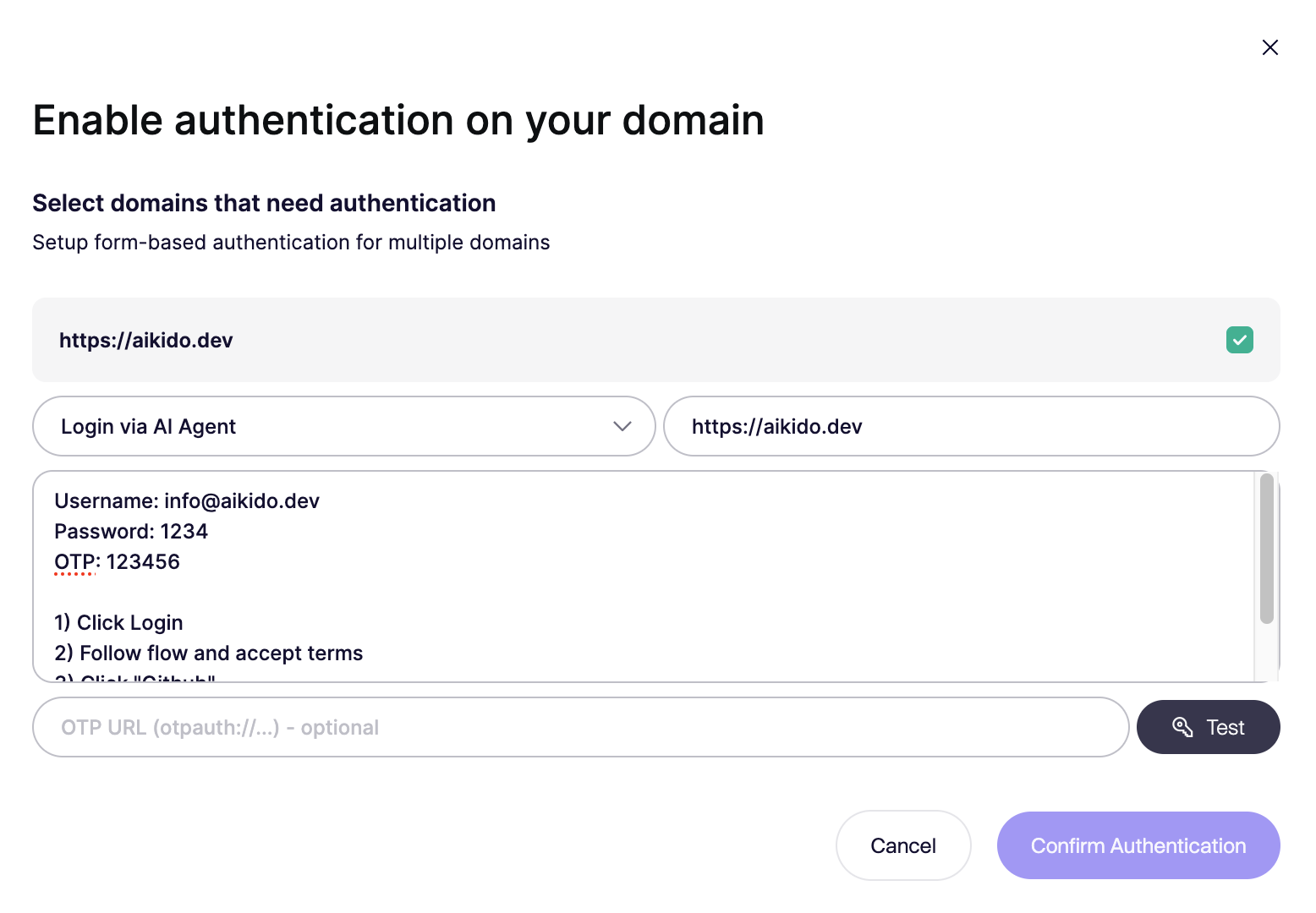
**AIエージェント経由でログイン(ベータ)**
AIエージェントはLLMを使用して実際のブラウザセッションを制御します。人間と同じように、あなたが提供する指示に従って認証プロセスを完了します。これは次のような場合に適しています:
* フォームベースのログイン
* 固定OTPまたはワンタイムコード
* 多段階認証フロー
* 独自の、または標準的ではないログイン画面
認証情報や必要な操作を含め、明確な手順を一つずつ指示してください。エージェントは、詳細な設定がなくてもリダイレクト、動的ページ、中間ステップを処理できます。ほとんどの場合、短くシンプルな指示で十分です。
---
# Agent Instructions
This documentation is published with GitBook. GitBook is the documentation platform designed so that both humans and AI agents can read, navigate, and reason over technical content effectively. Learn more at gitbook.com.
## Querying This Documentation
If you need additional information that is not directly available in this page, you can query the documentation by asking a question.
Perform an HTTP GET request on the following URL with the `ask` and `goal` query parameters:
```
GET https://help.aikido.dev/docs/docs-ja/dast-biao-mian-jian-shi/api-scanning/authenticated-api-scanning-for-rest-graphql.md?ask=&goal=
```
`ask` is the immediate question: it should be specific, self-contained, and written in natural language.
`goal` is what the user is ultimately trying to achieve, the reason they need the answer. Sharing it helps GitBook give you a better, more relevant answer. A goal is most helpful when it describes the outcome the user wants rather than restating the question. For example, with `ask=how do I create an API token`, a goal like `automate deployments from our CI pipeline` lets GitBook tailor the answer to that use case.
The response will contain a direct answer to the question and relevant excerpts and sources from the documentation.
Use this mechanism when the answer is not explicitly present in the current page, you need clarification or additional context, or you want to retrieve related documentation sections.