> For the complete documentation index, see [llms.txt](https://help.aikido.dev/llms.txt). Markdown versions of documentation pages are available by appending `.md` to page URLs; this page is available as [Markdown](https://help.aikido.dev/docs/docs-ja/dast-sfesu/api-scanning/add-additional-headers-in-api-scanning.md).
# API スキャンに追加ヘッダーを追加する
Aikido が API スキャン中のすべてのリクエストに含めるカスタムヘッダーを追加します。これは、認証トークン、テナント ID、またはサービスがトラフィックを受け入れる前に必要とする任意のヘッダーに便利です。
Aikido は、定義した各ヘッダーをすべてのスキャンリクエストに含めて送信します。スキャナーは不足しているヘッダーを自動で検出しようとしないため、API に必要なものをすべて含めてください。弊社のものとは異なり、 [認証](/docs/docs-ja/dast-sfesu/api-scanning/authenticated-api-scanning-for-rest-graphql.md) これらのヘッダーはスキャン中に含まれます。
### 一般的なユースケース
* ステージングまたはテスト環境向けの静的認証トークン
* X API キーヘッダー
* バージョンまたはテナントの選択子
* API の前にあるゲートウェイまたは WAF を回避するために必要なヘッダー
## ヘッダーを追加
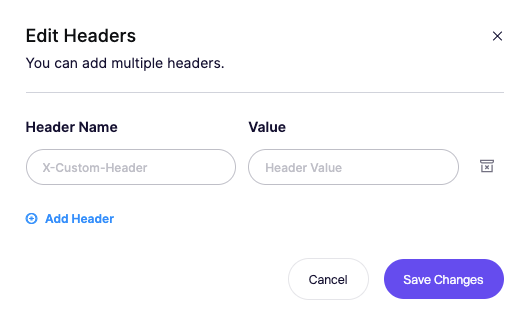
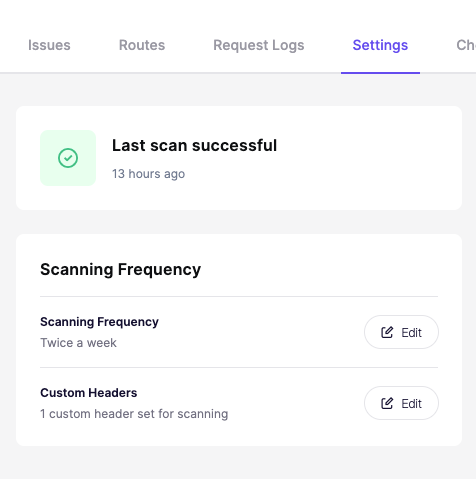
1. API 設定ページで[ヘッダーを編集]をクリックします。
1. ヘッダー名を入力します。
2. その値を入力します。
3. 必要に応じてヘッダーをさらに追加します。
4. 変更を保存します。
---
# Agent Instructions
This documentation is published with GitBook. GitBook is the documentation platform designed so that both humans and AI agents can read, navigate, and reason over technical content effectively. Learn more at gitbook.com.
## Querying This Documentation
If you need additional information that is not directly available in this page, you can query the documentation dynamically by asking a question.
Perform an HTTP GET request on the current page URL with the `ask` query parameter, and the optional `goal` query parameter:
```
GET https://help.aikido.dev/docs/docs-ja/dast-sfesu/api-scanning/add-additional-headers-in-api-scanning.md?ask=&goal=
```
`ask` is the immediate question: it should be specific, self-contained, and written in natural language.
`goal` is optional and describes the broader end goal you are ultimately trying to accomplish on behalf of the user. GitBook uses it to tailor the answer towards what is most useful for that goal.
The response will contain a direct answer to the question and relevant excerpts and sources from the documentation.
Use this mechanism when the answer is not explicitly present in the current page, you need clarification or additional context, or you want to retrieve related documentation sections.