> For the complete documentation index, see [llms.txt](https://help.aikido.dev/llms.txt). Markdown versions of documentation pages are available by appending `.md` to page URLs; this page is available as [Markdown](https://help.aikido.dev/docs/docs-ja/dast-sfesu/api-scanning/ignoring-routes-in-api-scanning.md).
# APIスキャンでルートを無視する
当社のAPIスキャンソリューションは、潜在的なセキュリティ脆弱性を特定することで、エンドポイントの保護を支援します。ただし、特定のルートをスキャン対象から除外する必要がある場合もあります。このドキュメントでは、スキャン処理でルートを無視するタイミングと方法を説明します。
### ルートを無視する方法
ルートのスキャン対象からの除外は簡単です:
* 変更したいドメインのルートページに移動します
* 除外したい特定のルートを見つけます
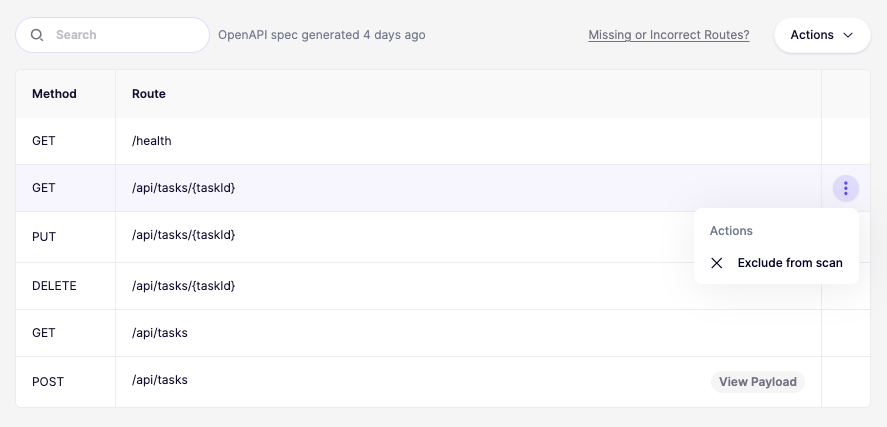
* ルートにカーソルを合わせると、右側にアクションメニューが表示されます
* アクションメニューをクリックし、「スキャンから除外」を選択します
一度無視すると、再度有効にするまで、そのルートは今後のセキュリティスキャンの対象から除外されます。
{% hint style="warning" %}
ルートを無視することが必要な場合もありますが、除外した各エンドポイントは潜在的なセキュリティ上の抜け穴を意味することを忘れないでください。明確な理由がある場合にのみルートを無視し、無視したルートの一覧は定期的に確認してください。
{% endhint %}
### ユースケース
APIスキャンから特定のルートを除外する正当な理由はいくつかあります:
1. **テスト用または開発用のルート**:開発時のみ使用され、本番環境では公開されないエンドポイント。
2. **大量トラフィックを扱うエンドポイント**:スキャンがパフォーマンスに影響を与える可能性がある、大量のトラフィックを処理できないルート。
3. **誤検知**:独自の機能により、一貫して誤ったセキュリティアラートを引き起こすルート。
4. **社内ツール**:異なるセキュリティモデルを使用する管理用またはデバッグ用のエンドポイント。
5. **サードパーティ連携**:独自のセキュリティ対策を持つ外部システムと連携するルート。
---
# Agent Instructions
This documentation is published with GitBook. GitBook is the documentation platform designed so that both humans and AI agents can read, navigate, and reason over technical content effectively. Learn more at gitbook.com.
## Querying This Documentation
If you need additional information that is not directly available in this page, you can query the documentation dynamically by asking a question.
Perform an HTTP GET request on the current page URL with the `ask` query parameter, and the optional `goal` query parameter:
```
GET https://help.aikido.dev/docs/docs-ja/dast-sfesu/api-scanning/ignoring-routes-in-api-scanning.md?ask=&goal=
```
`ask` is the immediate question: it should be specific, self-contained, and written in natural language.
`goal` is optional and describes the broader end goal you are ultimately trying to accomplish on behalf of the user. GitBook uses it to tailor the answer towards what is most useful for that goal.
The response will contain a direct answer to the question and relevant excerpts and sources from the documentation.
Use this mechanism when the answer is not explicitly present in the current page, you need clarification or additional context, or you want to retrieve related documentation sections.