> For the complete documentation index, see [llms.txt](https://help.aikido.dev/llms.txt). Markdown versions of documentation pages are available by appending `.md` to page URLs; this page is available as [Markdown](https://help.aikido.dev/docs/docs-ja/hajimeni/automated-user-management/setting-roles-and-permissions.md).
# ロールと権限の設定
## 役割と権限のロジック
Aikidoでは、3種類の異なるユーザー役割(**管理者**, **デフォルト** と **チームのみ** ユーザー)を用意しており、アクセスと権限を効果的に管理できます。デフォルトユーザーとチームのみユーザーは **標準の編集権限** を持つか、 **読み取り専用**.
| 役割 | アクセスレベル |
| ------------- | --------------------------------------- |
| **管理者** | フルアクセス |
| **デフォルトユーザー** | グローバル / 全チーム
標準権限または読み取り専用
|
| **チームのみユーザー** | チーム固有
標準権限または読み取り専用
|
### デフォルトユーザー vs チームのみユーザー
両者の主な違いは、チームのみユーザーは所属するチームに属する課題にのみアクセスできることです。それでも、ほとんどの課題管理は可能です。
| 権限 | デフォルトユーザー | チームのみユーザー |
| -------------------------------------------------------- | --------- | ---------------------------- |
| 課題アクション
スヌーズ、無視、重大度変更、自動修正
| ✅ | ✅ |
| **タスクを作成** | ✅ | ✅ |
| **リポジトリを追加** | ✅ | ❌ |
| **コンテナレジストリを追加** | ✅ | ❌ |
| **ドメインを追加** | ✅ | リポジトリにのみ接続。単独では不可。 |
| **課題をエクスポート** | ✅ | ❌ |
| **ペンテスト課題** | ✅ | ✅ すべてのリンク済みリポジトリが所属チーム内にある場合 |
| **AIコード解析課題** | ✅ | ✅ すべてのリンク済みリポジトリが所属チーム内にある場合 |
| **コード品質** | ✅ | ❌ |
| **Zen Firewall** | ✅ | ❌ |
| **設定へのアクセス** | すべての設定 | 一般設定 **Only** |
| **レポートへのアクセス** | すべてのレポート | 時系列トレンド、ライセンスとSBOM、マルウェアモニター |
### 標準権限ユーザー向けの高度な権限
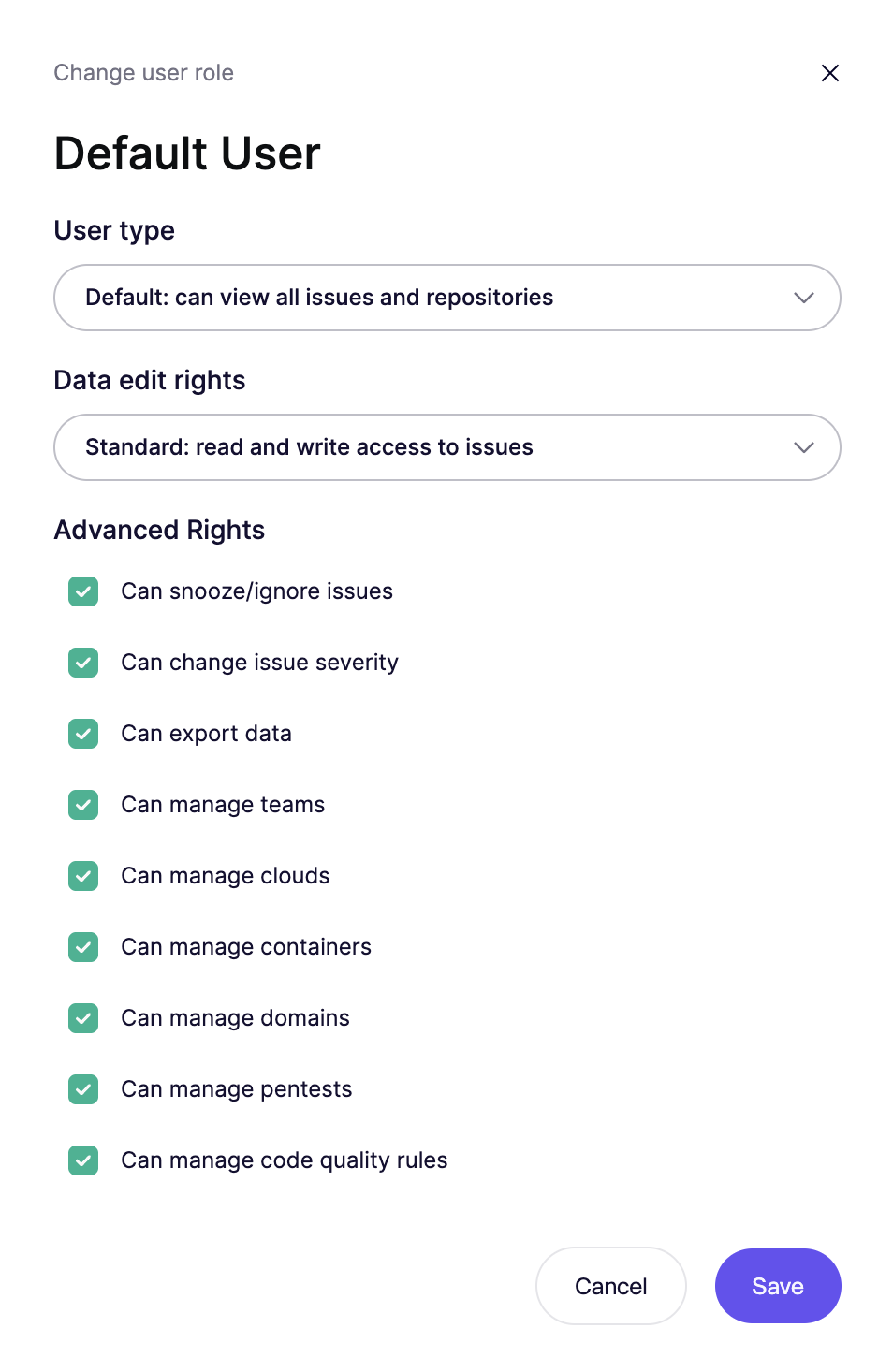
Aikidoには、有効化または無効化できる追加の権限レイヤーがあります(デフォルトユーザーとチームのみユーザーの両方に適用)。これは、ユーザーに特定の操作を実行させたい場合に便利です。 **読み取り専用権限は、可能なすべての操作をブロックします。**
**デフォルトおよびチームのみ向けに設定可能**
* **課題を無視可能**:検出結果を恒久的に無視する機能。実行時 [無視リクエストが有効な場合](/docs/docs-ja/hajimeni/core-functionalities/approval-inbox-for-ignored-issues.md#enabling-ignore-requests)、この権限を持たないユーザーは、個別の課題を無視するよう [承認受信箱](/docs/docs-ja/hajimeni/core-functionalities/approval-inbox-for-ignored-issues.md).
* **課題をスヌーズ可能**:検出結果を一時的にスヌーズする機能。無視リクエストが有効な場合、この権限を持たないユーザーは同じ受信箱から個別の課題のスヌーズを依頼できます。
* **課題の重大度を変更**:課題の重大度レベルを変更する機能。
* **データをエクスポートできます:** 脆弱性課題のCSVレポートをエクスポートする機能。
* **リポジトリを管理できます:** ブランチの変更、マルチブランチスキャンの設定、カスタムSASTルールの管理が可能。
**デフォルトユーザーに限定**
* **チームを管理**:チーム設定とメンバーシップを管理する機能。
* **クラウドを管理:** クラウドの追加と設定が可能
* **コンテナを管理:** コンテナの追加と設定が可能
* **ドメインを管理:** ドメインの追加と設定が可能
* **ペンテストとAIコード解析を管理:** ペンテストの作成、実行、設定が可能。
* **コード品質を管理:** コード品質の実行と設定が可能
* **デバイス保護を管理:** デバイスの追加とルールの設定が可能
## 役割と権限の変更方法
**手順 1.** 設定のユーザー概要に移動します
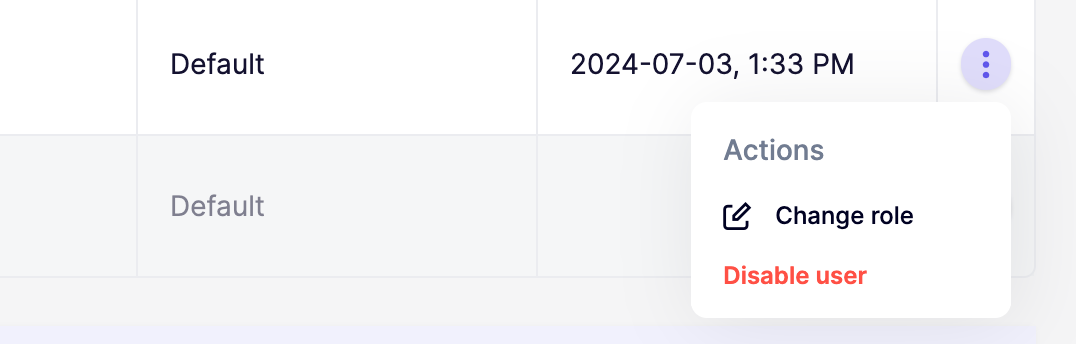
**手順 2.** 三点メニューをクリックして、特定ユーザーの役割と権限のモーダルを開きます
**手順 3.** 希望するユーザー役割と権限を設定します
## FAQ
なぜ「より上位の管理者の役割は変更できません」というエラーが表示されるのですか?
* これは、変更しようとしている管理者があなたより前にAikidoワークスペースへ参加しており、より高い権限レベルを持っていることを意味します。役割を変更するには、アプリ内チャットからAikidoサポートに連絡して、管理者権限の昇格を依頼してください。
---
# Agent Instructions
This documentation is published with GitBook. GitBook is the documentation platform designed so that both humans and AI agents can read, navigate, and reason over technical content effectively. Learn more at gitbook.com.
## Querying This Documentation
If you need additional information that is not directly available in this page, you can query the documentation by asking a question.
Perform an HTTP GET request on the following URL with the `ask` and `goal` query parameters:
```
GET https://help.aikido.dev/docs/docs-ja/hajimeni/automated-user-management/setting-roles-and-permissions.md?ask=&goal=
```
`ask` is the immediate question: it should be specific, self-contained, and written in natural language.
`goal` is what the user is ultimately trying to achieve, the reason they need the answer. Sharing it helps GitBook give you a better, more relevant answer. A goal is most helpful when it describes the outcome the user wants rather than restating the question. For example, with `ask=how do I create an API token`, a goal like `automate deployments from our CI pipeline` lets GitBook tailor the answer to that use case.
The response will contain a direct answer to the question and relevant excerpts and sources from the documentation.
Use this mechanism when the answer is not explicitly present in the current page, you need clarification or additional context, or you want to retrieve related documentation sections.