> For the complete documentation index, see [llms.txt](https://help.aikido.dev/llms.txt). Markdown versions of documentation pages are available by appending `.md` to page URLs; this page is available as [Markdown](https://help.aikido.dev/docs/docs-ja/hajimeni/core-functionalities/approval-inbox-for-ignored-issues.md).
# 無視した問題の承認受信箱
Request Inboxでは、ignoreまたはsnooze権限のないユーザーが指摘を却下する前に、承認を必須にできます。チームメンバーは理由を添えてリクエストを送信し、レビュー担当者が中央の受信箱で承認または却下してから、フィードから削除されます。
## ユースケース
* 🛡️ **リスク受容に対するガバナンス**: どの指摘を無視するかをセキュリティ責任者が管理できるようにします。
* 👥 **開発者に権限を与える**: エンジニアが誤検知をトリアージできるようにし、完全な無視権限を与える必要はありません。
* 📋 **監査証跡**: 各リクエストには、誰が依頼したか、理由、承認または却下した人が記録されます。
## 無視リクエストを有効にする
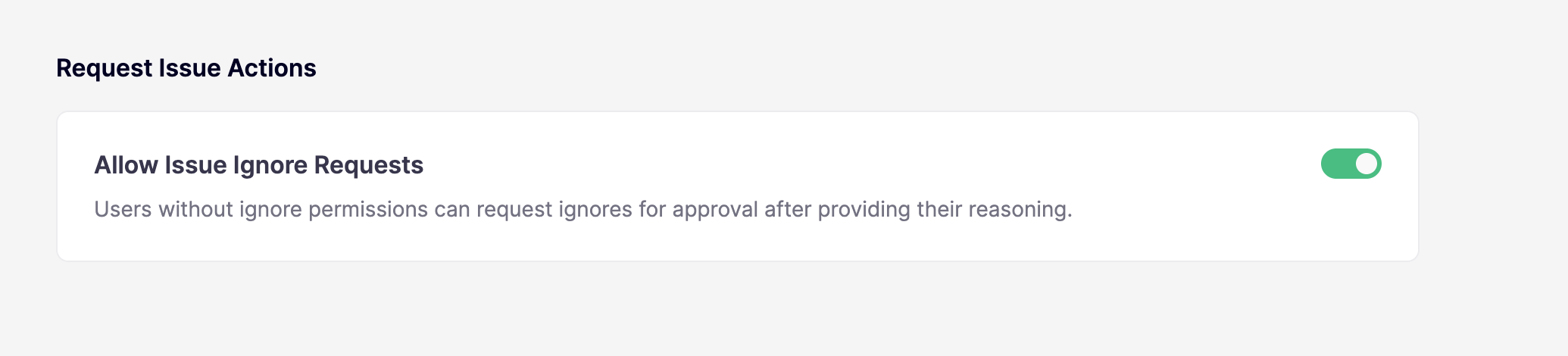
無視リクエストは **デフォルトでは有効になっていません**。ワークスペース管理者のみが、 [トリアージ設定](https://app.aikido.dev/settings/advanced)から有効にできます。同じ設定により、スヌーズ権限のないユーザーもスヌーズリクエストを送信できます。
## 仕組み
問題を直接無視またはスヌーズできるかは、 **無視** および **スヌーズ** 権限(参照 [ロールと権限の設定](/docs/docs-ja/hajimeni/automated-user-management/setting-roles-and-permissions.md))と、 **Issue無視リクエストを許可** がワークスペースで有効かどうかに依存します:
* **該当する権限がある場合**: すぐに無視またはスヌーズできます。
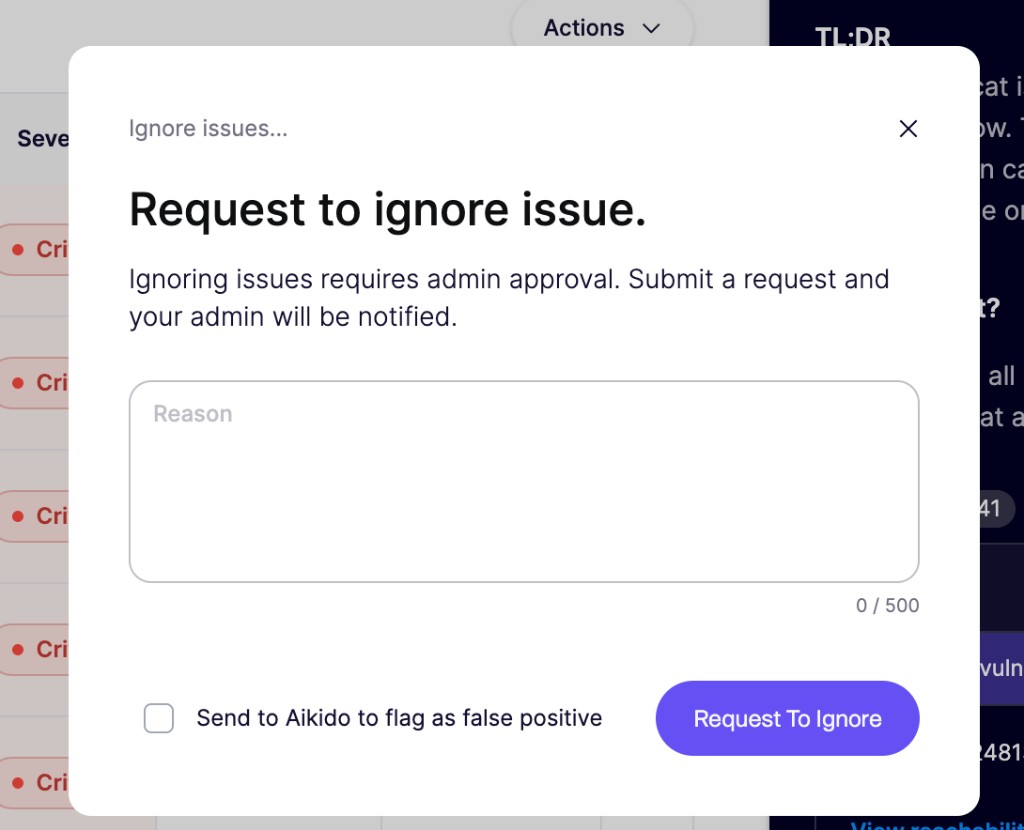
* **それがない場合で、無視リクエストが有効なとき**: 理由を添えてリクエストを送信します。その権限を持つ誰かが承認または却下するまで、問題はフィードに残ります。
* **それがない場合で、無視リクエストが無効なとき**: 指摘を無視またはスヌーズしたり、リクエストを送信したりできません。
同じ流れは、返信する場合にも適用されます `@AikidoSec ignore: [理由]` Aikidoの [PRまたはMRのコメント](/docs/docs-ja/prtorirsugtingu/aikido-ci-gating-functionality/autofix-suggestions-and-inline-commenting-for-pr-checks.md)。無視権限がない場合、そのリクエストは指摘をすぐに無視するのではなく、承認受信箱に届きます。
{% hint style="info" %}
無視リクエストは **個々のサブ問題のみに**適用されます。プルリクエスト内の指摘も含まれます。より広い無視ルール(パス、CVE、ルール別)は、引き続き無視権限が必要です。
{% endhint %}
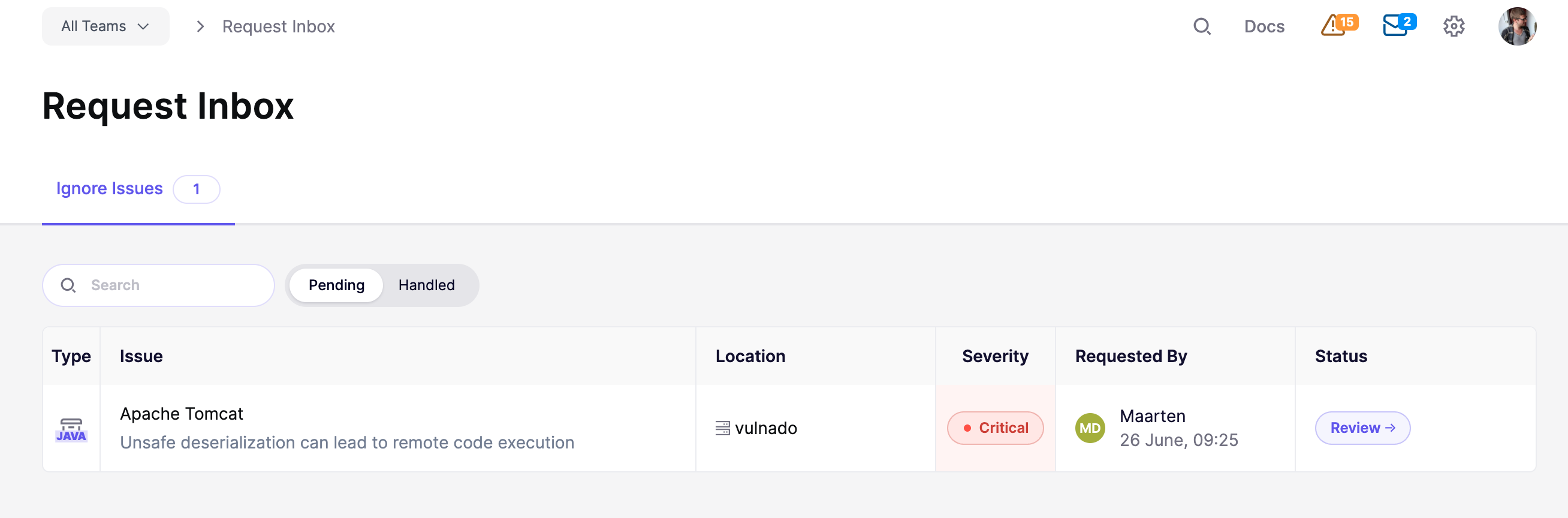
ユーザーがリクエストを送信すると、無視権限を持つユーザー(チーム限定ユーザーを除く)に通知され、 [Request Inbox](https://app.aikido.dev/inbox/issues/actions)で確認できます。受信箱には、問題の詳細、重大度、場所、依頼者、そしてその理由が表示されます。チーム限定ユーザーは、無視権限を持っていてもリクエストをレビューできません。
## 無視リクエストをレビューする
{% stepper %}
{% step %}
### 受信箱を開く
次へ移動します [Request Inbox](https://app.aikido.dev/inbox/issues/actions)、または **リクエスト** のトップナビゲーションのインジケーターにある保留中通知をクリックします。 **Issueを無視** タブがまだ選択されていない場合は開きます。このタブには、保留中のリクエスト数を示すバッジが表示されます。
{% endstep %}
{% step %}
### リクエストをレビューする
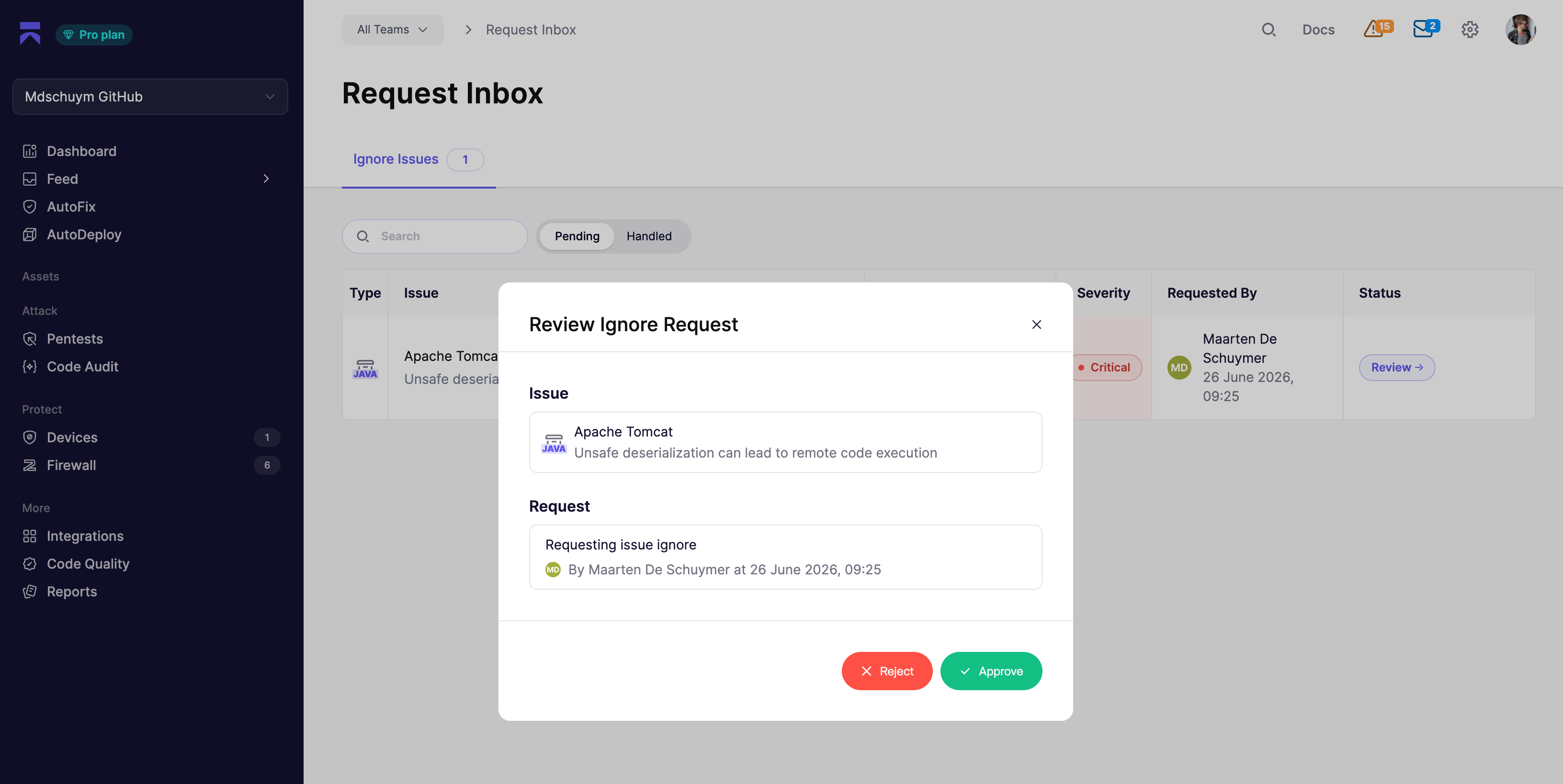
行、または **レビュー** ボタンをクリックします。レビュー用モーダルには、問題、依頼者の理由、そしてスヌーズのリクエストの場合はスヌーズ日が表示されます。
{% endstep %}
{% step %}
### 承認または却下
クリック **承認** を押すと、依頼者の理由に基づいて要求された無視またはスヌーズを適用します。 **却下** を押すと、リクエストを拒否して問題をそのまま残します。
{% endstep %}
{% endstepper %}
### 保留中と処理済み
その **Issueを無視** タブには2つの表示があります:
* **保留中**: 判断を待っているリクエストです。
* **処理済み**: すでに承認または却下されたリクエストで、誰がいつレビューしたかも含まれます。
検索バーを使って、問題タイトルまたは依頼者名で絞り込みます。Aikidoでチームフィルターが有効になっている場合、受信箱にはそのチームの問題に関するリクエストのみが表示されます。
### 判断後に起こること
**承認済み**: Aikidoは、依頼者の理由に基づいて要求された無視またはスヌーズを適用します。無視された指摘は [無視済みビュー](https://app.aikido.dev/issues/ignored) に移動し、メインフィードから消えます。
**却下済み**: 問題はフィード上でオープンのままか、スヌーズされたままになります。必要なら依頼者は新しいリクエストを送信できます。
## 通知
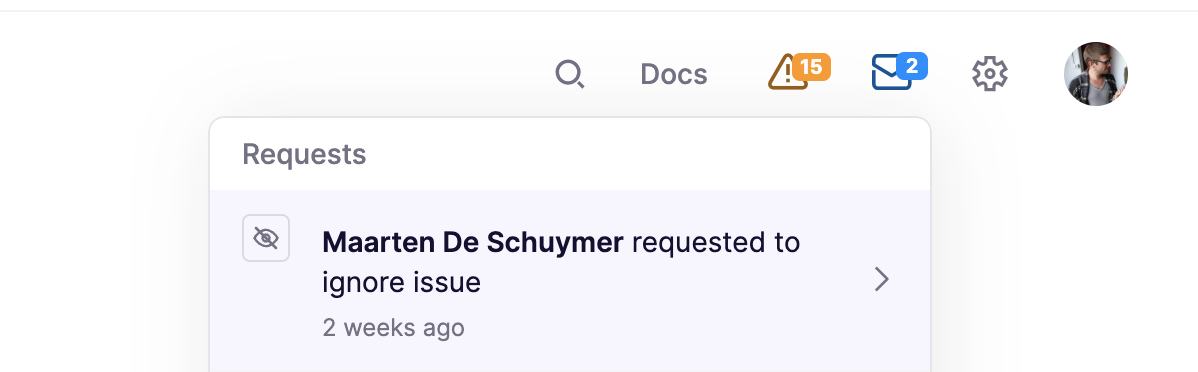
無視権限を持つユーザー(チーム限定ユーザーを除く)は、新しいリクエストを **リクエスト** トップナビゲーションのインジケーターで確認できます。各通知には、送信者と、無視またはスヌーズのどちらを求めたかが表示されます。通知をクリックするか、 **Request Inboxへ移動**すると受信箱が開きます。
### Slack通知
新しい無視またはスヌーズのリクエストが送信されると、Slackアラートも受け取れます。Aikidoは選択したチャンネルにメッセージを投稿し、 **Aikidoでレビュー** ボタンから直接Request Inboxへリンクします。
{% stepper %}
{% step %}
### Slackを接続
まだの場合は、 [Slack連携設定](https://app.aikido.dev/settings/integrations/notifications/slack)。参照: [Slack通知](/docs/docs-ja/hajimeni/chat-and-alerts/slack-notifications.md) からセットアップ手順を確認してください。
{% endstep %}
{% step %}
### Slackアラートを作成
次へ移動します [Request Inbox](https://app.aikido.dev/inbox/issues/actions)で、 **Issueを無視** タブを開き、 **アラートを管理** → **Slack**をクリックします。 **アラートを作成** をクリックし、リクエスト通知を受け取るチャンネルを選択します。
{% endstep %}
{% step %}
### アラートをテスト
保存後、 **テストアラートを送信** をアラート行で使い、メッセージが選択したチャンネルに届くことを確認します。
{% endstep %}
{% endstepper %}
---
# Agent Instructions
This documentation is published with GitBook. GitBook is the documentation platform designed so that both humans and AI agents can read, navigate, and reason over technical content effectively. Learn more at gitbook.com.
## Querying This Documentation
If you need additional information that is not directly available in this page, you can query the documentation dynamically by asking a question.
Perform an HTTP GET request on the current page URL with the `ask` query parameter, and the optional `goal` query parameter:
```
GET https://help.aikido.dev/docs/docs-ja/hajimeni/core-functionalities/approval-inbox-for-ignored-issues.md?ask=&goal=
```
`ask` is the immediate question: it should be specific, self-contained, and written in natural language.
`goal` is optional and describes the broader end goal you are ultimately trying to accomplish on behalf of the user. GitBook uses it to tailor the answer towards what is most useful for that goal.
The response will contain a direct answer to the question and relevant excerpts and sources from the documentation.
Use this mechanism when the answer is not explicitly present in the current page, you need clarification or additional context, or you want to retrieve related documentation sections.
 {% hint style="info" %}
無視リクエストは **個々のサブ問題のみに**適用されます。プルリクエスト内の指摘も含まれます。より広い無視ルール(パス、CVE、ルール別)は、引き続き無視権限が必要です。
{% endhint %}
ユーザーがリクエストを送信すると、無視権限を持つユーザー(チーム限定ユーザーを除く)に通知され、 [Request Inbox](https://app.aikido.dev/inbox/issues/actions)で確認できます。受信箱には、問題の詳細、重大度、場所、依頼者、そしてその理由が表示されます。チーム限定ユーザーは、無視権限を持っていてもリクエストをレビューできません。
## 無視リクエストをレビューする
{% stepper %}
{% step %}
### 受信箱を開く
次へ移動します [Request Inbox](https://app.aikido.dev/inbox/issues/actions)、または **リクエスト** のトップナビゲーションのインジケーターにある保留中通知をクリックします。 **Issueを無視** タブがまだ選択されていない場合は開きます。このタブには、保留中のリクエスト数を示すバッジが表示されます。
{% hint style="info" %}
無視リクエストは **個々のサブ問題のみに**適用されます。プルリクエスト内の指摘も含まれます。より広い無視ルール(パス、CVE、ルール別)は、引き続き無視権限が必要です。
{% endhint %}
ユーザーがリクエストを送信すると、無視権限を持つユーザー(チーム限定ユーザーを除く)に通知され、 [Request Inbox](https://app.aikido.dev/inbox/issues/actions)で確認できます。受信箱には、問題の詳細、重大度、場所、依頼者、そしてその理由が表示されます。チーム限定ユーザーは、無視権限を持っていてもリクエストをレビューできません。
## 無視リクエストをレビューする
{% stepper %}
{% step %}
### 受信箱を開く
次へ移動します [Request Inbox](https://app.aikido.dev/inbox/issues/actions)、または **リクエスト** のトップナビゲーションのインジケーターにある保留中通知をクリックします。 **Issueを無視** タブがまだ選択されていない場合は開きます。このタブには、保留中のリクエスト数を示すバッジが表示されます。