> For the complete documentation index, see [llms.txt](https://help.aikido.dev/llms.txt). Markdown versions of documentation pages are available by appending `.md` to page URLs; this page is available as [Markdown](https://help.aikido.dev/docs/docs-ja/hajimeni/manage-teams-and-applications/add-labels-to-resources.md).
# リソースにラベルを追加する
ラベルは、Aikido でリポジトリやコンテナーイメージに追加するカスタムメタデータです。さまざまなメタデータ属性でリソースをグループ化するために使用します。
例としては `支払い`, `本番`, `frontend`, `lambda` , `critical`, `PII` など
{% hint style="info" %}
ラベルはコンテナーの **スキャン対象タグ**とは同じではありません。スキャン対象タグは、Aikido がどのイメージバージョンをスキャンするかを制御します。ラベルはリソースの整理と課題の絞り込みにのみ役立ちます。
{% endhint %}
### リポジトリのラベルを管理する
1. 次を開きます: **リポジトリ** そしてリポジトリを選択します。
2. を開き、 **設定** タブを選択します。
3. 次の **ラベル** カードで、クリック **編集**.
各リポジトリには複数のラベルを付けられます。ラベルは自由形式のテキストです。
リポジトリを管理するには権限が必要です。チーム制限のあるユーザーは、アクセスできるリポジトリのラベルのみ編集できます。
#### GitHub からリポジトリのラベルをインポート
GitHub リポジトリでは、Aikido は GitHub のトピックをラベルとしてインポートできます。これらの同期済みラベルは Aikido では読み取り専用です。GitHub のトピックとは自動的に同期されます。手動ラベルをその横に追加することもできます。 **この機能を有効にするにはお問い合わせください。**
### コンテナーのラベルを管理する
1. 次を開きます: **コンテナ** そしてコンテナーイメージを選択します。
2. を開き、 **設定** タブを選択します。
コンテナーを管理するには権限が必要です。チーム制限のあるユーザーは、アクセスできるコンテナーのラベルのみ編集できます。
#### ワークロードからの自動ラベル
Kubernetes またはクラウドのワークロード統合が接続されている場合、Aikido はワークロードのラベルをコンテナーに反映できます。
現在これは次をサポートしています `オーナー` と `チーム`。Aikido はそれらを次の形式にします `owner:` と `team:`.
これらのラベルは統合によって管理されています。手動で編集したり削除したりすることはできません。手動ラベルは別で保持され、引き続き編集可能です。
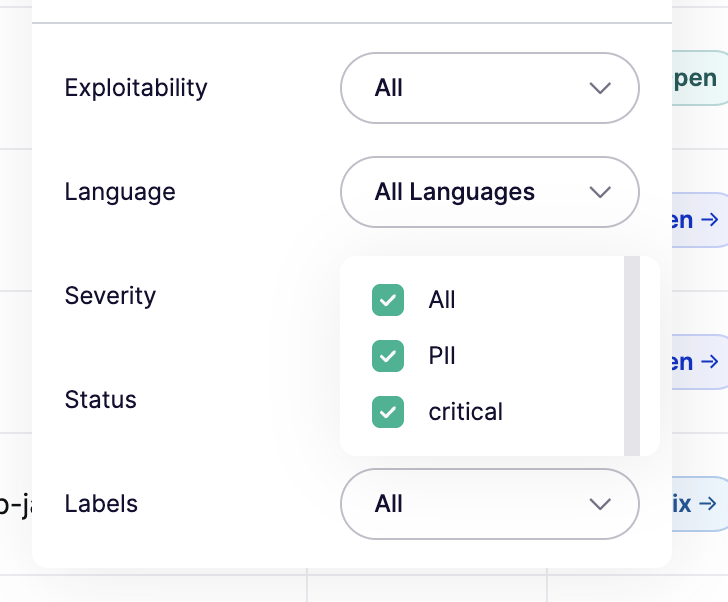
### 課題フィードをラベルで絞り込む
1. メインの **課題** フィード。
2. 次を開きます: **クイックフィルター**.
3. 残したいラベルを選択します。
次の **ラベル** このフィルターは、ワークスペースに少なくとも 1 つのラベルが存在してから表示されます。一部のバージョンでは、このフィルターは **リポジトリラベル**.
---
# Agent Instructions
This documentation is published with GitBook. GitBook is the documentation platform designed so that both humans and AI agents can read, navigate, and reason over technical content effectively. Learn more at gitbook.com.
## Querying This Documentation
If you need additional information that is not directly available in this page, you can query the documentation by asking a question.
Perform an HTTP GET request on the following URL with the `ask` and `goal` query parameters:
```
GET https://help.aikido.dev/docs/docs-ja/hajimeni/manage-teams-and-applications/add-labels-to-resources.md?ask=&goal=
```
`ask` is the immediate question: it should be specific, self-contained, and written in natural language.
`goal` is what the user is ultimately trying to achieve, the reason they need the answer. Sharing it helps GitBook give you a better, more relevant answer. A goal is most helpful when it describes the outcome the user wants rather than restating the question. For example, with `ask=how do I create an API token`, a goal like `automate deployments from our CI pipeline` lets GitBook tailor the answer to that use case.
The response will contain a direct answer to the question and relevant excerpts and sources from the documentation.
Use this mechanism when the answer is not explicitly present in the current page, you need clarification or additional context, or you want to retrieve related documentation sections.