> For the complete documentation index, see [llms.txt](https://help.aikido.dev/llms.txt). Markdown versions of documentation pages are available by appending `.md` to page URLs; this page is available as [Markdown](https://help.aikido.dev/docs/docs-ja/hajimeni/task-management-systems/all-supported-task-trackers/servicenow.md).
# ServiceNow
この一度限りのセットアップ *ワークスペースごとに* Aikido 組織内の誰もが ServiceNow で直接課題を作成できるようになります。
以下のユースケースがサポートされています:
* **自動チケット作成**: セキュリティ課題をシームレスに追跡するため、ServiceNow にチケットを自動的に作成して送信します。
* **手動チケット追加**: セキュリティ課題のチケットを ServiceNow に手動で追加し、重要な脆弱性に的を絞った対応を確実に行えます。
{% hint style="info" %}
Aikido は現在、チケットを **Incident** テーブルに送信します。追加のテーブルのサポートは、サポートを通じて依頼できます。
{% endhint %}
### 前提条件: ServiceNow で OAuth アプリを登録する
Aikido を接続する前に、ServiceNow インスタンスで OAuth アプリケーションを登録し、 **Client ID** と **Client Secret**.
{% stepper %}
{% step %}
**OAuth 2.0 プラグインを有効にする**
ServiceNow インスタンスにログインし、まだ有効でない場合は OAuth 2.0 プラグインを有効化します。
{% endstep %}
{% step %}
**OAuth システムプロパティを有効にする**
次の `sys_properties` テーブルで、次のシステムプロパティを設定します `com.snc.platform.security.oauth.is.active` を `true`.
{% endstep %}
{% step %}
**アプリケーションレジストリを開く**
次へ移動します **System OAuth > Application Registry**.
{% endstep %}
{% step %}
**新しい OAuth エンドポイントを作成する**
「 **New**」をクリックし、次に **外部クライアント向けの OAuth API エンドポイントを作成する**.
{% endstep %}
{% step %}
**アプリケーションを設定する**
次の項目を設定します:
* **名前**: 一意の名前(例: `Aikido`)
* **Client ID**: ServiceNow によって自動生成
* **Client Secret**: ServiceNow によって自動生成
* **リダイレクト URI**: `https://unify.apideck.com/vault/callback`
* **リフレッシュトークンの有効期間**: リフレッシュトークンが有効な秒数
* **アクセストークンの有効期間**: 次のように設定します `3600`
* **スコープ制限**: 次のように設定します **広範囲にスコープされた**
{% hint style="info" %}
デフォルトの `セキュアにスコープされた` では API 呼び出しが失敗します。
{% endhint %}
{% endstep %}
{% step %}
**保存して認証情報をコピーする**
「 **送信**を押し、その後レコードを再度開いて **Client ID** と **Client Secret** 値をコピーします。
{% endstep %}
{% endstepper %}
{% hint style="info" %}
注意: チケット作成は、その連携を設定したユーザーに紐づけられます。ServiceNow 内に、Incident テーブルへの書き込み権限を持つ専用の「Aikido」ユーザーを作成することを推奨します。
{% endhint %}
### Aikido App を ServiceNow に接続する
{% stepper %}
{% step %}
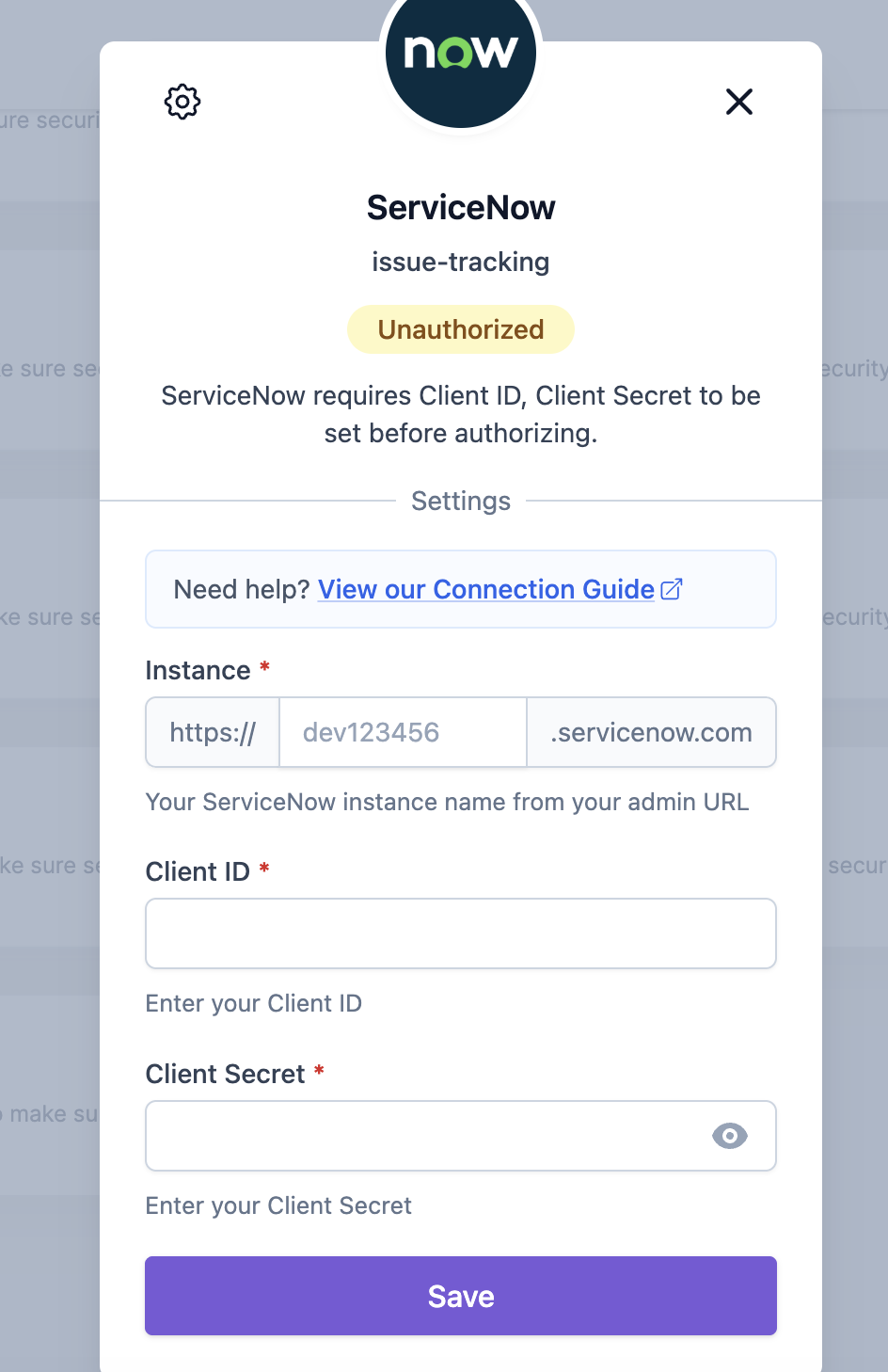
**連携を開く**
次へ移動します [Integration Settings](https://app.aikido.dev/settings/integrations) を Aikido アプリ内で開きます。「Task Trackers」セクションで、 **ServiceNow**.
 {% endstep %}
{% step %}
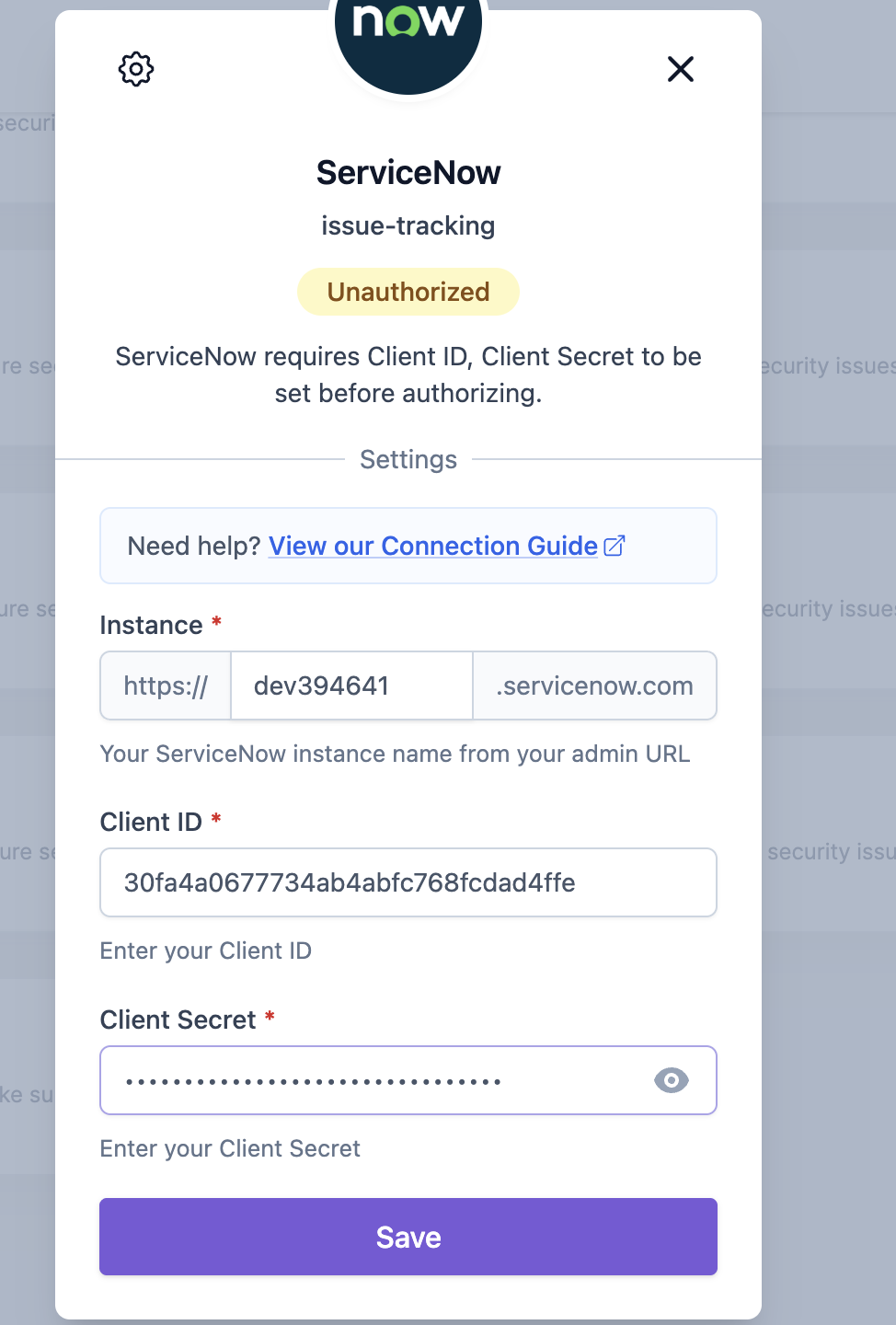
**を選択し、認証情報を入力します**
ServiceNow の **インスタンス名**, **Client ID**を入力し、 **Client Secret**、その後 **「Save」**.
{% hint style="info" %}
あなたの ServiceNow **インスタンス名** は管理者 URL のサブドメインです(例: `dev394641` from `https://dev394641.servicenow.com`).
{% endhint %}
{% endstep %}
{% step %}
**を選択し、認証情報を入力します**
ServiceNow の **インスタンス名**, **Client ID**を入力し、 **Client Secret**、その後 **「Save」**.
{% hint style="info" %}
あなたの ServiceNow **インスタンス名** は管理者 URL のサブドメインです(例: `dev394641` from `https://dev394641.servicenow.com`).
{% endhint %}
 {% endstep %}
{% step %}
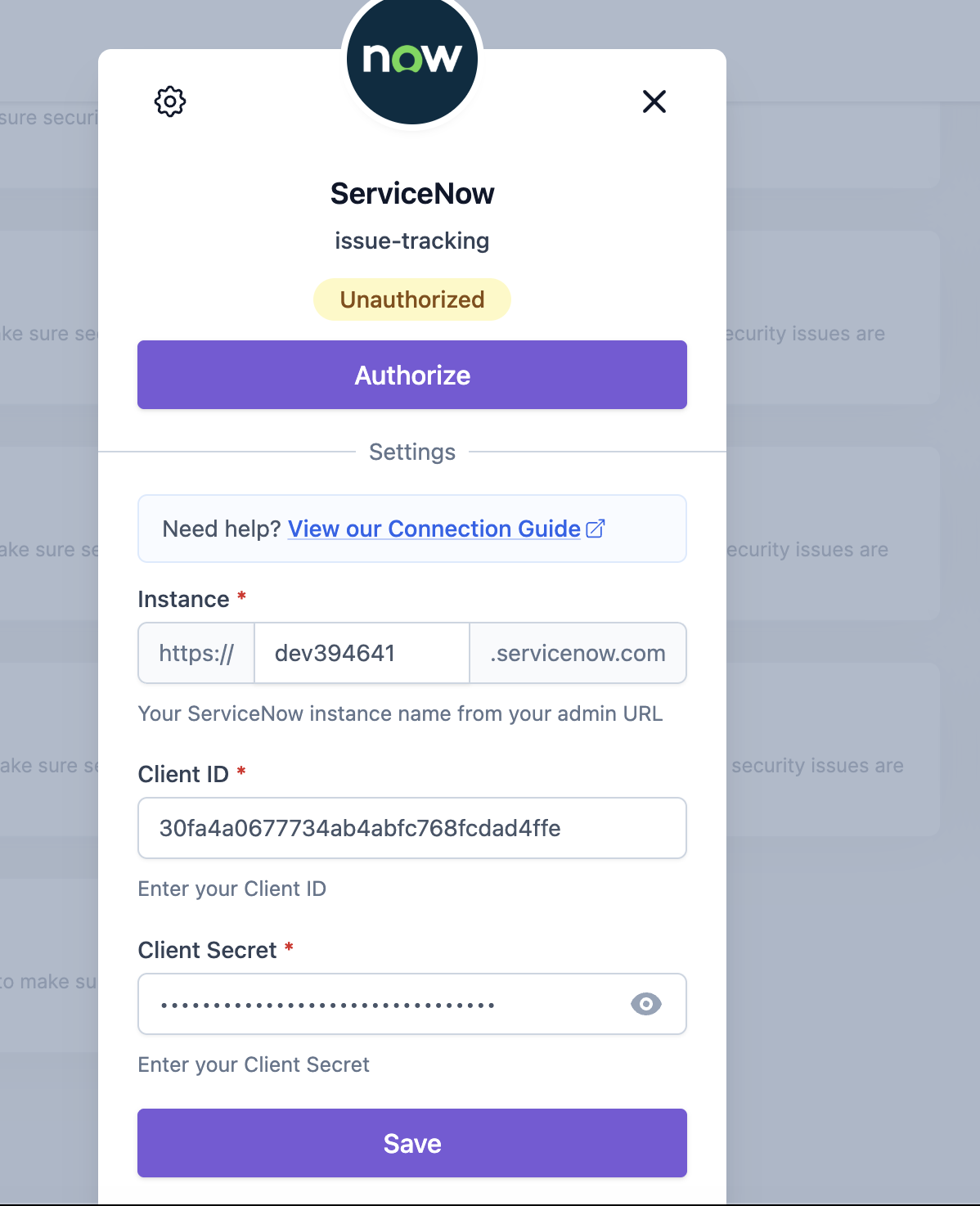
**接続を承認する**
「 **「Authorize」** をクリックして、Aikido に ServiceNow インスタンスへのアクセスを許可します。
{% endstep %}
{% step %}
**接続を承認する**
「 **「Authorize」** をクリックして、Aikido に ServiceNow インスタンスへのアクセスを許可します。
 {% endstep %}
{% step %}
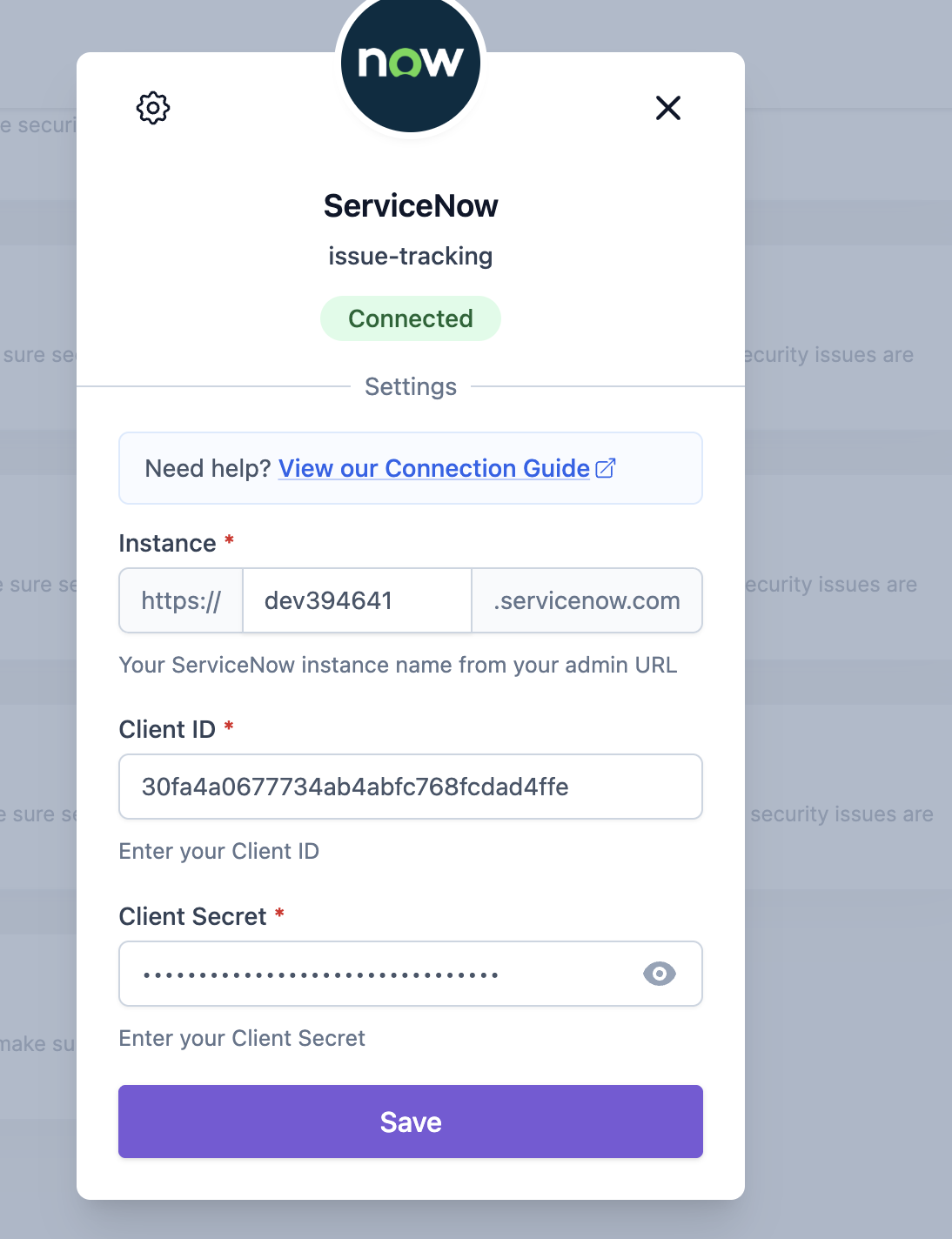
**確認**
「 **「Save」** をもう一度行ってセットアップを完了します。これで Aikido は ServiceNow に接続されました。
{% endstep %}
{% step %}
**確認**
「 **「Save」** をもう一度行ってセットアップを完了します。これで Aikido は ServiceNow に接続されました。
 {% endstep %}
{% endstepper %}
### Aikido 経由で ServiceNow にタスクを作成するためのオプション
Aikido から ServiceNow に新しいタスクを作成するには、2 つの異なるオプションがあります。
#### 1. 手動タスク作成
1. フィード内の任意の課題にカーソルを合わせ、 ***+*** を **割り当て列でクリックします。** または、最後の列にある三点アイコンをクリックしてアクションメニューを開くこともできます。課題がグループ化されている場合、三点アイコンのアクションメニューは各サブ課題で利用できます。\
\

2. ポップアップモーダルで必要な詳細を入力します。\
\

3. ServiceNow で新しく作成されたタスクは、Aikido の課題詳細の「Tasks」タブにリンクされます。
#### 2. 自動タスク作成
{% hint style="info" %}
Aikidoはタスクを自動的に作成します **毎時、一括で。** 現時点では、これを手動で実行するオプションはありません。
{% endhint %}
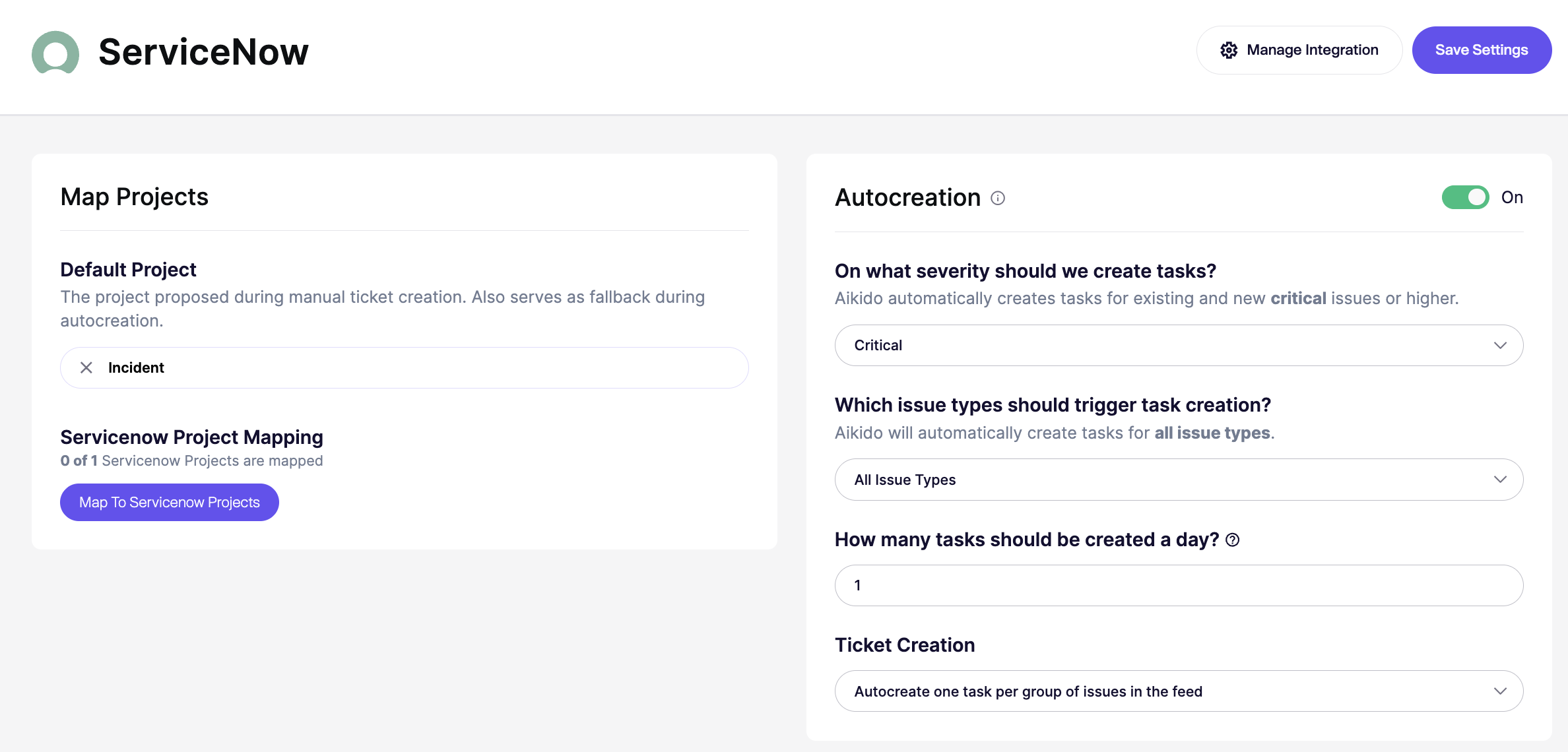
1. 次へ移動します [ServiceNow Integration](https://app.aikido.dev/settings/integrations/tasktracker) 設定
2. 必ず「**Autocreation**」を有効にしてください。トグルを **On**
3. に切り替えます。
これらの設定はすべて自動作成モーダルで構成できます:
* **オン/オフ:** 自動作成を有効または無効にします。オフの場合、しきい値は実質的に次の値に設定されます `なし`.
* **重大度しきい値:** 次の重大度の問題についてチケットを作成します `重大`, `高`, `中`、または `低` 以上。たとえば、 `高` では、次のものについてチケットを作成します `高` および `重大`.
* **問題の種類:** すべての問題タイプについてチケットを作成するか、次のような特定のタイプに限定します `SCA`, `SAST`, `シークレット`, `クラウド`, `IaC`, `マルウェア`、または `ライセンス`.
* **1日あたりの上限:** 1日に作成されるチケットの最大数を設定します。既定値は `25`です。一部のプランでは、より高い上限をサポートしています。
* **チケット作成モード:** 問題グループごとに1件のチケットを作成するか、場所またはスコープごとに個別のチケットを作成します。場所ごとのモードでは、より多くのチケットが作成される場合があります。
* **スコープ:** 場所ごとのモードでのみ使用できます。すべてのリポジトリまたはクラウド、マッピング済みのリポジトリまたはチームのみ、または含める/除外するリストを使用して特定のリポジトリまたはクラウドを対象にします。
{% endstep %}
{% endstepper %}
### Aikido 経由で ServiceNow にタスクを作成するためのオプション
Aikido から ServiceNow に新しいタスクを作成するには、2 つの異なるオプションがあります。
#### 1. 手動タスク作成
1. フィード内の任意の課題にカーソルを合わせ、 ***+*** を **割り当て列でクリックします。** または、最後の列にある三点アイコンをクリックしてアクションメニューを開くこともできます。課題がグループ化されている場合、三点アイコンのアクションメニューは各サブ課題で利用できます。\
\

2. ポップアップモーダルで必要な詳細を入力します。\
\

3. ServiceNow で新しく作成されたタスクは、Aikido の課題詳細の「Tasks」タブにリンクされます。
#### 2. 自動タスク作成
{% hint style="info" %}
Aikidoはタスクを自動的に作成します **毎時、一括で。** 現時点では、これを手動で実行するオプションはありません。
{% endhint %}
1. 次へ移動します [ServiceNow Integration](https://app.aikido.dev/settings/integrations/tasktracker) 設定
2. 必ず「**Autocreation**」を有効にしてください。トグルを **On**
3. に切り替えます。
これらの設定はすべて自動作成モーダルで構成できます:
* **オン/オフ:** 自動作成を有効または無効にします。オフの場合、しきい値は実質的に次の値に設定されます `なし`.
* **重大度しきい値:** 次の重大度の問題についてチケットを作成します `重大`, `高`, `中`、または `低` 以上。たとえば、 `高` では、次のものについてチケットを作成します `高` および `重大`.
* **問題の種類:** すべての問題タイプについてチケットを作成するか、次のような特定のタイプに限定します `SCA`, `SAST`, `シークレット`, `クラウド`, `IaC`, `マルウェア`、または `ライセンス`.
* **1日あたりの上限:** 1日に作成されるチケットの最大数を設定します。既定値は `25`です。一部のプランでは、より高い上限をサポートしています。
* **チケット作成モード:** 問題グループごとに1件のチケットを作成するか、場所またはスコープごとに個別のチケットを作成します。場所ごとのモードでは、より多くのチケットが作成される場合があります。
* **スコープ:** 場所ごとのモードでのみ使用できます。すべてのリポジトリまたはクラウド、マッピング済みのリポジトリまたはチームのみ、または含める/除外するリストを使用して特定のリポジトリまたはクラウドを対象にします。
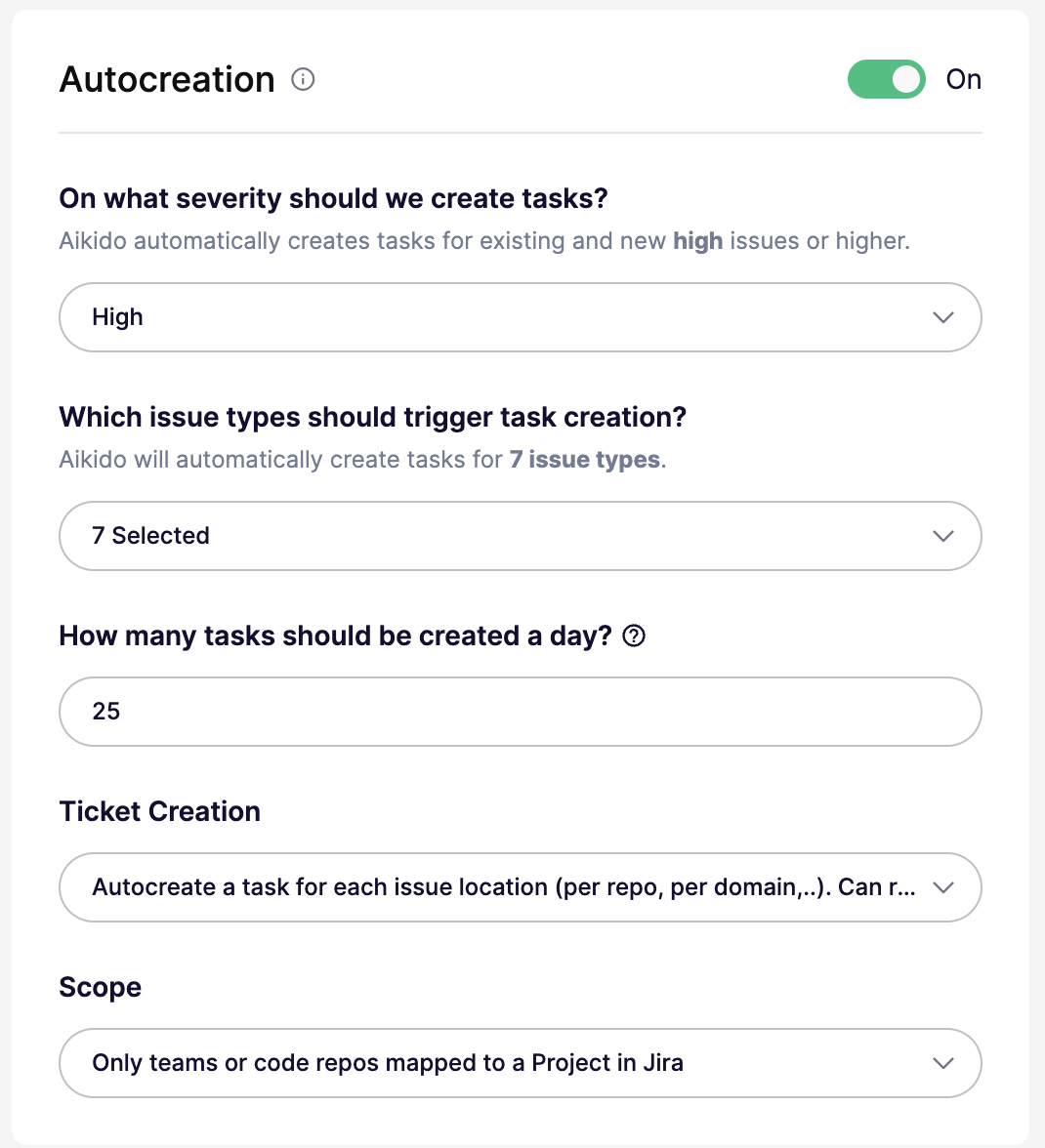 4. 設定された 1 日あたりのタスク上限に達するまで、Aikido は毎時 ServiceNow チケットを自律的に生成します。
 ### ServiceNow 同期
Aikido は次のいくつかのフィールドを ServiceNow に自動同期します:
* 重大度は ServiceNow の「Priority」フィールドにマッピングされます
* 担当者は双方向で同期されます(そのため、ServiceNow での更新は Aikido にも反映されます)
---
# Agent Instructions
This documentation is published with GitBook. GitBook is the documentation platform designed so that both humans and AI agents can read, navigate, and reason over technical content effectively. Learn more at gitbook.com.
## Querying This Documentation
If you need additional information that is not directly available in this page, you can query the documentation dynamically by asking a question.
Perform an HTTP GET request on the current page URL with the `ask` query parameter, and the optional `goal` query parameter:
```
GET https://help.aikido.dev/docs/docs-ja/hajimeni/task-management-systems/all-supported-task-trackers/servicenow.md?ask=&goal=
```
`ask` is the immediate question: it should be specific, self-contained, and written in natural language.
`goal` is optional and describes the broader end goal you are ultimately trying to accomplish on behalf of the user. GitBook uses it to tailor the answer towards what is most useful for that goal.
The response will contain a direct answer to the question and relevant excerpts and sources from the documentation.
Use this mechanism when the answer is not explicitly present in the current page, you need clarification or additional context, or you want to retrieve related documentation sections.
### ServiceNow 同期
Aikido は次のいくつかのフィールドを ServiceNow に自動同期します:
* 重大度は ServiceNow の「Priority」フィールドにマッピングされます
* 担当者は双方向で同期されます(そのため、ServiceNow での更新は Aikido にも反映されます)
---
# Agent Instructions
This documentation is published with GitBook. GitBook is the documentation platform designed so that both humans and AI agents can read, navigate, and reason over technical content effectively. Learn more at gitbook.com.
## Querying This Documentation
If you need additional information that is not directly available in this page, you can query the documentation dynamically by asking a question.
Perform an HTTP GET request on the current page URL with the `ask` query parameter, and the optional `goal` query parameter:
```
GET https://help.aikido.dev/docs/docs-ja/hajimeni/task-management-systems/all-supported-task-trackers/servicenow.md?ask=&goal=
```
`ask` is the immediate question: it should be specific, self-contained, and written in natural language.
`goal` is optional and describes the broader end goal you are ultimately trying to accomplish on behalf of the user. GitBook uses it to tailor the answer towards what is most useful for that goal.
The response will contain a direct answer to the question and relevant excerpts and sources from the documentation.
Use this mechanism when the answer is not explicitly present in the current page, you need clarification or additional context, or you want to retrieve related documentation sections.