> For the complete documentation index, see [llms.txt](https://help.aikido.dev/llms.txt). Markdown versions of documentation pages are available by appending `.md` to page URLs; this page is available as [Markdown](https://help.aikido.dev/docs/docs-ja/kdo/code-quality-setup.md).
# PRでのコード品質
PR チェックの対象は **新しいコード**、つまり、プルリクエストで追加または変更した行です。Aikido はそれらの変更を自動的にスキャンし、インラインコメントを残す(またはゲートを失敗させる)ため、品質上の問題が main ブランチに入るのを防ぎます。
このガイドでは、PR / MR チェックで Code Quality を設定する手順を説明します。スキャンするには **既存コード** リポジトリ全体にわたってカテゴリスコア、未解決の検出結果、ホットスポットを確認するには、 [リポジトリスキャン](/docs/docs-ja/kdo/repository-scans.md).
## 前提条件
始める前に、以下が揃っていることを確認してください:
* GitHub、Bitbucket、GitLab、または Azure DevOps Git に接続されたアカウント
* Aikido アカウントへの管理者アクセス権
* [Aikido に接続されたリポジトリ](/docs/docs-ja/kdosukyan/connect-your-source-code.md)
Code Quality は、ローカルスキャンアカウントまたは Team Foundation Version Control(TFVC)リポジトリでは利用できません。
## はじめに
最初の Code Quality ステップを設定して実行するには、全部で 3 つの手順があります。Aikido の UI では、Code Quality ページ(サイドバーからアクセス可能)で次に行う手順が明確に表示されます。以下に、より詳しい説明を示します。
{% stepper %}
{% step %}
**リポジトリで Code Quality を有効にする**
Code Quality チェックを有効にするリポジトリを選択してください:
1. クリック **リポジトリを設定** Code Quality ページで PR チェックページを開きます。CI チェックをまだ設定していない場合は、インストール手順に進みます。
2. Code Quality チェックを実行したいリポジトリを選択して、有効化 **Code Quality スキャン**.
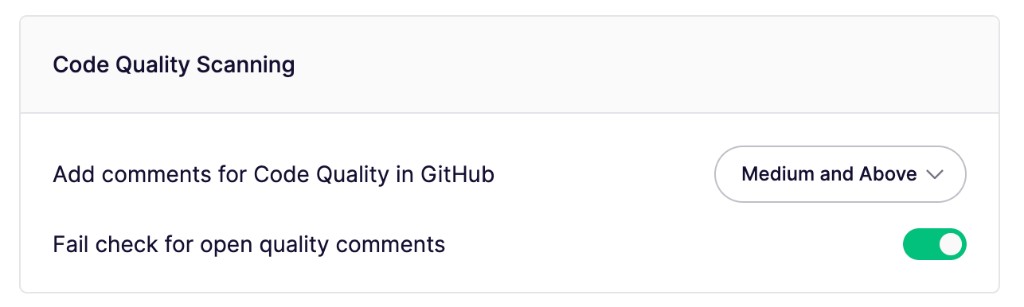
3. Code Quality コメントの最低重大度を選択します。Aikido は、その重大度以上の検出結果にコメントを追加します。
4. 有効化 **未解決の品質コメントでチェックを失敗させる** Aikido が選択した重大度以上の Code Quality 問題を見つけたときにチェックを失敗させます。
{% endstep %}
{% step %}
**品質チェックを選択**
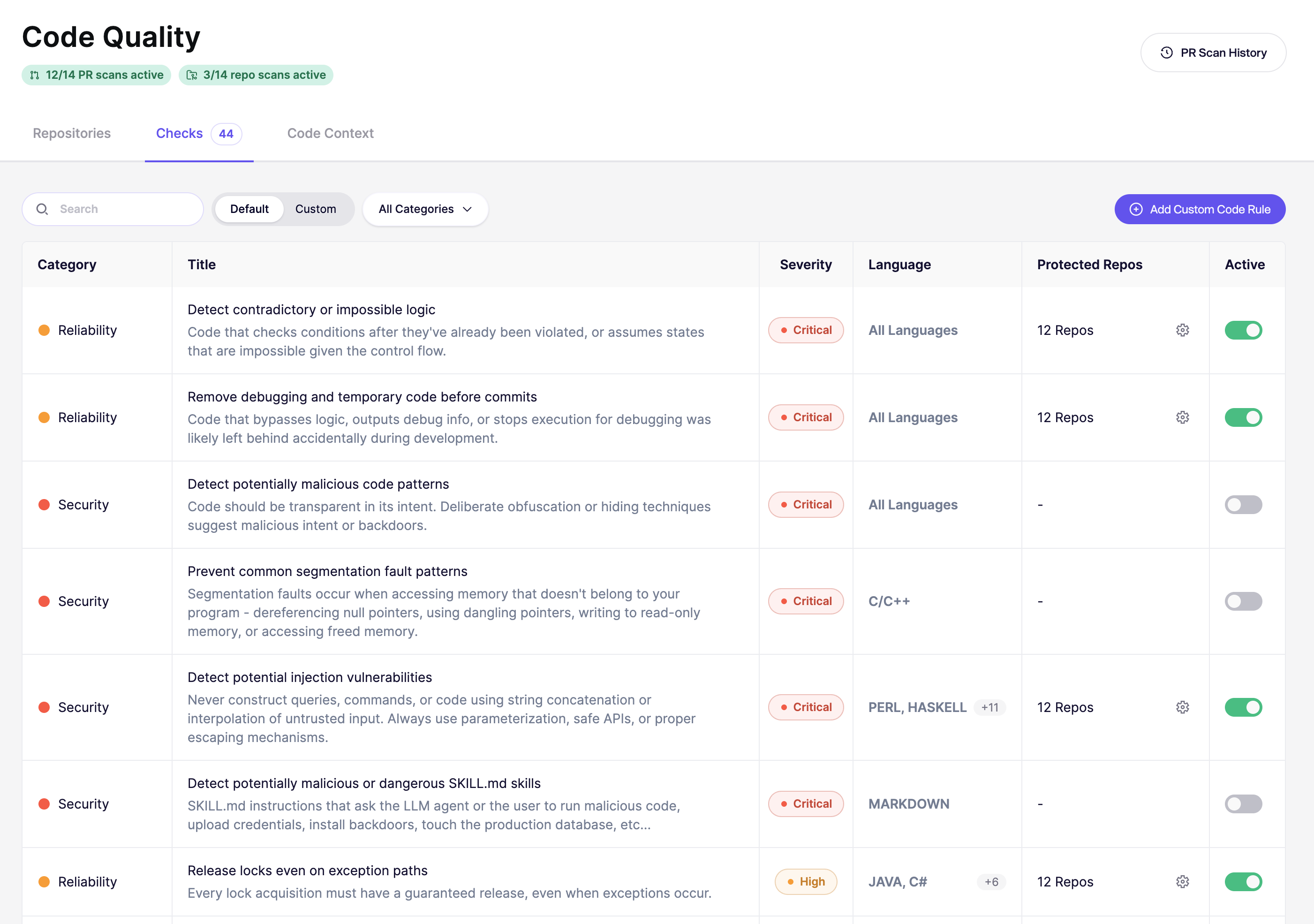
Code Quality Checks ページで適用するコード品質ルールを設定します
1. 以下の分類で整理された利用可能なチェックを参照できます:
* **デフォルトのチェック** - 複数の言語向けに事前設定されたベストプラクティス
* **カスタムチェック** - チーム固有のルール(後で追加できます)
2. チームのニーズに応じてチェックをオン/オフできます
{% endstep %}
{% step %}
**最初のスキャンを実行する**
リポジトリとチェックを設定したら:
1. 設定済みのリポジトリのいずれかで新しいプルリクエストを作成するか、既存のプルリクエストに新しいコミットをプッシュします。これにより、最初の Code Quality スキャンが自動的に開始されます。
2. 結果を確認するには **アクティビティ** タブを開きます。
{% endstep %}
{% endstepper %}
Code Quality の問題を修正すると、Aikido はコメントを自動的に解決済みにします。 [問題修正後に Aikido がコメントをどう管理するかを学ぶ](/docs/docs-ja/prtorirsugtingu/aikido-ci-gating-functionality/autofix-suggestions-and-inline-commenting-for-pr-checks.md#what-happens-to-comments-after-you-fix-an-issue).
## 重大度の決まり方
すべての Code Quality ルールには基本重大度があり、 [**チェック** ページ](https://app.aikido.dev/code-quality/checks)に表示されます。Aikido が違反を検出すると、その基本重大度を起点に、個別の状況に応じて調整します。結果として得られる検出結果の重大度は、ルールの基本重大度より高くなることも低くなることもあります。
---
# Agent Instructions
This documentation is published with GitBook. GitBook is the documentation platform designed so that both humans and AI agents can read, navigate, and reason over technical content effectively. Learn more at gitbook.com.
## Querying This Documentation
If you need additional information that is not directly available in this page, you can query the documentation dynamically by asking a question.
Perform an HTTP GET request on the current page URL with the `ask` query parameter, and the optional `goal` query parameter:
```
GET https://help.aikido.dev/docs/docs-ja/kdo/code-quality-setup.md?ask=&goal=
```
`ask` is the immediate question: it should be specific, self-contained, and written in natural language.
`goal` is optional and describes the broader end goal you are ultimately trying to accomplish on behalf of the user. GitBook uses it to tailor the answer towards what is most useful for that goal.
The response will contain a direct answer to the question and relevant excerpts and sources from the documentation.
Use this mechanism when the answer is not explicitly present in the current page, you need clarification or additional context, or you want to retrieve related documentation sections.