> For the complete documentation index, see [llms.txt](https://help.aikido.dev/llms.txt). Markdown versions of documentation pages are available by appending `.md` to page URLs; this page is available as [Markdown](https://help.aikido.dev/docs/docs-ja/kdo/repository-scans.md).
# コード品質リポジトリスキャン
リポジトリ内のすべてのファイルに対するコードベース全体の品質スキャン。
リポジトリスキャンでは、リポジトリ全体にすでに存在するコード品質の問題が表示されます。これらを使って技術的負債を見つけて優先順位を付け、コードが変更されるたびに結果を最新の状態に保ちます。
〜とは異なり [PR のコード品質](/docs/docs-ja/kdo/code-quality-setup.md)これは、マージ前の新しいコードのみをチェックしますが、リポジトリスキャンでは分析します **既存コード**。両方を使って、すでにある問題に取り組みながら、新たな品質上の負債がリポジトリに入り込むのを防ぎましょう。
## 内容
Aikido がリポジトリをスキャンした後、次のことができます:
* 未解決の検出事項を次のカテゴリに分類して表示する **保守性**, **可読性**, **パフォーマンス**、および **信頼性**
* 最初に対応すべきカテゴリとファイルに優先順位を付ける
* 未解決の検出事項が時間とともにどう変化するかを追跡する
* 使用してください [AutoFix](/docs/docs-ja/autofixto/overview-aikido-autofix.md) または自分で検出事項を修正する
## スキャンを開始
リポジトリスキャンの設定方法については、 [リポジトリスキャンを開始する](/docs/docs-ja/kdo/repository-scans/start-a-repository-scan.md)。前提条件、年間クレジットコスト、リポジトリの追跡を開始する方法について説明しています。
## 結果を確認する
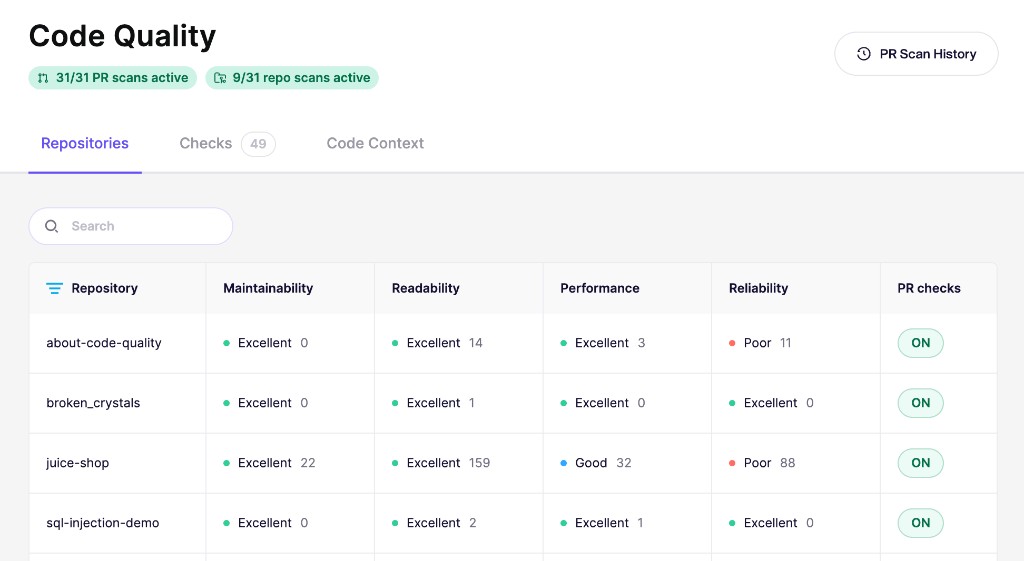
その **リポジトリ** このタブでは、スキャン済みの各リポジトリに対して、4つの品質カテゴリごとの評価と検出数が表示されます。リポジトリを開くと、根本的な検出事項、影響を受けるファイル、重大度、推定修正時間を確認できます。
### 品質の変化を確認する
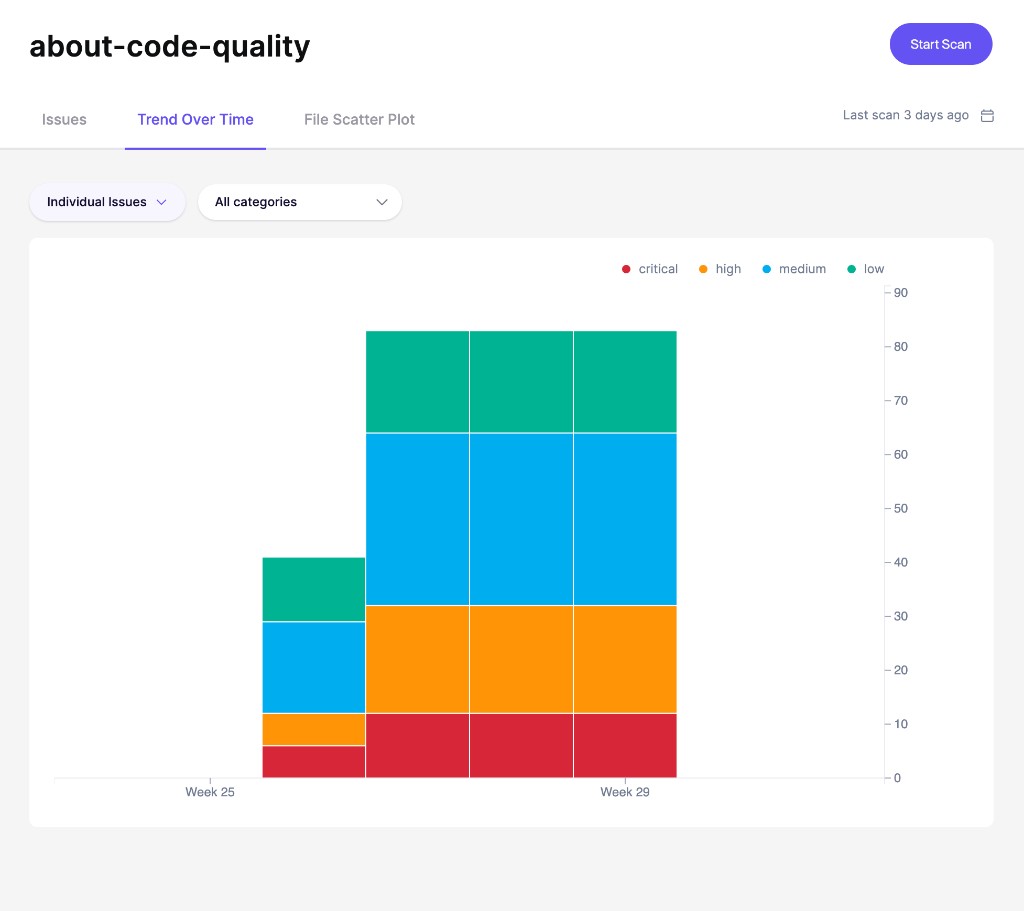
レポートの行で **時間経過による傾向** このタブでは、リポジトリの未解決の検出事項が週ごとにどう変化するかを確認できます。グラフは検出事項を重大度別に分けて表示するため、クリティカル、高、中、低優先度の品質負債が増えているのか減っているのかがわかります。
これを使って、クリーンアップ作業の効果を測定し、注意が必要なリグレッションを見つけます。
### ファイルのホットスポットを見つける
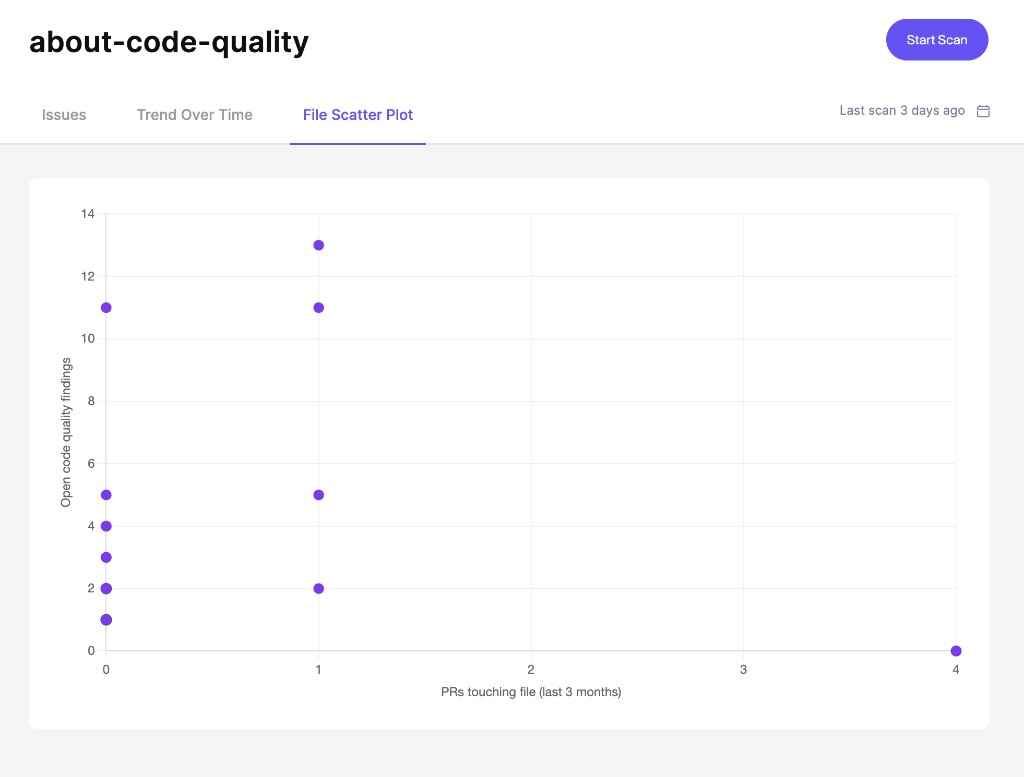
その **ファイル散布図** クリーンアップ作業の優先順位付けに役立ちます。右上のファイルがホットスポットです。変更頻度が高く、未解決のコード品質問題が多くあります。
{% hint style="info" %}
ファイル散布図には、リポジトリスキャンと [PR のコード品質](/docs/docs-ja/kdo/code-quality-setup.md) 同じリポジトリに対する PR チェックの両方が必要です。リポジトリスキャンは検出数を提供し、PR チェックはアクティビティデータを提供します。
{% endhint %}
評価、検出事項、散布図の詳細については、 [リポジトリスキャン結果を理解する](/docs/docs-ja/kdo/repository-scans/understand-repository-scan-results.md).
---
# Agent Instructions
This documentation is published with GitBook. GitBook is the documentation platform designed so that both humans and AI agents can read, navigate, and reason over technical content effectively. Learn more at gitbook.com.
## Querying This Documentation
If you need additional information that is not directly available in this page, you can query the documentation dynamically by asking a question.
Perform an HTTP GET request on the current page URL with the `ask` query parameter, and the optional `goal` query parameter:
```
GET https://help.aikido.dev/docs/docs-ja/kdo/repository-scans.md?ask=&goal=
```
`ask` is the immediate question: it should be specific, self-contained, and written in natural language.
`goal` is optional and describes the broader end goal you are ultimately trying to accomplish on behalf of the user. GitBook uses it to tailor the answer towards what is most useful for that goal.
The response will contain a direct answer to the question and relevant excerpts and sources from the documentation.
Use this mechanism when the answer is not explicitly present in the current page, you need clarification or additional context, or you want to retrieve related documentation sections.