> For the complete documentation index, see [llms.txt](https://help.aikido.dev/llms.txt). Markdown versions of documentation pages are available by appending `.md` to page URLs; this page is available as [Markdown](https://help.aikido.dev/docs/docs-ja/kdo/repository-scans/start-a-repository-scan.md).
# リポジトリスキャンを開始する
リポジトリ全体のコード品質スキャンを有効にし、年間クレジットコストを確認します。
リポジトリスキャンを有効にすると、次の完全スキャンが開始されます **既存コード** リポジトリ内の、進行中の変更だけでなく、すでにマージ済みのすべての内容が対象です。これにより、カテゴリスコア、課題一覧、散布図が利用可能になります。詳しくは [リポジトリスキャン結果を理解する](/docs/docs-ja/kdo/repository-scans/understand-repository-scan-results.md) 出力の読み方について。
すでに実行中 [PRチェック](/docs/docs-ja/kdo/code-quality-setup.md) 新しいコードに対してですか? この2つは独立して動作し、併用するよう設計されています。
## 前提条件
始める前に、以下を確認してください:
* **コード品質の管理権限があること** Aikidoワークスペース内で。
* **リポジトリが接続され、有効になっていること** Aikido内で。詳しくは [ソースコードを接続する](/docs/docs-ja/kdosukyan/connect-your-source-code.md).
* **ウォレットに十分なクレジットがあること** 見積もられた費用をまかなえること。確認モーダル内でチャージできます。詳しくは [ウォレットとクレジット](/docs/docs-ja/miscellaneous-info/wallet-and-credits.md).
リポジトリスキャンはローカルスキャンアカウントでは利用できません。
## リポジトリのスキャンを有効にする
{% stepper %}
{% step %}
### コード品質リポジトリタブを開く
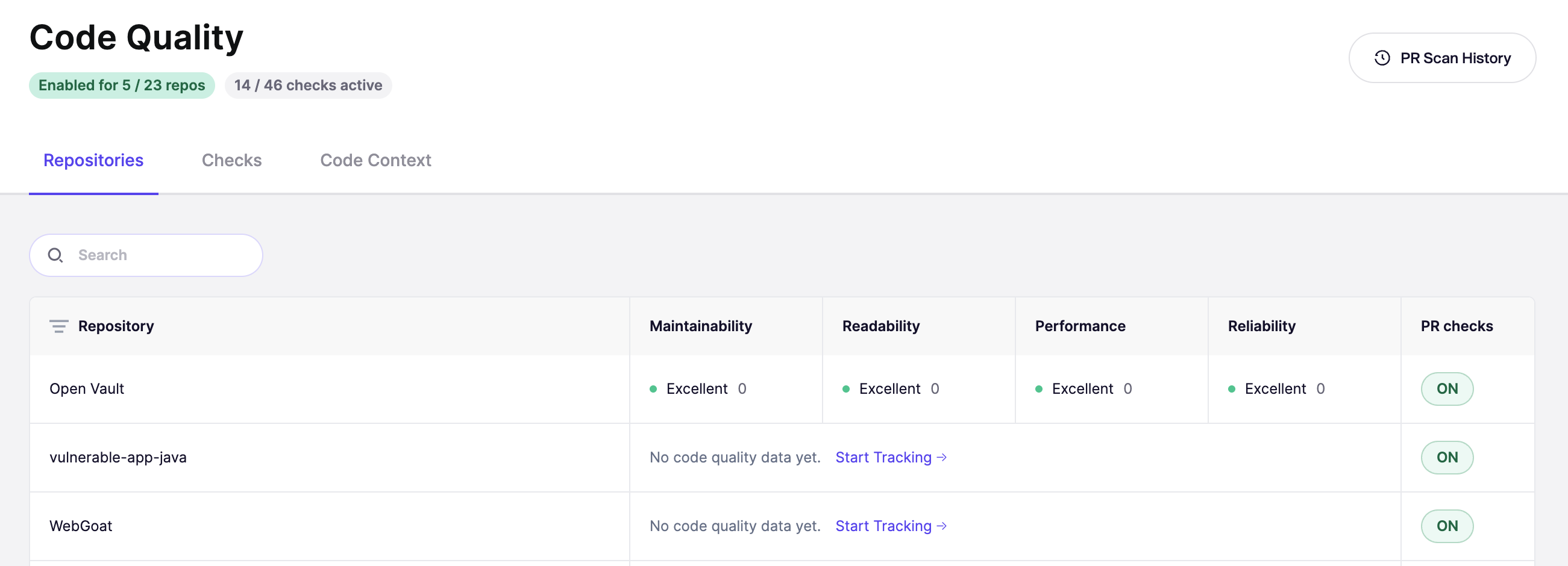
その後、Splunk Cloud と Splunk Enterprise の両方でトークンを作成します: **コード品質** サイドバーで、次を開きます。 **リポジトリ** タブ。接続済みのすべてのリポジトリが表示されます。すでに追跡されているリポジトリにはカテゴリスコアが表示され、未追跡のリポジトリには **追跡を開始**.
{% endstep %}
{% step %}
### 確認モーダルを開く
スキャンしたいリポジトリを見つけてクリックします **追跡を開始**.
{% endstep %}
{% step %}
### 費用を確認して開始
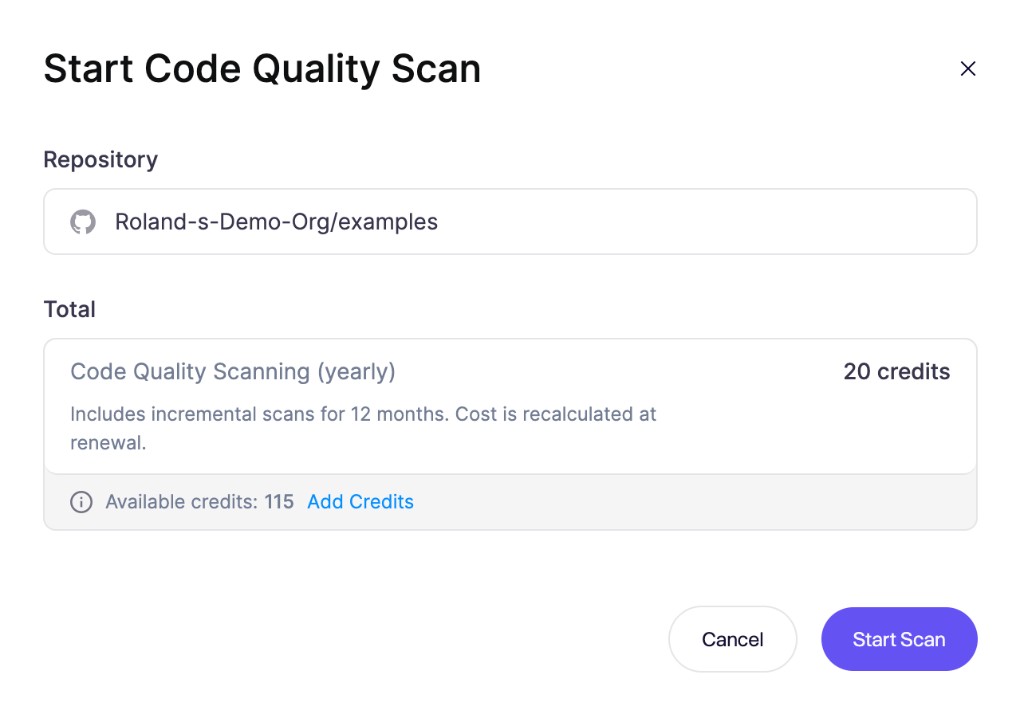
Aikidoは確定前に必要なクレジット数を計算します。合計を確認してから、次をクリックしてください **スキャンを開始**。Aikidoがウォレットからクレジットを差し引き、最初の完全スキャンをすぐに開始します。
残高が不足している場合は、次をクリックしてください **クレジットを追加** をモーダル内で押して、確認前にチャージしてください。
{% endstep %}
{% endstepper %}
スキャン開始後、次からリポジトリを開いて **リポジトリ** タブで進捗を追跡し、結果が出るたびに確認できます。詳しくは [リポジトリスキャン結果を理解する](/docs/docs-ja/kdo/repository-scans/understand-repository-scan-results.md).
## 料金とクレジット
リポジトリスキャンは次の形で提供されます: **リポジトリごとの1年サブスクリプション**、支払いは [Aikidoクレジット](/docs/docs-ja/miscellaneous-info/wallet-and-credits.md)。モーダルには合計が次のように表示されます。 **コード品質スキャン(年額)**.
お支払いには、そのリポジトリに対する1年間の継続スキャンが含まれます。Aikidoは12か月の間、増分再スキャンでリポジトリの検出結果を最新に保ちます。1年が終わると、スキャンを継続するために再度お支払いいただきます。
費用はリポジトリのサイズに応じて変わります。リポジトリをAikidoに接続し、次を開いて **コード品質スキャンを開始** モーダルで、確定前にこのリポジトリの正確なクレジット合計を確認できます。
### 1年が終了した後
スキャンは有効化した日から1年間、継続して実行されます。1年が経過すると、リポジトリの追跡を継続するために再度お支払いが必要です。費用は現在のリポジトリのファイル数に基づいて再計算されるため、新しい合計には、最初にスキャンを有効にしてからリポジトリが増減した状況が反映されます。
---
# Agent Instructions
This documentation is published with GitBook. GitBook is the documentation platform designed so that both humans and AI agents can read, navigate, and reason over technical content effectively. Learn more at gitbook.com.
## Querying This Documentation
If you need additional information that is not directly available in this page, you can query the documentation dynamically by asking a question.
Perform an HTTP GET request on the current page URL with the `ask` query parameter, and the optional `goal` query parameter:
```
GET https://help.aikido.dev/docs/docs-ja/kdo/repository-scans/start-a-repository-scan.md?ask=&goal=
```
`ask` is the immediate question: it should be specific, self-contained, and written in natural language.
`goal` is optional and describes the broader end goal you are ultimately trying to accomplish on behalf of the user. GitBook uses it to tailor the answer towards what is most useful for that goal.
The response will contain a direct answer to the question and relevant excerpts and sources from the documentation.
Use this mechanism when the answer is not explicitly present in the current page, you need clarification or additional context, or you want to retrieve related documentation sections.