> For the complete documentation index, see [llms.txt](https://help.aikido.dev/llms.txt). Markdown versions of documentation pages are available by appending `.md` to page URLs; this page is available as [Markdown](https://help.aikido.dev/docs/docs-ja/kdo/repository-scans/understand-repository-scan-results.md).
# リポジトリスキャン結果を理解する
カテゴリスコアを読み、傾向を追跡し、未解決の検出結果を閲覧し、ファイルの散布図を使用します。
リポジトリスキャンが完了すると、結果は **リポジトリ** タブとリポジトリ詳細ページに表示されます。これらの結果は **既存のコード**:最近のPRの変更だけでなく、コードベース全体にわたる未解決の品質問題。
このガイドでは、スコアの読み方、検出事項の優先順位付け、ホットスポットの見つけ方を説明します。
## リポジトリ概要
次の **リポジトリ** タブには、4つのカテゴリのスコア付きで接続済みのすべてのリポジトリが一覧表示されます:
* **保守性:** コードの変更や拡張のしやすさ
* **可読性:** 明確さ、命名、構造
* **パフォーマンス:** 効率性とリソース使用量
* **信頼性:** 正確性、エラーハンドリング、バグを招きやすいパターン
各セルには、評価ラベル、色のインジケーター、数値が表示されます。ラベルは、そのカテゴリで最も深刻な未解決の検出事項を反映し、数値はそのカテゴリにある未解決の検出事項の合計数です。
次の **PRチェック** 列は、〜かどうかを示します [PRチェック](/docs/docs-ja/kdo/code-quality-setup.md) そのリポジトリで有効になっているか(**ON** / **OFF**)。PRチェックは **新しいコード** プルリクエスト上のコードを対象とし、リポジトリスキャンは **既存のコード** リポジトリ全体を対象とします。両者は独立しているため、どちらか一方でも両方でも有効にできます。
追跡対象のリポジトリをクリックすると、その詳細ページが開きます。
## カテゴリ評価
各カテゴリの評価は、 **最も深刻な未解決の検出事項** に基づき、そのカテゴリの総問題数ではありません。
| 評価 | 条件 |
| ------ | ------------------------------ |
| **優秀** | 低または情報レベルの検出事項のみ(中以上はなし) |
| **良好** | 中レベルの検出事項が少なくとも1件あるが、高または重大はなし |
| **普通** | 高レベルの検出事項が少なくとも1件あるが、重大はなし |
| **不良** | 重大レベルの検出事項が少なくとも1件ある |
検出事項は、トリガーしたルールに基づいてカテゴリごとにグループ化されます。各デフォルトチェックとカスタムチェックは、上記4つのカテゴリのいずれかに属します。低深刻度の検出事項は評価ラベルには影響しませんが、問題数には含まれます。
## 時系列トレンド
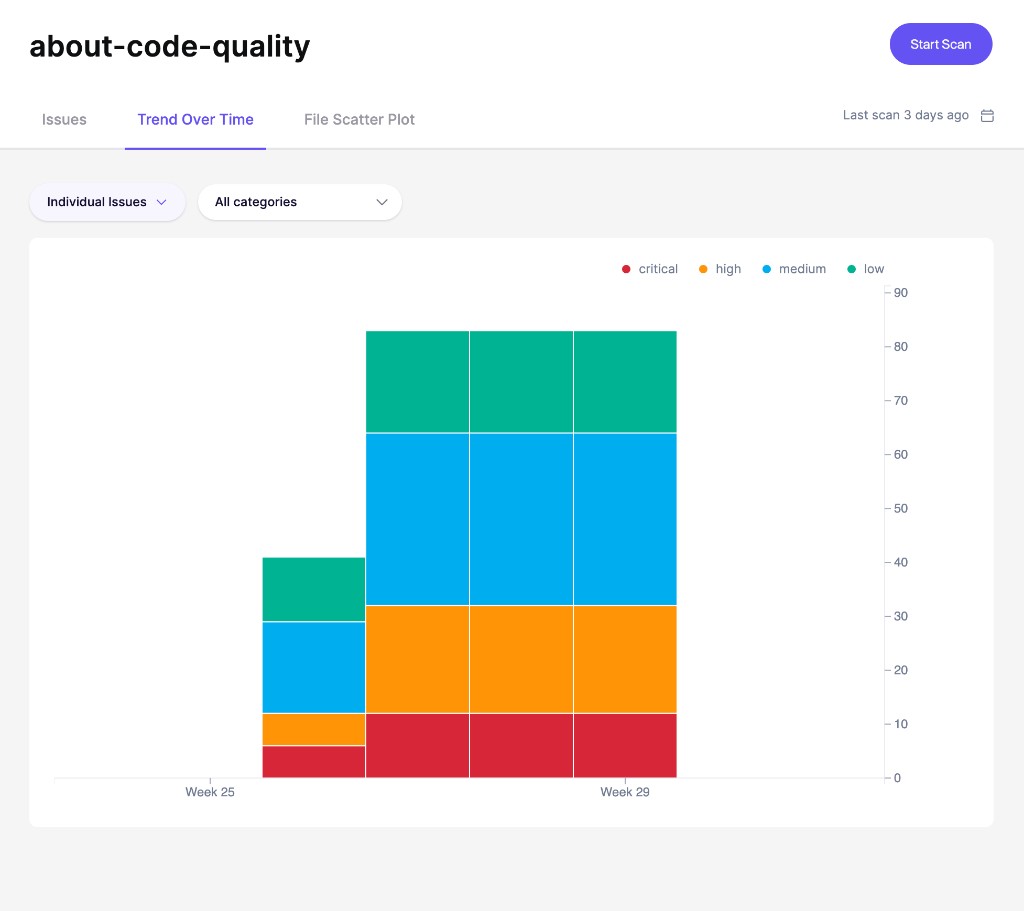
を開き、 **時系列の推移** タブをリポジトリ詳細ページで開くと、未解決の検出事項が週ごとにどう変化するかを確認できます。
グラフは検出事項を深刻度別に分けるため、重大、高、中、低優先度の品質負債が増えているのか減っているのかを確認できます。クリーンアップ作業の効果を測定し、対応が必要な回帰を特定するのに役立ちます。
## Issuesタブ
次の **課題** タブには、リポジトリ詳細ページ上のすべての未解決の検出事項がルールごとにグループ化して一覧表示されます。各行には次が表示されます:
* **種類:** 影響を受けるファイルの言語
* **名前:** ルール名と影響を受けるファイル
* **深刻度:** グループ内で最も高い深刻度
* **場所:** 問題が発生しているファイルパス
* **修正時間:** 解決に必要な見積もり工数
行をクリックすると詳細サイドバーが開きます。そこから次のことができます:
* 次を読む: **要約** と **どう修正しますか?** ガイダンス
* 閲覧 **サブ問題** ファイル名、行番号、コードスニペット付きで
* 次を開きます: **コード解析を表示** 特定の発生箇所を詳しく確認するために
* 個別の検出事項を無視する
### AutoFixで検出事項を修正する
Aikido は変更を生成できます。 [AutoFix](/docs/docs-ja/autofix-to/overview-aikido-autofix.md) 検出結果に対する修正を生成し、変更内容を含むプルリクエストを開くことができるため、あなたはそれをレビューしてマージできます。
Aikido にそれらのプルリクエストを毎日のスケジュールで開かせるには、自動作成をオンにしてください **コード品質の問題**。デフォルトのチェックにおける重大および高深刻度の検出結果を対象とします。参照 [プルリクエストの自動作成](/docs/docs-ja/autofix-to/automation-and-merging/automatic-creation-of-pull-requests.md).
## ファイル散布図
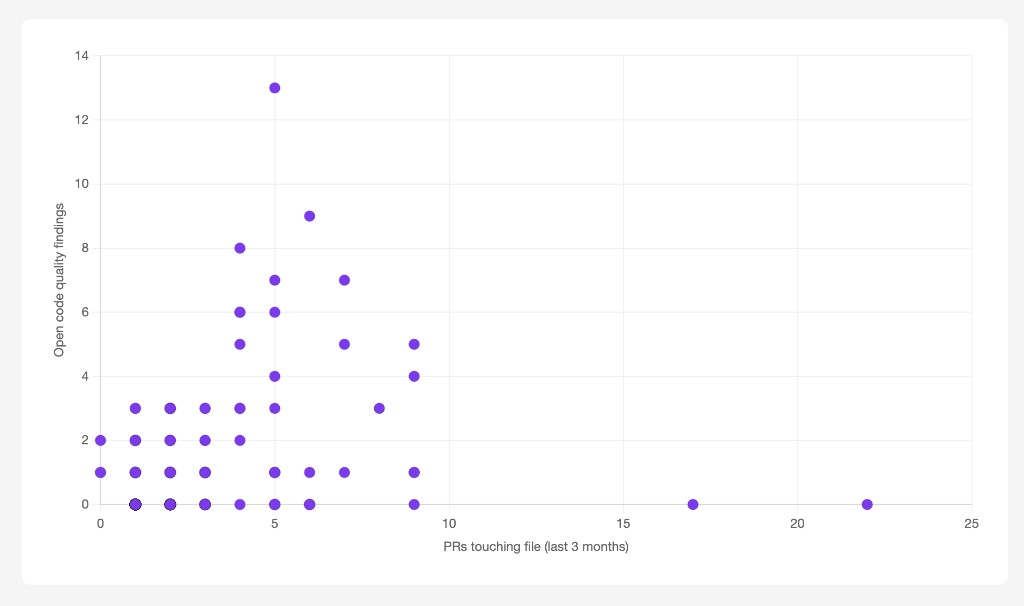
切り替えて **ファイル散布図** タブで、コード品質のホットスポットを可視化します。つまり、頻繁に変更され、未解決の品質負債を抱えているファイルです。
各点はリポジトリ内の1つのファイルを表します:
* **X軸:** 過去3か月間にそのファイルに触れたPRの数
* **Y軸:** そのファイル内の未解決のコード品質検出事項の数
グラフの **右上** にあるファイルがホットスポットです。高い活動量と低い品質が組み合わさっています。リファクタリングやクリーンアップ作業を計画する際は、これらを優先してください。
{% hint style="info" %}
散布図には **両方** 同じリポジトリで有効になっているモードが必要です: [PRチェック](/docs/docs-ja/kdo/code-quality-setup.md) について **新しいコード** アクティビティデータと、〜向けのリポジトリスキャン **既存のコード** 検出件数。
{% endhint %}
---
# Agent Instructions
This documentation is published with GitBook. GitBook is the documentation platform designed so that both humans and AI agents can read, navigate, and reason over technical content effectively. Learn more at gitbook.com.
## Querying This Documentation
If you need additional information that is not directly available in this page, you can query the documentation by asking a question.
Perform an HTTP GET request on the following URL with the `ask` and `goal` query parameters:
```
GET https://help.aikido.dev/docs/docs-ja/kdo/repository-scans/understand-repository-scan-results.md?ask=&goal=
```
`ask` is the immediate question: it should be specific, self-contained, and written in natural language.
`goal` is what the user is ultimately trying to achieve, the reason they need the answer. Sharing it helps GitBook give you a better, more relevant answer. A goal is most helpful when it describes the outcome the user wants rather than restating the question. For example, with `ask=how do I create an API token`, a goal like `automate deployments from our CI pipeline` lets GitBook tailor the answer to that use case.
The response will contain a direct answer to the question and relevant excerpts and sources from the documentation.
Use this mechanism when the answer is not explicitly present in the current page, you need clarification or additional context, or you want to retrieve related documentation sections.