> For the complete documentation index, see [llms.txt](https://help.aikido.dev/llms.txt). Markdown versions of documentation pages are available by appending `.md` to page URLs; this page is available as [Markdown](https://help.aikido.dev/docs/docs-ja/kdosukyan/connect-your-source-code/connect-bitbucket-data-center.md).
# Bitbucket Data Centerを接続する
コードスキャンのためにBitbucket Data CenterインスタンスをAikidoに接続します。
Aikidoを使うと、Bitbucket Data Centerを接続してリポジトリをスキャンできます。
#### ステップ1. Aikidoにサインイン
次の方法でAikidoにログイン **Google** または **Microsoft**.
#### ステップ2. Bitbucket Data Centerを選択
SCM選択画面で、次を選択してください **Bitbucket Data Center**.
#### ステップ3. Bitbucketの詳細を追加
次を入力してください `Bitbucket Data CenterのURL` および `HTTPアクセストークン`.
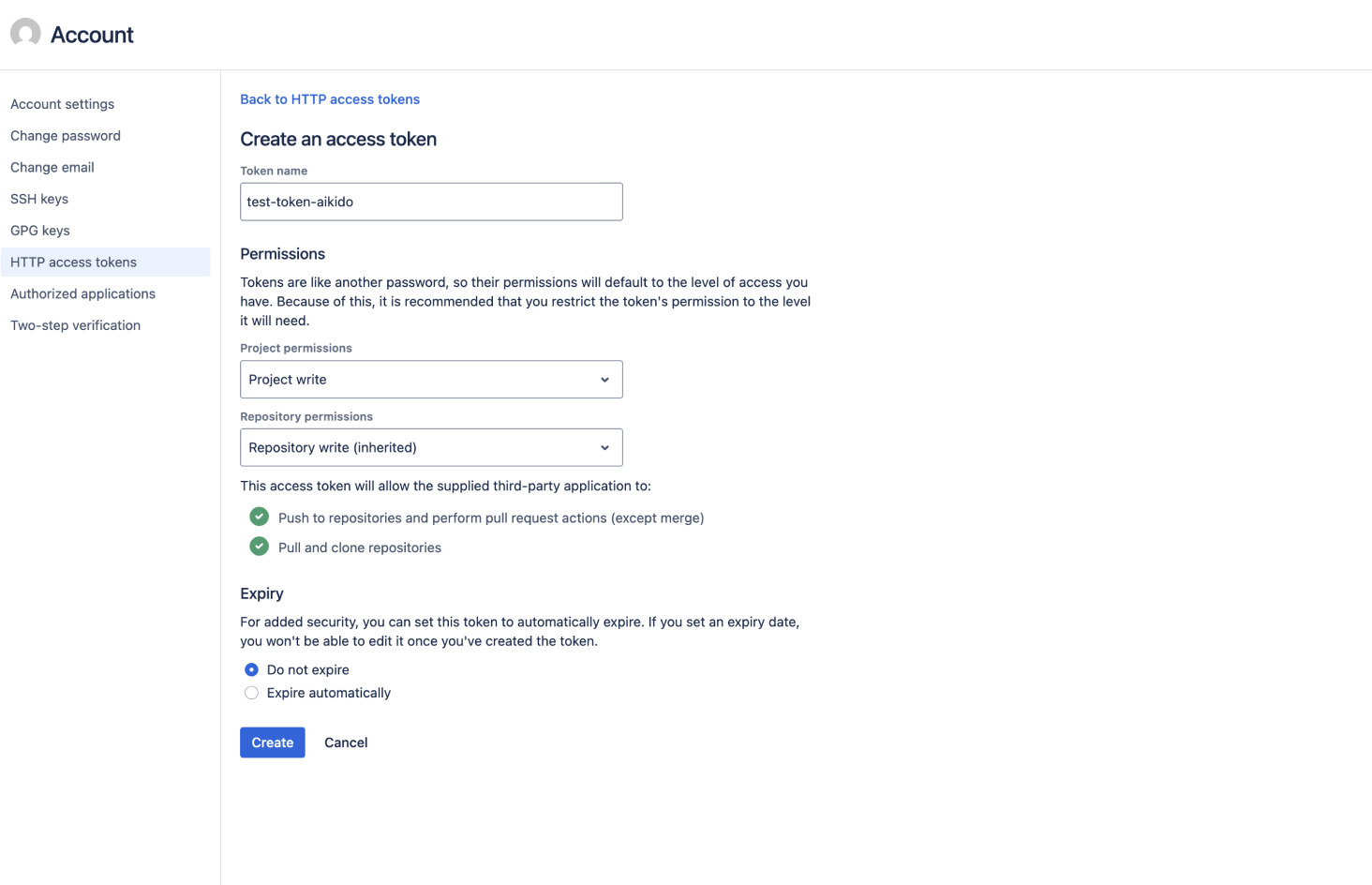
次の場所で確認できます `HTTPアクセストークン` の下で **プロフィール** → **アカウントの管理** → **HTTPアクセストークン** → **トークンを作成**.
**必要なトークン権限**
Aikidoは、お使いのBitbucketオンプレミス環境に対して次のトークン権限を要求します:
* **プロジェクト:** 書き込み
* **リポジトリ:** 書き込み
**なぜ書き込み権限が必要なのですか?**
書き込み権限は、AutoFix(マージ準備済みのPRを作成)やPRチェック(プルリクエストにステータスチェックとコメントを投稿)を含む、Aikidoの全機能をサポートするために必要です。
**スキャンのみ必要な場合**
チームがAikidoをリポジトリのスキャンとAIペンテストにのみ使用する場合、 **読み取り権限** で十分です。読み取り専用アクセスのトークンを設定すれば、すべてのスキャン機能が期待どおりに動作します。
#### ステップ4. プロジェクトを選択
接続するBitbucketプロジェクトを選択してください。
#### ステップ5. リポジトリを選択して完了
Aikidoにスキャンさせたいリポジトリを選択してください。
セットアップを完了してスキャンを開始します。
---
# Agent Instructions
This documentation is published with GitBook. GitBook is the documentation platform designed so that both humans and AI agents can read, navigate, and reason over technical content effectively. Learn more at gitbook.com.
## Querying This Documentation
If you need additional information that is not directly available in this page, you can query the documentation dynamically by asking a question.
Perform an HTTP GET request on the current page URL with the `ask` query parameter, and the optional `goal` query parameter:
```
GET https://help.aikido.dev/docs/docs-ja/kdosukyan/connect-your-source-code/connect-bitbucket-data-center.md?ask=&goal=
```
`ask` is the immediate question: it should be specific, self-contained, and written in natural language.
`goal` is optional and describes the broader end goal you are ultimately trying to accomplish on behalf of the user. GitBook uses it to tailor the answer towards what is most useful for that goal.
The response will contain a direct answer to the question and relevant excerpts and sources from the documentation.
Use this mechanism when the answer is not explicitly present in the current page, you need clarification or additional context, or you want to retrieve related documentation sections.