> For the complete documentation index, see [llms.txt](https://help.aikido.dev/llms.txt). Markdown versions of documentation pages are available by appending `.md` to page URLs; this page is available as [Markdown](https://help.aikido.dev/docs/docs-ja/kdosukyan/connect-your-source-code/connect-gitlab-account-to-aikido.md).
# GitLab アカウントを接続する
Aikido は、あなたのプロジェクトを分析するために、GitLab グループへの読み取り専用アクセスを要求します。分析後、あなたのコードはシステムから常に削除されます。
***始める前に重要なこと***
* GitLab がファイアウォールの内側にある場合、 [静的 IP の一覧](https://help.aikido.dev/en/articles/8731261-allowing-ip-addresses-for-code-scanning) を許可リストに追加できます。
* アカウントを設定する人は、GitLab インスタンスと **および** GitLab グループの両方にアクセス権を持っている必要があります。
{% hint style="info" %}
ユーザーがサブグループの直接メンバーであることが重要です。この操作では、継承されたメンバーシップはサポートされていません。
{% endhint %}
{% hint style="warning" %}
* ワークスペースを設定するユーザーが各 GitLab(サブ)グループの直接メンバーであることが重要です。継承されたメンバーシップだけでは不十分です。
* Aikido のワークスペースは既定で単一の GitLab グループに対応します。Aikido を、すべてのサブグループを含む最上位の GitLab グループ(つまりルートグループ)に接続することを推奨します。それができず、同じ Aikido ワークスペースに複数のグループを接続する必要がある場合は、次の特定の手順に従ってください。 [複数の最上位 GitLab グループを 1 つのワークスペースに接続する](https://help.aikido.dev/code-scanning/connect-your-source-code/connect-gitlab-account-to-aikido/connecting-multiple-top-level-gitlab-groups-to-a-single-workspace).
{% endhint %}
{% hint style="success" %}
**グループにリンクされていないリポジトリ**は、現時点ではスキャンできません。スキャンしたい個人リポジトリがある場合は、個人用グループを作成するか、所有しているグループに移管することをお勧めします。
{% endhint %}
#### ステップ 1. GitLab を使ってログインする
始めるには、 に移動し、GitLab でログインしてください。以下のスクリーンショットのように表示されます。ここで Aikido は、GitLab 上のあなたの पहचानと関連付けられたメールアドレスへのアクセスのみを要求します。

#### ステップ 2. ワークスペースを作成する、既存のワークスペースに参加する、またはデモを作成する
Aikido にあなたの個人の GitLab 情報を読み取ることを許可すると、次の画面が表示されます。
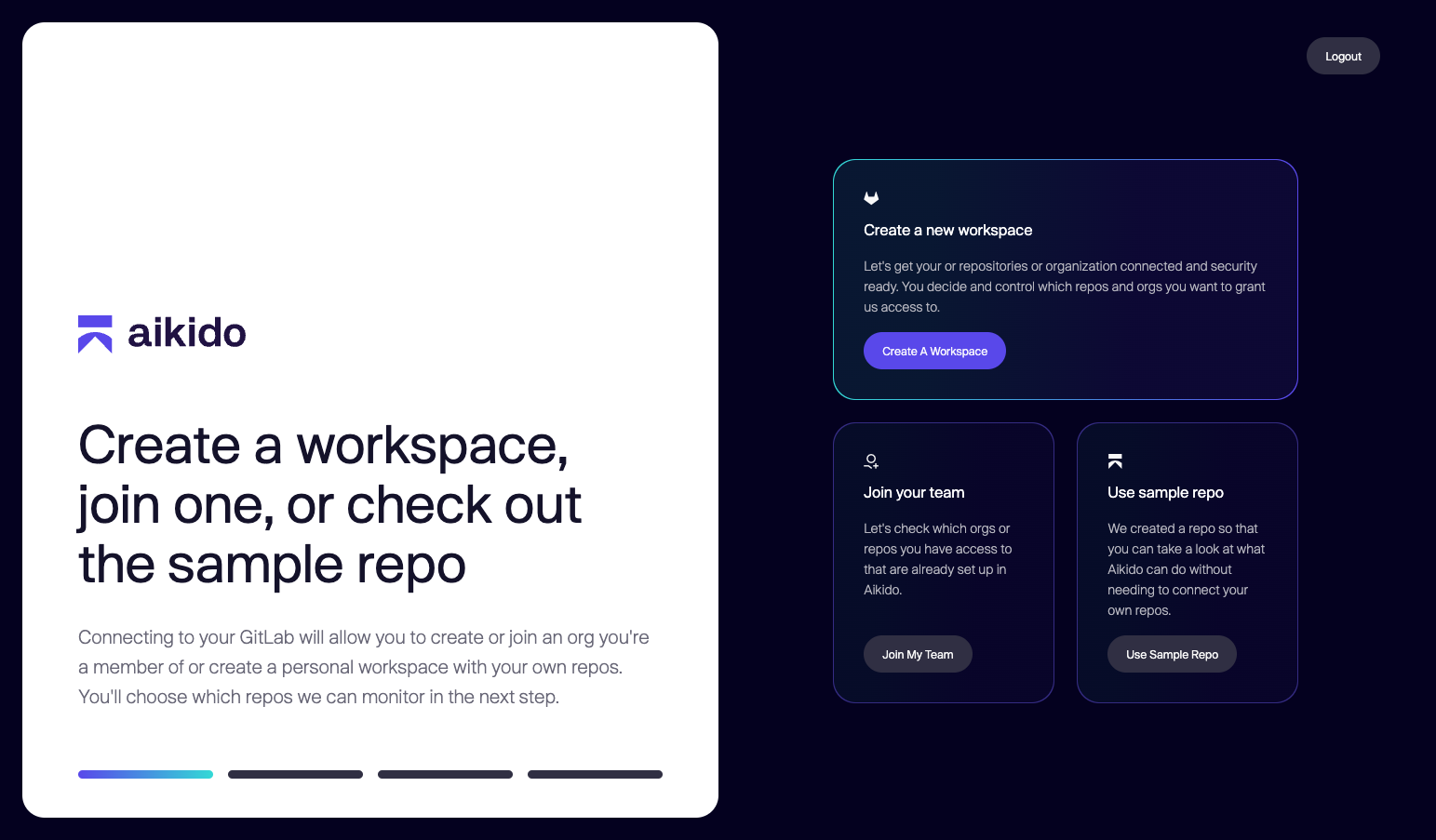
このページでは、次の 3 つのことができます:
* **新しいワークスペースを作成する:** GitLab グループを Aikido に接続し、コードリポジトリとクラウドのスキャンを開始したい場合は、このオプションを選択してください。
* **チームに参加する:** 組織内の誰かがすでに GitLab グループを Aikido に接続しており、そこへのアクセスを取得したい場合は、このオプションを選択してください。
* **サンプルリポジトリを使う:** Aikido がどのようなものか、何ができるのかを少し見てみたいですか? デモアカウントを作成して、Aikido を試してみてください。GitLab グループは後からいつでも接続できます。
#### ステップ 3. GitLab グループを Aikido に接続する
新しいワークスペースを作成したい場合、Aikido には **読み取り専用アクセス** があなたのプロジェクトとグループに必要になります。そのため、Aikido を承認できるよう、GitLab に戻っていただきます。
**注:** これは *しません* まだ実際のリポジトリへのアクセスを付与するものではありません。スキャンしたいものを選択するのは、この次のステップです。

#### ステップ 4. グループの選択とリポジトリの選択
Aikido にグループの読み取りを許可すると、Aikido に接続したいグループを選択できます。
**注:** Aikido は、ワークスペースで選択した GitLab グループのサブグループをすべて含めます。

希望するグループを選択したら、アクセスを許可したいリポジトリを選べます。

#### 5. 結果を確認する
アクセスを付与し、スキャンしたいリポジトリを確認すると、Aikido は自動的にスキャンを開始します。約 1 分後に、最初の結果が表示されるはずです!
---
# Agent Instructions
This documentation is published with GitBook. GitBook is the documentation platform designed so that both humans and AI agents can read, navigate, and reason over technical content effectively. Learn more at gitbook.com.
## Querying This Documentation
If you need additional information that is not directly available in this page, you can query the documentation dynamically by asking a question.
Perform an HTTP GET request on the current page URL with the `ask` query parameter, and the optional `goal` query parameter:
```
GET https://help.aikido.dev/docs/docs-ja/kdosukyan/connect-your-source-code/connect-gitlab-account-to-aikido.md?ask=&goal=
```
`ask` is the immediate question: it should be specific, self-contained, and written in natural language.
`goal` is optional and describes the broader end goal you are ultimately trying to accomplish on behalf of the user. GitBook uses it to tailor the answer towards what is most useful for that goal.
The response will contain a direct answer to the question and relevant excerpts and sources from the documentation.
Use this mechanism when the answer is not explicitly present in the current page, you need clarification or additional context, or you want to retrieve related documentation sections.