> For the complete documentation index, see [llms.txt](https://help.aikido.dev/llms.txt). Markdown versions of documentation pages are available by appending `.md` to page URLs; this page is available as [Markdown](https://help.aikido.dev/docs/docs-ja/kdosukyan/local-code-scanning/aws-codepipeline-setup-for-local-code-scanning.md).
# ローカルコードスキャン用のAWS CodePipeline設定
Aikido Security Local Scanner は、あなたの環境内で Aikido Security のスキャンを実行できるツールであり、コードが外部に出ることはありません。スキャンはローカルで実行され、その結果は Aikido Security プラットフォームにアップロードされます。この構成により、レポート用途で Local Scanner を AWS CodePipeline に簡単に統合できます。
## ローカルスキャンの設定方法
**前提条件**: ローカルスキャンを許可するアカウントを作成しておいてください。 [ローカルスキャンアカウントの作成に関する詳細](https://help.aikido.dev/en/articles/9070345-how-to-create-an-account-for-local-scanning-on-aikido).
このガイドでは、AWS CodePipeline と AWS CodeBuild を使用して AWS で CI パイプラインを作成します。パイプラインは、コンテナイメージ内で Aikido Security local scanner を使用してセキュリティスキャンを実行します。
## 1. CodeBuild プロジェクトを作成する
まず、スキャンを実行する CodeBuild プロジェクトを作成します。
CodeBuild に移動する
1. AWS コンソールを開く
2. CodeBuild に移動する
3. [Create build project]をクリック
#### 作成する `aikido-security-scan` プロジェクト。
* ソース: 選択 `ソースなし`。ソースは CodePipeline によって提供されます。
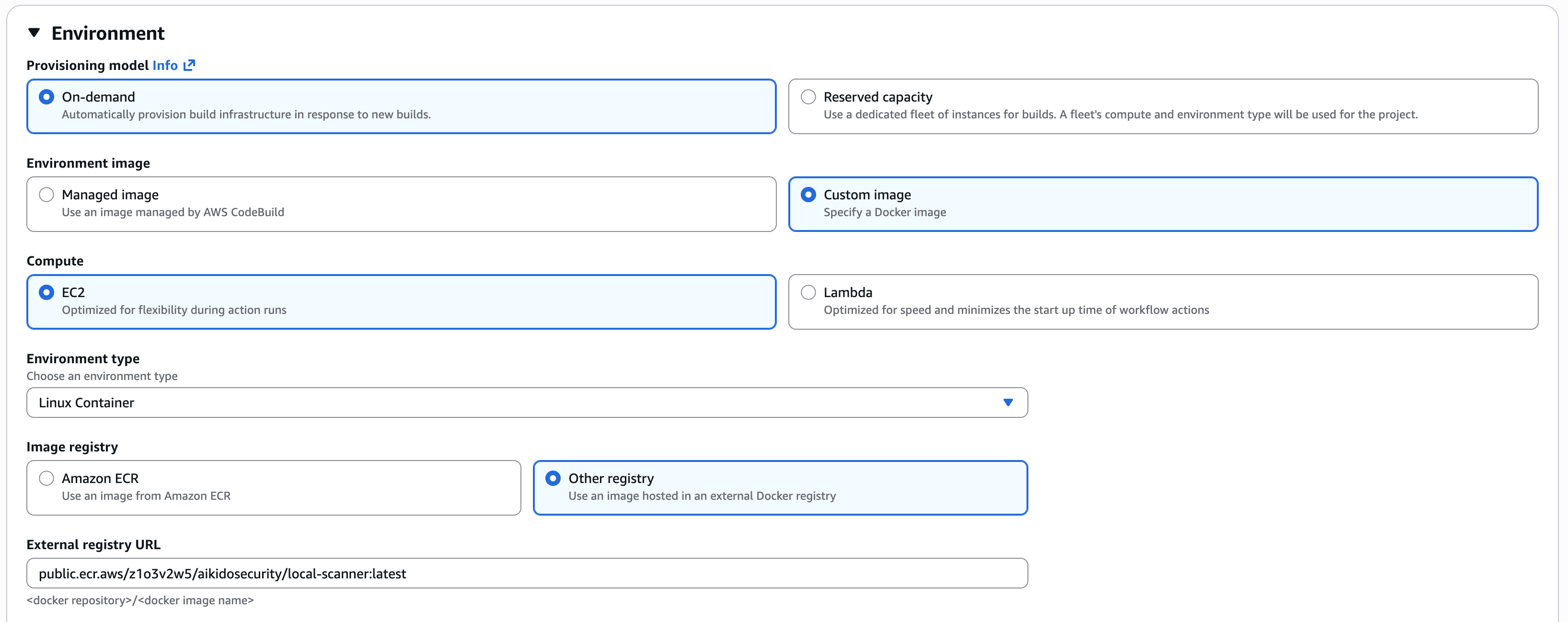
* 環境:
* イメージ: カスタムイメージ
* コンピュート: EC2
* 環境タイプ: Linux コンテナ
* イメージレジストリ: その他のレジストリ
* 外部レジストリ URL: public.ecr.aws/z1o3v2w5/aikidosecurity/local-scanner:latest
* Buildspec:
```
version: 0.2
phases:
build:
commands:
- aikido-local-scanner scan . --apikey $AIKIDO_API_KEY --repositoryname MyRepo --branchname myDefaultBranch
```
#### API キーを CodeBuild プロジェクトに追加する
* 次へ移動します [ローカルスキャナーのセットアップページ](https://app.aikido.dev/settings/integrations/localscan)
* 認証トークンを生成してコピーします。このトークンは一度しか表示できないことに注意してください。
* このトークンをキー AIKIDO\_API\_KEY で AWS Secrets Manager に追加し、aikido/local-scanner-api-key のような名前を付けてください。完全なシークレット ARN を控えておいてください。すぐに必要になります。
* CodeBuild プロジェクトは IAM サービスロールで実行されます。このロールにはシークレットを読み取る権限が必要です。以下のポリシーを追加し、ARN をシークレットの ARN に置き換えてください。
```
{
"Version": "2012-10-17",
"Statement": [
{
"Effect": "Allow",
"Action": [
"secretsmanager:GetSecretValue"
],
"Resource": "arn:aws:secretsmanager:::secret:aikido/local-scanner-api-key-*"
}
]
}
```
* CodeBuild プロジェクトに戻り、[Edit] > [Environment] > [Additional Configuration] をクリックします。環境変数を追加してください:
* Name: AIKIDO\_API\_KEY
* Value: aikido/local-scanner-api-key
* Type: Secrets Manager
値の形式は \:\ です。CodeBuild はビルド時にこれを自動的に解決し、値を環境に注入します。詳細は [AWS ドキュメント](https://docs.aws.amazon.com/codebuild/latest/APIReference/API_EnvironmentVariable.html) を参照してください。
## 2. CodePipeline を作成する
スキャンしたいリポジトリ用のパイプラインを設定します。\
デフォルトブランチへの変更でトリガーされるソースステージを追加します。ビルドステージでは、ビルドプロバイダーとして AWS CodeBuild を選択し、追加の `aikido-security-scan` ビルドプロジェクトを追加します。これにより、パイプラインが先ほど作成したビルドジョブに接続されます。
## 3. スキャン結果を確認する
最初のスキャンが完了したら、Aikido Feed に移動して結果を確認できます。スキャン結果をすべて含むリポジトリが作成されています。
---
# Agent Instructions
This documentation is published with GitBook. GitBook is the documentation platform designed so that both humans and AI agents can read, navigate, and reason over technical content effectively. Learn more at gitbook.com.
## Querying This Documentation
If you need additional information that is not directly available in this page, you can query the documentation dynamically by asking a question.
Perform an HTTP GET request on the current page URL with the `ask` query parameter, and the optional `goal` query parameter:
```
GET https://help.aikido.dev/docs/docs-ja/kdosukyan/local-code-scanning/aws-codepipeline-setup-for-local-code-scanning.md?ask=&goal=
```
`ask` is the immediate question: it should be specific, self-contained, and written in natural language.
`goal` is optional and describes the broader end goal you are ultimately trying to accomplish on behalf of the user. GitBook uses it to tailor the answer towards what is most useful for that goal.
The response will contain a direct answer to the question and relevant excerpts and sources from the documentation.
Use this mechanism when the answer is not explicitly present in the current page, you need clarification or additional context, or you want to retrieve related documentation sections.