> For the complete documentation index, see [llms.txt](https://help.aikido.dev/llms.txt). Markdown versions of documentation pages are available by appending `.md` to page URLs; this page is available as [Markdown](https://help.aikido.dev/docs/docs-ja/kdosukyan/scanning-practices/custom-code-context-for-sast-rules.md).
# SASTルールのためのカスタムコードコンテキスト
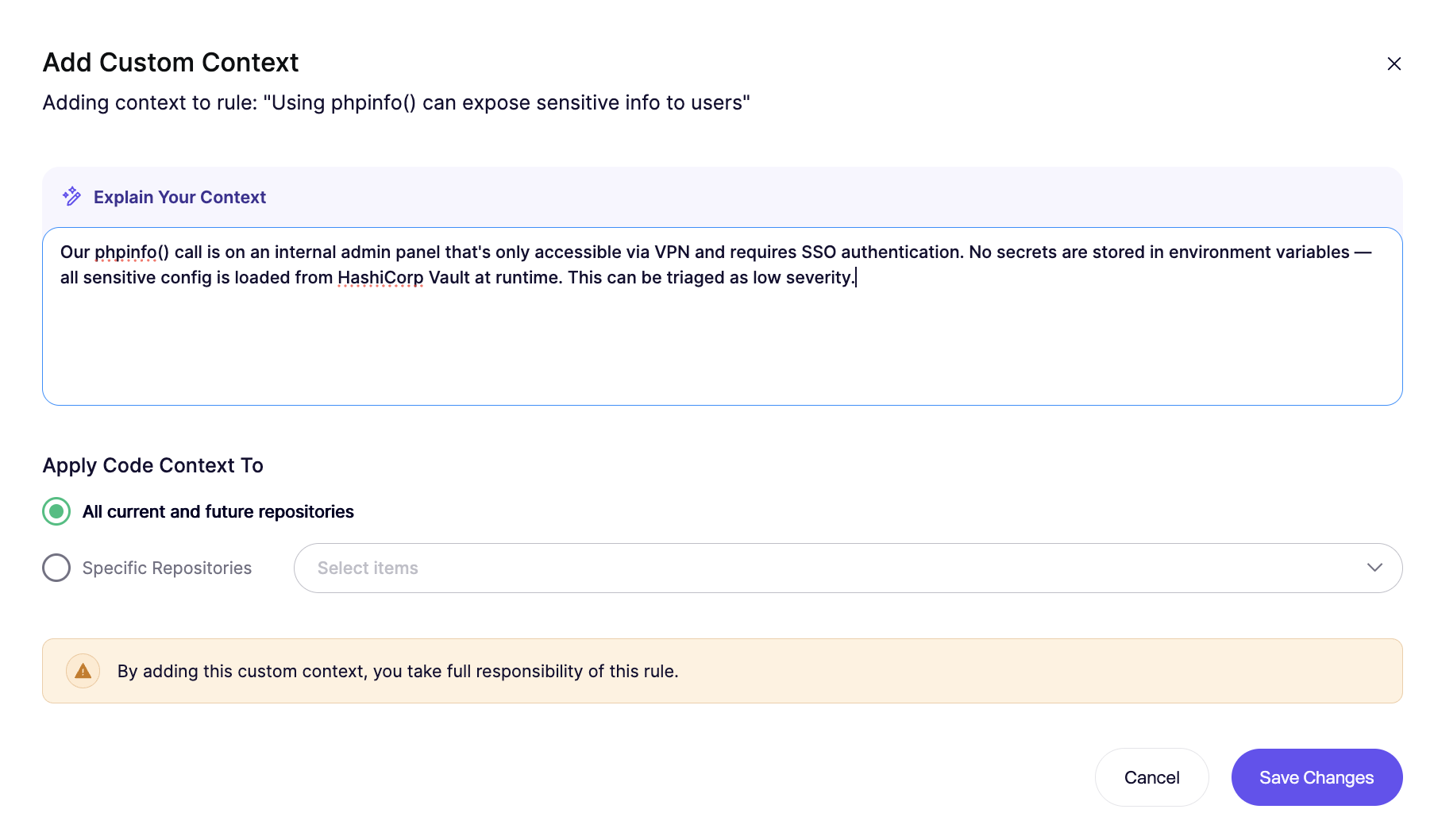
Custom Code Context を使うと、特定の SAST ルールに平易な言葉でのガイダンスを追加できます。Aikido はそのガイダンスを、 [SAST AutoTriage](/docs/docs-ja/aikido-agent/sast-autotriage.md) より適切に真陽性・偽陽性を判断するためです。コンテキストはグローバルにも、リポジトリ単位でも追加できます。
ただし、これは **しない** ルールが検出する内容を変えるものではありません。Aikido が検出結果をより正確に解釈するのに役立ちます。
### ユースケース
ルールにコードベース固有の知識が必要な場合は、Custom Code Context を使用します。たとえば:
* 信頼できるサニタイズライブラリ
* 危険な API を包む社内の安全なラッパー
* データを信頼済みとして扱う検証ヘルパー
* 1 つのリポジトリでのみ安全なパターン
* 信頼できる入力を受ける、隔離されたマシン上で実行されるスクリプト
具体例を表示
**信頼できるサニタイズライブラリ**
{% code overflow="wrap" %}
```
私たちはサニタイズに公開ライブラリ をよく使用します。このライブラリの関数が返すすべての変数は信頼できるものと見なされます。
```
{% endcode %}
**社内の検証ヘルパー**
{% code overflow="wrap" %}
```
このルールでは、validateAndNormalizeUserInput() が返す値はサニタイズ済みと見なされます。このヘルパーは無効な文字を拒否し、厳格な許可リストを適用します。
```
{% endcode %}
**危険な API を包む安全なラッパー**
{% code overflow="wrap" %}
```
このルールでは、safeRedirect() 経由の呼び出しが想定されます。このラッパーは、承認済みドメインの許可リストにある URL へのリダイレクトのみを許可します。
```
{% endcode %}
### コンテキストの追加方法
{% hint style="info" %}
Custom Code Context は、AutoTriage をサポートする SAST ルールでのみ利用できます。
{% endhint %}
**手順 1.** Repositories Checks ページを開き、'[SAST ルールを表示](https://app.aikido.dev/repositories/sast)'.
**手順 2.** 該当する SAST ルールを見つけ、アクションメニューを開いて選択します **Custom Code Context**.
**手順 3.** コンテキストを平易な言葉で追加します。
**手順 4.** コンテキストをグローバルに適用するか、そのリポジトリのみに適用するかを選び、変更を保存します。
{% hint style="info" %}
新しいコンテキストを適用するには、手動での再スキャンが必要です。
{% endhint %}
### 記述のヒント
コンテキストは狭く、具体的に保ちます。
すること:
* 正確なライブラリ、関数、ラッパー、またはフォルダ名を挙げる
* データが信頼できる、またはサニタイズされている理由を説明する
* 選択したルールに固有の内容にする
避けるもの:
* 「入力は通常サニタイズされる」のような広範な主張
* 関数名のない曖昧な記述
* すべてに当てはまる例外
良い例と弱い例を表示
**良い例**
{% code overflow="wrap" %}
```
この SQL インジェクション ルールでは、buildSafeQuery() が返す値は信頼できます。このヘルパーはパラメータ化クエリのみを作成し、未加工のユーザー入力を連結しません。
```
{% endcode %}
**弱い例**
{% code overflow="wrap" %}
```
私たちのチームは SQL クエリに注意しているので、これらの検出結果はしばしば誤検知です。
```
{% endcode %}
### Custom Code Context とカスタム SAST ルールの違い
既存のルールのトリアージを改善したい場合は、Custom Code Context を使用します。
使用 [カスタム SAST ルール](/docs/docs-ja/kdosukyan/scanning-practices/add-custom-sast-iac-rules.md) コードベース内の新しいパターンを検出する必要があるとき。
要するに:
* **Custom Code Context** 解釈を精緻化する
* **カスタム SAST ルール** 検出を拡張する
---
# Agent Instructions
This documentation is published with GitBook. GitBook is the documentation platform designed so that both humans and AI agents can read, navigate, and reason over technical content effectively. Learn more at gitbook.com.
## Querying This Documentation
If you need additional information that is not directly available in this page, you can query the documentation dynamically by asking a question.
Perform an HTTP GET request on the current page URL with the `ask` query parameter, and the optional `goal` query parameter:
```
GET https://help.aikido.dev/docs/docs-ja/kdosukyan/scanning-practices/custom-code-context-for-sast-rules.md?ask=&goal=
```
`ask` is the immediate question: it should be specific, self-contained, and written in natural language.
`goal` is optional and describes the broader end goal you are ultimately trying to accomplish on behalf of the user. GitBook uses it to tailor the answer towards what is most useful for that goal.
The response will contain a direct answer to the question and relevant excerpts and sources from the documentation.
Use this mechanism when the answer is not explicitly present in the current page, you need clarification or additional context, or you want to retrieve related documentation sections.