> For the complete documentation index, see [llms.txt](https://help.aikido.dev/llms.txt). Markdown versions of documentation pages are available by appending `.md` to page URLs; this page is available as [Markdown](https://help.aikido.dev/docs/docs-ja/kdosukyan/scanning-practices/custom-vulnerabilities.md).
# カスタム CVE 脆弱性
公開 CVE データベースにない社内またはプライベートパッケージの脆弱性を定義します。
Aikido では、ワークスペース管理者が社内またはプライベートのパッケージ向けに Custom CVE を定義できます。スキャンで一致するパッケージとバージョンが見つかると、Aikido はオープンソースの issue を次の内容で作成します。 `CUSTOM-CVE-{id}` 識別子。
{% hint style="info" %}
この機能はワークスペースレベルで有効にする必要があります。有効化するにはお問い合わせください。
{% endhint %}
#### ユースケース
* 社内またはプライベートのパッケージ: 公開 CVE データベースにはないものの、既知のセキュリティ上の欠陥があるライブラリを管理している場合。
* 公開 CVE が存在しない: 脆弱性は内部で見つかったものの、CVE が割り当てられなかった場合。
* ポリシー駆動のブロッキング: すべてのリポジトリとコンテナに対して、社内パッケージの「X 未満のバージョンは不可」を強制したい場合。
#### Custom CVE を追加
**ステップ 1.** 次へ [**CVE データベース**](https://app.aikido.dev/reports/cve) **レポート** → **Custom CVE を管理**
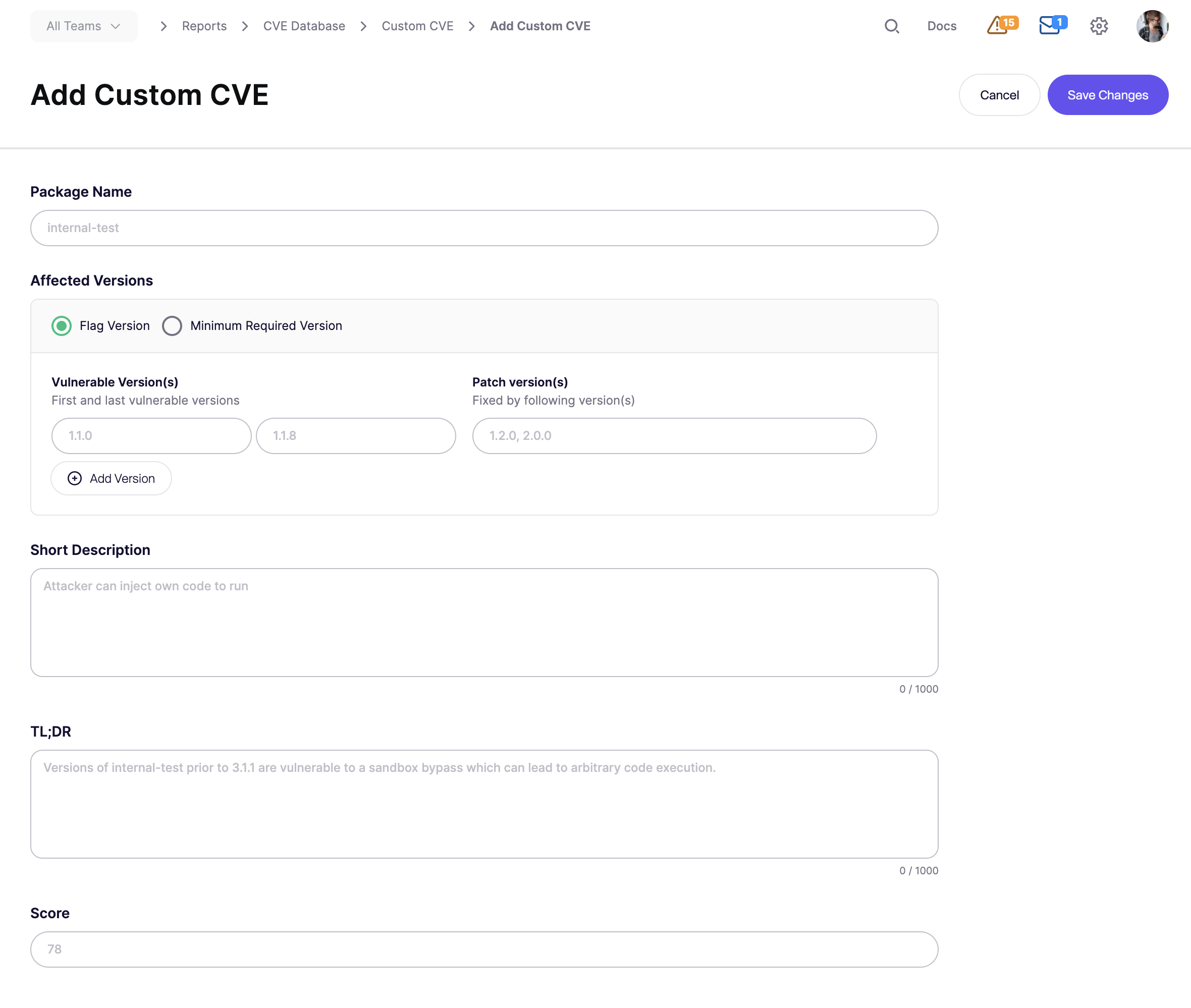
**ステップ 2.** クリック **Custom CVE を追加**.
**ステップ 3.** 以下の項目を入力してください:
* **パッケージ名**
* スキャンで検出されたパッケージ名を正確に使用してください。
* **影響を受けるバージョン**
* 次の一致方法のいずれかを使用してください:
* **フラグ対象バージョン:** 最初の脆弱バージョン、最後の脆弱バージョン、およびパッチまたは修正版を定義します。
* **必要最小バージョン:** 必要最小値を下回るすべてのバージョンをフラグします。
* **短い説明、TL;DR、およびスコア**
* 〜から優先度を設定 `1` を `100`。これにより issue の深刻度が設定されます。
**ステップ 4.** クリック **変更を保存**.
Aikido は〜を割り当て `CUSTOM-CVE-{id}` そして次回のスキャンでそれを照合し始めます。
例
パッケージ `acme-auth-lib` は〜から脆弱です `1.0.0` ~まで `1.5.2`.
バージョン `1.6.0` 修正が含まれています。
Custom CVE は次のように作成します:
* **パッケージ名:** `acme-auth-lib`
* **フラグ対象バージョン:** `1.0.0` → `1.5.2`
* **パッチバージョン:** `1.6.0`
* **スコア:** `78` これは高深刻度に相当します
脆弱なバージョンを使用しているリポジトリには issue が作成されます。
〜にアップグレードすると `1.6.0` 次回のスキャンで issue が自動的にクローズされます。
#### トラブルシューティング
次の場合、Custom CVE の issue が表示されないことがあります:
* パッケージ名が完全一致せず、大文字・小文字も区別される
* インストールされているバージョンが定義された範囲外である
* パッケージが dev dependency で、dev dependency のスキャンがオフになっている
* この機能がワークスペースで有効になっていない
影響を受けるパッケージが dev dependency の場合は、まず dev dependency の CVE スキャンを有効にしてください。参照: [dev dependency の CVE スキャン](/docs/docs-ja/kdosukyan/scanning-practices/scanning-dev-dependencies-for-cves.md).
---
# Agent Instructions
This documentation is published with GitBook. GitBook is the documentation platform designed so that both humans and AI agents can read, navigate, and reason over technical content effectively. Learn more at gitbook.com.
## Querying This Documentation
If you need additional information that is not directly available in this page, you can query the documentation dynamically by asking a question.
Perform an HTTP GET request on the current page URL with the `ask` query parameter, and the optional `goal` query parameter:
```
GET https://help.aikido.dev/docs/docs-ja/kdosukyan/scanning-practices/custom-vulnerabilities.md?ask=&goal=
```
`ask` is the immediate question: it should be specific, self-contained, and written in natural language.
`goal` is optional and describes the broader end goal you are ultimately trying to accomplish on behalf of the user. GitBook uses it to tailor the answer towards what is most useful for that goal.
The response will contain a direct answer to the question and relevant excerpts and sources from the documentation.
Use this mechanism when the answer is not explicitly present in the current page, you need clarification or additional context, or you want to retrieve related documentation sections.