> For the complete documentation index, see [llms.txt](https://help.aikido.dev/llms.txt). Markdown versions of documentation pages are available by appending `.md` to page URLs; this page is available as [Markdown](https://help.aikido.dev/docs/docs-ja/kdosukyan/scanning-practices/java-scala-kotlin-projects-using-gradle-security-scanning-best-practices.md).
# Gradleを使用するJava/Scala/Kotlinプロジェクト: セキュリティスキャンのベストプラクティス
Aikido は、Java の依存関係にある既知の脆弱性(CVE)だけでなく、それらの依存関係で使用されている危険なライセンスも見つけることができます。
Aikido はそれらの依存関係と、その推移的なサブ依存関係をどのように見つけるのですか?
標準で、Aikido はスキャン対象として次のファイルをサポートしています:
* gradle.lockfile
* pom.xml
* .jar/.war/.ear
build.gradle.\*(Gradle マニフェスト)ファイルには、依存関係の一部について正確なバージョンが含まれていない場合があることに注意してください。これにより、Aikido がアプリケーション内のリスクの全体像を見つけられなくなる可能性があります。
各依存関係およびサブ依存関係について正確なバージョンを含む Gradle のロックファイルを使用することをおすすめします。
Aikido によるセキュリティスキャンを容易にすること以外にも、ロックファイルを使う理由があります:
* ロックファイルを使うことで、悪意のあるパッケージを介したサプライチェーン攻撃から身を守れます。この種の攻撃はますます一般的になっています
* ロックファイルを使うと、誰もがパッケージのまったく同じマイナーバージョンを使うため、ビルドがより予測しやすくなります。「自分の環境では動く」可能性も減ります。
* ビルド時間の短縮: 依存関係の解決が不要になります
## Gradle プロジェクトでロックファイルの使用を始めるには?
リポジトリにロックファイルを追加する方法は 2 つあります:
**オプション 1: Aikido に作成させる(推奨)**
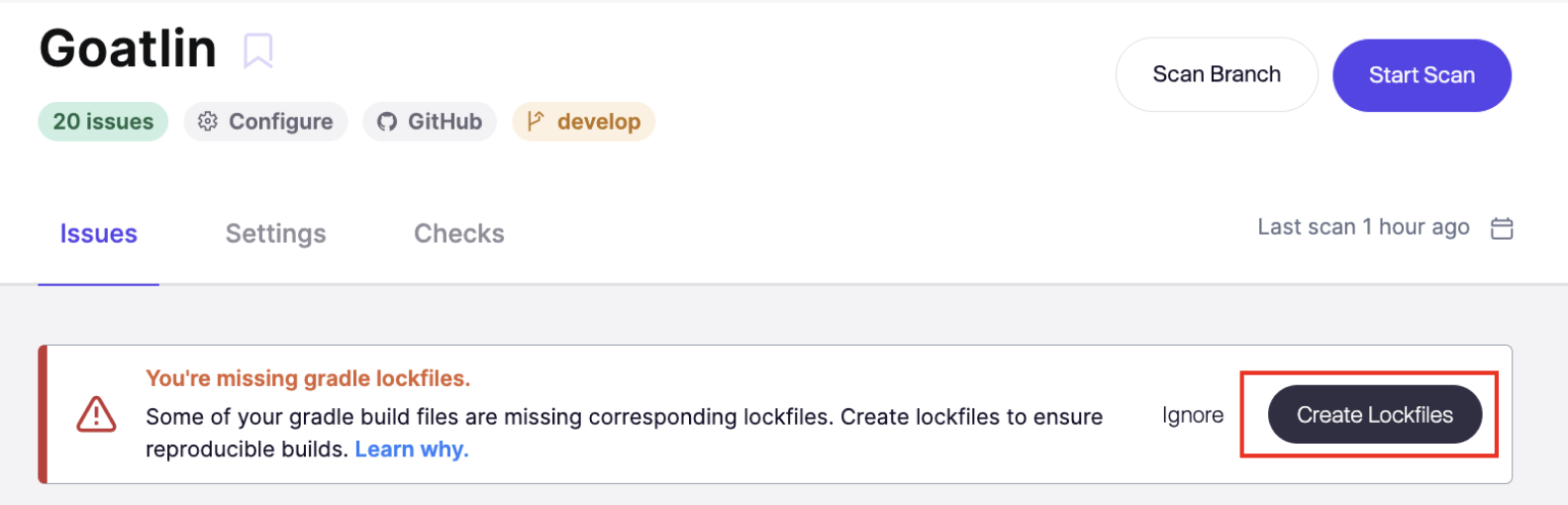
リポジトリに `build.gradle` または `build.gradle.kts` があり、対応する `gradle.lockfile`がない場合、Aikido はこれを自動検出し、 **プルリクエストを開いて** 作成できます。 *注意:* [*AutoFix*](https://help.aikido.dev/aikido-autofix/overview-aikido-autofix) *このオプションでは有効化が必要です。*
**手順 1.** ロックファイルがない該当リポジトリに移動してください
**手順 2.** 上部にあるロックファイルの提案を探してクリックしてください **PR を作成**
**手順 3.** PR を確認してマージしてください。あとは Aikido が処理します
マージされると、Aikido はすべての推移的依存関係を含む依存関係ツリー全体をすぐにスキャンできるようになります。
**オプション 2: 手動で追加する**
必要な設定を Gradle マニフェストファイルに追加してください。詳しくは [Gradle ロックファイルのドキュメント](https://docs.gradle.org/current/userguide/dependency_locking.html#ex-locking-all-configurations) で追加すべき正確な行を確認してください。
次に、以下を実行してください:
```
gradle dependencies --write-locks
```
生成されたロックファイルをリポジトリにコミットしてください。これは `package-lock.json` Node.js のものと同様に扱い、手動で編集しないでください。
---
# Agent Instructions
This documentation is published with GitBook. GitBook is the documentation platform designed so that both humans and AI agents can read, navigate, and reason over technical content effectively. Learn more at gitbook.com.
## Querying This Documentation
If you need additional information that is not directly available in this page, you can query the documentation dynamically by asking a question.
Perform an HTTP GET request on the current page URL with the `ask` query parameter, and the optional `goal` query parameter:
```
GET https://help.aikido.dev/docs/docs-ja/kdosukyan/scanning-practices/java-scala-kotlin-projects-using-gradle-security-scanning-best-practices.md?ask=&goal=
```
`ask` is the immediate question: it should be specific, self-contained, and written in natural language.
`goal` is optional and describes the broader end goal you are ultimately trying to accomplish on behalf of the user. GitBook uses it to tailor the answer towards what is most useful for that goal.
The response will contain a direct answer to the question and relevant excerpts and sources from the documentation.
Use this mechanism when the answer is not explicitly present in the current page, you need clarification or additional context, or you want to retrieve related documentation sections.