> For the complete documentation index, see [llms.txt](https://help.aikido.dev/llms.txt). Markdown versions of documentation pages are available by appending `.md` to page URLs; this page is available as [Markdown](https://help.aikido.dev/docs/docs-ja/konpuraiansutorepto/reports/trends-over-time-report.md).
# 時系列トレンドレポート
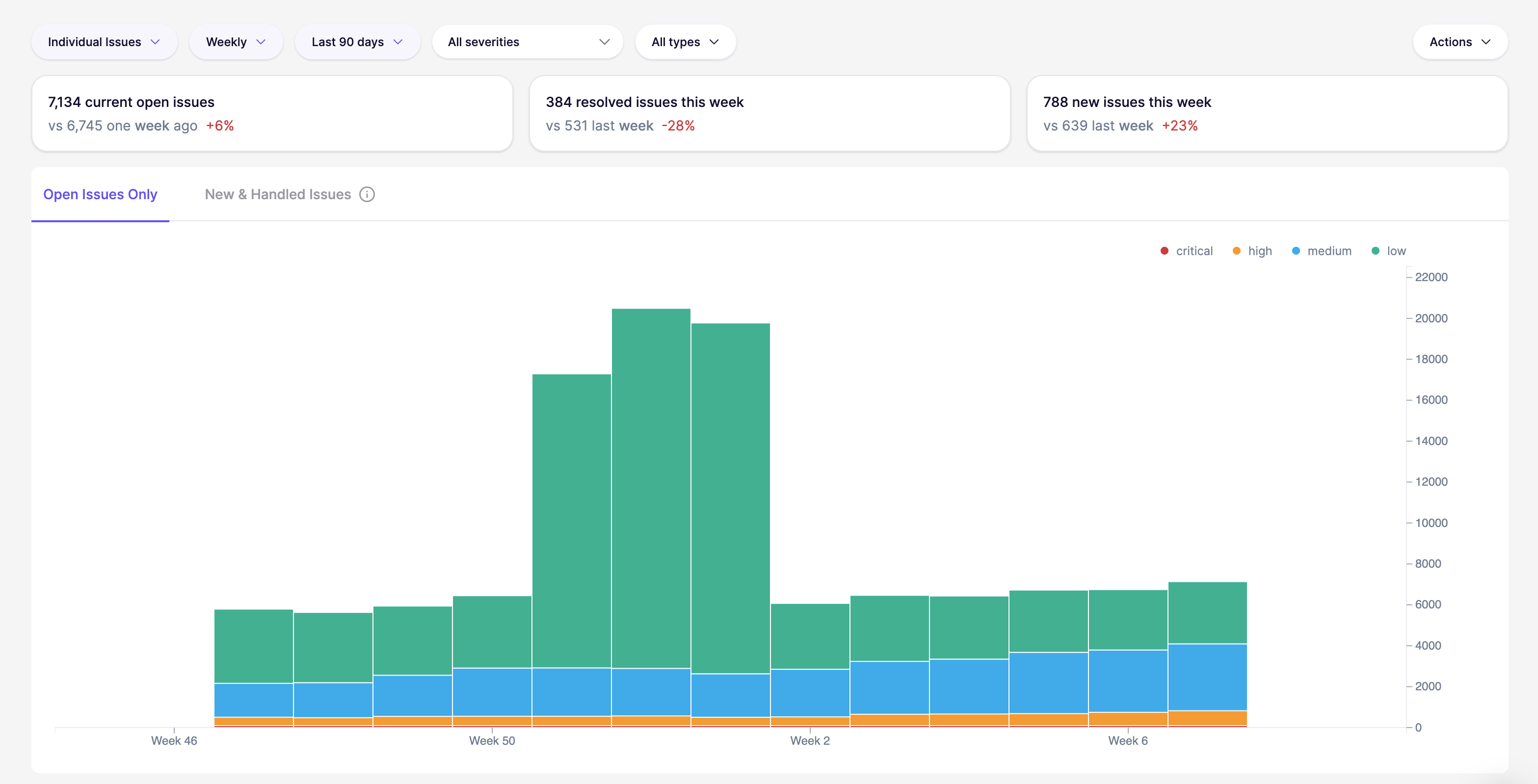
次の [時系列の傾向](https://app.aikido.dev) このレポートでは、セキュリティ体制が週ごとにどのように推移していくかを示します。静的なスナップショットだけでなく、件数と変化に重点を置いています。
このレポートには主に2つのビューがあります:
**未解決の課題**
未処理のバックログの推移を追跡します。リスクが蓄積しているのか、横ばいなのか、減少しているのかを最も早く把握できます。
**新規&対応済みの課題**
新規課題の流入数と、同期間に対応済みとなった課題数を比較します。これは、「バックログを減らせているのか、それとも現状維持にとどまっているのか」を判断するのに役立ちます。
**SLA 超過**
「SLA期限超過」チャートは、選択した期間内にサービスレベル合意(SLA)の期限を超過した課題の数を視覚的に示します。このグラフを分析することで、チームはSLA違反がいつピークに達するかを特定し、運用上の要因と関連付けて根本原因を把握できます。
## このレポートを使うタイミング
次のような場合に[傾向]レポートを使用します:
* セキュリティ施策の効果を追跡する
* 課題の繰り返し発生する急増を特定する
* チームが新しい検出事項  に対応できているかを把握する
* 対応済みの課題数が新規課題数と継続的に同等以上であることを確認する
---
# Agent Instructions
This documentation is published with GitBook. GitBook is the documentation platform designed so that both humans and AI agents can read, navigate, and reason over technical content effectively. Learn more at gitbook.com.
## Querying This Documentation
If you need additional information that is not directly available in this page, you can query the documentation by asking a question.
Perform an HTTP GET request on the following URL with the `ask` and `goal` query parameters:
```
GET https://help.aikido.dev/docs/docs-ja/konpuraiansutorepto/reports/trends-over-time-report.md?ask=&goal=
```
`ask` is the immediate question: it should be specific, self-contained, and written in natural language.
`goal` is what the user is ultimately trying to achieve, the reason they need the answer. Sharing it helps GitBook give you a better, more relevant answer. A goal is most helpful when it describes the outcome the user wants rather than restating the question. For example, with `ask=how do I create an API token`, a goal like `automate deployments from our CI pipeline` lets GitBook tailor the answer to that use case.
The response will contain a direct answer to the question and relevant excerpts and sources from the documentation.
Use this mechanism when the answer is not explicitly present in the current page, you need clarification or additional context, or you want to retrieve related documentation sections.