> For the complete documentation index, see [llms.txt](https://help.aikido.dev/llms.txt). Markdown versions of documentation pages are available by appending `.md` to page URLs; this page is available as [Markdown](https://help.aikido.dev/docs/docs-ja/kuraudosukyan/connect-your-cloud/connect-oracle-cloud.md).
# Oracle Cloudを接続する
### Oracle Cloudアカウントを接続する理由は?
クラウドインフラを保護することは、ユーザーデータを守るうえで不可欠です。Aikidoのセキュリティチェックを活用して、Oracle Cloud Infrastructure(OCI)のテナンシーにある設定ミスを検出し、対処できます。
#### **主なユースケース**
* Aikidoは、MFAなしのコンソールユーザー、90日以上古いAPIキー、複数の有効なAPIキーを持つユーザーなど、OCIテナンシーを攻撃者にさらしかねないIAMの設定ミスを可視化します。すべての設定チェックは [こちらで確認できます。](https://app.aikido.dev/clouds/checks)
* Aikidoは、構成の変更に応じてOracle Cloudテナンシーに新たなリスクがないかを継続的に監視します。
Aikido は上記に対して毎日コンプライアンススキャンを実行します。
### はじめに
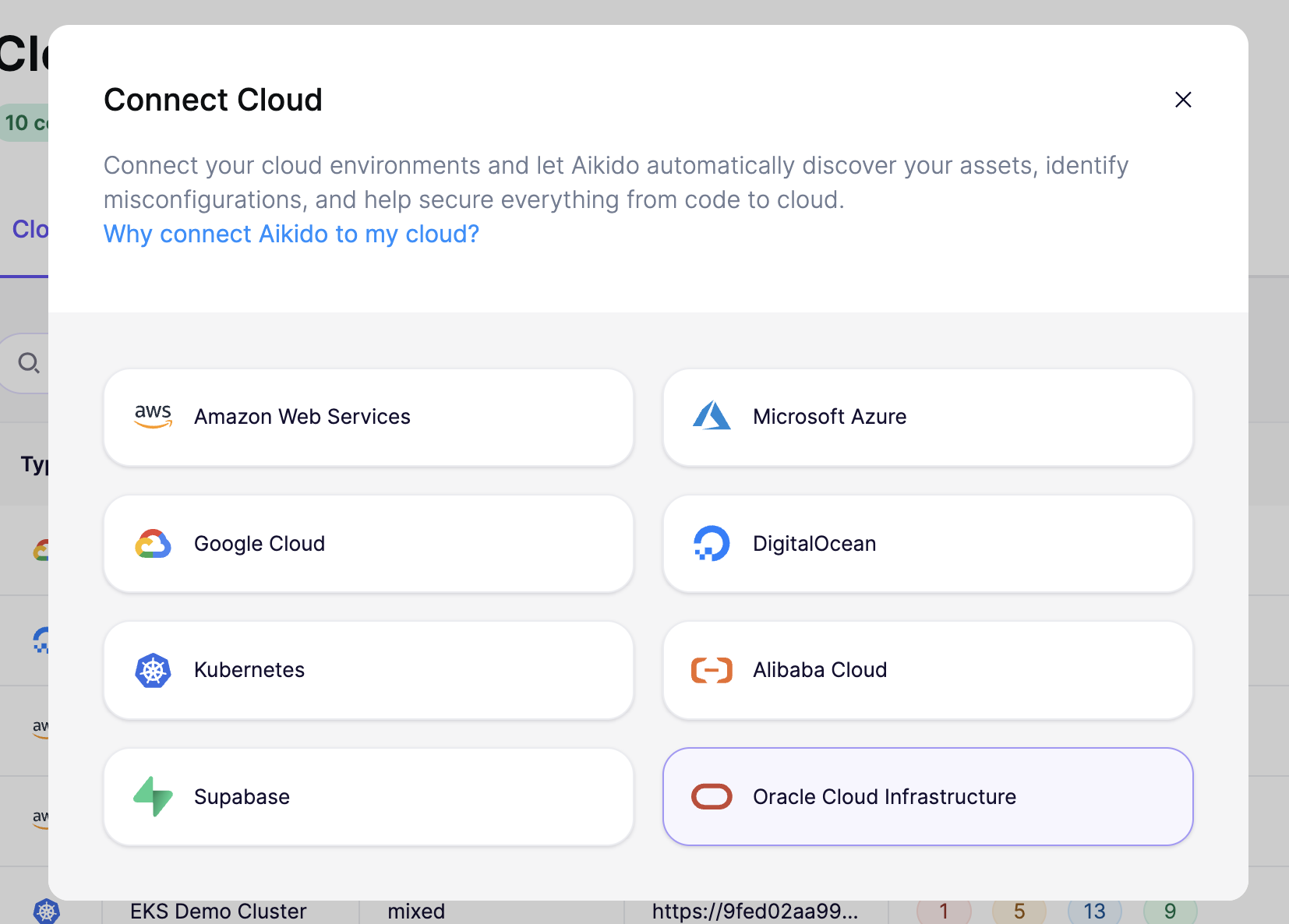
始めるには、 [クラウド概要ページ](https://app.aikido.dev/clouds) Aikido上でクリックし **「Cloud を接続」**。選択します **Oracle Cloud Infrastructure** を一覧から選択し、手順に沿ってセットアップウィザードを進めます。
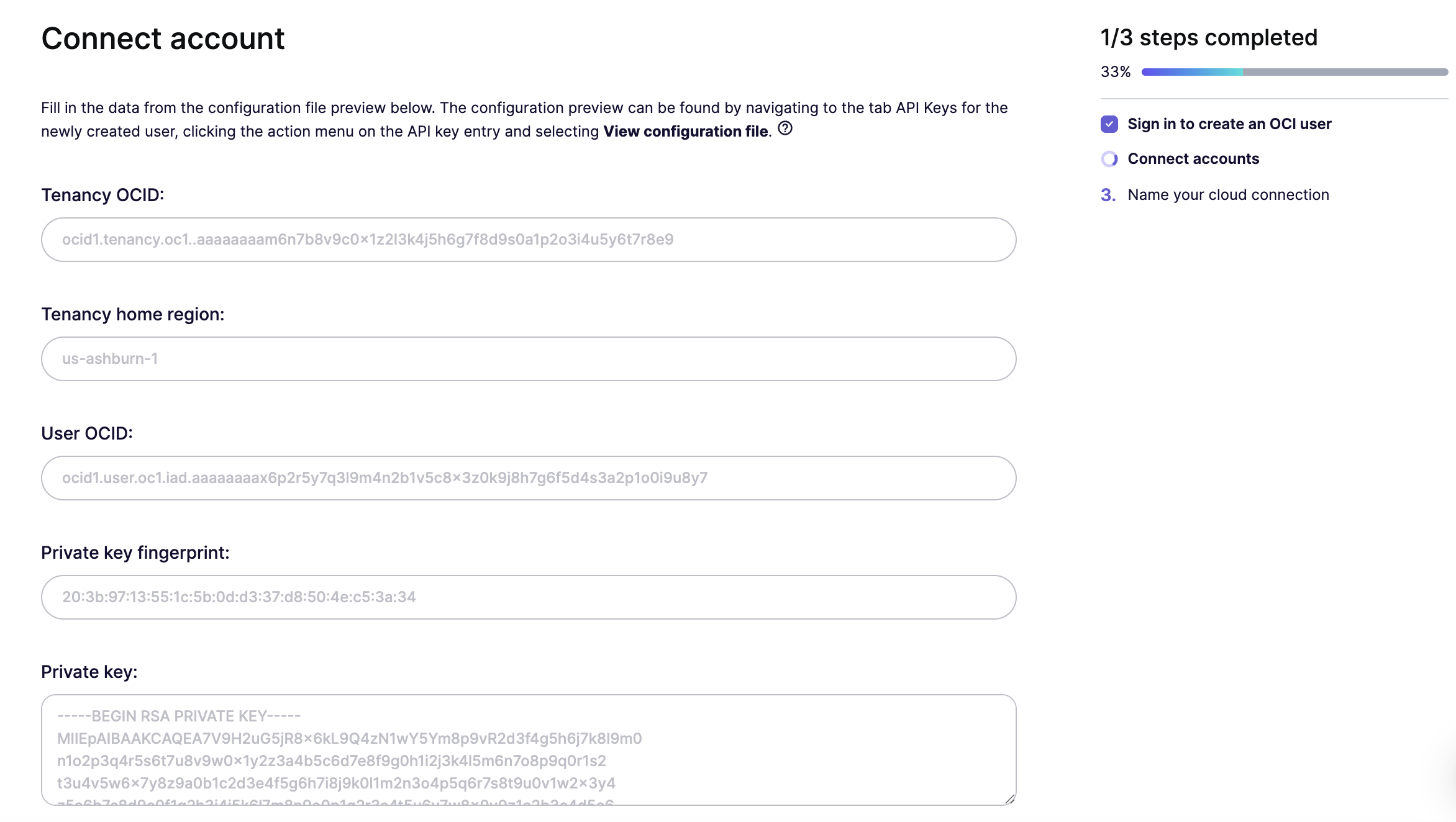
アカウントを接続するには、OCI設定ファイルからいくつかの値が必要です。 **テナンシーOCID**, **ホームリージョン**, **ユーザーOCID**, **秘密鍵のフィンガープリント**、および **秘密鍵**。以下の手順では、OCIで専用の読み取り専用ユーザーを作成し、これらの値を取得する方法を案内します。
{% stepper %}
{% step %}
**Oracle Cloudアカウントにログインする**
次へ移動します [Oracle Cloud Console](https://cloud.oracle.com/) にサインインします。 **IAMドメイン** Aikido Securityユーザーを管理したい場所へ移動します。
{% endstep %}
{% step %}
**専用ユーザーを作成する**
次の下で **ユーザー管理**、クリック **ユーザーを作成**。詳細を入力します(例: `aikido-security`)を入力し、クリックします **作成**.
*後でAikidoのアクセスを監査しやすいように、専用ユーザーを作成することを推奨します。*
{% endstep %}
{% step %}
**グループを作成してユーザーを追加する**
に戻る **ユーザー管理** を選択し **グループを作成**、次のようなわかりやすい名前を付けます: `aikido-security-readonly`、先ほど作成したユーザーを割り当て、クリックします **作成**.
{% endstep %}
{% step %}
**読み取り専用ポリシーを作成する**
次へ移動します **ポリシー** して、グループに読み取り専用アクセスを付与する新しいポリシーを作成します。方法は2つあります:
**オプション1:Policy Builderテンプレートを使用する(推奨)**
Policy Builderで **ポリシーのユースケース** を **監査** を選択し、 **「監査担当者がリソースを確認できるようにする」** テンプレートを選択します。次に **IDドメイン**を選択し、 **グループ**を選び、先ほど作成したグループ(例: `aikido-security-readonly`).\
\
**オプション2:ステートメントを手動で追加する**
クリック **手動エディターを表示** を開いて、以下のステートメントを貼り付けます。別のグループ名を使った場合は、ステートメント内で更新してください。
```
グループ aikido-security-readonly にテナンシー内の all-resources を検査することを許可
グループ aikido-security-readonly にテナンシー内の all-resources を読み取ることを許可
グループ aikido-security-readonly にテナンシー内の audit-events を読み取ることを許可
```
{% endstep %}
{% step %}
**ユーザーにAPIキーを追加する**
ユーザーのプロファイルで、クリックします **APIキーを追加**。自分の公開鍵をアップロードするか、OCIに鍵ペアを生成させることができます。キーが作成されると、OCIに **設定ファイルのプレビュー**が表示されます。これは開いたままにしておいてください。次の手順でその値が必要です。
{% endstep %}
{% step %}
**Aikidoで設定値を入力する**
クリック **続行** Aikidoウィザードで、OCI設定ファイルのプレビューから以下の値を貼り付けます:
* **テナンシーOCID**
* **テナンシーのホームリージョン** (例: `us-ashburn-1`)
* **ユーザーOCID**
* **秘密鍵のフィンガープリント**
* **秘密鍵** (次の内容をすべて含む: `-----BEGIN RSA PRIVATE KEY-----` および `-----END RSA PRIVATE KEY-----` の行)
次に、 **続行**.
{% endstep %}
{% step %}
**クラウド設定に名前を付ける**
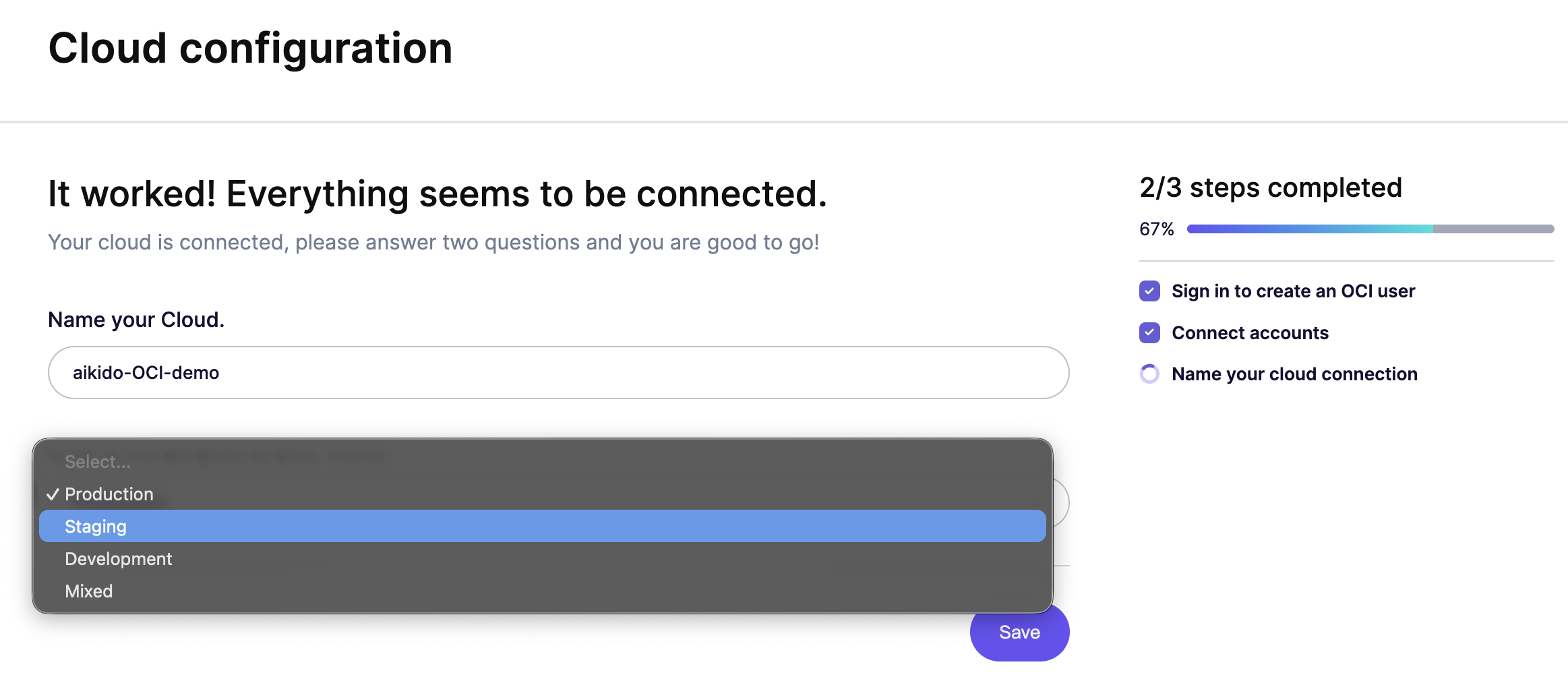
Aikidoで接続したテナンシーに名前を付け、運用環境(本番、ステージング、開発)を指定します。これにより、Aikidoは重大度とビジネスへの影響に基づいて検出結果の優先順位を付けやすくなります。クリックします **保存** で完了します。
{% endstep %}
{% endstepper %}
アカウントを接続してから 1〜2 分以内に、Aikido は脅威となり得る設定ミスを報告します。
---
# Agent Instructions
This documentation is published with GitBook. GitBook is the documentation platform designed so that both humans and AI agents can read, navigate, and reason over technical content effectively. Learn more at gitbook.com.
## Querying This Documentation
If you need additional information that is not directly available in this page, you can query the documentation dynamically by asking a question.
Perform an HTTP GET request on the current page URL with the `ask` query parameter, and the optional `goal` query parameter:
```
GET https://help.aikido.dev/docs/docs-ja/kuraudosukyan/connect-your-cloud/connect-oracle-cloud.md?ask=&goal=
```
`ask` is the immediate question: it should be specific, self-contained, and written in natural language.
`goal` is optional and describes the broader end goal you are ultimately trying to accomplish on behalf of the user. GitBook uses it to tailor the answer towards what is most useful for that goal.
The response will contain a direct answer to the question and relevant excerpts and sources from the documentation.
Use this mechanism when the answer is not explicitly present in the current page, you need clarification or additional context, or you want to retrieve related documentation sections.