> For the complete documentation index, see [llms.txt](https://help.aikido.dev/llms.txt). Markdown versions of documentation pages are available by appending `.md` to page URLs; this page is available as [Markdown](https://help.aikido.dev/docs/docs-ja/kuraudosukyan/connect-your-cloud/gcp/connect-google-cloud-organization.md).
# Google Cloud Organizationを接続する
GCPプロジェクトの1つをオンボーディングするだけで、Google Cloud Organization全体をAikidoに接続します。ほかのすべてのプロジェクトを自動検出して接続し、セットアップを簡素化し、完全なカバレッジを確保します。
同じ Google Cloud 組織に属する複数の GCP プロジェクトがある場合は、そのうちの1つを接続し、組織レベルで権限を付与すると、Aikido が残りを自動的に接続できます。将来作成するプロジェクトも含まれます。
### Google Cloud 組織を接続する理由は?
組織レベルでオンボーディングすると、次のメリットがあります:
* **セットアップの高速化**: 手動で接続する必要があるのは1つのプロジェクトだけです。
* **プロジェクトの自動検出**: プロジェクトは自動的に Aikido に追加されます。将来作成するものも含まれます。
* **コンテナスキャンの自動設定**: Artifact Registry にあるすべてのプロジェクトのコンテナを Aikido が自動的にスキャンします。
### 前提条件
* あなたは Pro、Advanced、または Enterprise プランをご利用です。
* Google Cloud 組織へのアクセス権があり、組織レベルで権限を付与できます。
* GCP プロジェクトの1つを「管理」プロジェクトとして指定します。このプロジェクトでサービスアカウント/Workload Identity Federation プールを作成し、Aikido にオンボードします。
### はじめに
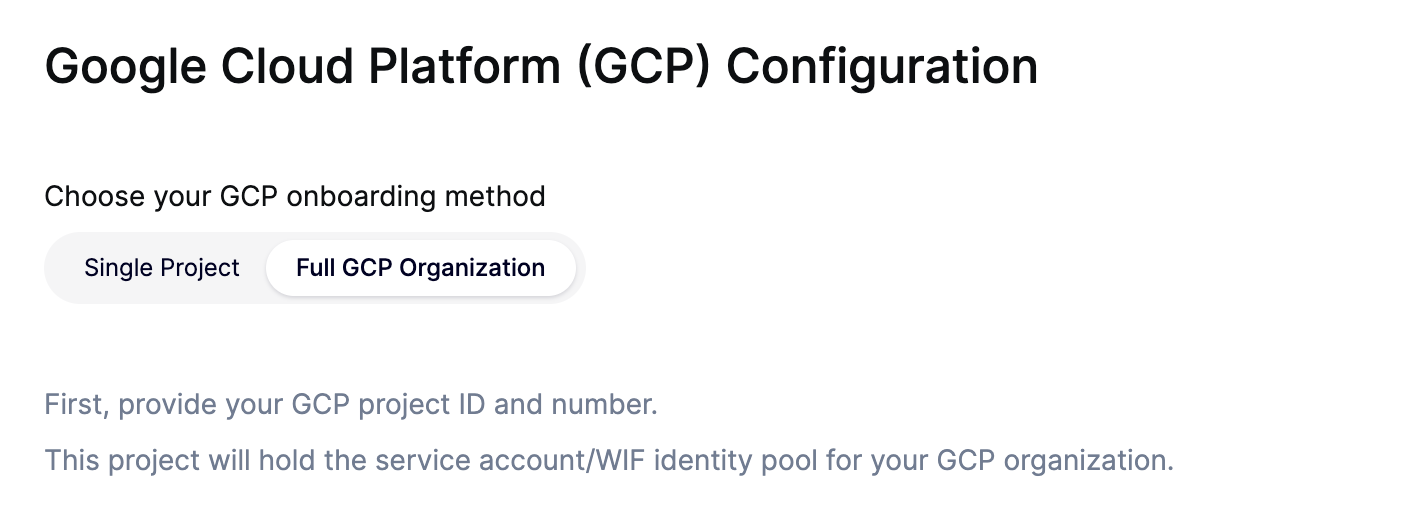
Google Cloud 組織を接続するには、次の「Full GCP Organization」オプションを選択してください [GCP オンボーディングウィザード](https://app.aikido.dev/clouds/add/gcp).
「管理」プロジェクトの ID と番号を入力したら、次の情報を提供する必要があります:
* **組織 ID**: '783352941112' のような形式である必要があります。
* **含めるフォルダ ID(任意)**: このオプションを使うと、組織の一部(例:フォルダとその配下すべて)をオンボードできます。
* **除外するフォルダ ID(任意)**: このオプションを使うと、フォルダ全体を自動オンボーディングから除外できます。これは次と組み合わせても機能します: **含めるフォルダ** オプションを選択してください。
* **除外するプロジェクト ID**: 必要に応じて、特定の GCP プロジェクトを Aikido に追加されないよう除外できます。
* また、を有効にすることで、プロジェクト全体でのコンテナスキャンを自動設定することもできます **Artifact Registry スキャン**.
この情報は次の場所で確認できます: [Google Cloud Resource Manager ページ](https://console.cloud.google.com/cloud-resource-manager) (プロジェクトセレクタで組織を選択してください)。
{% hint style="info" %}
オンボーディング中に資格情報の検証に失敗しても、IAM 権限はまだ Google Cloud 組織内で伝播中の可能性があります。数分待ってから再試行してください。伝播にかかる時間は組織の規模によって異なります。
{% endhint %}
#### 既存の組織接続を編集
組織が接続されたら、スコープを次から変更できます **クラウド** → あなたの GCP 組織 → **アクション** → **設定**。これにより次が開きます **組織を編集** モーダル。オンボーディングウィザードと同じ含める/除外する設定がありますが、より少ない項目にまとめられています:
* **組織 ID またはフォルダ ID**: 組織 ID、または1つ以上のフォルダ ID を受け付け、同期の範囲を組織の一部に限定します。ここでのフォルダ ID はプレフィックス付き形式を使用します。
* **除外するフォルダ ID**: 特定のフォルダとその下位のすべてを除外します。ここでのフォルダ ID はプレーン形式(プレフィックスなし)を使用します。
* **除外するプロジェクト ID**: 特定のプロジェクトを除外します。
{% hint style="info" %}
フォルダ ID の形式は上記2つのフィールドで異なります:
* **組織 ID またはフォルダ ID**: `folders/123456、folders/789012`
* **除外するフォルダ ID**: `123456, 987654`
{% endhint %}
{% hint style="warning" %}
スコープを狭めても、すでに接続されているプロジェクトは削除されません。新しいスコープ外にあるプロジェクトは、Aikido から手動で削除するまで残ります [クラウドページ](https://app.aikido.dev/clouds).
{% endhint %}
#### Terraform モジュール
Infrastructure as Code を好む場合は、Aikido の Terraform モジュールを使って、組織レベルのオンボーディングに必要な Google Cloud IAM と Workload Identity Federation の設定を構成できます。このモジュールは、単一プロジェクト構成と組織全体構成の両方、任意の Artifact Registry スキャン、任意の VM スキャン権限をサポートしています。
組織レベルのオンボーディングには modules/org モジュールを使用し、その後生成された `credential_config_json` をクラウド接続フロー中に Aikido にアップロードします。
Aikido アカウントが EU インスタンス(app.aikido.dev)上にない場合は、 `aikido_region` を `us`, `me`、または `au` を適切に設定してください。
{% hint style="info" %}
**重要**
Terraform モジュールは、必要な Google Cloud IAM 設定のみを構成します。生成されたものをアップロードして Aikido でオンボーディングフローを完了し、クラウドアカウントを接続する必要があります `credential_config_json` およびアプリ内の残りの手順を完了してください。
{% endhint %}
#### クラウドの用途の判定
GCP プロジェクトの用途/環境は、プロジェクト名に基づいて自動的に判定されます。Aikido は「production」「staging」「uat」などの用語を探し、それに応じてクラウドの用途を設定します。該当するものが見つからない場合、用途は「mixed」になります。各クラウド接続の用途は、「Configure」ボタンを使って手動で更新できます。
### よくある質問
* **安全ですか?**
はい。GCP 組織の接続は、個々の GCP プロジェクトを接続するときと同じ仕組みに依存しています。 [Workload Identity Federation](https://help.aikido.dev/cloud-scanning/connect-your-cloud/gcp/google-cloud-workload-identity-federation-setup) もサポートされており、推奨されています。
* **GCP プロジェクトを組織に追加したら、Aikido に表示されますか?**
はい。Aikido は「管理」プロジェクトをスキャンするたびに GCP 組織もスキャンし、新しい GCP プロジェクトを自動的に接続します。特に GCP 組織に何千ものプロジェクトがある場合、Aikido にプロジェクトが表示されるまで少し時間がかかることがあります(私たちは [Google Cloud API の制限](https://cloud.google.com/resource-manager/docs/limits)).
* **組織に新しい GCP プロジェクトを追加したばかりなのに、Aikido に表示されませんでした。**
Aikido が GCP の「管理」プロジェクトをスキャンしており(手動でスキャンできます)、15 分たっても新しいプロジェクトが表示されない場合は、契約プランのクラウド数上限に達している可能性があります。上限の引き上げについてお問い合わせください。
* **GCP プロジェクトを停止したり、別の組織に移動したりするとどうなりますか?**
Aikido は、そのプロジェクトがもはやアクティブでない、または組織の一部ではないことを検出し、対応するクラウドを「到達不可」とマークします。これを次で確認できます。 [クラウドページ](https://app.aikido.dev/clouds).
---
# Agent Instructions
This documentation is published with GitBook. GitBook is the documentation platform designed so that both humans and AI agents can read, navigate, and reason over technical content effectively. Learn more at gitbook.com.
## Querying This Documentation
If you need additional information that is not directly available in this page, you can query the documentation dynamically by asking a question.
Perform an HTTP GET request on the current page URL with the `ask` query parameter, and the optional `goal` query parameter:
```
GET https://help.aikido.dev/docs/docs-ja/kuraudosukyan/connect-your-cloud/gcp/connect-google-cloud-organization.md?ask=&goal=
```
`ask` is the immediate question: it should be specific, self-contained, and written in natural language.
`goal` is optional and describes the broader end goal you are ultimately trying to accomplish on behalf of the user. GitBook uses it to tailor the answer towards what is most useful for that goal.
The response will contain a direct answer to the question and relevant excerpts and sources from the documentation.
Use this mechanism when the answer is not explicitly present in the current page, you need clarification or additional context, or you want to retrieve related documentation sections.