> For the complete documentation index, see [llms.txt](https://help.aikido.dev/llms.txt). Markdown versions of documentation pages are available by appending `.md` to page URLs; this page is available as [Markdown](https://help.aikido.dev/docs/docs-ja/kuraudosukyan/connect-your-cloud/gcp/google-cloud-workload-identity-federation-setup.md).

# Google Cloud Workload Identity Federation の設定

Google Cloud Workload Identity Federation（WIF）を使用すると、サービス アカウント キーやその他のシークレットなしで、Aikido に Google Cloud プロジェクトをスキャンさせることができます。

Workload Identity Federation のプールとプロバイダを設定すると、Aikido は独自の認証情報を、GCP 環境で有効な認証情報に交換できます。これらは短期間のみ有効で、どこにも保存されないため、この方法ははるかに安全で、さまざまなコンプライアンス要件にも適合します。

WIF について詳しくは [Google Cloud のドキュメントをご覧ください。](https://docs.cloud.google.com/iam/docs/workload-identity-federation-with-other-clouds).

## **なぜ Workload Identity Federation なのか？**

* 長期間有効なサービス アカウント キーを排除できます。
* キーのローテーションとシークレット管理を簡素化します。
* より厳格なコンプライアンス要件とセキュリティ要件を満たします。

## はじめに

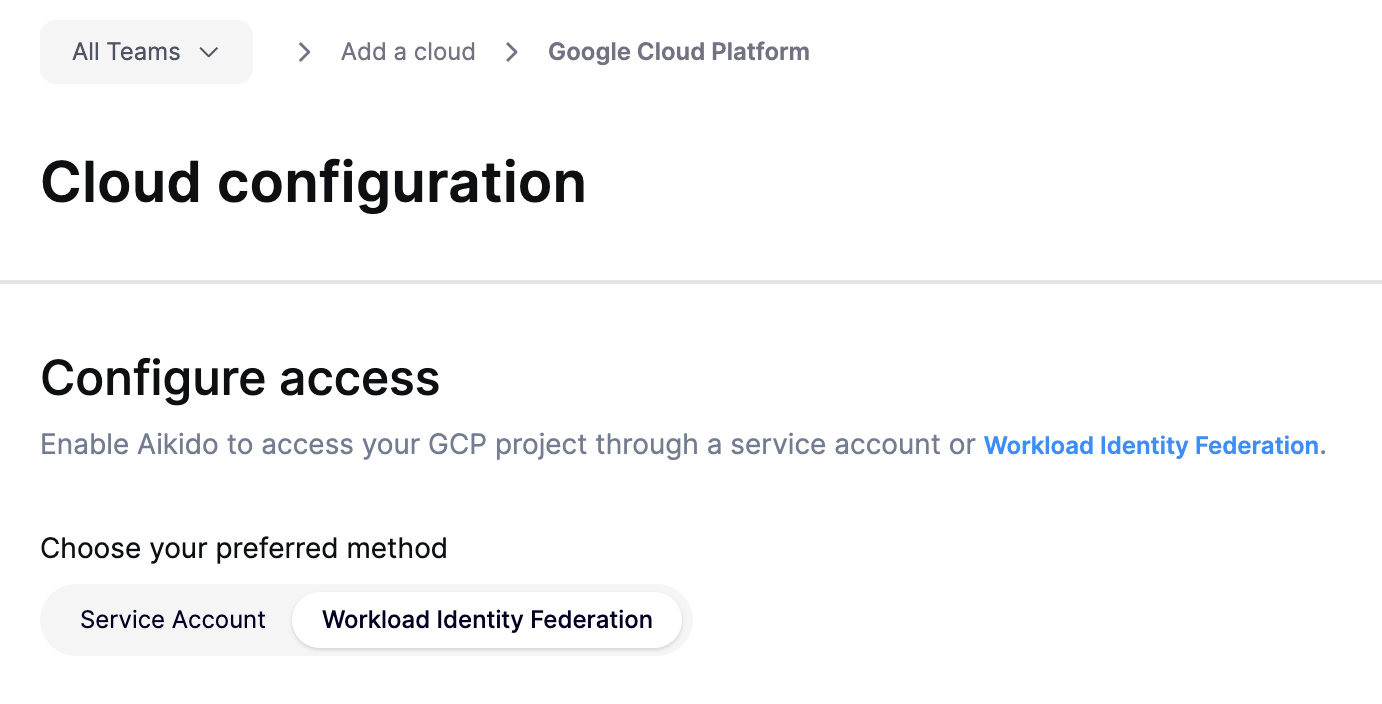
Workload Identity Federation は、Google Cloud のオンボーディング ウィザードの「アクセスを構成」ステップで選択できます。

<figure><img src="/files/ebdd6e57e982cca06839d9daca1089db84df1d9e" alt="" width="563"><figcaption><p>Aikido の GCP オンボーディングで Service Account と Workload Identity Federation のどちらを選ぶか</p></figcaption></figure>

Aikido が、Google Cloud プロジェクトに workload identity pool と provider を設定するために必要な CLI コマンドを提供します。

別の方法で WIF を設定したい場合は、以下の情報が必要です。

### プロバイダの詳細

{% hint style="info" %}
これらの値は、アプリ内で Aikido が提供する CLI コマンドから取得することを強く推奨します。
{% endhint %}

* プロバイダ: **AWS** （これにより、Aikido は AWS IAM 認証情報を GCP 認証情報に交換できます）
* AWS アカウント ID: **881830977366** （これは、Aikido が認証情報の交換を開始する AWS アカウントです）
* 属性マッピング（AWS のデフォルト マッピングは次のとおりです）:
  * `google.subject` = `assertion.arn`
  * `attribute.aws_role` = `assertion.arn.contains('assumed-role') ? assertion.arn.extract('{account_arn}assumed-role/') + 'assumed-role/' + assertion.arn.extract('assumed-role/{role_name}/') : assertion.arn`

### IAM 権限

アクセスを付与します **この場合に限って** Aikido AWS アカウント内のすべてのプリンシパルではなく、必要な特定の Aikido IAM ロールに対してです。

Aikido IAM ロールのプリンシパルを組み立てる方法は次のとおりです。

`principalSet://iam.googleapis.com/projects/` + `<your_project_number>` + `/locations/global/workloadIdentityPools/` + `<your_wif_pool>` + `/attribute.aws_role/arn:aws:sts::` + `<aikido_aws_acocunt_id>` + `:assumed-role/` + `<aikido_aws_role_name>`

Aikido には、プロジェクトまたは [組織](https://help.aikido.dev/cloud-scanning/connect-your-cloud/gcp/connect-google-cloud-organization) レベルで、以下の権限が必要です:

* **Viewer/Reader** （利用可能であれば Reader が推奨です）および **セキュリティ レビュアー** Aikido ロール用に `lambda-gcp-cloud-findings-role-1muvqxle`.
* **Artifact Registry Viewer** 対象:
  * Aikido ロールに対して、Aikido に Artifact Registry 内のコンテナ イメージをスキャンさせたい場合 `lambda-container-image-scanner-role-pb0qotst`.
  * または、Aikido ロールに対して、Artifact Registry Vulnerability Scanning の検出結果のみを Aikido に取り込みたい場合 `lambda-gcp-cloud-findings-role-1muvqxle`.

{% hint style="info" %}
プロジェクトまたは組織の IAM ポリシーにすでに **条件付きバインディングが含まれている場合**, `gcloud` では、新しいバインディングにすべて明示的な条件の指定が必要です。

Aikido 用の IAM バインディングを適用する際は、必ず **条件を明示的に無効化してください**。これは次のようにして行えます。 `--condition=None` 〜に `gcloud` コマンドを追加するか、 **なし** CLI のプロンプトで選択します。
{% endhint %}

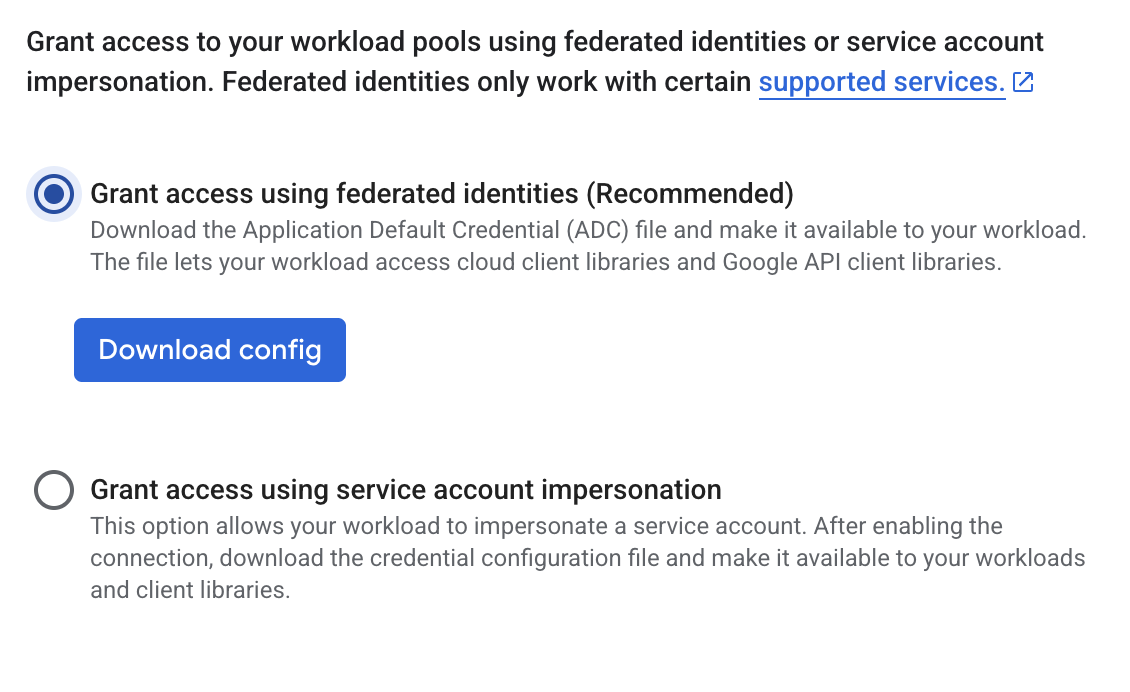
Workload Identity Federation のプールとプロバイダ、および IAM 権限の設定が完了したら、Aikido にアップロードする設定ファイルを生成します。推奨される、より簡単な方法は **直接アクセス** （サービス アカウントのなりすましではありません）

<figure><img src="/files/8cfd470bad356be86c6c2befa4b5ebbe83cc6916" alt="" width="563"><figcaption><p>直接アクセスを使用した Google Cloud WIF 設定ファイルの生成</p></figcaption></figure>

## よくある質問

* **すでに接続済みの GCP プロジェクトを service account から WIF に移行できますか？**

はい。アプリ内の手順に従ってプロジェクトで WIF を設定し、オンボーディングを完了する代わりに、生成した設定ファイルを使って、すでに接続済みの GCP プロジェクトの認証情報を更新できます。

* **既存の WIF プールを使用できますか？**

はい。WIF プールのいずれかに新しいプロバイダを追加できます。CLI コマンドは、既存のプール名を使用するように調整する必要があります。

* **WIF プロバイダに属性条件も設定すべきですか？**

すでにアクセスは特定の Aikido プリンシパルのみに付与しているため（WIF プール全体ではなく）、 [属性条件](https://docs.cloud.google.com/iam/docs/workload-identity-federation#conditions) の重要性は下がります。ただし、ポリシーで必須の場合は、上記の 2 つの IAM ロールに条件を追加できます。

* **直接アクセスの代わりに、サービス アカウントのなりすまし経由でアクセスを設定できますか？**

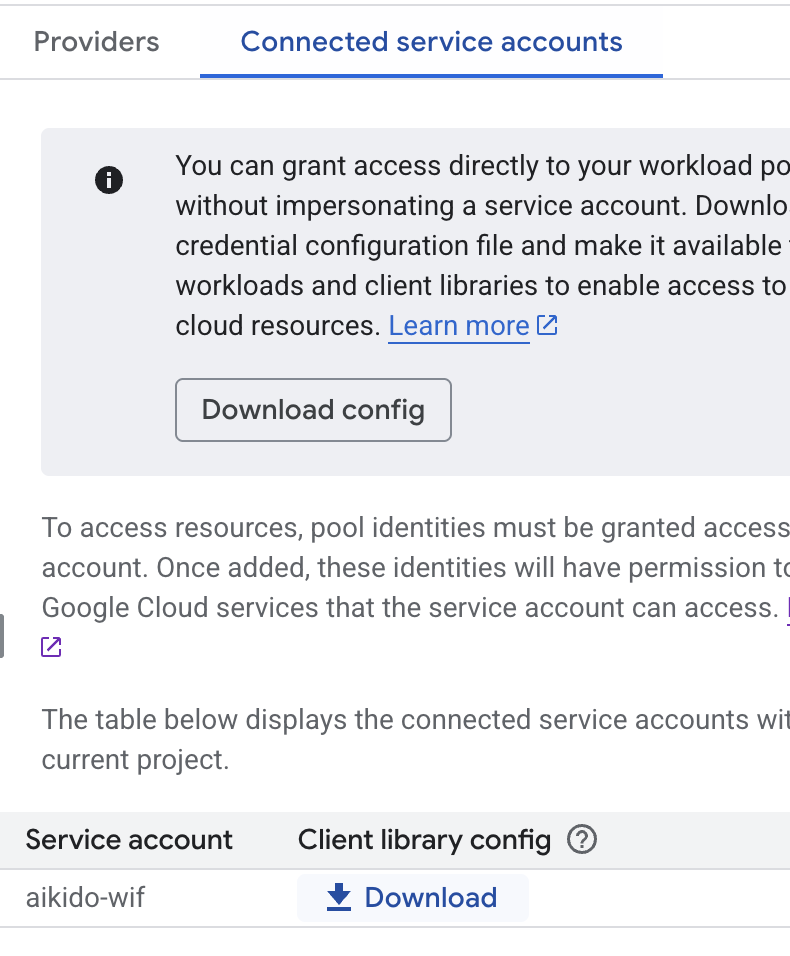
はい。ただし、直接アクセスの方が簡単です。組織が、すべての外部 ID がサービス アカウント経由で動作することを義務付けている場合は、なりすましを使用してください。サービス アカウントを作成し、上記の Aikido プリンシパルにそのなりすましを許可して（`roles/iam.workloadIdentityUser`）、必要な IAM 権限を付与し、サービス アカウント用の設定ファイルを生成できます。

<figure><img src="/files/118c80a6b37db88cf950eac7c93fda5cc45f5f95" alt="" width="375"><figcaption><p>サービス アカウント用の設定ファイルを生成する</p></figcaption></figure>

* **これ用の Terraform モジュールはありますか？**

はい！こちらで利用できます: <https://github.com/AikidoSec/gcp-onboarding-terraform-module>。プロジェクト用と組織用の 2 つのバリアントがあります。


---

# Agent Instructions
This documentation is published with GitBook. GitBook is the documentation platform designed so that both humans and AI agents can read, navigate, and reason over technical content effectively. Learn more at gitbook.com.

## Querying This Documentation
If you need additional information that is not directly available in this page, you can query the documentation dynamically by asking a question.

Perform an HTTP GET request on the current page URL with the `ask` query parameter, and the optional `goal` query parameter:

```
GET https://help.aikido.dev/docs/docs-ja/kuraudosukyan/connect-your-cloud/gcp/google-cloud-workload-identity-federation-setup.md?ask=<question>&goal=<endgoal>
```

`ask` is the immediate question: it should be specific, self-contained, and written in natural language.
`goal` is optional and describes the broader end goal you are ultimately trying to accomplish on behalf of the user. GitBook uses it to tailor the answer towards what is most useful for that goal.

The response will contain a direct answer to the question and relevant excerpts and sources from the documentation.

Use this mechanism when the answer is not explicitly present in the current page, you need clarification or additional context, or you want to retrieve related documentation sections.