# Safety Measures
Penetration testing carries inherent risks, whether performed by humans or AI agents. Testing can affect data, application behavior, or service availability, and no approach can eliminate those risks entirely.
Aikido invests significant engineering effort in making pentests as safe as possible. The safeguards below are designed to reduce risk throughout the assessment.
Aikido uses multiple safeguards to keep pentests within the approved scope, block destructive actions, and limit the load on your systems. You stay in control of when testing runs and can pause or cancel when needed.
## Keeping testing within scope
### Attackable and accessible domains
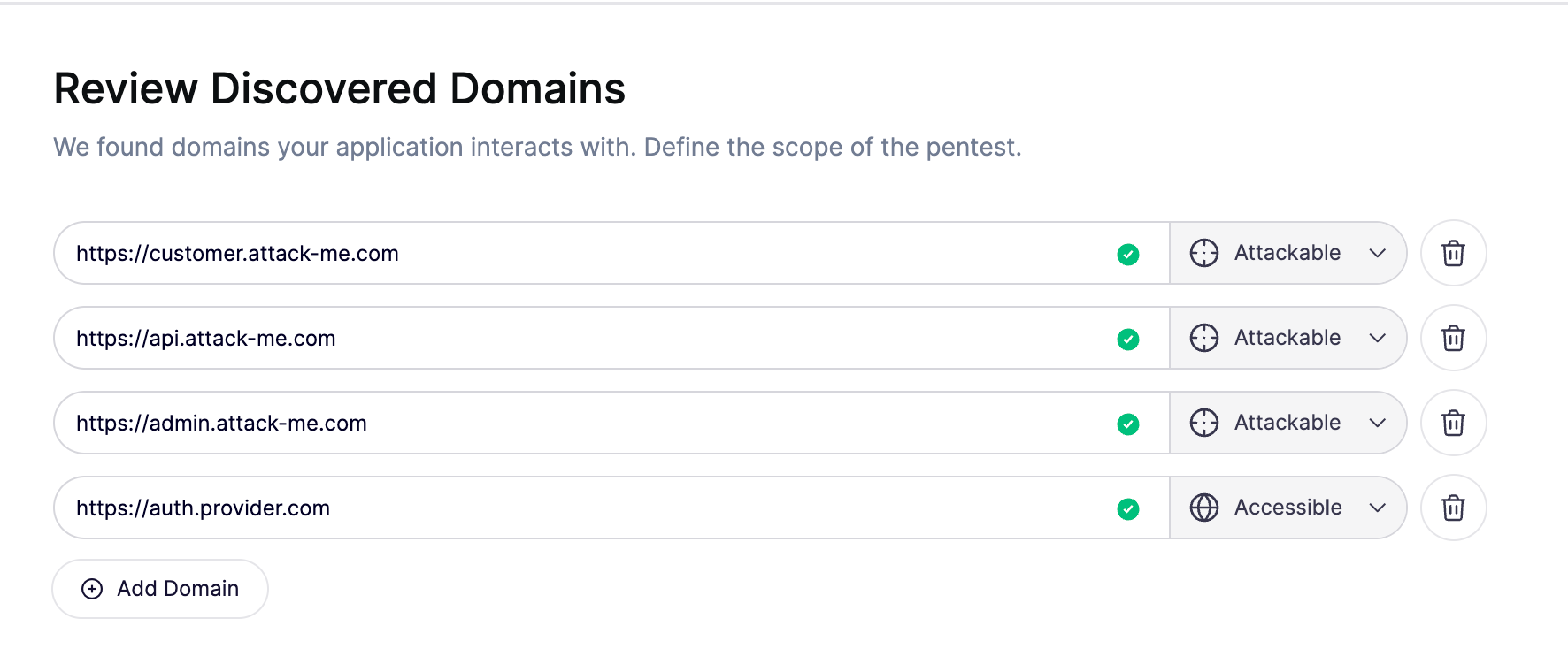
You control which domains the pentest may attack and which it may only access. During setup, configure the allowed domains and assign each one as attackable or accessible:
* **Attackable domains:** Targets that agents are allowed to actively test for vulnerabilities.
* **Accessible domains:** Services that agents may use for normal functionality, such as signing in, but must not actively attack.
Review these settings before launching the pentest so they match the targets you want tested and the supporting services your application needs.
Aikido enforces your configuration in 2 ways:
* **Network access controls:** Agents cannot access domains outside the allowed list, apart from the supporting resources described below. This boundary is deterministic: network rules block access regardless of what an agent decides to do.
* **Agent instructions and supervisor checks:** Testing agents receive an explicit distinction between domains they may attack and domains they may only use. A supervisor reviews proposed testing commands and blocks attacks against accessible-only domains before they run.
For example, an agent can test your application at `customer.attack-me.com` and use `auth.provider.com` to sign in. The authentication provider is reachable, but the supervisor blocks attempts to attack it because you marked it as accessible only.
{% hint style="info" %}
Requests for static files and developer tool platforms are automatically accessible to support testing. This access does not make those services attackable targets.
{% endhint %}
### Ownership checks for external network testing
A subdomain under your domain can point to a service operated by another company. Owning the domain does not necessarily give you permission to test the infrastructure behind it.
For external network testing, a scoping agent checks who controls the application and who operates the underlying services. It uses that evidence to decide whether testing can proceed, must be restricted to your application, or should be blocked.
For example:
* **Your own server:** A server you operate on rented cloud infrastructure can be included in network testing.
* **Your application on shared hosting:** Testing is restricted to your application, excluding the provider's shared infrastructure and other customers.
* **A provider-hosted status or documentation site:** A hostname that only serves content through a third-party service is excluded from testing.
This check helps prevent discovery of a hostname from being treated as permission to attack everything behind it.
## Blocking destructive actions
A supervisor agent reviews proposed testing commands before they run. When it identifies a destructive action, it blocks the command and directs the testing agent to choose another approach.
Examples of actions it blocks include dropping database tables, deleting large amounts of data, stopping essential services, and deliberately exhausting server resources. Testing agents are also instructed to use less disruptive ways to demonstrate vulnerabilities, such as a short database delay to confirm SQL injection instead of deleting a table.
## Controlling testing impact
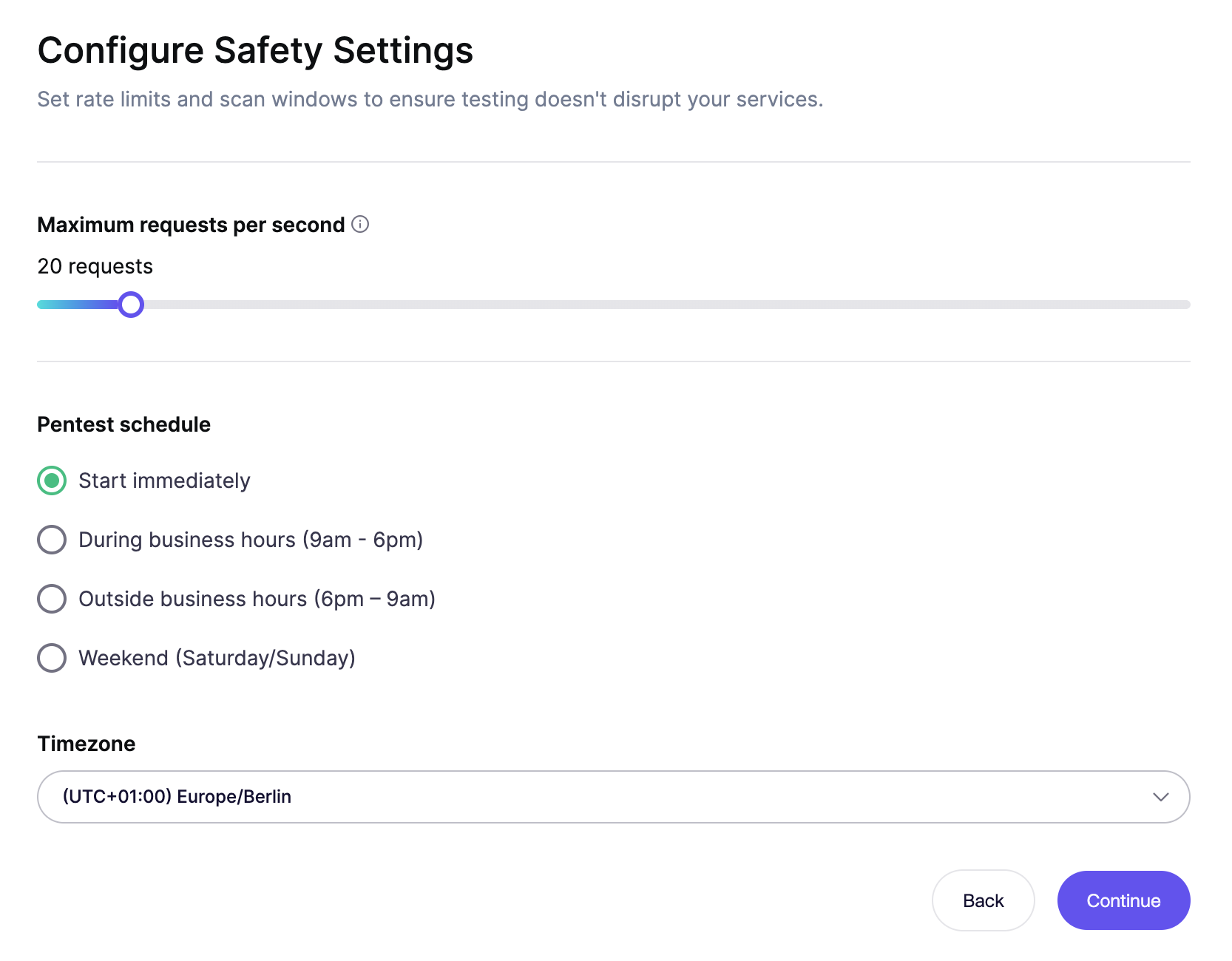
Set **Maximum requests per second** during setup to limit the request rate generated by the pentest. Choose a rate that your environment can handle alongside its normal traffic.
Use the **Pentest schedule** to control when testing takes place, for example during or outside business hours. Adjust the request rate and testing schedule during the pentest if your operational needs change.
## Pausing, stopping, and getting help
You stay in control throughout the pentest. During active testing, click **Pause** to stop attacks temporarily and **Resume** when you are ready to continue. Click **Cancel** to permanently stop the assessment if you do not want it to continue.
Aikido combines automated monitoring with dedicated personnel to respond when issues arise:
* **Automated monitoring:** Aikido automatically pauses pentests when it detects issues that need attention, such as blocked requests or login problems.
* **Dedicated Aikido personnel:** Every pentest is monitored by dedicated Aikido personnel. If they identify an issue that requires intervention, they pause the pentest and contact you to resolve it together before testing continues.
If you notice unexpected behavior or need help deciding how to continue, [contact Aikido support](https://help.aikido.dev/docs/docs-ja/miscellaneous-info/contact-support).
## Choosing between staging and production
The right environment depends on what you are testing. Web pentests exercise application behavior, while external network pentests assess the systems actually exposed to the internet.
### Web pentests: prefer staging
Aikido strongly recommends running web pentests in a staging, test, or isolated environment that closely matches production. Confirming an application vulnerability can require creating, changing, or deleting a record, such as a test order or user account. Staging gives these tests room to run without involving real customer data.
Use dummy data and keep the environment separate from production databases and live integrations. A staging URL alone does not provide that isolation. See [Why Use a Testing Environment](https://help.aikido.dev/docs/docs-ja/pentests/prepare-a-pentest/why-use-a-testing-environment) for examples and preparation guidance.
### External network pentests: assess production exposure
To assess your production attack surface, an external network pentest must test the public-facing production hosts and services themselves. A staging copy cannot establish which ports, software versions, or configurations are exposed on your live systems.
Because these tests run against live services, Aikido applies the safeguards described above to limit their impact, including the additional ownership checks for external network testing. Choose a request rate and testing window appropriate for your live services. These controls reduce risk, but do not make production testing risk-free.