> For the complete documentation index, see [llms.txt](https://help.aikido.dev/llms.txt). Markdown versions of documentation pages are available by appending `.md` to page URLs; this page is available as [Markdown](https://help.aikido.dev/docs/docs-ja/pentesuto/configure-a-pentest/safety-measures.md).
# 安全対策
ペンテストが環境に与える影響を最小限に抑えるため、以下の安全機構が用意されています。
{% hint style="success" %}
ペンテストはステージング、テスト、または隔離された環境で開始することを強く推奨します。 [なぜテスト環境を使うのですか?](/docs/docs-ja/pentesuto/prepare-a-pentest/why-use-a-testing-environment.md)
{% endhint %}
## 意図した範囲外でのペンテストの防止
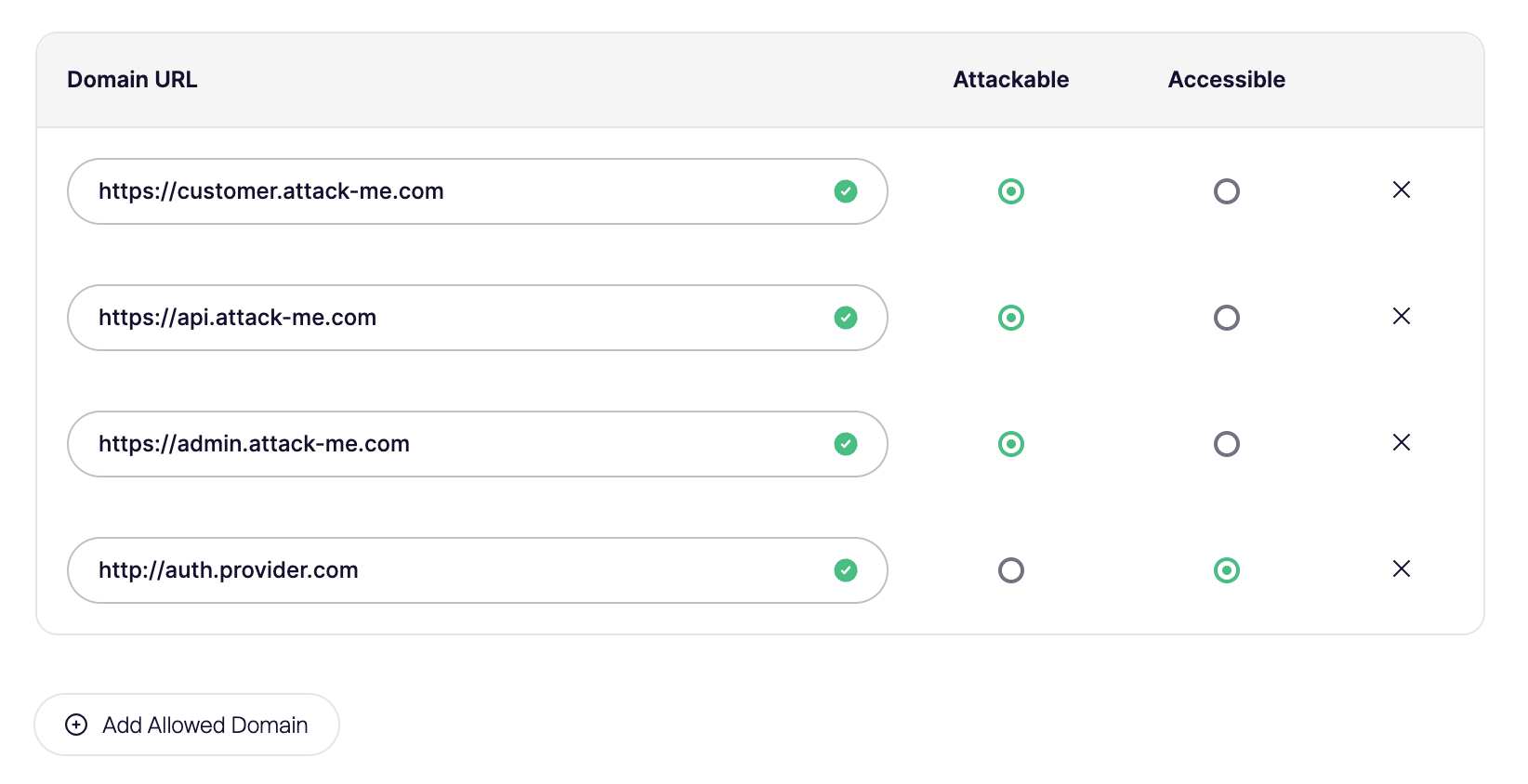
設計上、ペンテストエージェントは、ペンテストのセットアップ時に明示的に承認されていないドメインには到達できません。2つのセキュリティ境界が設けられています:
1. **攻撃可能なドメイン**:ペンテスト中に実際に攻撃できるドメイン
2. **アクセス可能なドメイン:** 積極的に攻撃すべきではないが、使用は許可されているドメイン。
以下の例の構成では、エージェントは次の下にある指定のサブドメインを攻撃できます `attack-me.com` および使用できます `auth.provider.com`。その他のすべてのドメインはブロックされます。
{% hint style="info" %}
**注意:** 静的ファイルを含むリクエスト、または開発者向けツールプラットフォームの一部であるリクエストは自動的にアクセス可能ですが、攻撃対象にはなりません。
{% endhint %}
## ペンテストを一時停止またはキャンセルする
**キャンセル** 評価を完全に停止し、再開することはできません。実行に使用したクレジットは、起動後最初の数分以内にキャンセルしない限り返金されません。次を使用してください **一時停止** 攻撃を止めて、同じ評価を後で続行したい場合は、代わりにこちらを使ってください。
**一時停止** 評価を開いたまま、攻撃エージェントを一時的に停止します。 **再開** テストを続行します。一時停止は、エージェントが実際に攻撃を開始した後にのみ利用できます。スケジューリング、コードベース分析、アクセス確認、または探索中は利用できません。各評価は手動で最大3回まで一時停止できます。
Aikidoは、ブロックされたリクエストやログインの問題など、対応が必要な場合に評価を自動で一時停止することもあります。評価ページでステータスを確認し、求められている内容を修正してから、次をクリックしてください **再開** 続行の準備ができたら。
## 高いサーバー負荷の軽減
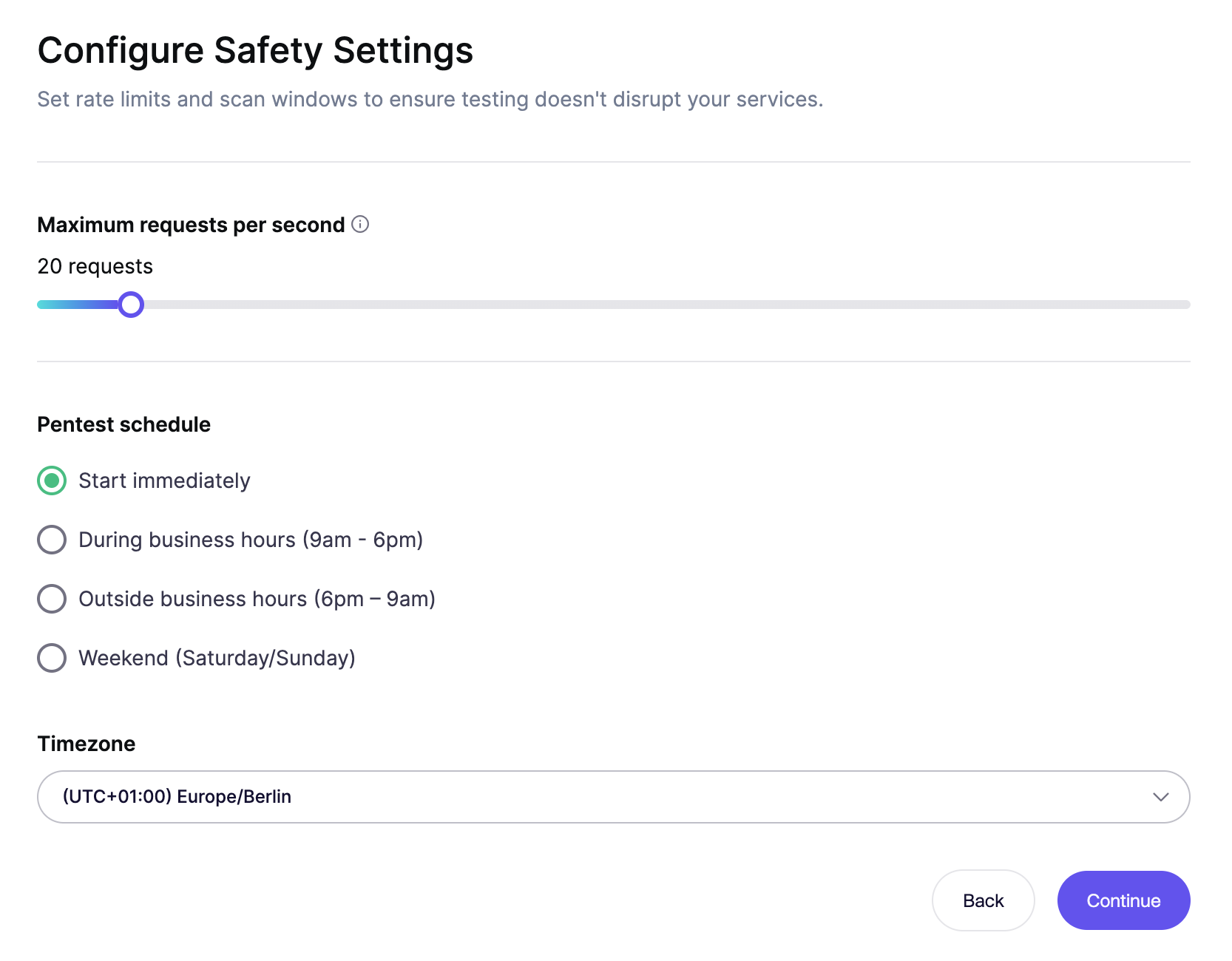
サーバー負荷による潜在的な影響を最小限に抑えるため、セットアップではペンテストが生成する1秒あたりの最大リクエスト数を設定でき、さらに営業時間内または営業時間外に実行するオプションも用意されています。
この設定は、ペンテスト開始後にも変更できます。
---
# Agent Instructions
This documentation is published with GitBook. GitBook is the documentation platform designed so that both humans and AI agents can read, navigate, and reason over technical content effectively. Learn more at gitbook.com.
## Querying This Documentation
If you need additional information that is not directly available in this page, you can query the documentation dynamically by asking a question.
Perform an HTTP GET request on the current page URL with the `ask` query parameter, and the optional `goal` query parameter:
```
GET https://help.aikido.dev/docs/docs-ja/pentesuto/configure-a-pentest/safety-measures.md?ask=&goal=
```
`ask` is the immediate question: it should be specific, self-contained, and written in natural language.
`goal` is optional and describes the broader end goal you are ultimately trying to accomplish on behalf of the user. GitBook uses it to tailor the answer towards what is most useful for that goal.
The response will contain a direct answer to the question and relevant excerpts and sources from the documentation.
Use this mechanism when the answer is not explicitly present in the current page, you need clarification or additional context, or you want to retrieve related documentation sections.