> For the complete documentation index, see [llms.txt](https://help.aikido.dev/llms.txt). Markdown versions of documentation pages are available by appending `.md` to page URLs; this page is available as [Markdown](https://help.aikido.dev/docs/docs-ja/pentesuto/configure-a-pentest/setting-up-authenticated-testing/handling-files-for-authentication.md).
# スクリプト経由で認証する
これは **スクリプト経由のログイン** フローです。認証に、エージェントが実行、署名、または読み取りできるファイルが必要な場合に使用してください。たとえば、ログインスクリプト、クライアント証明書、またはログインを導く参照ドキュメントなどです。
**この機能を使用するのは、次の場合です:**
* あなたには **script** ログインを実行し、セッショントークン、Cookie、またはヘッダーを出力するものがあります。
* 認証は次を介して行います **クライアント証明書または署名付きリクエスト** (`.pem`, `.crt`, `.key`, `.p12`, `.pfx`, `.csr`, `.pub`).
* エージェントには **参照資料** が認証するために必要です(`.pdf`, `.md`, `.txt`, `.csv`, `.json`, `.yaml`, `.yml`)- 例:KYC書類、GraphQLの信頼済みドキュメント、またはアカウント一覧。
{% hint style="info" %}
Only `.py` ファイルは **実行されます** (Python 3、サンドボックス環境内)。その他のサポート対象ファイル形式はすべて、エージェントへの参照入力として提供されます。エージェントはそれらを読み取り、あなたの指示に従うために使用します。
{% endhint %}
### セットアップガイド
{% stepper %}
{% step %}
**テストユーザーを追加する**
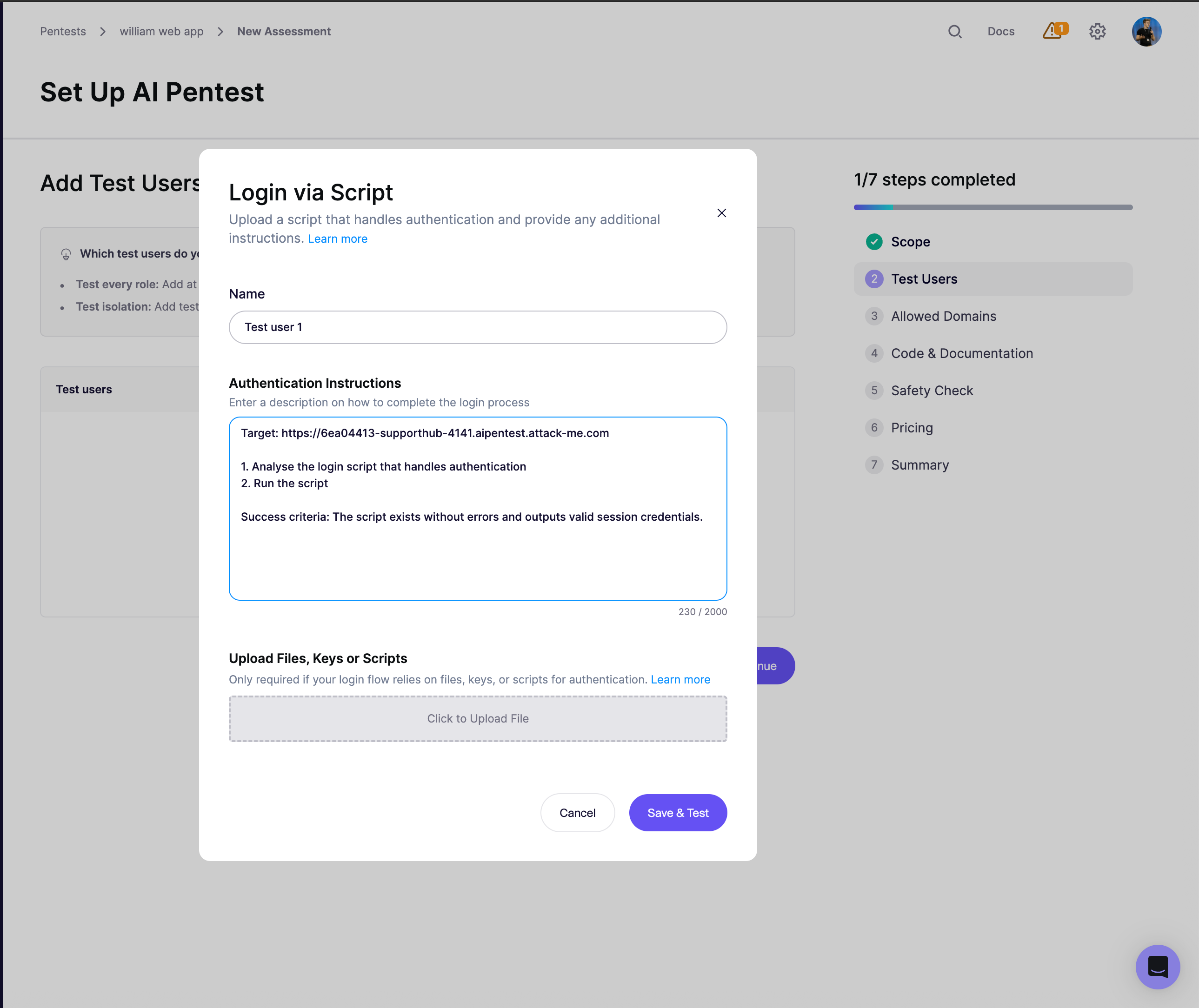
評価ウィザードで、 **テストユーザーを追加** → **カスタム** → **スクリプト経由のログイン**.
{% endstep %}
{% step %}
**認証手順を記述**
Aikido は次をあらかじめ入力します **認証手順** フィールドに初期テンプレートを入れます:
エージェントがあなたのファイルに対して何をすべきかを正確に記述するよう編集してください。 **成功条件** の行は曖昧にしないでください。ログイン後ページ上の目に見える文字列や特定のステータスコードなどが適しており、エージェントが自分で確認できます。
{% endstep %}
{% step %}
**ファイル、キー、またはスクリプトをアップロード**
ファイルをアップロードボックスにドラッグ&ドロップしてください。テストユーザーごとに1ファイルのみ。最大 **2 MB**;拡張子は上記のリストに限定されます。
Pythonスクリプトをアップロードする場合、エージェントは必要に応じてそれを調整し、 `python3`.
{% endstep %}
{% step %}
**保存してテスト**
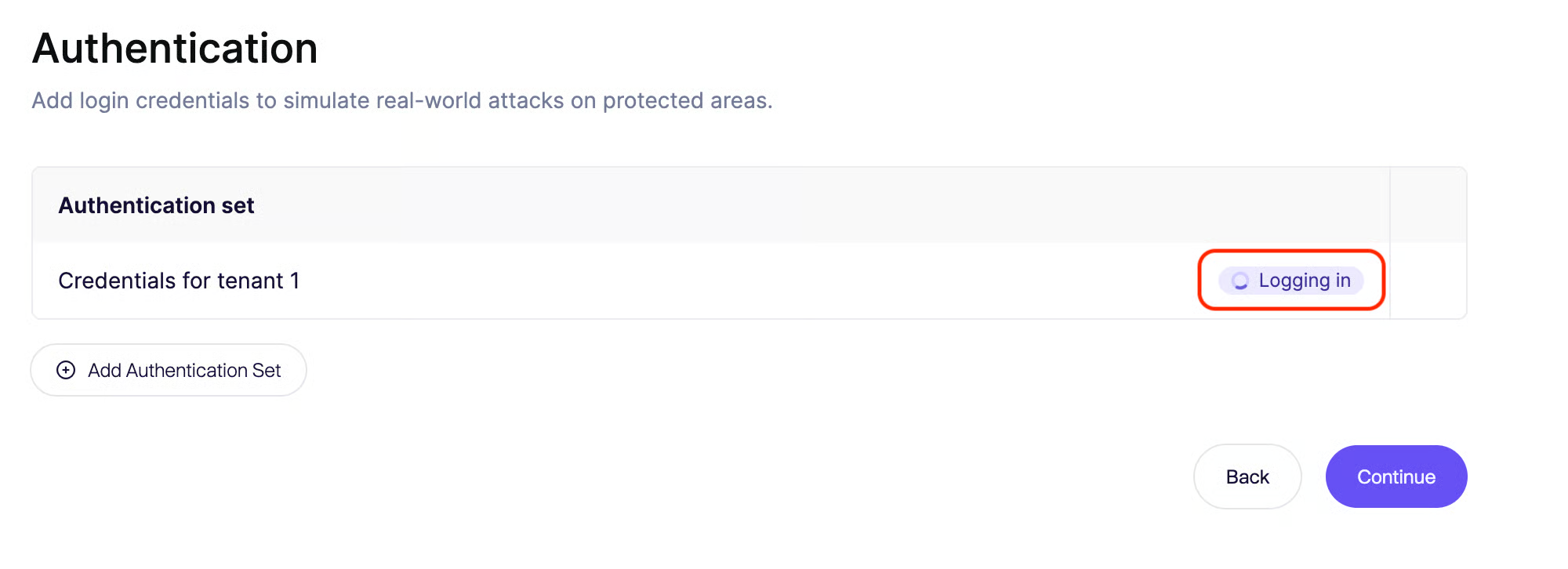
クリックします **保存してテスト**で実行します。事前確認ではエージェントが起動し、あなたの指示に従って(スクリプトを実行するか、アップロードされたファイルを参照して)ログイン後の状態に到達することを確認します。事前確認が通れば、そのセッションは本番のペンテスト用にキャプチャされます。
{% endstep %}
{% endstepper %}
### ヒントとベストプラクティス
* **スクリプトは自己完結型にしてください。** 可能な限りPython 3の標準ライブラリのみを使用してください。 `pip install` の手順は実行時にありません。
* **証明書については、** 指示の中でファイル名とパスの規則を明記してください。例: *「アップロードされた `client.p12` を次のパスフレーズで `` 使って次へのリクエストに署名する `/api`."*
* **パスキー** はまだサポートされていません。この機能が必要でしたら、ご連絡ください。認識しておきます!
---
# Agent Instructions
This documentation is published with GitBook. GitBook is the documentation platform designed so that both humans and AI agents can read, navigate, and reason over technical content effectively. Learn more at gitbook.com.
## Querying This Documentation
If you need additional information that is not directly available in this page, you can query the documentation by asking a question.
Perform an HTTP GET request on the following URL with the `ask` and `goal` query parameters:
```
GET https://help.aikido.dev/docs/docs-ja/pentesuto/configure-a-pentest/setting-up-authenticated-testing/handling-files-for-authentication.md?ask=&goal=
```
`ask` is the immediate question: it should be specific, self-contained, and written in natural language.
`goal` is what the user is ultimately trying to achieve, the reason they need the answer. Sharing it helps GitBook give you a better, more relevant answer. A goal is most helpful when it describes the outcome the user wants rather than restating the question. For example, with `ask=how do I create an API token`, a goal like `automate deployments from our CI pipeline` lets GitBook tailor the answer to that use case.
The response will contain a direct answer to the question and relevant excerpts and sources from the documentation.
Use this mechanism when the answer is not explicitly present in the current page, you need clarification or additional context, or you want to retrieve related documentation sections.