> For the complete documentation index, see [llms.txt](https://help.aikido.dev/llms.txt). Markdown versions of documentation pages are available by appending `.md` to page URLs; this page is available as [Markdown](https://help.aikido.dev/docs/docs-ja/pentesuto/high-risk-recommended-and-deeper-coverage.md).
# カバレッジレベルの意味
Rightsized Pentest において、「高リスクのみ」「推奨カバレッジ」「より深いカバレッジ」が何を変えるのか。
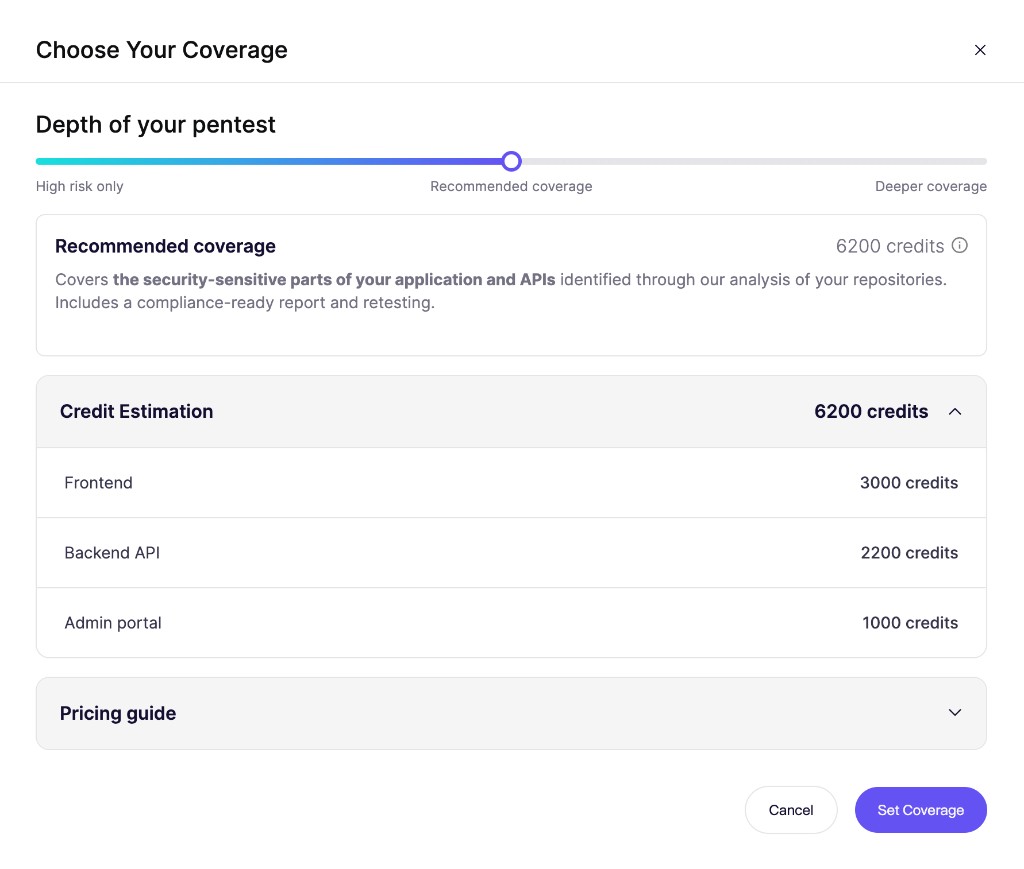
Rightsized Pentest では、カバレッジスライダーで Aikido がアプリケーションのどこまでをテストするかを設定します。Aikido は開始前に必要クレジットの合計を表示します。
## 仕組み
スライダーを使って、Aikido がアプリケーションをどの程度徹底的にテストするかを決めます。低コストを優先するか、より徹底したテストを優先するかを選べます。
### 高リスクのみ
Aikido は、重大な脆弱性が見つかりやすい領域に重点を置きます。いくつかの領域はテストが少なくなったり、まったく行われなかったりします。
より本格的なテストの合間に、手早く確認するために選んでください。コストは低めです。
### 推奨カバレッジ
Aikido は、アプリケーションと API のセキュリティ上重要な部分をカバーします。
Aikido はこのレベルを推奨しています。コストと徹底度のバランスがいいです。
### より深いカバレッジ
Aikido は推奨カバレッジ内のすべてをテストし、さらに踏み込みます。これには、複雑なワークフローやあまり一般的でない攻撃経路も含まれます。
より広範なテストを行いたい場合、たとえば大きな新リリースの前などに選んでください。コストは高めです。
すべてのレベルには、コンプライアンス対応のレポート、再テスト、そして [AutoFix](/docs/docs-ja/autofix-to/overview-aikido-autofix.md)。Aikido は各レベルで同じ種類の問題を探します。スライダーはアプリケーションのどれだけの範囲をテストするかを変更します。
## 関連
{% content-ref url="/pages/b6efa08d2c93478e8e9db96db04e702e7168264a" %}
[ペンテストの料金](/docs/docs-ja/pentesuto/pentest-pricing.md)
{% endcontent-ref %}
{% content-ref url="/pages/730241c329f12791987fe30437752972b9a97424" %}
[ペンテストの設定方法](/docs/docs-ja/pentesuto/configure-a-pentest/starting-an-assessment.md)
{% endcontent-ref %}
---
# Agent Instructions
This documentation is published with GitBook. GitBook is the documentation platform designed so that both humans and AI agents can read, navigate, and reason over technical content effectively. Learn more at gitbook.com.
## Querying This Documentation
If you need additional information that is not directly available in this page, you can query the documentation by asking a question.
Perform an HTTP GET request on the following URL with the `ask` and `goal` query parameters:
```
GET https://help.aikido.dev/docs/docs-ja/pentesuto/high-risk-recommended-and-deeper-coverage.md?ask=&goal=
```
`ask` is the immediate question: it should be specific, self-contained, and written in natural language.
`goal` is what the user is ultimately trying to achieve, the reason they need the answer. Sharing it helps GitBook give you a better, more relevant answer. A goal is most helpful when it describes the outcome the user wants rather than restating the question. For example, with `ask=how do I create an API token`, a goal like `automate deployments from our CI pipeline` lets GitBook tailor the answer to that use case.
The response will contain a direct answer to the question and relevant excerpts and sources from the documentation.
Use this mechanism when the answer is not explicitly present in the current page, you need clarification or additional context, or you want to retrieve related documentation sections.