> For the complete documentation index, see [llms.txt](https://help.aikido.dev/llms.txt). Markdown versions of documentation pages are available by appending `.md` to page URLs; this page is available as [Markdown](https://help.aikido.dev/docs/docs-ja/pentesuto/integrate-your-supabase-projects.md).
# Supabaseプロジェクトを連携する
Supabaseの組織をAikidoに接続すると、当社のペンテストエージェントがあなたの構成についてより深い文脈を把握でき、そうでなければ見過ごされる可能性のあるセキュリティ問題の発見に役立ちます。
{% hint style="warning" %}
ペンテストを実行すると、エージェントはアプリケーションの脆弱性を見つけようとし、アプリケーションとやり取りする必要があります。その結果、Supabaseプロジェクト内にテストデータが作成される場合があります。
{% endhint %}
## Supabaseのペンテストで何が対象になりますか?
Supabase連携により、AikidoはSupabaseプロジェクトの設定を確認し、より隠れたセキュリティ問題を見つけるために必要な文脈を当社のペンテストエージェントに提供します。
以下の領域がテストされます:
* **RLSポリシー:** これらは、誰がデータを閲覧または変更できるかを決定します。設定を誤ると、顧客や事業の機密データが不適切なユーザーに公開される可能性があります。
* **ストレージバケット:** これらには、機密性の高いアップロード、ドキュメント、画像、エクスポートなどが含まれることがよくあります。小さな設定ミスでも、気づかないうちに機密ファイルが公開される可能性があります。
* **Edge Functions:** これらは、支払い、アカウント操作、連携などの重要なバックエンドロジックを扱うことがよくあります。適切に保護されていない場合、攻撃者がそのロジックを悪用したり、その背後にあるデータへアクセスしたりできる可能性があります。
* **PostgRESTの公開範囲:** SupabaseはAPIを通じてデータベースのデータを公開できます。意図したデータと操作だけに到達できるよう、これを確認する必要があります。
* **認証設定:** ログインとサインアップの設定は、ユーザーアカウントを保護するものです。弱い設定だと、アカウントの悪用、偽のサインアップ、不正アクセスが可能になる場合があります。
* **Realtime:** Realtime機能は、ユーザーにライブ更新を送信します。アクセス範囲が広すぎると、誤ったユーザーに送られた更新を通じて機密データが公開される可能性があります。
* **サービスキーとanonキーの露出:** キーはアプリがSupabaseに接続するためのものです。誤った場所で露出すると、攻撃者にプロジェクトを悪用される手段を与える可能性があります。
* **データベース設定:** 公開スキーマの露出や危険な拡張機能は、データベースの機密領域を意図せず開放してしまう可能性があります。これをテストすることで、攻撃者がデータへアクセスするために使える危険な設定を事前に検出できます。
## Supabaseを接続してペンテストを実行
Supabaseの接続ではOAuth認可フローを使用します。Aikidoは、フロー中に選択したSupabase組織へのアクセス権を付与され、そのアクセスはSupabaseからいつでも取り消せます。
{% stepper %}
{% step %}
**アプリケーションタイプとしてSupabaseを選択**
Aikidoでペンテストプロジェクトを開き、 **評価を作成**。その **アプリケーション** のステップで、 **Supabase** を選び、ペンテストしたいアプリケーションの種類として指定します。
{% endstep %}
{% step %}
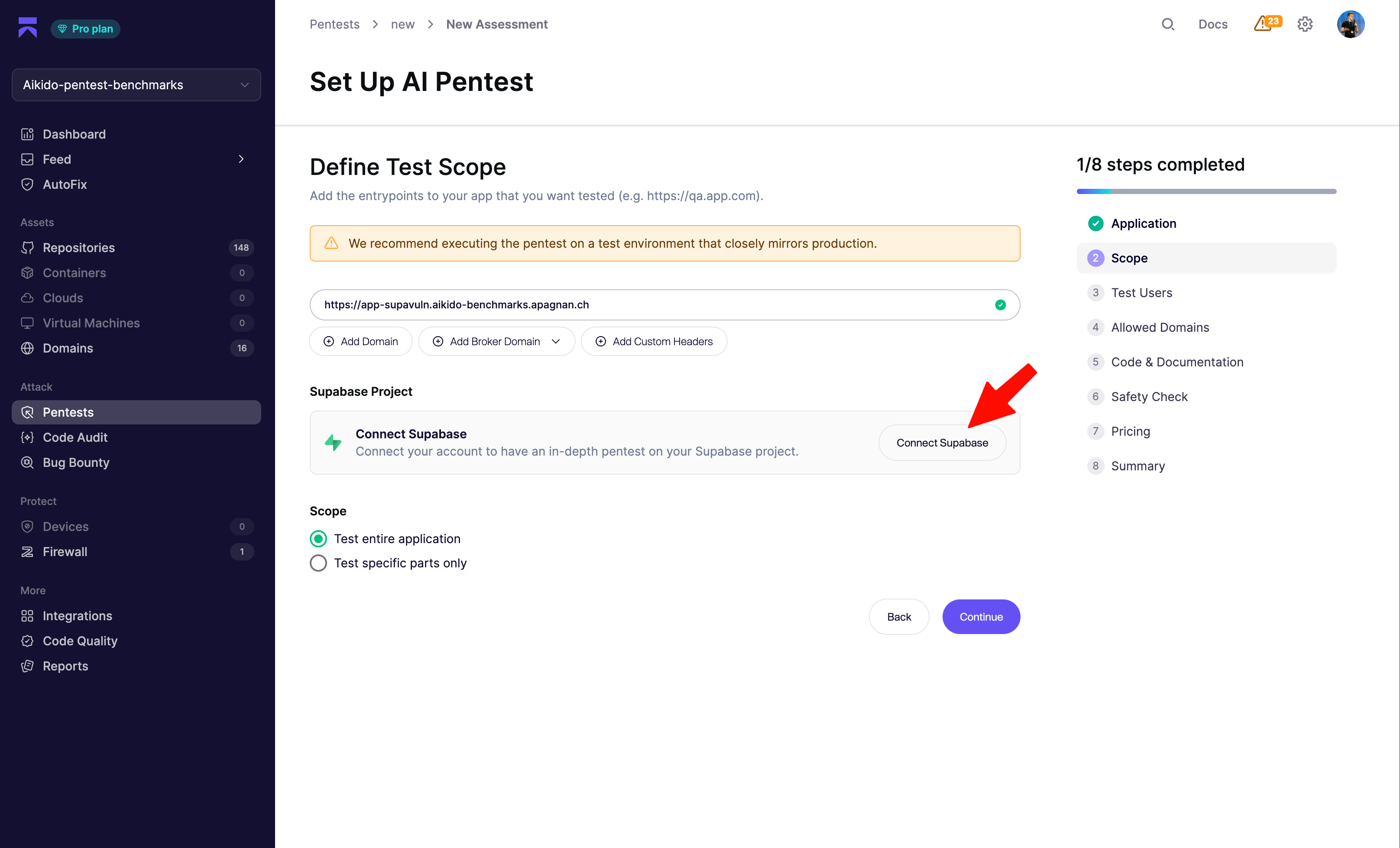
**スコープを定義してSupabase接続を開始**
Supabaseプロジェクト上に構築されたアプリケーションのエントリポイントを追加してください。これはSupabaseのURLではなく、アプリケーションのURLである必要があります。
Aikidoは、このアプリケーションのエントリポイントを使って、実際の攻撃者と同じようにSupabaseの設定をテストします。これにより、エージェントはアプリケーションとビジネスフローの文脈を把握でき、特定の設定が意図されたものか、それとも潜在的に危険かを判断しやすくなります。
本番環境にできるだけ近いテスト環境に対してペンテストを実行することをお勧めします。
次の **Supabaseプロジェクト** セクションで、 **Supabaseを接続** をクリックしてOAuthフローを開始します。
{% endstep %}
{% step %}
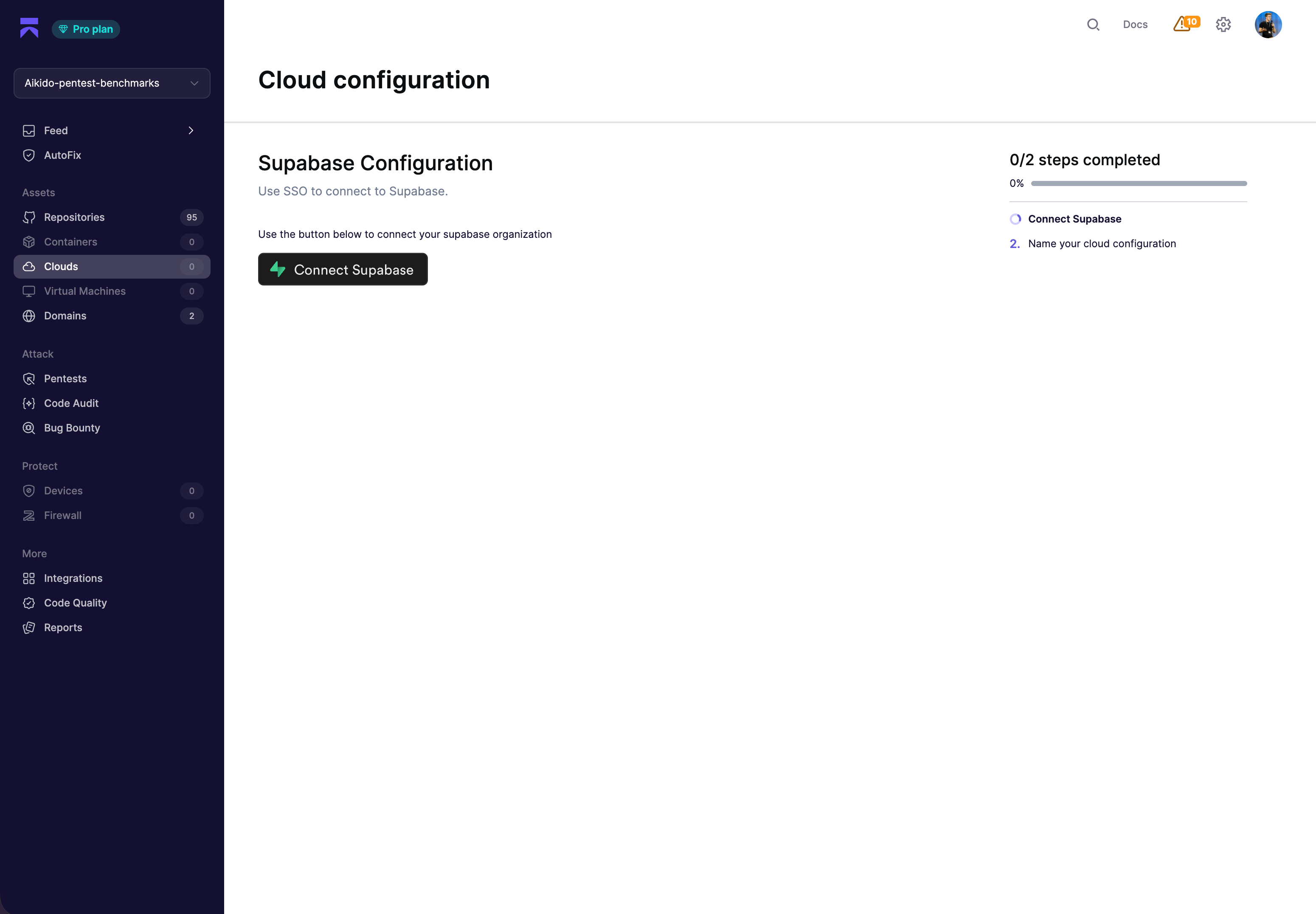
**SupabaseでAikidoを認可**
Supabaseにリダイレクトされ、要求された権限を確認し、アクセスを許可する組織を選択できます。
認可を承認してください。Aikidoは短期間有効な認可コードを受け取り、それを更新トークンと交換してプロジェクト一覧の取得に使用します。個人用アクセストークンを作成または保存する必要はありません。
{% endstep %}
{% step %}
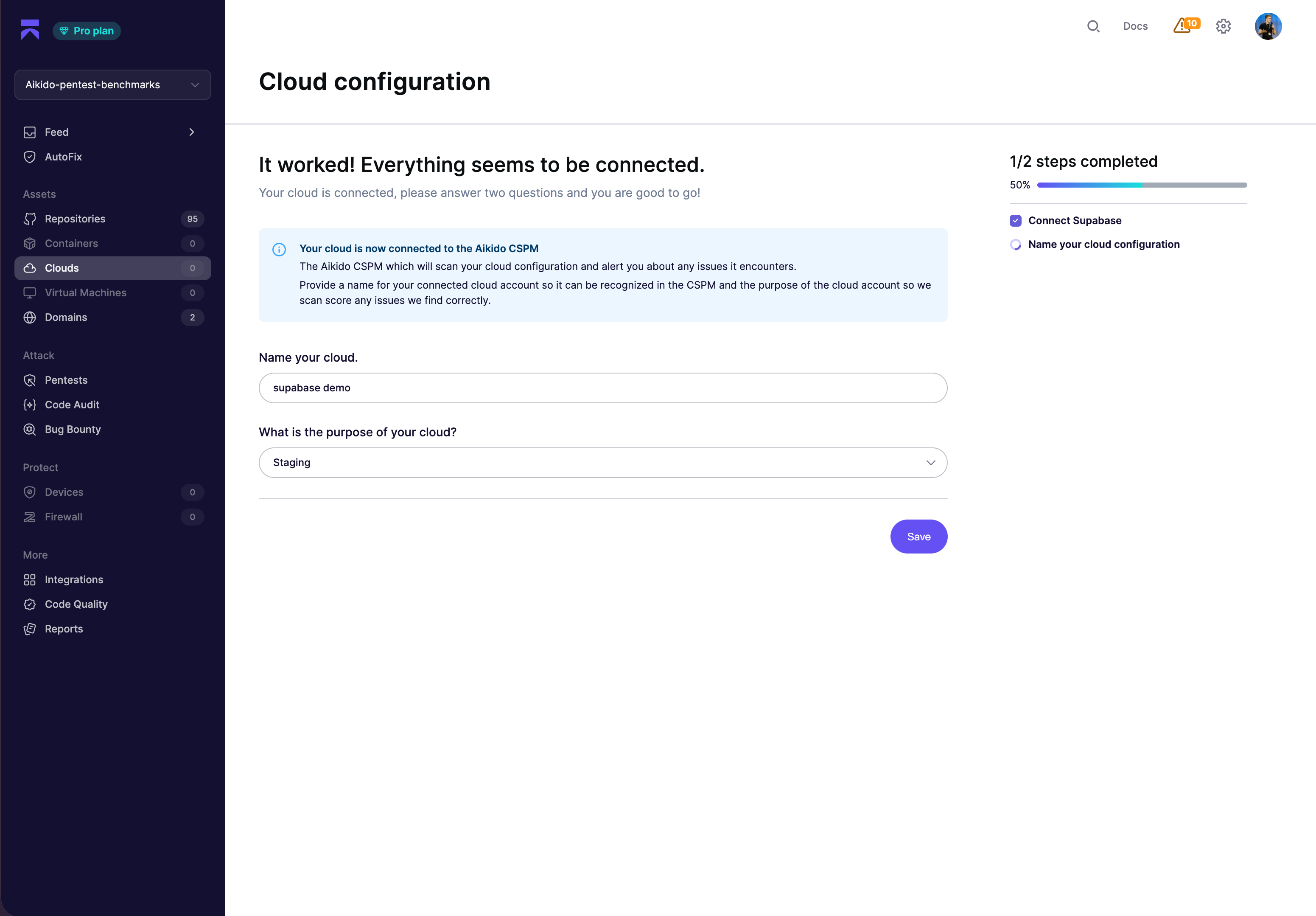
**クラウド構成に名前を付ける**
Aikidoに戻ったら、接続したSupabase組織に名前を付け、それが表す環境(本番、ステージングなど)を選択してください。これにより、Aikidoは重大度とビジネスへの影響に基づいて検出結果の優先度を付けやすくなります。
{% endstep %}
{% step %}
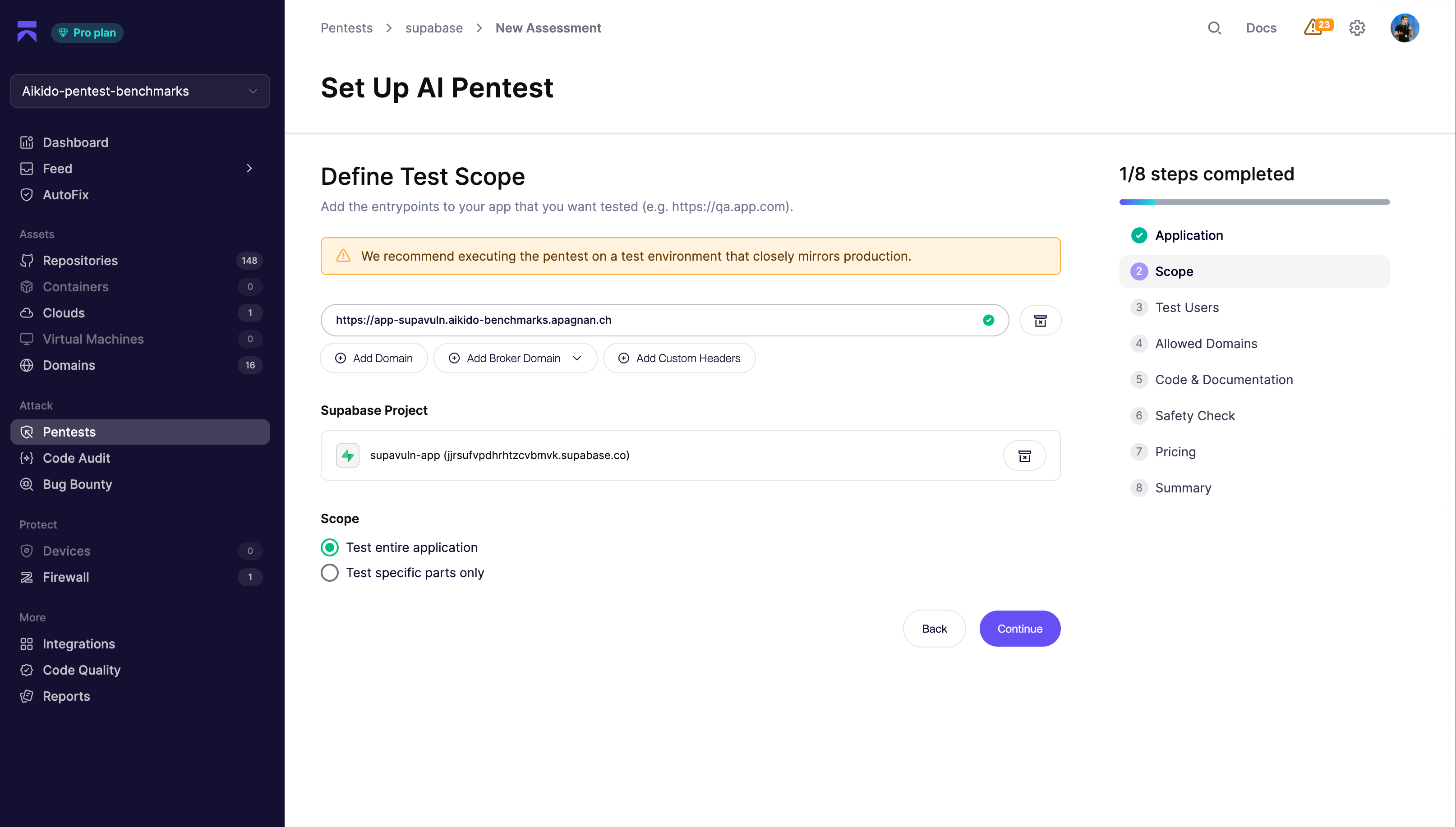
**Supabaseプロジェクトを選択**
Aikidoから **スコープ** のステップに戻ります。 **プロジェクトを追加** ドロップダウンからテストしたいプロジェクトを選択してください。Aikidoは、そのプロジェクトのSupabaseドメイン(または設定されている場合はカスタムドメイン)を自動的にペンテストのスコープに追加します。
{% endstep %}
{% step %}
**残りのセットアップを完了**
Aikido内で評価フローの残りのステップを進めてください。最も重要なのは、テストユーザーを追加すること(Aikidoがアプリの認証済み領域に到達できるようにするため)と、検出されたドメインを確認することです。
各セクションについて、次を参照してください:
* [ペンテストの設定方法](/docs/docs-ja/pentesuto/configure-a-pentest/starting-an-assessment.md) - 全体のセットアップフローの概要
* [テストユーザーの設定](/docs/docs-ja/pentesuto/configure-a-pentest/setting-up-authenticated-testing.md) - より広くカバーするためのテストユーザーと役割の追加
* [アセスメントの範囲](/docs/docs-ja/pentesuto/configure-a-pentest/scope-of-assessment.md) - ドメインを攻撃可能またはアクセス可能としてマーク
* [コードとドキュメントの活用](/docs/docs-ja/pentesuto/configure-a-pentest/leveraging-code-and-documentation.md) - リポジトリをリンクして、エージェントがRLSポリシーやEdge Functionsを推論できるようにする
* [安全対策](/docs/docs-ja/pentesuto/configure-a-pentest/safety-measures.md) - 実行前の安全性チェックを確認
このペンテストプロジェクトでまだSupabaseドメインの所有権を確認していない場合は、 [Supabaseのドメイン検証](/docs/docs-ja/pentesuto/configure-a-pentest/domain-verification/supabase.md).
{% endstep %}
{% step %}
**ペンテストを選択**
On the **料金** のステップで、必要に合うペンテストの種類を選択してください:
* **Supabase Test** - Supabaseプロジェクトの脆弱性発見に焦点を当てた対象限定のペンテスト。
* **標準** - Supabase Testも含む、アプリケーションの標準的なペンテスト。
* **適正化された** - アプリケーションの規模に応じた、アプリケーション全体のペンテスト。これにはSupabase Testも含まれます。
{% endstep %}
{% step %}
**ペンテストを開始**
すべて設定済みです。 **ペンテストを開始** をクリックして評価を開始します。
{% endstep %}
{% endstepper %}
---
# Agent Instructions
This documentation is published with GitBook. GitBook is the documentation platform designed so that both humans and AI agents can read, navigate, and reason over technical content effectively. Learn more at gitbook.com.
## Querying This Documentation
If you need additional information that is not directly available in this page, you can query the documentation by asking a question.
Perform an HTTP GET request on the following URL with the `ask` and `goal` query parameters:
```
GET https://help.aikido.dev/docs/docs-ja/pentesuto/integrate-your-supabase-projects.md?ask=&goal=
```
`ask` is the immediate question: it should be specific, self-contained, and written in natural language.
`goal` is what the user is ultimately trying to achieve, the reason they need the answer. Sharing it helps GitBook give you a better, more relevant answer. A goal is most helpful when it describes the outcome the user wants rather than restating the question. For example, with `ask=how do I create an API token`, a goal like `automate deployments from our CI pipeline` lets GitBook tailor the answer to that use case.
The response will contain a direct answer to the question and relevant excerpts and sources from the documentation.
Use this mechanism when the answer is not explicitly present in the current page, you need clarification or additional context, or you want to retrieve related documentation sections.