> For the complete documentation index, see [llms.txt](https://help.aikido.dev/llms.txt). Markdown versions of documentation pages are available by appending `.md` to page URLs; this page is available as [Markdown](https://help.aikido.dev/docs/docs-ja/pr-torirsugtingu/aikido-ci-gating-functionality.md).
# PRゲーティング概要
Aikido CIゲーティングは、機能ブランチが本番に到達する前にスキャンします。新たに導入された問題をブロックし、既存の問題のうちどれをブランチが解決しているかを確認するのに役立ちます。オープンソース依存関係(SCA)、IaC、シークレット、SAST、マルウェア、ライセンスリスク、コード品質の問題、そして [詳細レビュー](/docs/docs-ja/reby/how-deep-review-works.md) 有効になっている場合。
## 概要
Aikido には2つのゲーティングモードがあります:
* **PRゲーティング:** 主にネイティブ統合(GitHub、GitLab、Bitbucket、Azure)で処理されます。ブランチの差分をスキャンします。
* **リリースゲーティング:** Aikido CLI で処理されます。デプロイ前に最終ビルドがクリーンであることを保証します。
## 設定オプション
ゲーティングは2つの方法で設定できます:
1. **Aikido インターフェース:** 次の項目に対して1クリック設定を使用できます: [GitHub](/docs/docs-ja/pr-torirsugtingu/github-ci-pr-gating-via-aikido-dashboard.md), [GitLab](/docs/docs-ja/pr-torirsugtingu/gitlab-mr-gating.md), [Bitbucket](/docs/docs-ja/pr-torirsugtingu/bitbucket-pr-gating.md)、および [Azure](/docs/docs-ja/pr-torirsugtingu/azure-pipelines-ci-pr-gating-via-aikido-dashboard-with-a-personal-access-token.md)。この設定はAikidoインターフェース内だけで完全に管理され、より見やすく、 **CI 分を消費しません。**
2. **CI パイプライン:** 自分たちの環境で設定を管理したいチーム向けです。次を使用できます: [Bitbucket Pipes](/docs/docs-ja/pr-torirsugtingu/bitbucket-pr-gating/bitbucket-pipes-setting-up-gating-for-pull-requests-via-code.md) をネイティブに、または他の任意のランナー(Jenkins、CircleCI など)と統合するには、 [Aikido CLI](https://help.aikido.dev/~/revisions/SGhJfnCIOpxRjx1gC1k5/pr-and-release-gating/cli-for-pr-and-release-gating) または [公開 CI API](https://help.aikido.dev/en/articles/8711075-aikido-ci-api).
## CIゲートの設定
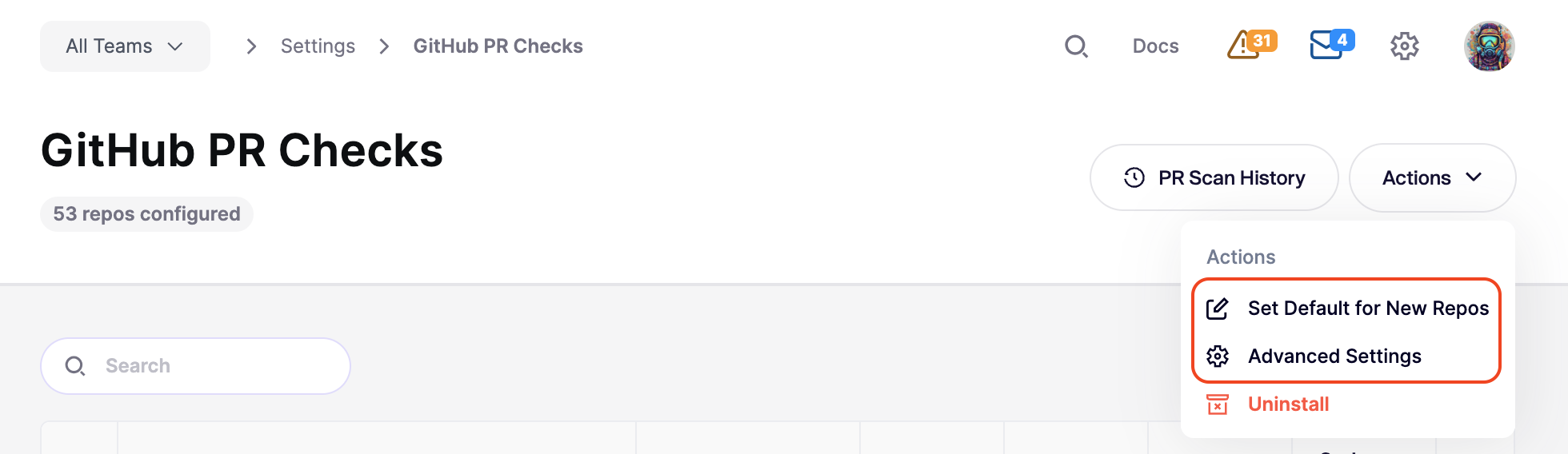
Aikido でゲーティングを設定すると、何が失敗を引き起こすかを細かく制御できます。これらの設定は次の場所で確認できます: **統合 > PR品質ゲーティング > \[あなたの設定]**.
ここから、次のことができます:
* **デフォルトを設定:** ワークスペースに追加されるすべての新しいリポジトリに対するデフォルトのゲーティング設定を定義します。参照: [新しく追加されたリポジトリの自動設定](/docs/docs-ja/pr-torirsugtingu/aikido-ci-gating-functionality/default-pr-mr-gating-configuration-for-new-repositories.md).
* **一括編集:** 複数のリポジトリを選択して、プロジェクト全体に設定変更を適用します。
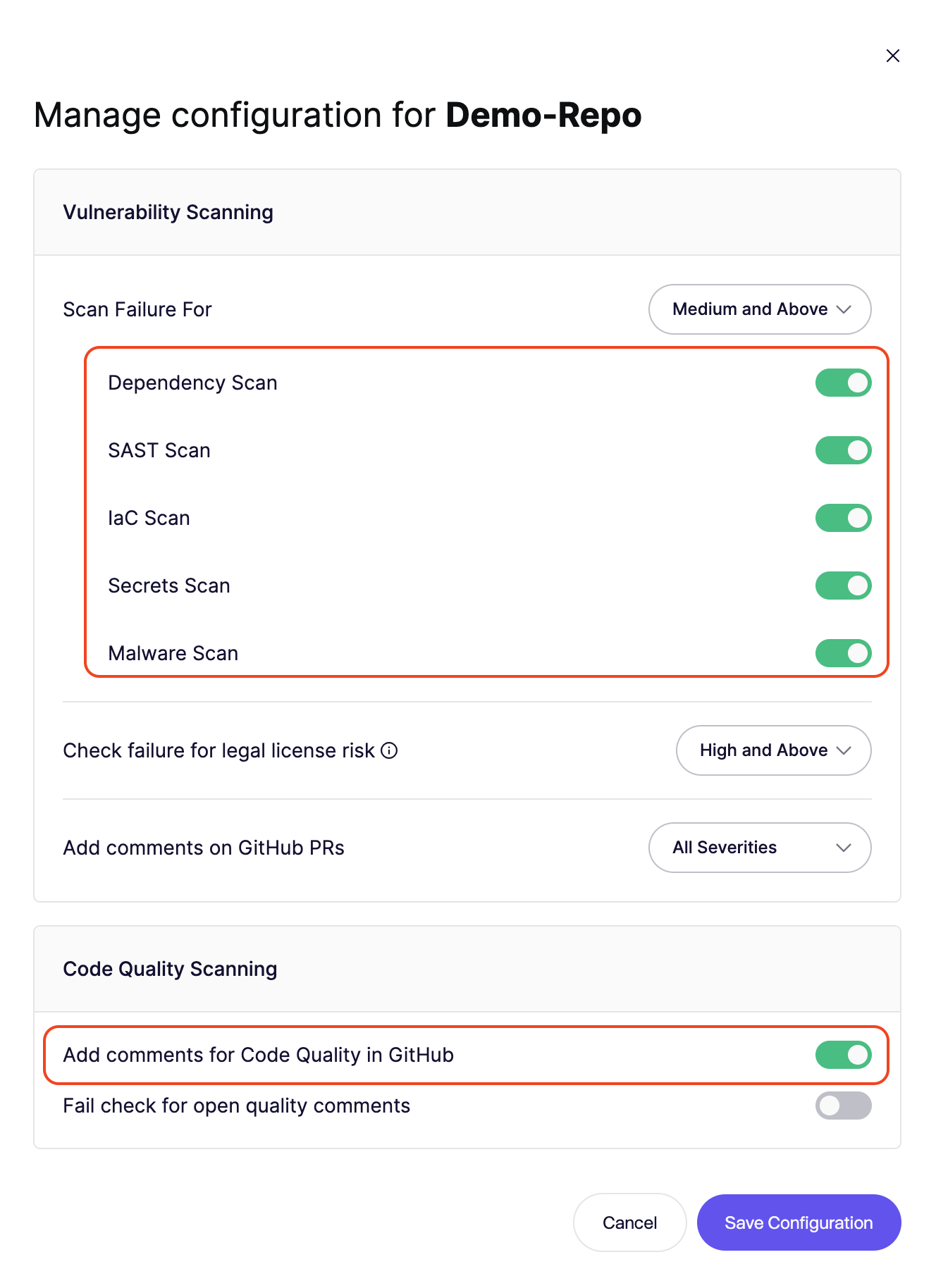
* **きめ細かな制御:** 特定のプロジェクト要件に対応するため、単一のリポジトリの設定を調整します。
* **詳細設定:** Aikido がワークフローとどのように連携するかを細かく調整します。
### 失敗しきい値
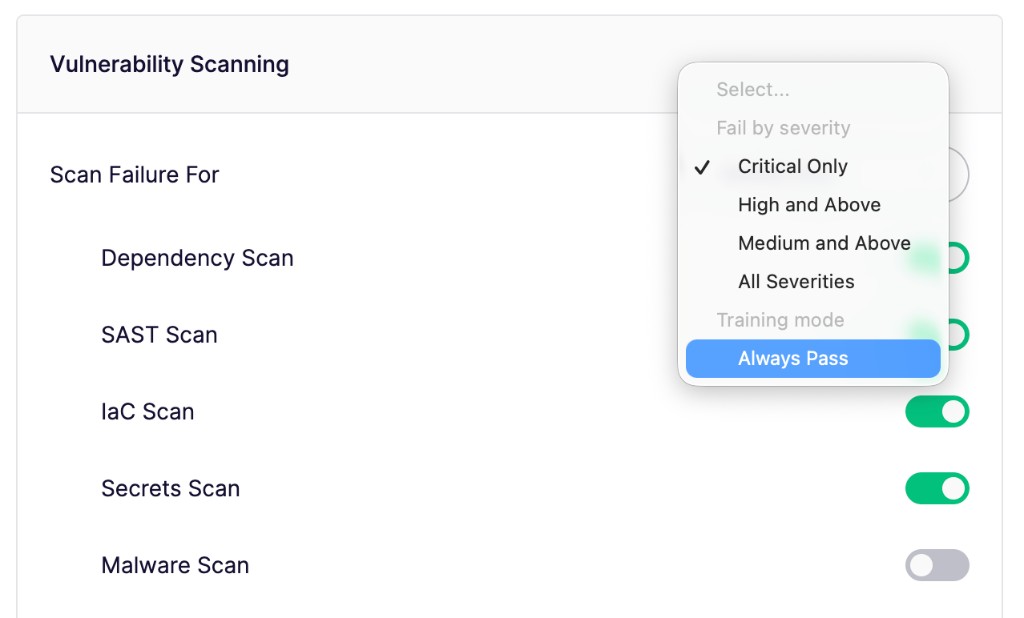
CIゲートを失敗させる最小の重大度レベルを選択します(例: **重大** または **高**).
* このレベル以上で検出された新しい問題は、ゲートを失敗させます。
* このしきい値未満の問題も報告されますが、マージはブロックされません。
* 選択 **常に合格** 有効なスキャンを実行しても、PRチェックを失敗させません。
* [詳細レビュー](/docs/docs-ja/reby/configure-deep-review.md#pr-check-gating) もこの同じしきい値を使用します。個別のゲーティング設定はありません。
### 実行するスキャン
CIゲートで特定のスキャン種別のオン/オフを切り替えます。これにより、ワークフローに最も関連性の高いセキュリティカテゴリに集中できます。
### 詳細な設定
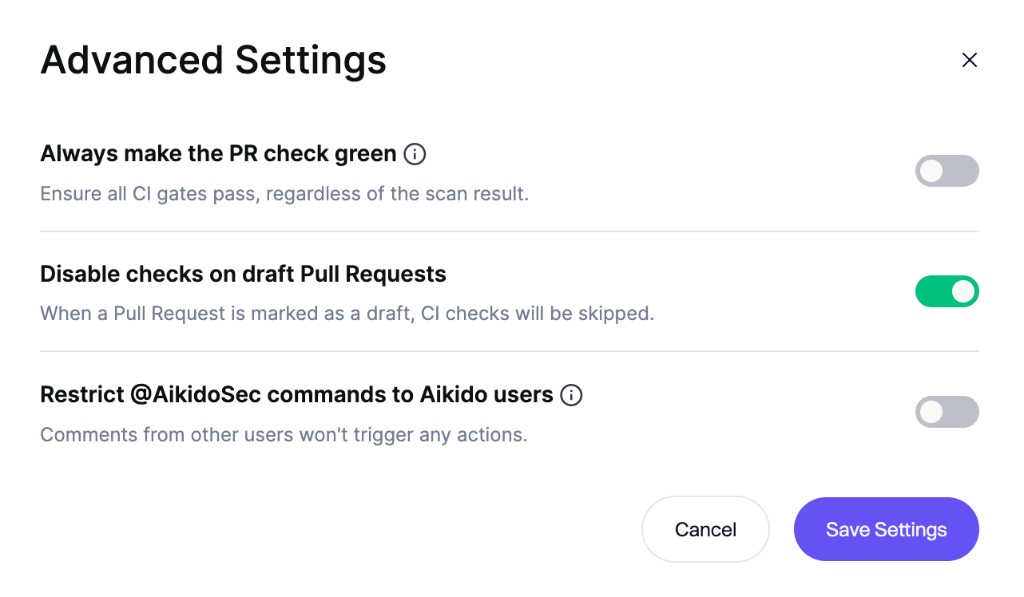
開発速度を維持するために、Aikido がワークフローとどう連携するかを細かく調整します:
* **PRチェックは常にグリーンに保つ:** Aikido が有効なすべてのスキャンからの検出結果を引き続き報告しながら、ワークスペース全体で PR チェックをグリーンに保ちます。これは、設定済みのすべてのゲートとリポジトリに適用されます。
* **ドラフト Pull Request でチェックを無効にする:** 作業途中のコードで不要なノイズを出さないようにします。スキャンは PR が「Ready for Review」に移動された時点でのみ実行されます。
* **制限する `@AikidoSec` コマンドをAikidoユーザーに:** Aikido ワークスペースのメンバーのみが、PR または MR コメント経由でアクションをトリガーできます(例: `@AikidoSec ignore`)。他のユーザーからのコメントは、返信付きで拒否されます。
{% hint style="info" %}
**制限する `@AikidoSec` Aikido ユーザー向けのコマンド** は GitHub と GitLab で利用できます。Bitbucket と Azure DevOps のサポートも近日対応予定です。
{% endhint %}
## **結果の確認**
CI 実行後、Aikido はその特定ブランチのスキャン結果への直接リンクを提供します。Aikido はリポジトリ全体ではなくブランチの差分をスキャンするため、次のものを明確に区別できます: **修正済みの問題** と **新たに導入されたリスク**.
* **ブランチで修正済み:** PR が既存の脆弱性を解消すると、Aikido はフィード上でそれを「PR open」としてマークし、マージ前に修正を確認できるようにします。
* **新しい問題:** ブランチで追加されたもので、重大度しきい値を超えるものは失敗を引き起こします(ただし **常に合格** が有効な場合を除く)。
### 失敗状態をバイパスする
失敗状態を回避したい場合は、CI ゲートを失敗させた問題を無視することで可能です。問題をクリックし、右上の **アクションメニュー** から「Ignore」または「Snooze」を選択します。すると、この問題は今後の CI のどのブランチでも無視/スヌーズされます。
{% hint style="info" %}
問題をスヌーズまたは無視する権限を持つユーザーのみが、CI ゲートを即座にバイパスできます。無視権限のないユーザーは、PR または MR コメント、あるいは問題フィードから無視をリクエストできます。管理者はそれらを確認します。 [承認受信箱](/docs/docs-ja/hajimeni/core-functionalities/approval-inbox-for-ignored-issues.md).
{% endhint %}
---
# Agent Instructions
This documentation is published with GitBook. GitBook is the documentation platform designed so that both humans and AI agents can read, navigate, and reason over technical content effectively. Learn more at gitbook.com.
## Querying This Documentation
If you need additional information that is not directly available in this page, you can query the documentation by asking a question.
Perform an HTTP GET request on the following URL with the `ask` and `goal` query parameters:
```
GET https://help.aikido.dev/docs/docs-ja/pr-torirsugtingu/aikido-ci-gating-functionality.md?ask=&goal=
```
`ask` is the immediate question: it should be specific, self-contained, and written in natural language.
`goal` is what the user is ultimately trying to achieve, the reason they need the answer. Sharing it helps GitBook give you a better, more relevant answer. A goal is most helpful when it describes the outcome the user wants rather than restating the question. For example, with `ask=how do I create an API token`, a goal like `automate deployments from our CI pipeline` lets GitBook tailor the answer to that use case.
The response will contain a direct answer to the question and relevant excerpts and sources from the documentation.
Use this mechanism when the answer is not explicitly present in the current page, you need clarification or additional context, or you want to retrieve related documentation sections.