> For the complete documentation index, see [llms.txt](https://help.aikido.dev/llms.txt). Markdown versions of documentation pages are available by appending `.md` to page URLs; this page is available as [Markdown](https://help.aikido.dev/docs/docs-ja/pr-torirsugtingu/bitbucket-pr-gating/bitbucket-ci-pr-gating-via-aikido-dashboard.md).

# Bitbucket FreeおよびStandard: PRスキャン設定

Bitbucketのプルリクエストスキャンを設定し、Aikidoからの問題についてスキャン結果とコメントを公開します。パイプラインコードは不要です。

{% hint style="warning" %}
この設定は次の用途向けです **Bitbucket Free および Standard** Workspace Access Token が利用できず、代わりに専用ユーザーを使用するプランです。

もし **Bitbucket Premium 用です**、次を使用します [**Workspace Access Token**](/docs/docs-ja/pr-torirsugtingu/bitbucket-pr-gating/bitbucket-ci-pr-gating-via-aikido-dashboard-with-a-workspace-access-token.md) ユーザーベースのセットアップの代わりに。
{% endhint %}

## Bitbucket PR スキャンを設定する <a href="#setting-up-bitbucket-ci" id="setting-up-bitbucket-ci"></a>

{% stepper %}
{% step %}
**専用の Bitbucket ユーザーを作成する**

次のような専用ユーザーを作成します `AikidoSec`。Aikido のみに使用してください。

このユーザーに、制御したいリポジトリの管理者アクセス権を付与してください。Aikido はリポジトリの webhook を作成・管理するために必要です。
{% endstep %}

{% step %}
**統合を有効にする**

新しいユーザーとして Bitbucket にログインします。

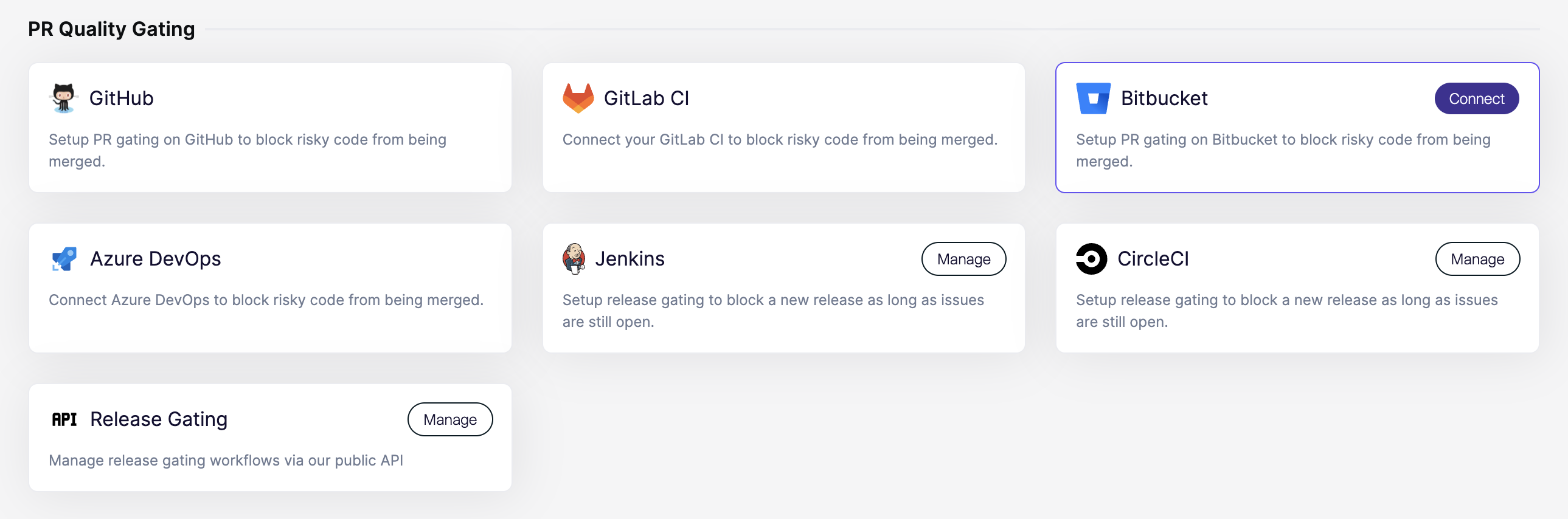
Aikido で、 [連携](https://app.aikido.dev/settings/integrations?section=ci) ページを開きます。次に **Bitbucket** の **PR Quality Gating**.

<div data-with-frame="true"><figure><img src="https://715870456-files.gitbook.io/~/files/v0/b/gitbook-x-prod.appspot.com/o/spaces%2FyKbzcQGrx7UtrG0nPZZ7%2Fuploads%2Fgit-blob-40075f81a6a797407276d4cf64fd9e8d4a5eb9a9%2FScreenshot%202026-02-26%20at%2016.57.41.png?alt=media" alt=""><figcaption></figcaption></figure></div>
{% endstep %}

{% step %}
**アクセスを付与**

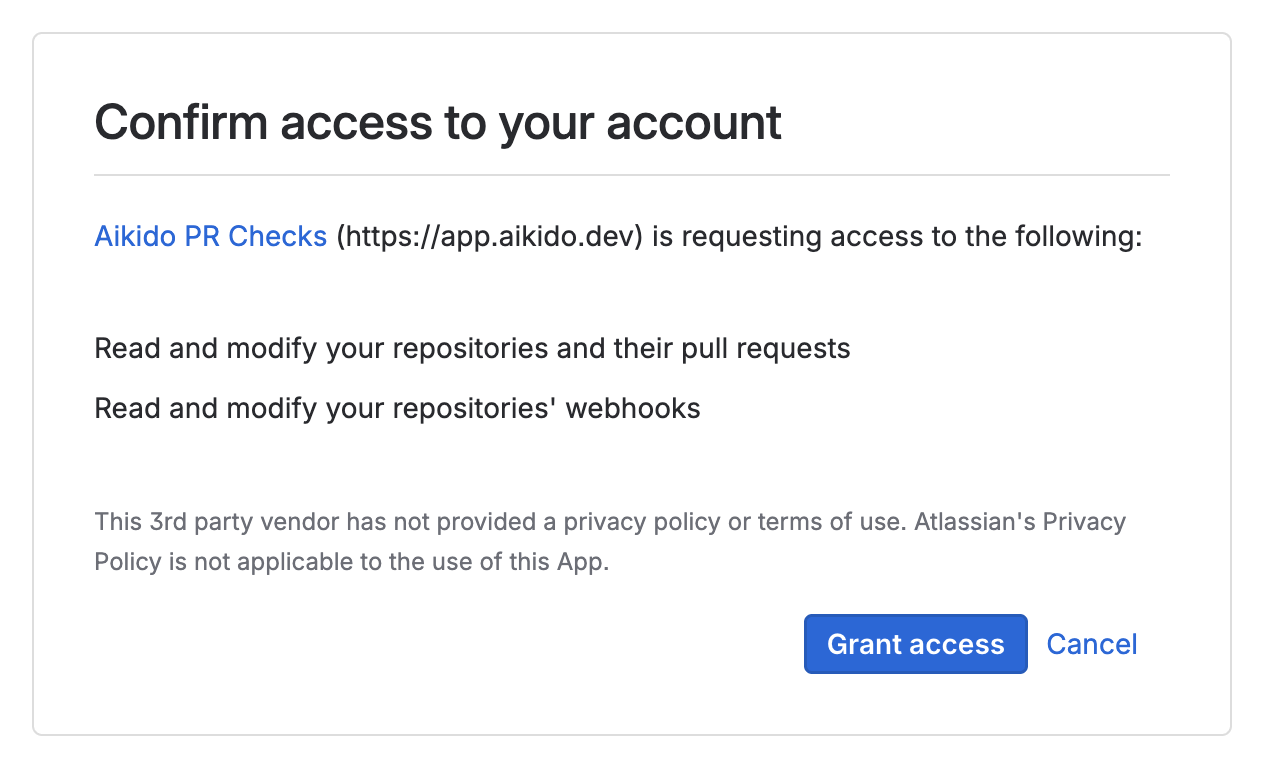
Bitbucket にリダイレクトされます。要求されたアクセスを承認してください。

<div data-with-frame="true"><figure><img src="https://715870456-files.gitbook.io/~/files/v0/b/gitbook-x-prod.appspot.com/o/spaces%2FyKbzcQGrx7UtrG0nPZZ7%2Fuploads%2Fgit-blob-68e8baf45122e82713949c4e58a6edc4c0b6038e%2FScreenshot%202026-02-26%20at%2016.35.57.png?alt=media" alt=""><figcaption></figcaption></figure></div>
{% endstep %}

{% step %}
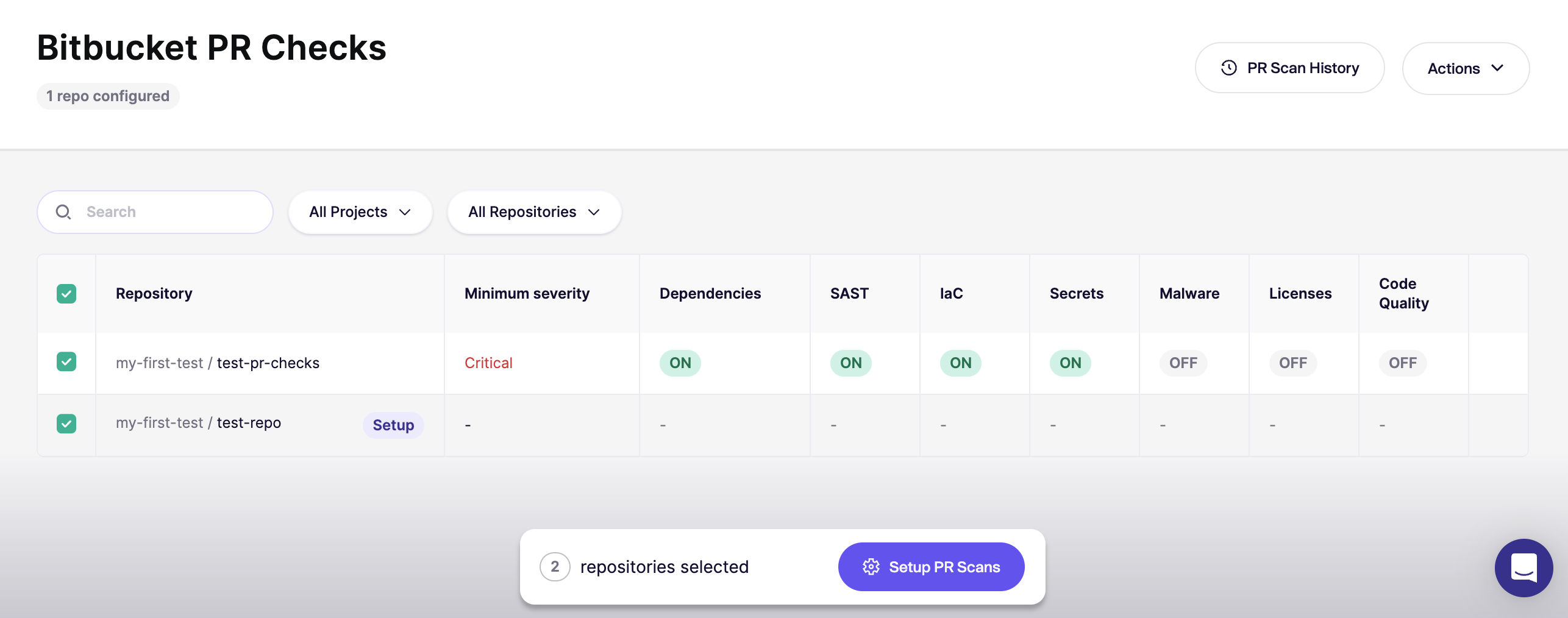
**最初のリポジトリを設定する**

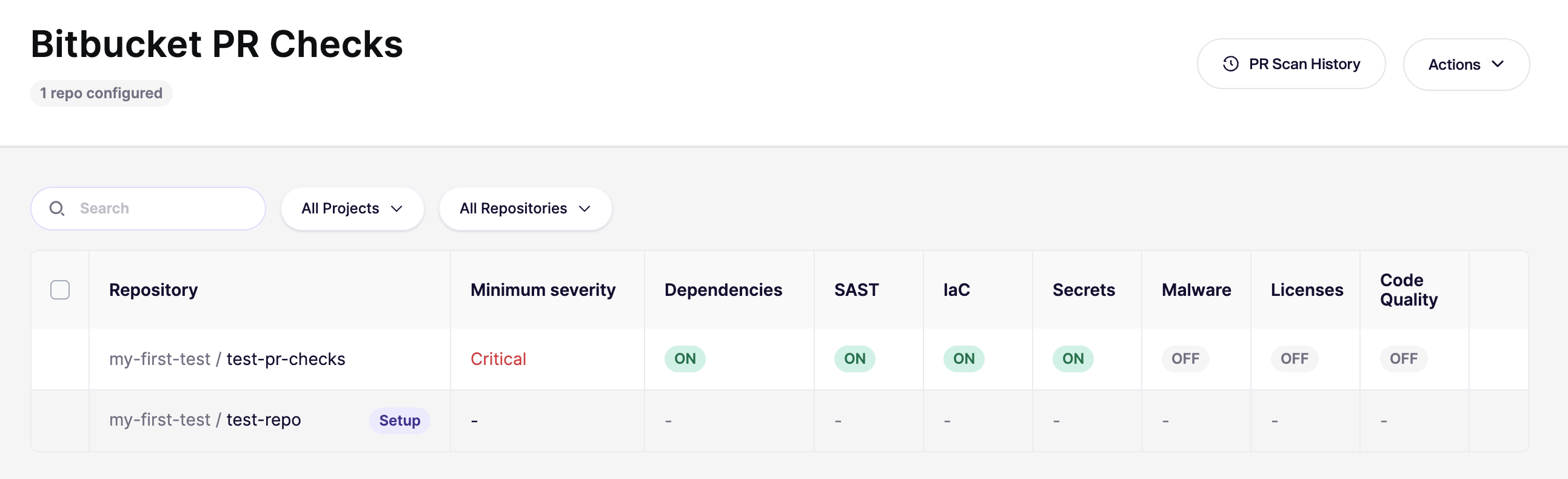
認可後、Aikido は [Bitbucket PR Checks](https://app.aikido.dev/settings/integrations/bitbucket/checks) ページ。

まずは **1 つのリポジトリを** まず開きます。広く展開する前に、すべてが動作することを確認してください。

<div data-with-frame="true"><figure><img src="https://715870456-files.gitbook.io/~/files/v0/b/gitbook-x-prod.appspot.com/o/spaces%2FyKbzcQGrx7UtrG0nPZZ7%2Fuploads%2Fgit-blob-ff730017744cac5b9148a817045c11610fd86445%2FScreenshot%202026-02-26%20at%2017.02.36.png?alt=media" alt=""><figcaption></figcaption></figure></div>
{% endstep %}

{% step %}
**新しい PR で確認する**

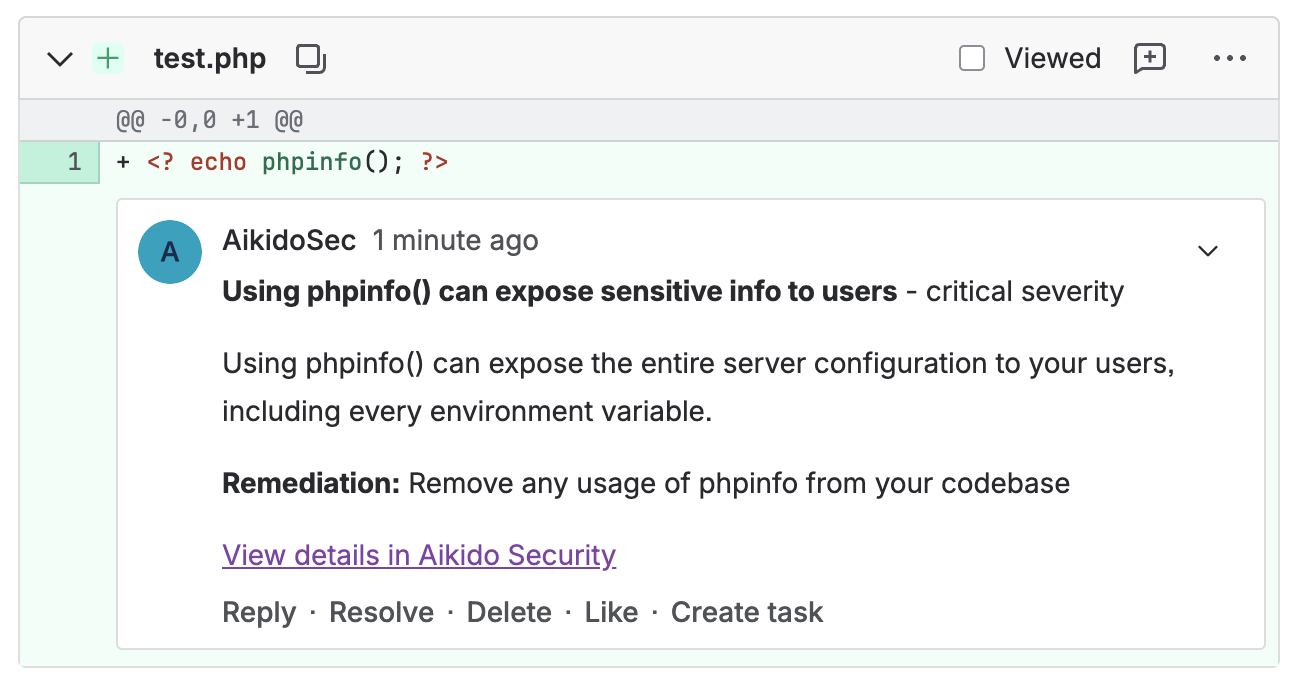
設定したリポジトリで新しい PR を開きます。その後、チェックが実行されることを確認します。

<div data-with-frame="true"><figure><img src="https://715870456-files.gitbook.io/~/files/v0/b/gitbook-x-prod.appspot.com/o/spaces%2FyKbzcQGrx7UtrG0nPZZ7%2Fuploads%2Fgit-blob-568bd026adfc6c847c8d7e1a0811434658ef04bd%2FScreenshot%202026-02-26%20at%2018.04.55.png?alt=media" alt=""><figcaption></figcaption></figure></div>

コメントは、手順 1 で作成したユーザーとして表示されるはずです（例： `AikidoSec`).

<figure><img src="https://715870456-files.gitbook.io/~/files/v0/b/gitbook-x-prod.appspot.com/o/spaces%2FyKbzcQGrx7UtrG0nPZZ7%2Fuploads%2Fgit-blob-6f526277eecb2d594f46f86871ab328396d00235%2FScreenshot%202026-02-26%20at%2018.09.19.png?alt=media" alt=""><figcaption></figcaption></figure>
{% endstep %}

{% step %}
**すべてのリポジトリで有効にする**

結果に満足したら、 [Bitbucket PR Checks](https://app.aikido.dev/settings/integrations/bitbucket/checks) ページに戻り、残りのリポジトリでチェックを有効にします。

<div data-with-frame="true"><figure><img src="https://715870456-files.gitbook.io/~/files/v0/b/gitbook-x-prod.appspot.com/o/spaces%2FyKbzcQGrx7UtrG0nPZZ7%2Fuploads%2Fgit-blob-4d6f5bf3c25c48beba52c724565e081059b0d921%2FScreenshot%202026-02-26%20at%2018.13.59.png?alt=media" alt=""><figcaption></figcaption></figure></div>
{% endstep %}

{% step %}
**新しいリポジトリの既定値を設定する**

右上で `アクション` をクリックし、 `新しいリポジトリに対して既定に設定` また、今後追加されるリポジトリに対して自動構成を有効にします。

UI の手順が必要ですか？こちらをご覧ください [新しいリポジトリ向けのデフォルト PR/MR ゲーティング設定](/docs/docs-ja/pr-torirsugtingu/aikido-ci-gating-functionality/default-pr-mr-gating-configuration-for-new-repositories.md).
{% endstep %}
{% endstepper %}

{% hint style="info" %}
オン **Bitbucket Free および Standard**、あなたは **要求できません** Aikido のスキャンが成功することをマージ防止の条件にすることはできません。これには **Bitbucket Premium 用です**.

Atlassian を参照： [マージ前のチェックを提案または必須にする](https://support.atlassian.com/bitbucket-cloud/docs/suggest-or-require-checks-before-a-merge/).
{% endhint %}


---

# Agent Instructions
This documentation is published with GitBook. GitBook is the documentation platform designed so that both humans and AI agents can read, navigate, and reason over technical content effectively. Learn more at gitbook.com.

## Querying This Documentation
If you need additional information that is not directly available in this page, you can query the documentation dynamically by asking a question.

Perform an HTTP GET request on the current page URL with the `ask` query parameter, and the optional `goal` query parameter:

```
GET https://help.aikido.dev/docs/docs-ja/pr-torirsugtingu/bitbucket-pr-gating/bitbucket-ci-pr-gating-via-aikido-dashboard.md?ask=<question>&goal=<endgoal>
```

`ask` is the immediate question: it should be specific, self-contained, and written in natural language.
`goal` is optional and describes the broader end goal you are ultimately trying to accomplish on behalf of the user. GitBook uses it to tailor the answer towards what is most useful for that goal.

The response will contain a direct answer to the question and relevant excerpts and sources from the documentation.

Use this mechanism when the answer is not explicitly present in the current page, you need clarification or additional context, or you want to retrieve related documentation sections.