> For the complete documentation index, see [llms.txt](https://help.aikido.dev/llms.txt). Markdown versions of documentation pages are available by appending `.md` to page URLs; this page is available as [Markdown](https://help.aikido.dev/docs/docs-ja/reby/configure-deep-review.md).
# Deep Reviewを設定する
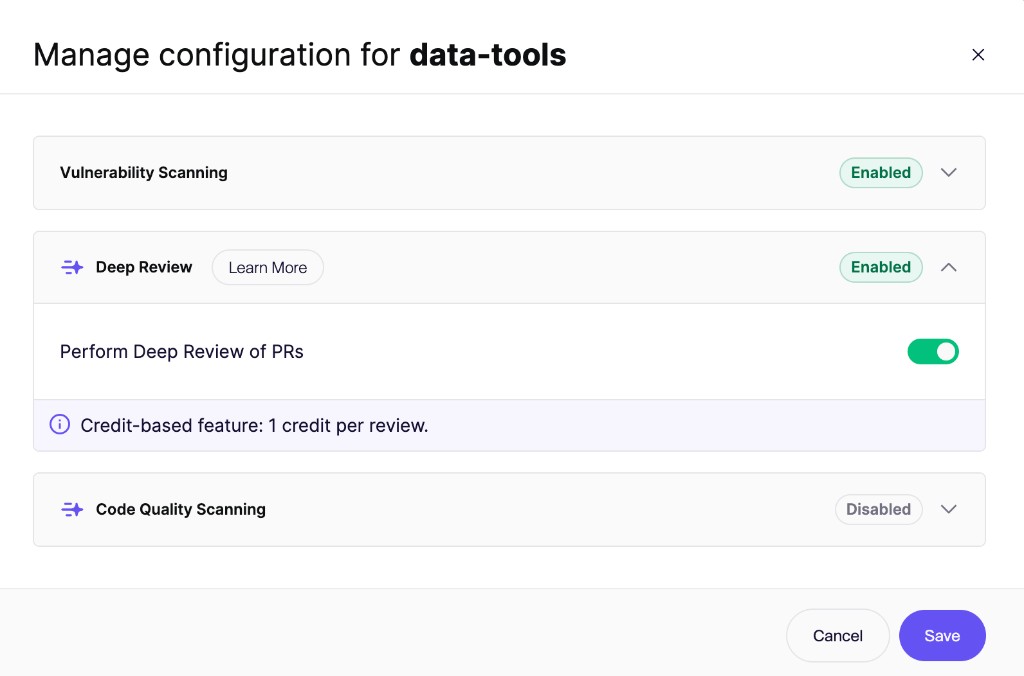
PR Checks から 1 つ以上のリポジトリで Deep Review を有効にします。有効化後は、各リポジトリの設定で厳格さレベルを選択し、 [関連するリポジトリをリンク](/docs/docs-ja/reby/link-repositories.md).
Deep Review はセキュリティレビューと同じゲーティング設定を使用します。個別の失敗しきい値はありません。
{% hint style="info" %}
Deep Reviewの料金は **プルリクエスト1件につき1クレジット**. 同じPRに対する追加レビューは追加料金なしです。
{% endhint %}
## Deep Review を有効にする
{% stepper %}
{% step %}
### PR Checks を開く
次へ移動します: **リポジトリ > プル/マージリクエスト > PR/MR Checks を管理**。また、 [PR/MR チェックを管理](https://app.aikido.dev/repositories/prs) を直接開くこともできます。
{% endstep %}
{% step %}
### リポジトリを選択する
1 つ以上のリポジトリを選択します。一括で有効にするには、設定したいすべてのリポジトリを選択してから、クリックします **「PR スキャンを設定」** 一括操作バーで。
{% endstep %}
{% step %}
### Deep Review をオンにする
を開き、 **詳細レビュー** セクションを開いてオンにし **PR を Deep Review する**.
{% endstep %}
{% step %}
### 変更を保存します
クリックします **「保存」**。Aikido は選択したリポジトリの今後のプルリクエストをレビューします。
{% endstep %}
{% endstepper %}
## PR チェックのゲーティング
Deep Review は、そのリポジトリのセキュリティレビューのゲーティング設定に従います。これらの設定は、 **脆弱性スキャン** 同じ PR Checks モーダルのセクションで変更します。
次の **スキャン失敗の** しきい値は、次の項目にも適用されます **Aikido Security: Deep Review** チェック:
* しきい値以上の検出結果は、Deep Review チェックに失敗します。
* しきい値未満の検出結果も引き続き報告されコメントされますが、チェックは失敗しません。
* **常に合格** Deep Review チェックは緑のまま維持されます。Aikido は引き続き PR をレビューし、コメントを投稿します。
もし **PRチェックを常に成功にする** ワークスペースで有効になっている場合、Deep Review チェックも緑のまま維持されます。
参照 [PRゲーティング概要](/docs/docs-ja/pr-torirsugtingu/aikido-ci-gating-functionality.md) 失敗しきい値の設定方法について。
## リポジトリの Deep Review 設定を開く
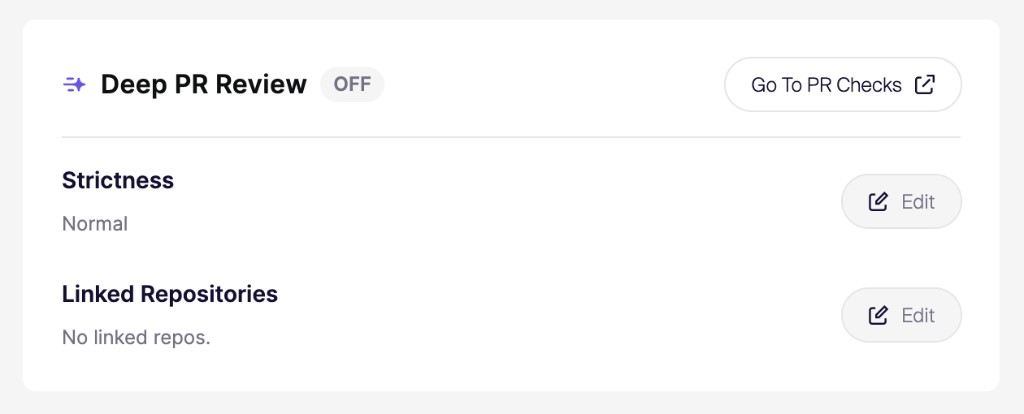
厳格さとリンクされたリポジトリは、各リポジトリごとに個別に設定されます:
1. 次を開きます: [**リポジトリ**](https://app.aikido.dev/repositories) そして、設定したいリポジトリを選択します。
2. その **リポジトリ設定**.
3. 次の項目を見つけます: **Deep PR Review** カード
4. クリックします **「編集」** の横にある **厳格さ** または **リンクされたリポジトリ**.
## 厳格さレベルを選択する
厳格さによって、Deep Review が投稿するフィードバックの量が決まります:
* **ゆるめ**:レビューを要点に絞り、コメントを少なく保ちます。
* **標準**:レビュー担当者を圧倒せず、バランスよくカバーします。
* **積極的**:より多くの潜在的な問題や改善点を指摘するため、コメントが増えます。
## パスとファイルを除外する
Aikido は、依存関係フォルダ、ビルド出力、生成ファイル、ロックファイル、バイナリ、メディアを含む多くのパスを標準で無視しています。さらに多くのパスを除外するには、 [`.aikido` ファイル](/docs/docs-ja/kdosukyan/scanning-practices/ignore-via-code-with-aikido-files.md)。プルリクエストが除外されたファイルのみを変更する場合、Aikido はレビューをスキップし、料金は発生しません。
参照 [Deep Reviewの仕組み](/docs/docs-ja/reby/how-deep-review-works.md#exclude-paths-and-files) 詳細について。
## クレジット
Deep Reviewの料金は **プルリクエスト1件につき1クレジット**.
同じ PR に対する追加のレビュー(たとえば新しいコミット後)でも、追加のクレジットは消費されません。クレジットはコミットごとや個別のレビュー実行ごとではなく、PR ごとに課金されます。詳細はこちら: [Aikidoクレジット](/docs/docs-ja/miscellaneous-info/wallet-and-credits.md).
{% hint style="info" %}
チームで Deep Review にどれくらいの費用がかかるか気になりますか?
当社の [見積もりツール](https://app.aikido.dev/repositories/deep-review) が、過去30日間の利用状況に基づいて目安を示します。
{% endhint %}
## 月間支出上限を設定する
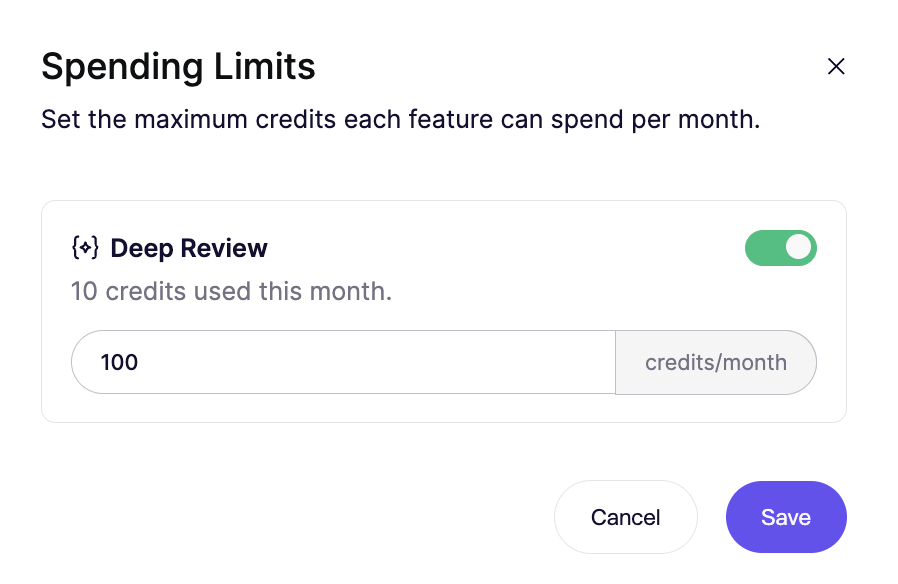
ワークスペース管理者は、Deep Review の支出上限を [Wallet設定](https://app.aikido.dev/settings/wallet/settings).
{% stepper %}
{% step %}
### ウォレット設定を開く
次へ移動します: [Wallet設定](https://app.aikido.dev/settings/wallet/settings)。また、 **組織設定** に移動し、 **ウォレットを管理**.
{% endstep %}
{% step %}
### Deep Review の上限を設定する
クリックします **上限を設定**。オンにする **詳細レビュー** トグルを使って、 **クレジット/月** の上限を入力し、クリックします **Save**.
{% endstep %}
{% endstepper %}
使用量が上限に達すると、Aikido は次の暦月まで、クレジットが消費される Deep Review をスキップします。同じ PR に対する追加のレビューは引き続き実行されます。
月間上限を設定したくない場合は、トグルをオフにしてください。
---
# Agent Instructions
This documentation is published with GitBook. GitBook is the documentation platform designed so that both humans and AI agents can read, navigate, and reason over technical content effectively. Learn more at gitbook.com.
## Querying This Documentation
If you need additional information that is not directly available in this page, you can query the documentation by asking a question.
Perform an HTTP GET request on the following URL with the `ask` and `goal` query parameters:
```
GET https://help.aikido.dev/docs/docs-ja/reby/configure-deep-review.md?ask=&goal=
```
`ask` is the immediate question: it should be specific, self-contained, and written in natural language.
`goal` is what the user is ultimately trying to achieve, the reason they need the answer. Sharing it helps GitBook give you a better, more relevant answer. A goal is most helpful when it describes the outcome the user wants rather than restating the question. For example, with `ask=how do I create an API token`, a goal like `automate deployments from our CI pipeline` lets GitBook tailor the answer to that use case.
The response will contain a direct answer to the question and relevant excerpts and sources from the documentation.
Use this mechanism when the answer is not explicitly present in the current page, you need clarification or additional context, or you want to retrieve related documentation sections.