> For the complete documentation index, see [llms.txt](https://help.aikido.dev/llms.txt). Markdown versions of documentation pages are available by appending `.md` to page URLs; this page is available as [Markdown](https://help.aikido.dev/docs/docs-ja/sonono/private-registries/nexus-repository.md).
# Sonatype Nexus Repository
Nexus Repository を仲介役として設定し、Aikido のレジストリプロキシ経由でレジストリトラフィックをルーティングします。Nexus は公開レジストリではなく Aikido からパッケージを取得するため、チームがインストールするすべてのパッケージがマルウェア、年齢制限、既知の脆弱性についてチェックされます。
{% stepper %}
{% step %}
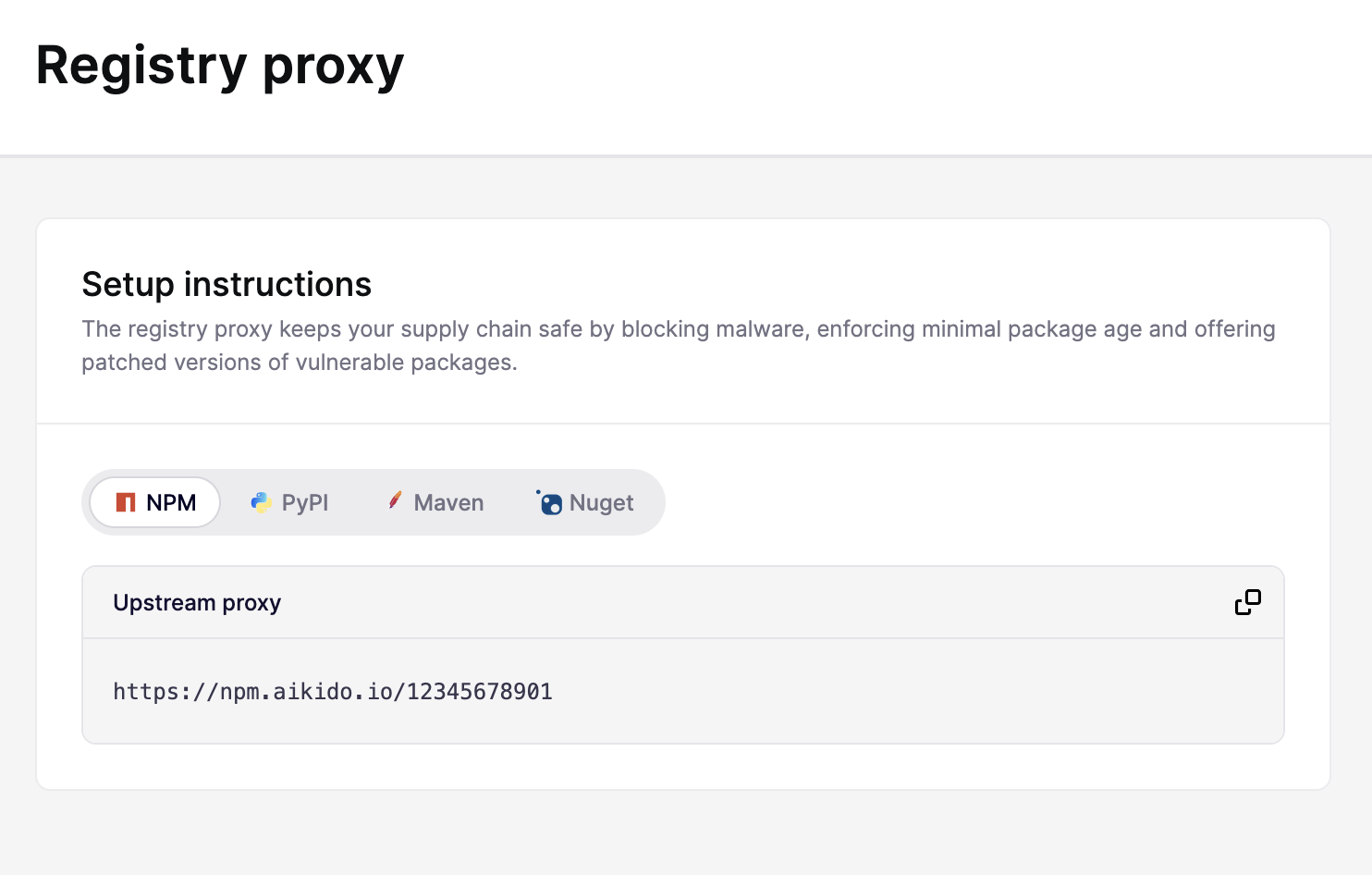
### Aikido のプロキシ URL を取得する
その後、Splunk Cloud と Splunk Enterprise の両方でトークンを作成します: [設定 > レジストリプロキシ](https://app.aikido.dev/issues/aikido-libraries/setup-instructions)、エコシステムを選択し、アップストリームのプロキシ URL をコピーします
{% endstep %}
{% step %}
### Nexus にプロキシリポジトリを作成する
1. Nexus で **設定 > リポジトリ > リポジトリ**.
2. クリック **リポジトリを作成** を選択します。
3. リポジトリに名前を付けます。たとえば `aikido`.
4. 次の下で **リモートストレージ**に、手順 1 で取得した Aikido のプロキシ URL を貼り付けます。
5. リポジトリを保存します。
{% hint style="warning" %}
リポジトリ作成後は、リモートストレージの URL を変更しないでください。変更すると、Nexus がキャッシュされたメタデータの整合を取ろうとして 404 エラーが発生する可能性があります。別の上流 URL が必要な場合は、代わりに新しいプロキシリポジトリを作成してください。
{% endhint %}
{% endstep %}
{% step %}
### (任意)グループリポジトリを作成する
ホスト型 Nexus リポジトリに社内パッケージもある場合は、両方を 1 つの URL で公開するためにグループリポジトリを作成します。
1. その後、Splunk Cloud と Splunk Enterprise の両方でトークンを作成します: **設定 > リポジトリ > リポジトリ > リポジトリを作成** を選択し **aikido**
2. ホスト型リポジトリとプロキシリポジトリをメンバーとして追加します。
3. 代わりに、パッケージマネージャーをグループリポジトリの URL に向けます。
{% hint style="info" %}
Nexus Community Edition ではグループリポジトリは読み取り専用です。パッケージを公開するには、必ずホスト型リポジトリに直接 push してください。
{% endhint %}
{% endstep %}
{% step %}
### 開発者マシンを Nexus を使用するように設定する
各開発者のパッケージマネージャーを Nexus リポジトリに向けます。認証設定を含む正確な手順については、Sonatype のドキュメントを参照してください。
{% tabs %}
{% tab title="npm" %}
[npm の設定](https://help.sonatype.com/en/configuring-npm.html)
{% endtab %}
{% tab title="PyPI" %}
[PyPI の設定](https://help.sonatype.com/en/configure-pypi-with-nexus.html)
{% endtab %}
{% tab title="Maven" %}
[Maven の設定](https://help.sonatype.com/en/maven-repositories.html)
{% endtab %}
{% tab title="NuGet" %}
[NuGet の設定](https://help.sonatype.com/en/configure-nuget-with-nexus.html)
{% endtab %}
{% endtabs %}
{% endstep %}
{% step %}
### (オプション)Device Protection で公開レジストリをブロックする
Nexus を導入しても、開発者はパッケージマネージャーを公開レジストリに直接向けることで迂回できます。すべてのトラフィックがプライベートレジストリを通るように強制するには、Aikido Device Protection を導入してください。
{% content-ref url="/pages/7fa47c5a1ee5b3c664f0ab37ca9a23372513ddeb" %}
[公開パッケージレジストリをブロックする](/docs/docs-ja/aikidodebaisu/using-aikido-endpoint/block-public-package-registries.md)
{% endcontent-ref %}
{% endstep %}
{% endstepper %}
---
# Agent Instructions
This documentation is published with GitBook. GitBook is the documentation platform designed so that both humans and AI agents can read, navigate, and reason over technical content effectively. Learn more at gitbook.com.
## Querying This Documentation
If you need additional information that is not directly available in this page, you can query the documentation dynamically by asking a question.
Perform an HTTP GET request on the current page URL with the `ask` query parameter, and the optional `goal` query parameter:
```
GET https://help.aikido.dev/docs/docs-ja/sonono/private-registries/nexus-repository.md?ask=&goal=
```
`ask` is the immediate question: it should be specific, self-contained, and written in natural language.
`goal` is optional and describes the broader end goal you are ultimately trying to accomplish on behalf of the user. GitBook uses it to tailor the answer towards what is most useful for that goal.
The response will contain a direct answer to the question and relevant excerpts and sources from the documentation.
Use this mechanism when the answer is not explicitly present in the current page, you need clarification or additional context, or you want to retrieve related documentation sections.