> For the complete documentation index, see [llms.txt](https://help.aikido.dev/llms.txt). Markdown versions of documentation pages are available by appending `.md` to page URLs; this page is available as [Markdown](https://help.aikido.dev/docs/docs-ja/zen-firewall/zen-features/bypassed-ips.md).
# バイパスされた IP
バイパスされた IP は、Aikido Zen がリクエスト処理中に明示的に無視する、信頼された IP アドレスまたは CIDR 範囲です。バイパスされた IP からのリクエストは、Zen の検査と適用の対象から完全に除外されます。
つまり、Zen はそのトラフィックを解析したり、検出結果を生成したり、ブロックルールを適用したりしません。
## バイパスされた IP を使う理由
すべてのトラフィックが実際の攻撃者の行動を表しているわけではありません。中には、信頼して管理しているシステムからのリクエストもあります。
一般的な例としては、ロードバランサーやリバースプロキシなどの社内インフラ、監視や稼働状況監視サービス、社内テスト環境、承認済みのセキュリティツール、または Aikido のスキャン トラフィックが挙げられます。
これらの IP をバイパスすることでノイズを減らし、誤検知を避け、アラートを実際の脅威に集中させることができます。
実行時 **AI ペンテストまたはドメインおよび API セキュリティ** スキャンでは、実行したいスキャンの種類に応じて IP のバイパスが有用な場合があります。
場合によっては、検出やブロックの動作を確認するために Zen を完全に有効にしておきたいことがあります。別の場合では、スキャン トラフィックを一時的にバイパスすることで干渉を防ぎ、中断のないテストが可能になります。
## バイパスされた IP を設定する方法
{% hint style="danger" %}
設定された IP ではすべての Zen セキュリティ機能が無効になるため、完全に信頼できる送信元のみを追加してください。
{% endhint %}
1. Aikido ダッシュボードの Firewall タブに移動します
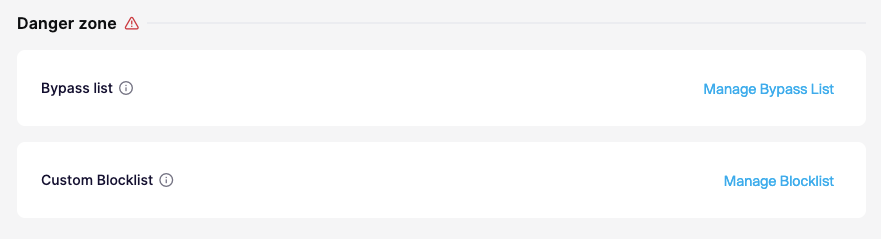
2. ページ下部の Danger zone セクションまでスクロールします
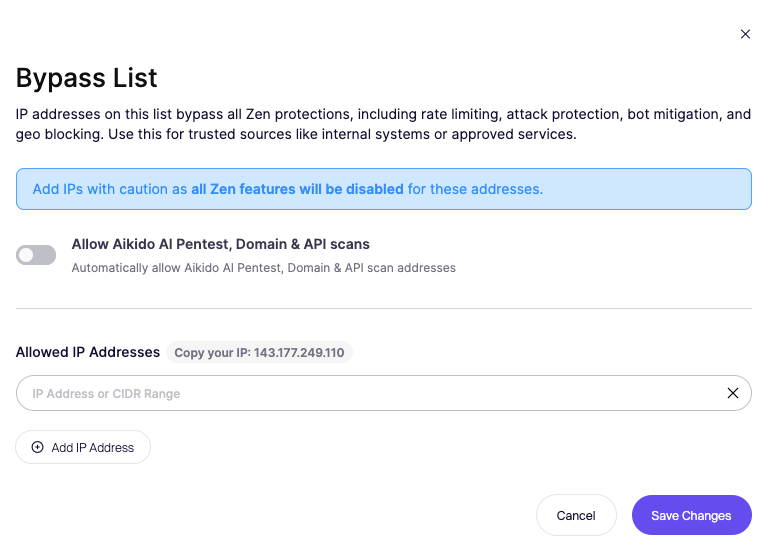
3. Manage Bypass List を選択します
4. 1 つ以上の IP アドレスまたは CIDR 範囲を追加します
5. 変更を保存します
---
# Agent Instructions
This documentation is published with GitBook. GitBook is the documentation platform designed so that both humans and AI agents can read, navigate, and reason over technical content effectively. Learn more at gitbook.com.
## Querying This Documentation
If you need additional information that is not directly available in this page, you can query the documentation by asking a question.
Perform an HTTP GET request on the following URL with the `ask` and `goal` query parameters:
```
GET https://help.aikido.dev/docs/docs-ja/zen-firewall/zen-features/bypassed-ips.md?ask=&goal=
```
`ask` is the immediate question: it should be specific, self-contained, and written in natural language.
`goal` is what the user is ultimately trying to achieve, the reason they need the answer. Sharing it helps GitBook give you a better, more relevant answer. A goal is most helpful when it describes the outcome the user wants rather than restating the question. For example, with `ask=how do I create an API token`, a goal like `automate deployments from our CI pipeline` lets GitBook tailor the answer to that use case.
The response will contain a direct answer to the question and relevant excerpts and sources from the documentation.
Use this mechanism when the answer is not explicitly present in the current page, you need clarification or additional context, or you want to retrieve related documentation sections.