> For the complete documentation index, see [llms.txt](https://help.aikido.dev/llms.txt). Markdown versions of documentation pages are available by appending `.md` to page URLs; this page is available as [Markdown](https://help.aikido.dev/docs/docs-ja/zen-firewall/zen-features/disable-attack-protection-for-specific-path-or-url.md).
# 特定のパスまたは URL で攻撃保護を無効にする
攻撃保護を無効にすると、Zen が正当なトラフィックを誤ってブロックしている場合に、そのルートを安全としてマークできます。これは誤検知への対処として推奨される方法です。無効にすると、Zen はそのルート(またはルートのグループ)でのリクエストのブロックを停止します
## ユースケース
* データベースツール、たとえば PHPMyAdmin: 生の SQL クエリが想定されるルート。Zen は通常これらをブロックしますが、ここでは正当です。
* カスタムクエリ構文を持つ検索 API: たとえば、インジェクションの試行のように見えるフィルター式(field:value)を受け付ける API。
* 開発者 / デバッグ用エンドポイント: 大きな、または通常とは異なるペイロードを受け付ける内部ツール。
* カスタムアプリケーション: 攻撃に似た入力パターンを受け付けるよう意図的に設計されたエンドポイント。
{% hint style="warning" %}
その動作が想定内で安全だと確信できる場合にのみ保護を無効にしてください。実際の攻撃に対しては、Zen は有効のままにしておくべきです。
{% endhint %}
## 保護を無効にする方法
### 単一のルートで無効にする
1. Zen ダッシュボードで Routes ビューを開きます。
2. 誤検知を引き起こしたルートを見つけます。
3. アクションメニュー(⋮)をクリックします。
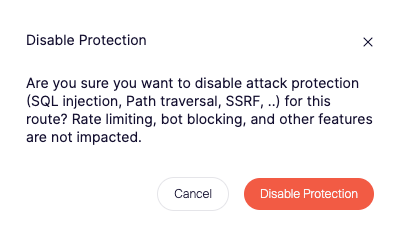
4. 選択します **保護を無効にする** このルートで。
5. 選択を確定します。
これで Zen は、この特定のルートでの攻撃のブロックを行わなくなります。
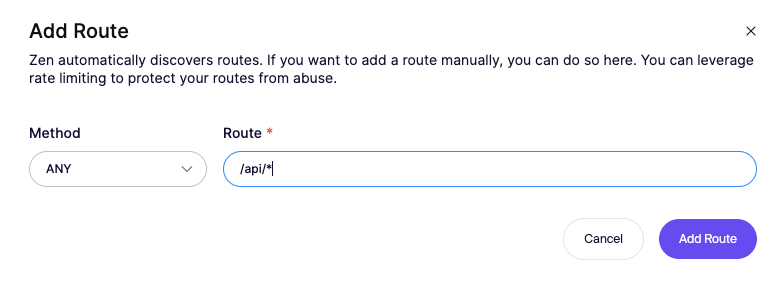
### 複数のルートで無効にする(ワイルドカード)
1. Zen ダッシュボードで Routes ビューを開きます。
2. ワイルドカード付きで新しいルートを追加 `*`
3. アクションメニュー(⋮)をクリックします
4. ルートのワイルドカードに対して保護を無効にするを選択します。
5. 選択を確定します。
ワイルドカードに一致するすべてのルートで、攻撃のブロックをバイパスします。
---
# Agent Instructions
This documentation is published with GitBook. GitBook is the documentation platform designed so that both humans and AI agents can read, navigate, and reason over technical content effectively. Learn more at gitbook.com.
## Querying This Documentation
If you need additional information that is not directly available in this page, you can query the documentation by asking a question.
Perform an HTTP GET request on the following URL with the `ask` and `goal` query parameters:
```
GET https://help.aikido.dev/docs/docs-ja/zen-firewall/zen-features/disable-attack-protection-for-specific-path-or-url.md?ask=&goal=
```
`ask` is the immediate question: it should be specific, self-contained, and written in natural language.
`goal` is what the user is ultimately trying to achieve, the reason they need the answer. Sharing it helps GitBook give you a better, more relevant answer. A goal is most helpful when it describes the outcome the user wants rather than restating the question. For example, with `ask=how do I create an API token`, a goal like `automate deployments from our CI pipeline` lets GitBook tailor the answer to that use case.
The response will contain a direct answer to the question and relevant excerpts and sources from the documentation.
Use this mechanism when the answer is not explicitly present in the current page, you need clarification or additional context, or you want to retrieve related documentation sections.